fastmcp review
FastMCP 3.4.7 is a Python application framework for Model Context Protocol servers and clients. It derives tool schemas from typed functions, exposes data through resources, publishes prompt templates, and connects over in-memory, stdio, or HTTP transports. The current patch corrects the audience used to validate `private_key_jwt` assertions when an OAuthProxy sits at a bare origin. Installation succeeded in our Python 3.12 container, but the package then failed its plain import check, which changes the adoption decision.
FastMCP 3.4.7 installed in 1.4 seconds and consumed 64 MB in our sandbox, but `import fastmcp` failed after installation despite 0 audit findings. Its server and client API covers serious MCP applications; require a passing clean-image import and startup test before accepting this version.
We installed it
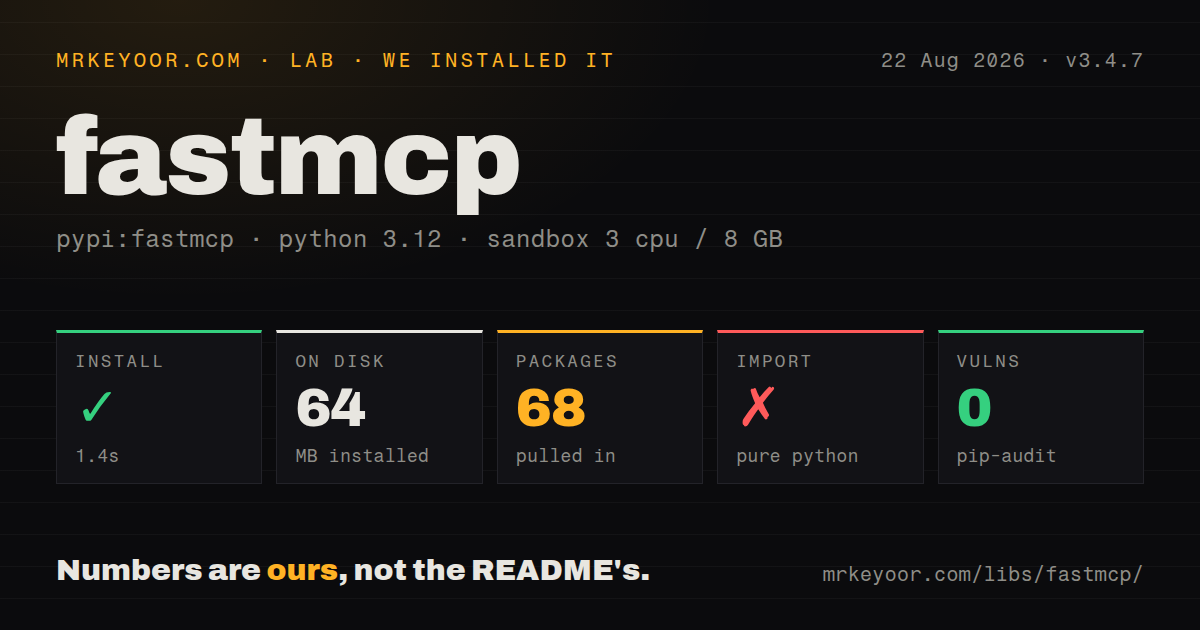
| Install | ✓ · 1.4s | 68 packages on disk · 64 MB |
| Import | ✗ | import fastmcp · pure Python · requires Python >=3.10 |
| Known vulns | 0 | (pip-audit) |
Answers from our run
Does fastmcp install cleanly?
Yes. In a fresh container with an empty cache, pip install fastmcp finished in 1 seconds, leaving 68 packages and 64 MB on disk. pip-audit reported no known vulnerabilities.
What does fastmcp need to run?
Python >=3.10, and nothing compiled: it is pure Python. In our run import fastmcp failed, so it needs extra system packages.
fastmcp or mcp: which should you use?
mcp: Use the official Python SDK when you want protocol primitives and less framework policy. FastMCP 3.4.7 installed in 1.4 seconds and consumed 64 MB in our sandbox, but import fastmcp failed after installation despite 0 audit findings.
When should you not use fastmcp?
A clean-image import must pass before dependencies enter the project. Our fresh 3.4.7 environment installed successfully, then import fastmcp failed without an exception string in the stored log.
Use it if
- Typed Python functions need to become MCP tools with generated schemas and protocol handling.
- The same project needs a server plus an in-memory client for tests, a stdio client for local processes, or an HTTP client for remote endpoints.
- You need resources, prompts, middleware, server composition, authentication hooks, and lifecycle handling under one framework.
- Your team can pin the standalone 3.x API and keep its examples separate from the FastMCP class bundled in the official Python SDK.
- A clean-image import must pass before dependencies enter the project. Our fresh 3.4.7 environment installed successfully, then `import fastmcp` failed without an exception string in the stored log.
- A 68-package environment is too much for a small protocol adapter. The lower-level `mcp` package gives direct access to the Python SDK with less framework surface.
- Your service is TypeScript-first. `@modelcontextprotocol/sdk` keeps server and client code in that runtime and avoids a separate Python process.
- You only need to publish existing FastAPI routes. `fastapi-mcp` maps that application shape without rebuilding it around FastMCP decorators.
- Major-generation churn is unacceptable. Search results and migration docs currently span standalone FastMCP 2, FastMCP 3, and FastMCP implementations inside multiple official SDK generations.
Setup reality
We installed FastMCP 3.4.7 in a new Python 3.12 Bookworm container. Installation took 1.4 seconds and left 68 packages using 64 MB. pip-audit returned 0 known vulnerabilities. The pure-Python distribution requires Python 3.10 or newer, declares 8 direct dependencies, uses the Apache Software License label, and does not ship py.typed.
The next check, import fastmcp, failed. Our stored lab output contains no exception message, so the cause cannot be narrowed further without rerunning that exact image. The 3.4.7 README documents a forced reinstall for imports broken after an upgrade from 3.2 or earlier, but our environment was a fresh install. Treat the failure as open and make a clean-image import plus server startup part of your build.
Import names can mislead during migration. from fastmcp import FastMCP selects this standalone package; from mcp.server.fastmcp import FastMCP selects the class shipped in the official Python SDK. Lock one API family in requirements and examples. Stdio servers must reserve stdout for protocol frames, so send application logs to stderr. Hosted clients normally connect to an HTTP endpoint ending in /mcp.
Production HTTP requires an auth choice, proxy-aware origin settings, request limits, and process supervision. Sync and async tools are both accepted, though blocking work inside an async tool still blocks its event loop. Version 3.4.7 fixes a precise OAuthProxy bug: at a bare origin, CIMD private_key_jwt assertions now validate against the exact token endpoint from authorization metadata instead of an audience containing a doubled slash.
Patterns
Expose a typed function publish-tool
from fastmcp import FastMCP

mcp = FastMCP('Inventory')

@mcp.tool
def stock(sku: str) -> int:
    """Return available units for one SKU."""
    return lookup_stock(sku)

if __name__ == '__main__':
    mcp.run()
FastMCP builds the tool input schema from type hints and uses the docstring as description text. `mcp.run()` selects stdio unless another transport is requested.
Run an HTTP MCP endpoint serve-http
if __name__ == '__main__':
    mcp.run(transport='http', host='0.0.0.0', port=8000)
HTTP clients normally target the `/mcp` path. Add authentication and request limits before binding this listener on a public interface.
Expose read-only application state publish-resource
@mcp.resource('config://current')
def current_config() -> dict[str, str]:
    return {
        'region': 'eu-west-1',
        'mode': 'read-only',
    }
Resources represent readable data addressed by URI. Operations that change state should be tools so clients can distinguish reads from actions.
Parameterize a resource address template-resource-uri
@mcp.resource('customer://{customer_id}/summary')
def customer_summary(customer_id: str) -> dict:
    return load_customer_summary(customer_id)
Each placeholder in the resource URI must match a function parameter. A mismatched name prevents the template from supplying the expected argument.
Register a reusable prompt publish-prompt
@mcp.prompt
def review_query(sql: str) -> str:
    return f'Review this SQL for correctness:\n\n{sql}'
A prompt is selected and rendered by a client. It does not behave like a callable tool and should contain no side effects.
Report progress from an async tool report-progress
from fastmcp import Context

@mcp.tool
async def import_rows(rows: list[dict], ctx: Context) -> int:
    for index, row in enumerate(rows, start=1):
        await save_row(row)
        await ctx.report_progress(progress=index, total=len(rows))
    return len(rows)
`Context` is injected by FastMCP and does not appear in the public tool schema. Its progress method is asynchronous and must be awaited.
Call a remote tool call-http-tool
from fastmcp import Client

async with Client('http://localhost:8000/mcp') as client:
    result = await client.call_tool('stock', {'sku': 'INK-42'})
    print(result.data)
The async context opens and closes the transport around the call. Reading results after an improperly closed client can leave connection cleanup unfinished.
Test a server without a socket test-in-memory
from fastmcp import Client

async def test_stock():
    async with Client(mcp) as client:
        result = await client.call_tool('stock', {'sku': 'INK-42'})
        assert result.data == 12
Passing the server object uses the in-memory transport while preserving MCP request dispatch. It avoids a port and subprocess in unit tests.
Mount a prefixed tool group compose-server
billing = FastMCP('Billing')

@billing.tool
def invoice_total(invoice_id: str) -> float:
    return load_total(invoice_id)

main = FastMCP('Operations')
main.mount(billing, prefix='billing')
The prefix separates names from mounted servers. Without a naming plan, two child servers can publish tools that collide.
Return an expected tool failure return-tool-error
from fastmcp.exceptions import ToolError

@mcp.tool
def divide(total: float, count: int) -> float:
    if count == 0:
        raise ToolError('count must be greater than zero')
    return total / count
`ToolError` carries a client-facing message. Keep internal traces, secrets, and infrastructure details out of that text.
Launch a module object run-from-cli
fastmcp run server.py:mcp
fastmcp run server.py:mcp --transport http --port 8000
CLI flags select the launched transport and port. Code inside a module's `if __name__ == '__main__'` block does not run when the CLI imports the object.
Start a local server as a client connect-stdio-file
from fastmcp import Client

async with Client('server.py') as client:
    tools = await client.list_tools()
    print([tool.name for tool in tools])
A Python file path starts a subprocess transport. Logs written by that server to stdout can corrupt MCP framing, so route them to stderr.
Alternatives
| Package | Registry | Pick it when |
|---|---|---|
| mcp | PyPI | Use the official Python SDK when you want protocol primitives and less framework policy. |
| fastapi-mcp | PyPI | Use it when an existing FastAPI route set is the source of your MCP tools. |
| @modelcontextprotocol/sdk | npm | Use it for MCP clients and servers owned by a TypeScript service. |
More ai / ml guides
@modelcontextprotocol/sdk · openai · mcp · huggingface-hub · @anthropic-ai/sdk · openai · the whole shelf →
How this guide is made: grounded in the library's documentation, release notes, changelog, and issue history, on a fixed rubric — not a hands-on install of every release. The 50 most-downloaded entries are additionally install-verified in clean containers. Corrections: contact the desk.