electron-builder review
electron-builder 26.15.3 is a release tool for Electron desktop applications. It turns an app directory into macOS, Windows, and Linux artifacts such as DMG, NSIS, AppImage, deb, and zip files. The same configuration controls ASAR contents, native dependency rebuilding, code signing, notarization, update metadata, and release publishing. Version 26.15.3 fixes predictable caching of downloaded tool archives, adds an explicit opt-in for non-localhost HTTP binary mirrors, and corrects AWS SigV4 headers during publishing. This is a Node build tool, not a renderer dependency; our browser bundle attempt failed on its Node-only imports.
electron-builder 26.15.3 took 18.6 seconds and 95 MB for 241 installed packages in our sandbox, then failed browser bundling because it is Node-only build infrastructure. Install it when one Electron release pipeline needs installers, signing, updater metadata, and publishing; pick a smaller packager if you only need an app bundle.
We installed it
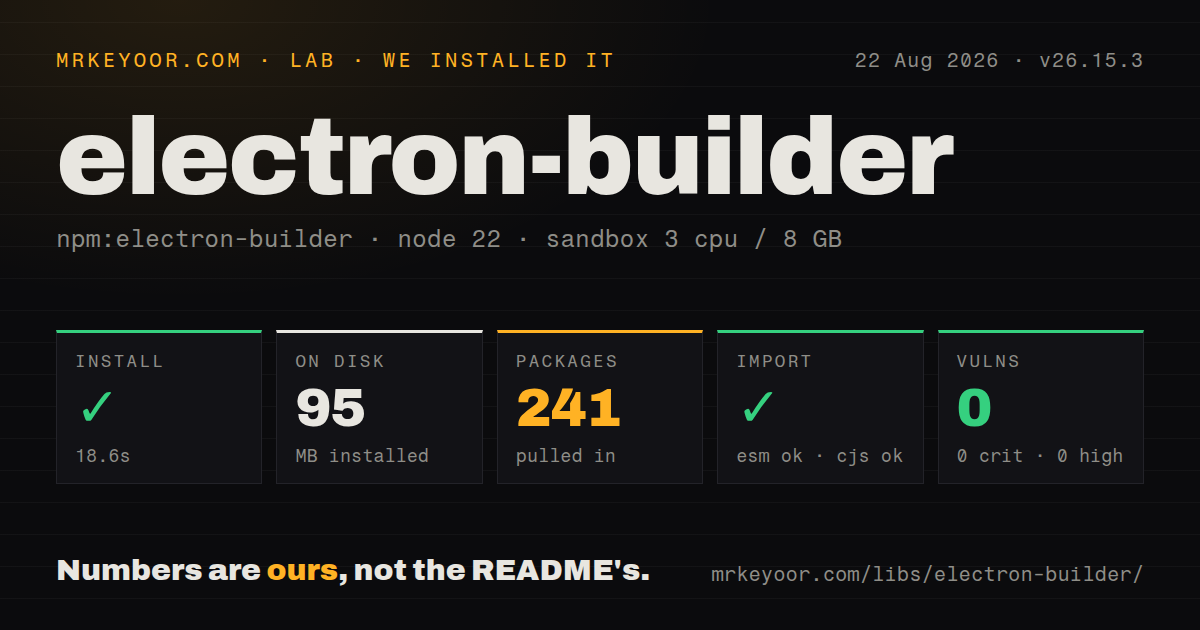
| Install | ✓ · 18.6s | 241 packages on disk · 95 MB · 4 deprecation warnings |
| Import | ✓ | ESM import works · require() works · CommonJS package |
| Browser | n/a | could not be bundled for the browser (Node-only code, most likely) |
| Types | ✓ | TypeScript types bundled |
| Known vulns | 0 | 0 critical · 0 high · 0 moderate · 0 low (npm audit) |
Answers from our run
Does electron-builder install cleanly?
Yes. In a fresh container with an empty cache, npm install electron-builder finished in 19 seconds, leaving 241 packages and 95 MB on disk. npm audit reported no known vulnerabilities. The install printed 4 deprecation warnings.
Can electron-builder run in a browser?
Not directly: esbuild could not bundle it for the browser in our run, which normally means it depends on Node built-ins. Use it on the server, or find a browser-targeted alternative.
Does electron-builder work with both ESM and CommonJS?
Yes. Both import 'electron-builder' and require('electron-builder') worked in Node 22 in our run. The package is published as CommonJS.
Does electron-builder include TypeScript types?
Yes, type declarations ship inside the package, so no @types install is needed.
electron-builder or @electron-forge/cli: which should you use?
@electron-forge/cli: Choose it for Electron's official scaffolding, packaging, makers, publishers, and plugin workflow. electron-builder 26.15.3 took 18.6 seconds and 95 MB for 241 installed packages in our sandbox, then failed browser bundling because it is Node-only build infrastructure.
When should you not use electron-builder?
You only need an unpacked application directory. @electron/packager handles that narrower job without the signing, installer, updater, and publishing layers.
Use it if
- One Electron release configuration should produce installers and archives for macOS, Windows, and Linux.
- Your shipped app needs signed artifacts plus metadata consumed by `electron-updater`.
- Native Node dependencies must be rebuilt against the Electron ABI during install or packaging.
- CI should publish finished artifacts to GitHub Releases, S3-compatible storage, or another documented provider.
- You only need an unpacked application directory. `@electron/packager` handles that narrower job without the signing, installer, updater, and publishing layers.
- The build must run entirely in a browser or renderer process. Our esbuild browser build failed because electron-builder depends on Node APIs and command-line tooling.
- One Linux machine is expected to produce every signed release. macOS signing requires macOS, and native modules generally need a runner for their target operating system and architecture.
- Your Yarn 3 workspace must keep Plug'n'Play. The project README requires `nodeLinker: node-modules`, so PnP-only dependency resolution is a poor fit.
- The team cannot manage signing certificates, Apple notarization credentials, Windows signing, or release-provider tokens. The CLI can assemble files, but it cannot supply the trust identities stores and operating systems require.
Setup reality
We installed electron-builder 26.15.3 in a fresh Node 22 Bookworm sandbox. npm took 18.6 seconds, printed 4 deprecation warnings, and left 241 packages using 95 MB. The top-level package was 180 KB unpacked with 10 direct dependencies and no peers. npm audit found 0 known vulnerabilities. It is CommonJS without an exports map; both require() and ESM import worked, and TypeScript declarations were bundled.
A successful npm install is only the bootstrap. The first package build downloads Electron and helper binaries, then stores them in caches. Version 26.15.3 makes downloaded tool archives persist at a predictable cache path. Set a stable appId, product metadata, icons, file rules, and platform targets in package.json or a supported config file. Yarn 3 users must select the node-modules linker.
Native production dependencies need Electron's ABI, so the README recommends electron-builder install-app-deps in postinstall. ASAR is on by default. Executables and some native modules must live under app.asar.unpacked; inspect a --dir build before blaming runtime paths. Cross-building still has host limits: sign macOS output on macOS, and compile native modules for the destination OS and CPU.
Signing and publishing add the awkward secrets. macOS distribution needs an Apple identity and often notarization; Windows releases need an accepted signing route to avoid unknown-publisher warnings. Turn on forceCodeSigning in release jobs so missing credentials fail instead of yielding unsigned files. Our browser bundle failed, as expected for a Node CLI. Keep all 95 MB of build tooling in devDependencies and out of renderer code.
Patterns
Add the smallest useful build config configure-package
{
  "name": "acme-notes",
  "version": "1.0.0",
  "description": "Desktop notes",
  "author": "Acme Inc.",
  "main": "dist/main.js",
  "scripts": {"dist": "electron-builder"},
  "build": {
    "appId": "com.acme.notes",
    "productName": "Acme Notes"
  }
}
Keep `appId` unchanged after the first release. Operating systems and update metadata use it as application identity.
Build an unpacked app first smoke-test-directory
npx electron-builder --dir`--dir` skips installer creation. It catches missing entry files and resources, but it does not exercise installation, signing, or update metadata.
Request exact release formats select-targets
npx electron-builder --mac dmg zip
npx electron-builder --win nsis portable
npx electron-builder --linux AppImage deb
Use appropriate runners for production output. macOS signing requires macOS, and target-native modules need matching builds.
Limit files included in ASAR filter-app-files
appId: com.acme.notes
files:
  - dist/**/*
  - package.json
  - node_modules/**/*
  - '!**/*.map'
  - '!**/__tests__/**'
Custom `files` rules can exclude the main process, preload scripts, migrations, or assets. Inspect the unpacked directory after changing them.
Place runtime data beside ASAR copy-extra-resources
extraResources:
  - from: assets/models
    to: models
    filter:
      - '**/*'

# Runtime path:
# path.join(process.resourcesPath, 'models')
`extraResources` copies into the installed resources directory. Resolve those files from `process.resourcesPath`, not the development working directory.
Leave native files outside ASAR unpack-native-code
asar: true
asarUnpack:
  - node_modules/better-sqlite3/**/*
  - bin/**/*
Electron places matches under `app.asar.unpacked`. Test child processes and native loaders from the packaged application because development paths do not prove this layout.
Rebuild modules for Electron rebuild-app-dependencies
{
  "scripts": {
    "postinstall": "electron-builder install-app-deps",
    "dist": "electron-builder"
  }
}
This command matches production dependencies to Electron's ABI. App-owned native addon sources may also need `nodeGypRebuild`.
Prevent artifact name collisions name-artifacts
artifactName: '${productName}-${version}-${os}-${arch}.${ext}'
directories:
  output: release/${version}
Keep `${arch}` when publishing more than one architecture and `${ext}` when building several formats, or later artifacts can overwrite earlier ones.
Fail a release with no signing identity require-signature
forceCodeSigning: true
mac:
  hardenedRuntime: true
  notarize: true
win:
  target: nsis

# Supply certificate values through CI secrets.
`forceCodeSigning` converts missing credentials into a build failure. Do not put certificates or passwords in the checked-in config.
Publish on a tagged CI build publish-github
publish:
  provider: github
  owner: acme
  repo: notes-desktop

# GH_TOKEN is present in the environment
npx electron-builder --publish onTag
Choose the publish policy explicitly. Version 26 warns that token-driven implicit CI publishing is removed in v27.
Start updater checks after Electron is ready check-for-updates
import {app} from 'electron';
import {autoUpdater} from 'electron-updater';

app.whenReady().then(() => {
  autoUpdater.checkForUpdatesAndNotify();
});
`electron-updater` is a separate application dependency. Test it from an installed, signed artifact whose publish metadata points at a supported provider.
Build one Linux target from code call-node-api
const {build, Platform, Arch} = require('electron-builder');

const files = await build({
  targets: Platform.LINUX.createTarget(['AppImage'], Arch.x64),
  config: {
    appId: 'com.acme.notes',
    directories: {output: 'release'},
  },
});
console.log(files);
CommonJS loading worked in our 26.15.3 check. The Node API still downloads helpers and follows the CLI's host-platform limits.
Alternatives
| Package | Registry | Pick it when |
|---|---|---|
| @electron-forge/cli | npm | Choose it for Electron's official scaffolding, packaging, makers, publishers, and plugin workflow. |
| @electron/packager | npm | Choose it when an application bundle is enough and installers or publishing are separate jobs. |
| electron-winstaller | npm | Choose it for a focused Windows Squirrel installer pipeline. |
| create-dmg | npm | Choose it when a packaged macOS app only needs a DMG wrapper. |
More cli & tooling guides
commander · chalk · typescript · esbuild · yargs · click · the whole shelf →
How this guide is made: grounded in the library's documentation, release notes, changelog, and issue history, on a fixed rubric — not a hands-on install of every release. The 50 most-downloaded entries are additionally install-verified in clean containers. Corrections: contact the desk.