dockerode review
dockerode 5.0.1 is a Node wrapper around the Docker Engine API. Container, image, network, volume, exec, and Swarm resources become small JavaScript objects, while request options and returned data retain Docker's own shapes. Image pulls, builds, logs, attach, exec, and stats stay as Node streams. Its docker-modem transport provides helpers for progress messages and Docker's multiplexed stdout and stderr frames. Version 5 removed uuid, requires Node 14.17 or newer, and 5.0.1 updates protobuf and gRPC packages. Our browser build failed because this client depends on Node networking and filesystem APIs and expects access to a Docker daemon.
dockerode 5.0.1 installed in 18 seconds and 19 MB with 0 audit findings on our box, but it supplied no types and its browser bundle failed. It fits trusted Node automation that truly needs Docker streams and Engine objects; testcontainers or a few CLI calls are easier for narrower jobs.
We installed it
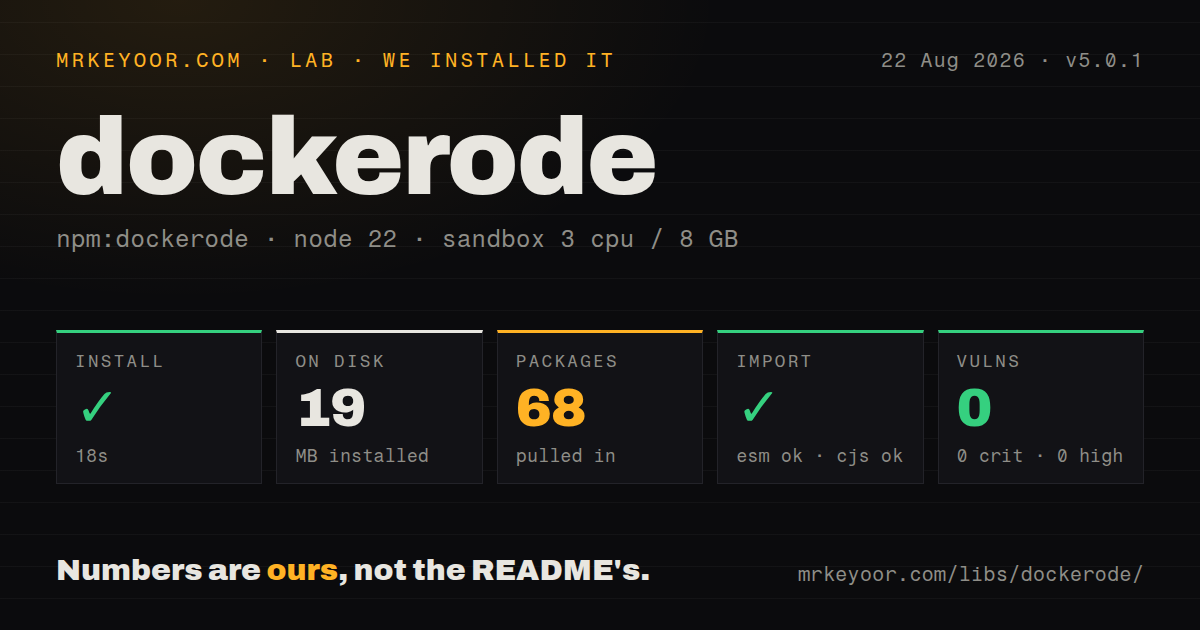
| Install | ✓ · 18s | 68 packages on disk · 19 MB |
| Import | ✓ | ESM import works · require() works · CommonJS package |
| Browser | n/a | could not be bundled for the browser (Node-only code, most likely) |
| Types | — | no TypeScript types found |
| Known vulns | 0 | 0 critical · 0 high · 0 moderate · 0 low (npm audit) |
Answers from our run
Does dockerode install cleanly?
Yes. In a fresh container with an empty cache, npm install dockerode finished in 18 seconds, leaving 68 packages and 19 MB on disk. npm audit reported no known vulnerabilities.
Can dockerode run in a browser?
Not directly: esbuild could not bundle it for the browser in our run, which normally means it depends on Node built-ins. Use it on the server, or find a browser-targeted alternative.
Does dockerode work with both ESM and CommonJS?
Yes. Both import 'dockerode' and require('dockerode') worked in Node 22 in our run. The package is published as CommonJS.
Does dockerode include TypeScript types?
No type declarations were found in our install, so TypeScript users need their own declarations.
dockerode or testcontainers: which should you use?
testcontainers: Use it for integration-test services when readiness, mapped ports, and teardown should be handled by the library. dockerode 5.0.1 installed in 18 seconds and 19 MB with 0 audit findings on our box, but it supplied no types and its browser bundle failed.
When should you not use dockerode?
TypeScript declarations must come from the installed package. dockerode 5.0.1 ships none, so TypeScript users also need the separately versioned @types/dockerode package.
Use it if
- A trusted Node process needs to manage containers through the Engine API instead of parsing output from the docker command.
- Your job consumes pull, build, attach, log, exec, or stats streams and can handle Docker's progress records and output framing.
- The automation also controls images, networks, volumes, secrets, configs, or Swarm objects.
- You prefer Docker API option objects and response bodies with only a thin JavaScript wrapper around them.
- TypeScript declarations must come from the installed package. dockerode 5.0.1 ships none, so TypeScript users also need the separately versioned @types/dockerode package.
- The code must run in a browser, edge runtime, or restricted sandbox. esbuild could not produce a browser bundle in our test, and the client needs Node transport APIs plus a reachable daemon.
- The process cannot be trusted with host control. Opening /var/run/docker.sock can permit privileged containers, host mounts, and writes to the host filesystem.
- Your task is only to start disposable dependencies in tests. testcontainers already supplies readiness checks, mapped-port discovery, and automatic cleanup.
- You expect pull or build promises to mean the remote job finished. Those calls first return a stream; followProgress is the separate completion step.
Setup reality
We installed dockerode 5.0.1 in a fresh Node 22 Bookworm sandbox in 18 seconds. npm left 68 packages and 19 MB on disk, while dockerode itself lists 6 direct dependencies, 0 peer dependencies, and 244 KB unpacked. npm audit found 0 known vulnerabilities. The CommonJS package has no exports map; require and ESM import both succeeded. It contains no TypeScript declarations. esbuild failed to make a browser bundle, which confirms this is Node-only code.
With no options, the client uses /var/run/docker.sock. The OS account must be able to open it, and mounting that socket into another container gives the workload control over the Docker host. Remote TLS needs the daemon host and port plus CA, client certificate, and private key buffers. Docker API fields pass through unchanged, so HostConfig, PortBindings, filters, and response formats come from the Engine reference.
A pull or buildImage promise resolves when the response stream arrives, not when all layers finish. Feed the stream to docker.modem.followProgress and reject its final error. For Tty false, attach and exec output includes Docker's 8-byte framing headers; use demuxStream to split stdout and stderr. A build context assembled from context and src contains only the listed files, so an omitted COPY input fails during the image build.
Most methods accept either callbacks or promises. docker.run returns an EventEmitter with a callback and a promise without one, so mixing styles changes control flow. After exec output ends, call inspect to read ExitCode. Daemon errors do not become a special dockerode error hierarchy. Set request timeouts, handle a missing socket, pass registry credentials carefully, and remove only containers and volumes your service owns.
Patterns
Connect through the local Docker socket connect-to-local-engine
const Docker = require('dockerode')

const docker = new Docker({ socketPath: '/var/run/docker.sock' })
const version = await docker.version()
console.log(version.ApiVersion)
The process needs permission to open /var/run/docker.sock. That permission should be treated as control of the Docker host.
Use mutual TLS with a remote daemon connect-with-tls
const fs = require('node:fs')
const Docker = require('dockerode')

const docker = new Docker({
  protocol: 'https',
  host: 'docker.internal',
  port: 2376,
  ca: fs.readFileSync('certs/ca.pem'),
  cert: fs.readFileSync('certs/client.pem'),
  key: fs.readFileSync('certs/client-key.pem'),
})
Keep the private key outside the application image and verify the server certificate. An unauthenticated TCP daemon exposes host control to the network.
List running containers with one label list-running-containers
const rows = await docker.listContainers({
  all: true,
  filters: JSON.stringify({
    label: ['com.example.role=worker'],
    status: ['running'],
  }),
})

for (const row of rows) console.log(row.Id, row.Names)
The filters query value is JSON text. List results are summaries; call inspect on a Container object for its complete configuration.
Start a container on an assigned port create-start-inspect
const container = await docker.createContainer({
  Image: 'redis:7',
  HostConfig: {
    AutoRemove: true,
    PortBindings: { '6379/tcp': [{ HostPort: '0' }] },
  },
})
await container.start()
const detail = await container.inspect()
console.log(detail.NetworkSettings.Ports['6379/tcp'][0].HostPort)
HostPort 0 asks Docker to choose a host port. Inspect after start to discover it; AutoRemove deletes the container when it exits.
Run a short command and wait run-one-command
const [result, container] = await docker.run(
  'alpine:3.20',
  ['sh', '-c', 'printf ready'],
  process.stdout,
  { HostConfig: { AutoRemove: true } },
)
console.log(result.StatusCode, container.id)
Without a callback, run resolves after the command and returns the status plus Container object. AutoRemove may have deleted that container already.
Wait for an image pull to complete pull-and-wait
const stream = await docker.pull('postgres:16')
await new Promise((resolve, reject) => {
  docker.modem.followProgress(stream, (error, events) => {
    if (error) reject(error)
    else resolve(events)
  })
})
docker.pull returns the response stream before the image is usable. Start dependent work only after followProgress calls its completion handler.
Build from an explicit file list build-an-image
const stream = await docker.buildImage(
  { context: process.cwd(), src: ['Dockerfile', 'package.json', 'src'] },
  { t: 'example/app:local' },
)
await new Promise((resolve, reject) => {
  docker.modem.followProgress(stream, error => error ? reject(error) : resolve())
})
Only entries in src reach this generated build context. Any file referenced by COPY must appear in the list or inside a listed directory.
Split a container's stdout and stderr follow-container-logs
const output = await container.logs({
  follow: true,
  stdout: true,
  stderr: true,
  tail: 100,
})

docker.modem.demuxStream(output, process.stdout, process.stderr)
demuxStream is for containers created with Tty false. A TTY combines both channels and can be piped without Docker frame parsing.
Inspect an exec command's exit status exec-and-check-status
const command = await container.exec({
  Cmd: ['sh', '-c', 'test -f /app/ready'],
  AttachStdout: true,
  AttachStderr: true,
})
const stream = await command.start({ hijack: true, stdin: false })
docker.modem.demuxStream(stream, process.stdout, process.stderr)
await new Promise(resolve => stream.on('end', resolve))
const result = await command.inspect()
if (result.ExitCode !== 0) throw new Error(`exec exited ${result.ExitCode}`)
exec.start exposes output without returning the final status. Wait for the stream to end, then inspect the exec and read ExitCode.
Read a single resource sample read-one-stats-sample
const stats = await container.stats({ stream: false })
console.log({
  memory: stats.memory_stats.usage,
  cpuTotal: stats.cpu_stats.cpu_usage.total_usage,
})
stream false requests 1 daemon sample. The response contains CPU counters rather than a finished percentage, so monitoring code must calculate that rate.
Authenticate a private image pull pull-private-image
const stream = await docker.pull('registry.example.com/team/api:2026-08', {
  authconfig: {
    username: process.env.REGISTRY_USER,
    password: process.env.REGISTRY_TOKEN,
    serveraddress: 'registry.example.com',
  },
})
await new Promise((resolve, reject) => {
  docker.modem.followProgress(stream, error => error ? reject(error) : resolve())
})
docker-modem encodes authconfig for the daemon. Keep the registry token out of logs and read progress errors for authentication failures.
Stop and delete an owned container remove-a-container
const container = docker.getContainer(containerId)
const state = await container.inspect()
if (state.State.Running) await container.stop({ t: 10 })
await container.remove({ v: true })
Limit deletion to containers created by your service. The v option also removes anonymous volumes, which may contain data.
Alternatives
| Package | Registry | Pick it when |
|---|---|---|
| testcontainers | npm | Use it for integration-test services when readiness, mapped ports, and teardown should be handled by the library. |
| docker-compose | npm | Use it when a checked-in Compose file already defines the stack and Node only needs to bring that stack up or down. |
| execa | npm | Use it when a few docker CLI calls are enough and CLI-compatible output matters more than direct Engine objects. |
More infra guides
semver · boto3 · opentelemetry-api · @opentelemetry/api · psutil · distro · the whole shelf →
How this guide is made: grounded in the library's documentation, release notes, changelog, and issue history, on a fixed rubric — not a hands-on install of every release. The 50 most-downloaded entries are additionally install-verified in clean containers. Corrections: contact the desk.