docker-compose review
docker-compose 1.4.2 lets Node code invoke the external Docker Compose CLI through promise-returning functions such as `upAll`, `down`, `exec`, `ps`, and `config`. It spawns `docker compose` by default, captures stdout, stderr, and the exit code, and can parse several command results. The package includes TypeScript declarations and also supports the retired standalone `docker-compose` executable. It is a process wrapper for test setup scripts, not a Docker engine, a Compose implementation, or a container test framework.
docker-compose 1.4.2 installed in 0.7 seconds and occupied 2 MB in our sandbox, but every useful call still depends on a working host Docker setup. It fits a Node test runner that already owns a Compose project; use Testcontainers when the tests need readiness and lifecycle guarantees.
We installed it
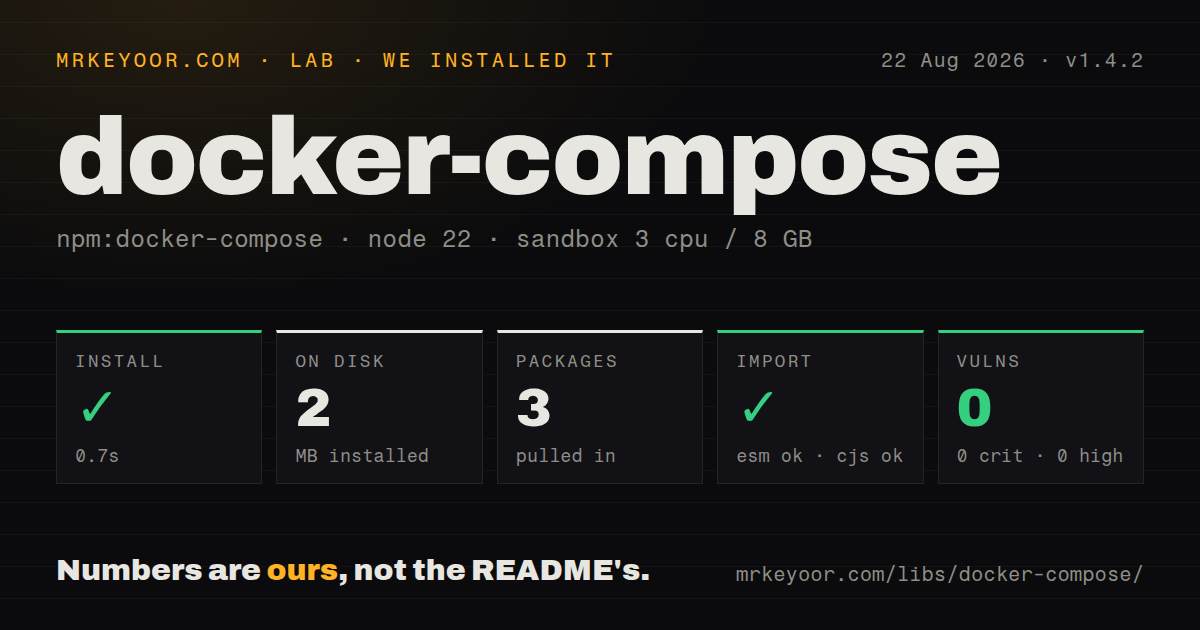
| Install | ✓ · 0.7s | 3 packages on disk · 2 MB |
| Import | ✓ | ESM import works · require() works · CommonJS package |
| Browser | n/a | could not be bundled for the browser (Node-only code, most likely) |
| Types | ✓ | TypeScript types bundled |
| Known vulns | 0 | 0 critical · 0 high · 0 moderate · 0 low (npm audit) |
Answers from our run
Does docker-compose install cleanly?
Yes. In a fresh container with an empty cache, npm install docker-compose finished in 0.7s, leaving 3 packages and 2 MB on disk. npm audit reported no known vulnerabilities.
Can docker-compose run in a browser?
Not directly: esbuild could not bundle it for the browser in our run, which normally means it depends on Node built-ins. Use it on the server, or find a browser-targeted alternative.
Does docker-compose work with both ESM and CommonJS?
Yes. Both import 'docker-compose' and require('docker-compose') worked in Node 22 in our run. The package is published as CommonJS.
Does docker-compose include TypeScript types?
Yes, type declarations ship inside the package, so no @types install is needed.
docker-compose or testcontainers: which should you use?
testcontainers: Choose it when tests need wait strategies, mapped ports, isolated containers, and managed cleanup. docker-compose 1.4.2 installed in 0.7 seconds and occupied 2 MB in our sandbox, but every useful call still depends on a working host Docker setup.
When should you not use docker-compose?
Docker, its daemon, or the Compose plugin is absent. The README says Compose is required, and this npm package installs none of those system pieces.
Use it if
- A Node integration-test runner already has a Compose file and needs programmatic setup and teardown.
- You want typed wrappers around common Compose commands and parsed output from `ps`, `config`, `images`, `port`, or `version`.
- Your script must feed a YAML string or a typed Compose object through stdin instead of creating a temporary file.
- One codebase must address both the Compose v2 plugin and a configured standalone `docker-compose` binary.
- Docker, its daemon, or the Compose plugin is absent. The README says Compose is required, and this npm package installs none of those system pieces.
- Tests need per-container readiness checks, random host ports, lifecycle isolation, and automatic cleanup. Testcontainers owns those jobs; this wrapper forwards CLI commands.
- A command needs shell quoting inside a string. `run` and `exec` split strings on whitespace, so arguments containing spaces must be passed as arrays.
- Teardown must be proven complete at promise resolution. The package adds a fixed 500 ms wait after v2 `stop` and `down` because Compose may exit before container work appears finished.
- You need an interactive terminal. `run` and `exec` add `-T`, which disables TTY allocation.
- Command output can be very large. Callbacks receive chunks, but the wrapper still retains complete stdout and stderr for the final result.
Setup reality
We installed docker-compose 1.4.2 in a clean Node 22 Bookworm sandbox. npm finished in 0.7 seconds and left 3 packages occupying 2 MB. The package has 1 direct dependency, no peer dependencies, and 236 KB unpacked. npm audit reported 0 known vulnerabilities. CommonJS require() and ESM import both worked, and TypeScript declarations are included.
That successful install supplies only the JavaScript wrapper. The host still needs Docker, the Compose v2 plugin, a reachable daemon, registry credentials, and user permission for the Docker socket. Calls normally need the project cwd or explicit config files. Set executable.standalone only for an old docker-compose binary; the default process is docker compose.
The env option becomes the child's whole environment. Include ...process.env if Compose still needs PATH, DOCKER_HOST, or credential-helper settings. A nonzero CLI exit rejects with captured output and an exit code, so test cleanup belongs in finally. Adding --volumes to down deletes the project's named volumes.
run and exec force -T, and string commands are split at whitespace. Use an argument array when a path or value contains spaces. The 500 ms delay after stop and down is only a timing workaround. It does not check readiness or resource removal. Our browser build failed under esbuild, consistent with a Node-only child-process wrapper.
Patterns
Bring up the complete project start-all-services
import path from 'node:path';
import { upAll } from 'docker-compose';

await upAll({
  cwd: path.resolve('test/stack'),
  log: true,
});
`upAll` adds detached mode unless command options request attached or abort-on-exit behavior. Docker must already work for this user.
Start a service subset start-selected-services
import { upMany } from 'docker-compose';

await upMany(['postgres', 'redis'], {
  cwd: process.cwd(),
  commandOptions: ['--build'],
});
Compose can still start declared dependencies. Add `--no-deps` only when those dependencies are intentionally excluded.
Guarantee teardown after a test tear-down-in-tests
import { down, upAll } from 'docker-compose';

await upAll({ cwd: stackDir });
try {
  await runIntegrationSuite();
} finally {
  await down({ cwd: stackDir, commandOptions: ['--remove-orphans'] });
}
The promise includes a 500 ms delay for Compose v2 teardown, but callers should still verify resources when removal timing matters.
Delete disposable volumes remove-test-volumes
await compose.down({
  cwd: stackDir,
  commandOptions: ['--volumes', ['--timeout', '20']],
});
`--volumes` removes named project volumes. Do not use it against a developer environment whose data must survive.
Run a one-off test command run-one-off-command
const result = await compose.run(
  'app',
  ['npm', 'test', '--', '--runInBand'],
  { cwd: stackDir, commandOptions: ['--rm', '--no-deps'] }
);
console.log(result.out);
Arrays preserve argument boundaries. String commands are split on whitespace, and this method disables TTY allocation with `-T`.
Execute inside an existing service exec-in-running-service
const result = await compose.exec(
  'app',
  ['node', 'scripts/health check.js'],
  { cwd: stackDir }
);
console.log(result.exitCode, result.out);
The service must already be running. Passing the command as an array preserves filenames and values containing spaces.
Read structured container state inspect-service-state
const result = await compose.ps({
  cwd: stackDir,
  commandOptions: [['--format', 'json']],
});

for (const service of result.data.services) {
  console.log(service.name, service.state, service.ports);
}
`--format json` maps into defined state values. Default table output remains human-oriented text such as `Up 2 hours`.
Check and inspect configuration validate-compose-config
const validated = await compose.config({ cwd: stackDir });
const listed = await compose.configServices({ cwd: stackDir });

console.log(validated.data.config);
console.log(listed.data.services);
Both calls reject on a nonzero Compose exit. `config` parses YAML, while `configServices` returns the service-name list.
Supply Compose data from memory provide-compose-object
import { type ComposeSpecification, upAll } from 'docker-compose';

const compose: ComposeSpecification = {
  services: {
    cache: { image: 'redis:7-alpine', ports: ['0:6379'] },
  },
};

await upAll({ compose });
The wrapper serializes this object to YAML and pipes it to Compose. Pin image tags if repeatable tests matter.
Layer Compose files in order use-multiple-config-files
await compose.upAll({
  cwd: stackDir,
  config: ['compose.yml', 'compose.test.yml'],
});
Every path becomes a separate `-f` argument relative to `cwd`. An inline config string wins when both forms are present.
Observe a long-running build stream-command-output
await compose.buildAll({
  cwd: stackDir,
  parallel: true,
  callback: (chunk, source) => {
    process[source === 'stderr' ? 'stderr' : 'stdout'].write(chunk);
  },
});
The callback streams chunks, yet the wrapper also buffers full stdout and stderr until completion.
Extend the child environment safely preserve-child-environment
await compose.pullAll({
  cwd: stackDir,
  env: {
    ...process.env,
    COMPOSE_PROJECT_NAME: 'mrkeyoor-tests',
  },
});
The `env` object replaces the child's environment. Copy `process.env` if Compose needs PATH, Docker variables, or credential settings.
Alternatives
| Package | Registry | Pick it when |
|---|---|---|
| testcontainers | npm | Choose it when tests need wait strategies, mapped ports, isolated containers, and managed cleanup. |
| dockerode | npm | Choose it for direct Docker Engine API access without parsing Compose CLI behavior. |
| execa | npm | Choose it when a general subprocess API plus a few explicit Compose commands is easier to audit. |
More testing guides
pytest · chai · vitest · playwright · jsdom · axe-core · the whole shelf →
How this guide is made: grounded in the library's documentation, release notes, changelog, and issue history, on a fixed rubric — not a hands-on install of every release. The 50 most-downloaded entries are additionally install-verified in clean containers. Corrections: contact the desk.