date-fns review
date-fns 4.4.0 is a large catalog of standalone functions for native JavaScript Date objects. It covers strict parsing, display formatting, comparisons, date arithmetic, intervals, relative labels, and locale-aware calendar rules without introducing its own everyday date class. Version 4 can preserve a date extension such as TZDate from the separate @date-fns/tz package, which makes named-zone calculations possible while keeping the familiar function calls. Version 4.4 moves browser CDN files into @date-fns/cdn and deprecates the CDN scripts inside the main package. Our whole-package browser test measured 71.7 KB minified and 17.9 KB gzipped, so selective imports still matter.
date-fns 4.4.0 installed in 2.8 seconds with 0 dependencies and 0 audit findings, but the full package occupied 28 MB and bundled to 17.9 KB gzipped in our sandbox. Install it for native-Date applications that need many explicit calendar operations; use Intl alone for display-only work and Luxon when zone identity belongs on every value.
We installed it
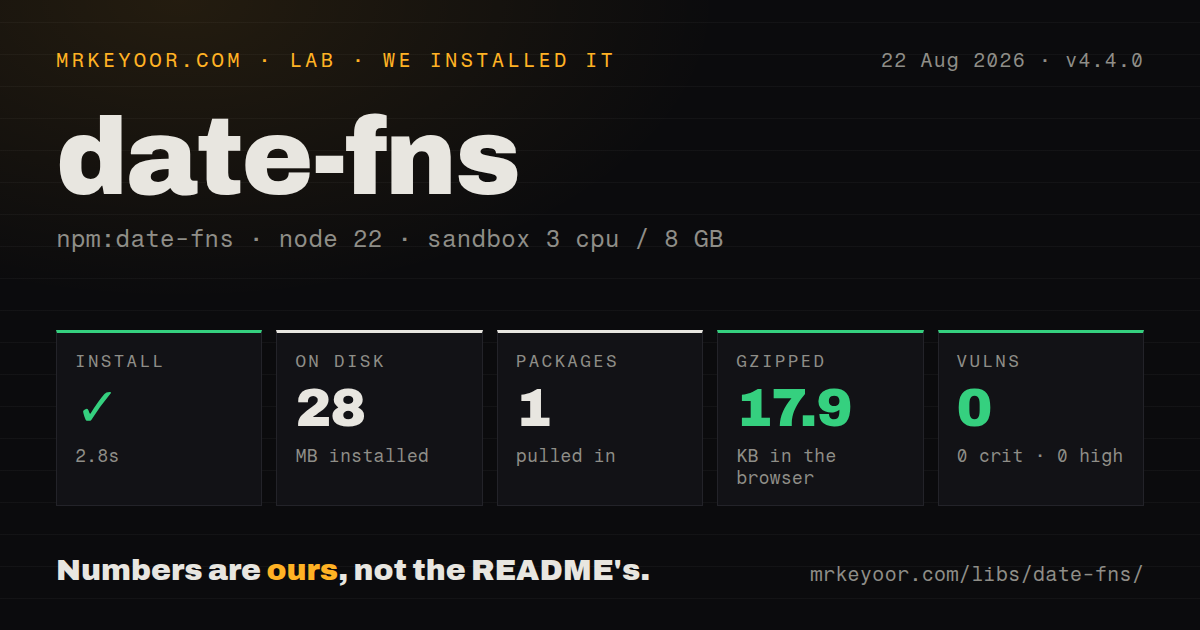
| Install | ✓ · 2.8s | 1 package on disk · 28 MB |
| Import | ✓ | ESM import works · require() works · ESM package with exports map |
| Browser | 17.9 KB | gzipped (71.7 KB minified), bundled with esbuild |
| Types | ✓ | TypeScript types bundled |
| Known vulns | 0 | 0 critical · 0 high · 0 moderate · 0 low (npm audit) |
Answers from our run
Does date-fns install cleanly?
Yes. In a fresh container with an empty cache, npm install date-fns finished in 3 seconds, leaving 1 package and 28 MB on disk. npm audit reported no known vulnerabilities.
How much does date-fns add to a browser bundle?
17.9 KB gzipped (71.7 KB minified) when the whole package is bundled for the browser with esbuild. Importing only part of it is usually smaller.
Does date-fns work with both ESM and CommonJS?
Yes. Both import 'date-fns' and require('date-fns') worked in Node 22 in our run. The package is published as ESM with an exports map.
Does date-fns include TypeScript types?
Yes, type declarations ship inside the package, so no @types install is needed.
date-fns or dayjs: which should you use?
dayjs: Choose it when a small chainable API and Moment-like plugins suit the team's existing habits. date-fns 4.4.0 installed in 2.8 seconds with 0 dependencies and 0 audit findings, but the full package occupied 28 MB and bundled to 17.9 KB gzipped in our sandbox.
When should you not use date-fns?
Every timestamp must retain its IANA zone through the application. Luxon's DateTime stores that identity directly, while a plain Date passed to date-fns does not.
Discussed on
- hnDate-fns v2 is out9 points
- hnDate-fns 4.08 points
- hnDate-fns: Modern JavaScript date utility library8 points
- hnHow date-fns came about4 points
- hnDate-fns v2 beta is out4 points
Use it if
- Your data layer already returns native Date values and you need explicit functions for arithmetic, comparison, formatting, or intervals.
- Frontend code can import only the functions and locale data it uses instead of shipping the full catalog.
- Calendar rules such as week starts, month boundaries, business-day offsets, and inclusive intervals need readable named operations.
- You need occasional IANA-zone calculations and are willing to add @date-fns/tz rather than move every date into a wrapper type.
- Every timestamp must retain its IANA zone through the application. Luxon's DateTime stores that identity directly, while a plain Date passed to date-fns does not.
- Users enter dates in unknown natural-language forms. date-fns parse expects a format string; it is not a free-form language parser.
- Your team expects mutable, chainable Moment calls. date-fns returns new Date values from separate functions, so the programming model is different.
- The application needs only localized display. Intl.DateTimeFormat is built into the runtime and avoids installing the 28 MB package we measured.
- You load scripts straight from a CDN and want the main package to remain the supported source. Version 4.4 deprecates those files and directs CDN users to @date-fns/cdn.
Setup reality
Our install of date-fns 4.4.0 finished in 2.8 seconds inside a fresh Node 22 Bookworm container. It left one package using 28 MB, declared no direct or peer dependencies, and npm audit reported 0 known vulnerabilities. The package is ESM with an exports map, yet both require() and ESM import worked in our checks. TypeScript declarations are bundled. A browser build that imported the entire public package produced 71.7 KB minified and 17.9 KB gzipped.
Use named public exports and import each locale from date-fns/locale. Locale choice is normally passed in an options object, as is weekStartsOn when the product rule must stay fixed. Version 4.4 deprecates the main package's CDN scripts; projects using script tags should move to @date-fns/cdn before version 5 removes them. The release also removes CDN source maps from date-fns itself.
The formatter follows Unicode field tokens. yyyy means calendar year and dd means day of month; Moment-style uppercase tokens do not mean the same thing. parse() requires a reference date to fill fields absent from the input and can produce Invalid Date, so pair it with isValid(). These details create bugs that look correct during most of the year and fail near a boundary.
Plain Date values still display in the host zone. Add @date-fns/tz and use TZDate when an operation must follow an IANA zone across daylight-saving changes. The interval helpers include endpoints unless a specific function says otherwise, while differenceInDays and differenceInCalendarDays answer different questions. Read the chosen function's boundary rule before using it for billing or expiry logic.
Patterns
Format with Unicode date tokens format-date
import { format } from 'date-fns';

const label = format(new Date(2026, 7, 22), 'yyyy-MM-dd');
// '2026-08-22'
In date-fns 4, lowercase `yyyy` is the calendar year and `dd` is the day of month. Moment's uppercase tokens carry different meanings.
Parse a supported ISO value parse-iso
import { parseISO, isValid } from 'date-fns';

const value = parseISO('2026-08-22T14:30:00Z');
if (!isValid(value)) throw new Error('Invalid timestamp');
parseISO avoids the runtime differences associated with passing partial date strings directly to the Date constructor.
Parse a fixed human date format parse-known-format
import { parse, isValid } from 'date-fns';

const value = parse('22/08/2026', 'dd/MM/yyyy', new Date());
if (!isValid(value)) throw new Error('Expected DD/MM/YYYY');
The third argument fills fields missing from the input. parse can return Invalid Date, so validate its result before storing it.
Add calendar days without mutation add-calendar-days
import { addDays } from 'date-fns';

const createdAt = new Date('2026-08-22T10:00:00Z');
const expiresAt = addDays(createdAt, 14);
addDays returns a new Date. The input object remains unchanged.
Sort dates from oldest to newest compare-dates
import { compareAsc } from 'date-fns';

const ordered = [...dates].sort(compareAsc);
Copy the array first when callers must retain its original order; Array.sort mutates the array even though date-fns does not mutate Date inputs.
Count crossed calendar dates measure-calendar-days
import { differenceInCalendarDays } from 'date-fns';

const days = differenceInCalendarDays(checkout, checkin);
differenceInCalendarDays removes time components before comparing dates. Use differenceInDays when complete local-day periods are the rule.
Enumerate an inclusive date interval build-date-range
import { eachDayOfInterval } from 'date-fns';

const days = eachDayOfInterval({
  start: new Date(2026, 7, 1),
  end: new Date(2026, 7, 7),
});
The returned array includes both August 1 and August 7. A long interval allocates one Date for every day.
Start weeks on Monday set-week-boundary
import { startOfWeek } from 'date-fns';

const monday = startOfWeek(new Date(), { weekStartsOn: 1 });
Pass weekStartsOn when the product has a fixed rule. Otherwise locale defaults can change the result.
Format with one imported locale format-locale
import { format } from 'date-fns';
import { fr } from 'date-fns/locale';

const label = format(new Date(2026, 7, 22), 'd MMMM yyyy', { locale: fr });
Importing a single locale keeps unrelated locale data out of a tree-shaken browser build.
Render a relative timestamp show-relative-time
import { formatDistanceToNow } from 'date-fns';

const label = formatDistanceToNow(message.createdAt, { addSuffix: true });
The output is human text such as `3 days ago`; do not persist it because it changes as the clock moves.
Check whether intervals overlap test-overlap
import { areIntervalsOverlapping } from 'date-fns';

const conflicts = areIntervalsOverlapping(first, second, { inclusive: true });
With inclusive true, intervals that meet at one endpoint count as overlapping. Omit it if adjacent bookings are allowed.
Run calendar math in an IANA zone calculate-in-time-zone
import { addDays, startOfDay } from 'date-fns';
import { TZDate } from '@date-fns/tz';

const berlin = new TZDate(2026, 2, 28, 12, 0, 0, 'Europe/Berlin');
const nextStart = startOfDay(addDays(berlin, 1));
TZDate comes from the separate @date-fns/tz package. A plain Date does not retain the Europe/Berlin identity.
Alternatives
| Package | Registry | Pick it when |
|---|---|---|
| dayjs | npm | Choose it when a small chainable API and Moment-like plugins suit the team's existing habits. |
| luxon | npm | Choose it when zones, durations, and intervals should be represented by dedicated objects. |
| moment | npm | Keep it for an established codebase that already relies on Moment's mutable API and plugin behavior. |
More utils guides
lru-cache · type-fest · ajv · zod · p-limit · find-up · the whole shelf →
How this guide is made: grounded in the library's documentation, release notes, changelog, and issue history, on a fixed rubric — not a hands-on install of every release. The 50 most-downloaded entries are additionally install-verified in clean containers. Corrections: contact the desk.