luxon review
Luxon wraps JavaScript dates in immutable DateTime, Duration, and Interval objects, with IANA zones and locale output supplied by the runtime's Intl implementation. That makes zone conversion and calendar arithmetic much clearer than raw Date without bundling timezone tables. Version 3.7.2 fixes ES module packaging after 3.7.1 reverted the first attempt; the 3.7 line also added Duration zero controls, relative-time rounding, and ISO precision. Our full browser import measured 69.5 KB minified and 21.5 KB gzipped.
Luxon is a sensible choice when named zones, durations, and intervals justify an object model and a 21.5 KB gzipped client cost. Add the separate type package, validate every parse, and test DST boundaries instead of assuming day and 24-hour arithmetic are identical.
We installed it
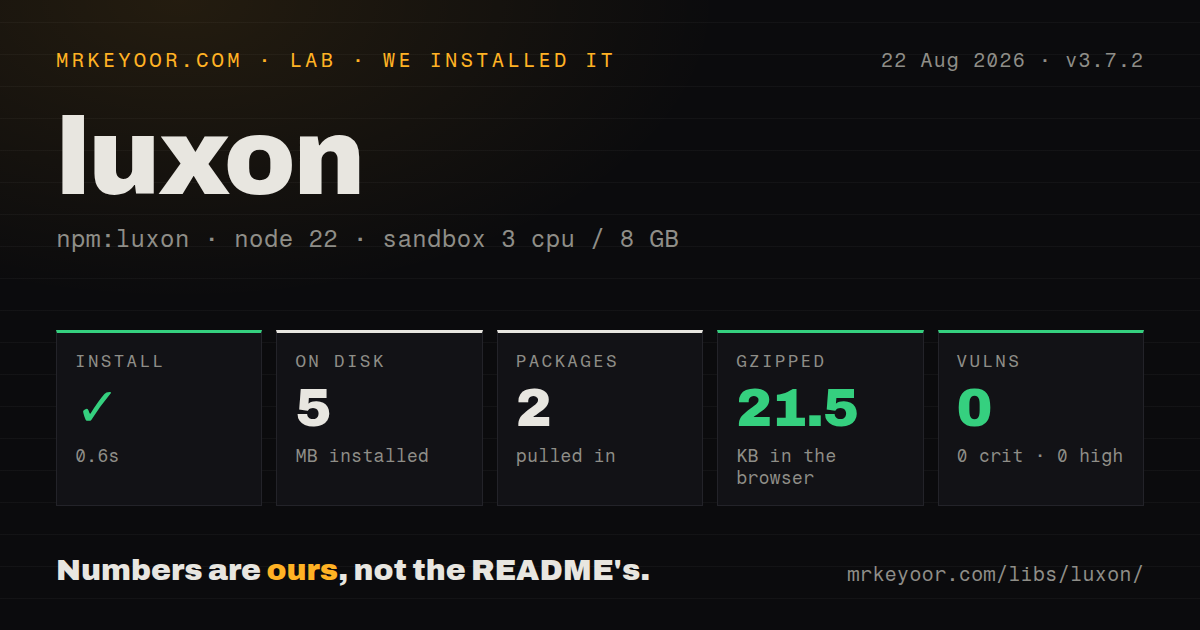
| Install | ✓ · 0.6s | 2 packages on disk · 5 MB |
| Import | ✓ | ESM import works · require() works · CommonJS package with exports map |
| Browser | 21.5 KB | gzipped (69.5 KB minified), bundled with esbuild |
| Types | — | no TypeScript types found |
| Known vulns | 0 | 0 critical · 0 high · 0 moderate · 0 low (npm audit) |
Answers from our run
Does luxon install cleanly?
Yes. In a fresh container with an empty cache, npm install luxon finished in 0.6s, leaving 2 packages and 5 MB on disk. npm audit reported no known vulnerabilities.
How much does luxon add to a browser bundle?
21.5 KB gzipped (69.5 KB minified) when the whole package is bundled for the browser with esbuild. Importing only part of it is usually smaller.
Does luxon work with both ESM and CommonJS?
Yes. Both import 'luxon' and require('luxon') worked in Node 22 in our run. The package is published as CommonJS with an exports map.
Does luxon include TypeScript types?
No type declarations were found in our install, so TypeScript users need their own declarations.
luxon or date-fns: which should you use?
date-fns: Choose it for tree-shakeable functions over Date when only selected operations should enter the bundle. Luxon is a sensible choice when named zones, durations, and intervals justify an object model and a 21.5 KB gzipped client cost.
When should you not use luxon?
You need function-level tree shaking: importing DateTime brought our browser build to 21.5 KB gzipped, while date-fns can ship selected functions
Discussed on
Use it if
- Your product schedules or displays events in named IANA time zones and daylight-saving changes matter
- You need intervals and durations as objects with overlap, splitting, shifting, and ISO conversion methods
- Locale-aware date and relative-time output should use the runtime's Intl data instead of shipped locale files
- A team migrating from Moment wants immutable values and explicit zone handling with a familiar object API
- You need function-level tree shaking: importing DateTime brought our browser build to 21.5 KB gzipped, while date-fns can ship selected functions
- Your runtime lacks dependable Intl and ICU data, as Luxon does not carry replacement locale or timezone databases
- Bad input must throw immediately: parsing returns an invalid DateTime unless you check isValid or enable the global throwOnInvalid setting
- You want bundled TypeScript declarations: our package inspection found none, so TypeScript projects need @types/luxon
- You are ready to standardize on Temporal: @js-temporal/polyfill follows the newer platform API and Luxon's README is already discussing version 4 in that context
Setup reality
Our clean Node 22 install of 3.7.2 finished in 0.6 seconds. It left 2 packages and used 5 MB on disk. Luxon itself has no direct or peer dependencies and is 4,608 KB unpacked. npm audit reported 0 known vulnerabilities. require() and ESM import both worked through the exports map. We found no TypeScript declarations in the package.
Install @types/luxon separately for TypeScript. There is no native build, zone file, or locale pack to configure. Luxon asks Intl for both. Current standard Node builds include broad ICU data, but slim or unusual runtimes can have missing locale behavior. Test every deployment runtime with the zones and languages the product promises.
DateTime.fromISO and the other parsers return an object even when input is bad. Check isValid, invalidReason, and invalidExplanation at the boundary. Settings.throwOnInvalid changes that behavior process-wide; it can also affect a dependency that uses Luxon, so enabling it inside a shared library is unfriendly. Set defaultZone and defaultLocale only at application startup if machine defaults must not leak into output.
Calendar math and elapsed math are different around daylight-saving transitions. plus({ days: 1 }) keeps local clock time, while plus({ hours: 24 }) advances an exact duration and may land an hour away. Intervals include the start and exclude the end. Our browser bundle was 69.5 KB minified and 21.5 KB gzipped, so high-traffic clients should compare that cost with smaller function-based libraries.
Patterns
Parse ISO input and reject invalid values parse-iso
import { DateTime } from 'luxon';

const value = DateTime.fromISO(input, { setZone: true });
if (!value.isValid) {
  throw new Error(`${value.invalidReason}: ${value.invalidExplanation}`);
}
Parsing does not throw by default. setZone preserves an offset or zone present in the input instead of converting to the local zone.
Format for a user's locale format-localized
const label = DateTime.now()
  .setLocale('fr-FR')
  .toLocaleString(DateTime.DATETIME_MED);
Locale presets follow local ordering and names. toFormat uses fixed tokens and is better reserved for machine or prescribed display formats.
Display the same instant in another zone convert-zone
const utc = DateTime.fromISO('2026-11-05T15:00:00Z');
const local = utc.setZone('America/New_York');
console.log(local.toFormat('yyyy-LL-dd HH:mm ZZZZ'));
setZone changes the display zone while preserving the instant. keepLocalTime: true changes the instant and needs a specific scheduling reason.
Choose calendar days or elapsed hours add-calendar-time
const start = DateTime.fromISO('2026-03-07T12:00', { zone: 'America/New_York' });
const sameWallTime = start.plus({ days: 1 });
const exactElapsed = start.plus({ hours: 24 });
The two results may differ across a daylight-saving boundary. Tests should cover the zones used in production.
Parse a known non-ISO format parse-custom-format
const date = DateTime.fromFormat(
  '24/08/2026 18:30',
  'dd/LL/yyyy HH:mm',
  { zone: 'Asia/Kolkata', locale: 'en-IN' }
);
Luxon tokens differ from Moment tokens. Always inspect isValid after parsing external text.
Return a difference in named units measure-difference
const opened = DateTime.fromISO(openedAt);
const closed = DateTime.fromISO(closedAt);
const elapsed = closed.diff(opened, ['days', 'hours', 'minutes']).toObject();
diff returns a Duration. Pass the desired units or convert it with as() before treating the result as a number.
Normalize duration units for display normalize-duration
import { Duration } from 'luxon';

const duration = Duration.fromObject({ hours: 2, minutes: 95 });
const normalized = duration.shiftTo('hours', 'minutes');
console.log(normalized.toHuman());
toHuman reflects stored units. Use shiftTo or normalize when 95 minutes should be carried into hours.
Check whether two intervals overlap test-interval-overlap
import { Interval } from 'luxon';

const booking = Interval.fromDateTimes(start, end);
if (!booking.isValid) throw new Error(booking.invalidExplanation);
const conflicts = booking.overlaps(existingBooking);
Intervals are half-open: start is included and end is excluded, so adjacent bookings do not overlap.
Split a range into calendar slots split-interval
const slots = Interval.fromDateTimes(dayStart, dayEnd)
  .splitBy({ minutes: 30 })
  .filter(slot => slot.length('minutes') === 30);
A final partial interval can be returned when the range is not evenly divisible. Filter it only if partial slots are invalid for the product.
Create a relative-time label render-relative-time
const label = DateTime.fromISO(createdAt)
  .setLocale(userLocale)
  .toRelative({ base: DateTime.now() });
The result depends on the base clock and becomes stale. Refresh it on the client or regenerate it when caching HTML.
Cross the native Date boundary convert-js-date
const luxonValue = DateTime.fromJSDate(nativeDate, { zone: 'utc' });
const nativeAgain = luxonValue.toJSDate();
const epochMs = luxonValue.toMillis();
A Date stores an instant without a named zone. Supply the intended zone when wrapping it for display or calendar work.
Set deterministic process defaults set-application-defaults
import { Settings } from 'luxon';

Settings.defaultZone = 'UTC';
Settings.defaultLocale = 'en-GB';
Set globals once during application startup. Shared libraries should accept zone and locale inputs instead of changing process-wide settings.
Alternatives
| Package | Registry | Pick it when |
|---|---|---|
| date-fns | npm | Choose it for tree-shakeable functions over Date when only selected operations should enter the bundle. |
| dayjs | npm | Choose it for a small Moment-like surface when plugins can cover the required behavior. |
| @js-temporal/polyfill | npm | Choose it to adopt the Temporal data model before every target runtime ships it. |
| date-fns-tz | npm | Choose it when a date-fns codebase only needs named-zone formatting and conversion. |
More utils guides
lru-cache · type-fest · ajv · zod · p-limit · find-up · the whole shelf →
How this guide is made: grounded in the library's documentation, release notes, changelog, and issue history, on a fixed rubric — not a hands-on install of every release. The 50 most-downloaded entries are additionally install-verified in clean containers. Corrections: contact the desk.