dayjs review
Day.js 1.11.23 produced a 7.5 KB minified, 3.3 KB gzipped namespace bundle in our esbuild check. It wraps JavaScript `Date` in an immutable, chainable API with Moment-compatible names for formatting and calendar calculations. Features such as strict custom parsing, relative time, durations, UTC, and named timezones live in plugins that the application must register. The current release fixes a precise timezone bug: calling `.tz()` on an invalid Day.js value now returns that invalid value instead of reaching `Intl.DateTimeFormat` and throwing `RangeError`. You still have to call `isValid()` before using the result.
Our Day.js 1.11.23 install finished in 1.4 seconds, occupied 3 MB, bundled to 3.3 KB gzipped, and returned 0 audit findings. Install it for a compact Moment-shaped API with centralized plugin setup, but choose Temporal or Luxon when distinct date types and explicit zone behavior carry more weight than size.
We installed it
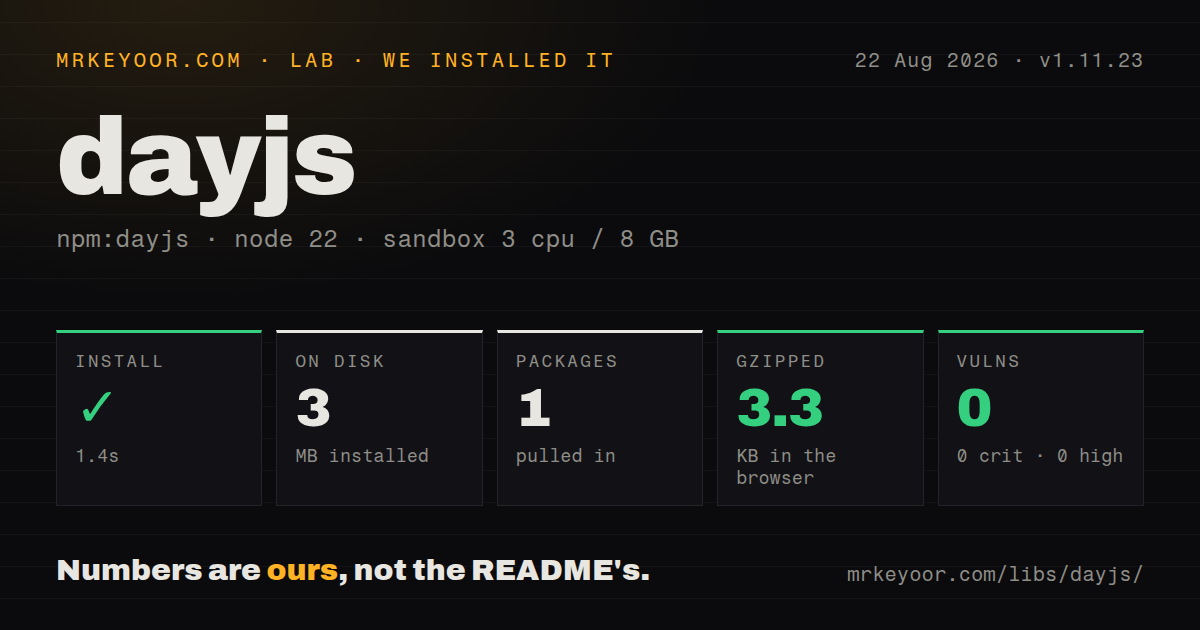
| Install | ✓ · 1.4s | 1 package on disk · 3 MB |
| Import | ✓ | ESM import works · require() works · CommonJS package |
| Browser | 3.3 KB | gzipped (7.5 KB minified), bundled with esbuild |
| Types | ✓ | TypeScript types bundled |
| Known vulns | 0 | 0 critical · 0 high · 0 moderate · 0 low (npm audit) |
Answers from our run
Does dayjs install cleanly?
Yes. In a fresh container with an empty cache, npm install dayjs finished in 1 seconds, leaving 1 package and 3 MB on disk. npm audit reported no known vulnerabilities.
How much does dayjs add to a browser bundle?
3.3 KB gzipped (7.5 KB minified) when the whole package is bundled for the browser with esbuild. Importing only part of it is usually smaller.
Does dayjs work with both ESM and CommonJS?
Yes. Both import 'dayjs' and require('dayjs') worked in Node 22 in our run. The package is published as CommonJS.
Does dayjs include TypeScript types?
Yes, type declarations ship inside the package, so no @types install is needed.
dayjs or date-fns: which should you use?
date-fns: Choose it when named functions operating on ordinary Date objects are easier to audit than a shared plugin setup. Our Day.js 1.11.23 install finished in 1.4 seconds, occupied 3 MB, bundled to 3.3 KB gzipped, and returned 0 audit findings.
When should you not use dayjs?
Your type system must distinguish an instant from a plain date or zoned date-time. The declarations use one Dayjs type for core, UTC, and timezone values.
Discussed on
- hnShow HN: Fast 2kB date library alternative to Moment.js with the same API122 points
- hnShow HN: Day.js 1.6 locale and plugins 2kb moment.js alternative with same API6 points
- hnShow HN: I made a React/DayJS picker as my first open source library5 points
- hnAsk HN: The Day.js Dilemma: How Should We Handle OSS Maintainers Going MIA?4 points
Use it if
- You are moving existing Moment calls and want to keep familiar tokens, units, and chained methods.
- A browser entry point needs date formatting and calendar arithmetic and can live with the 3.3 KB gzipped namespace bundle we measured.
- One startup module can register the same plugins and locale files for the application, workers, and tests.
- Using the runtime's `Intl` timezone data is acceptable for every browser and Node version you support.
- Your type system must distinguish an instant from a plain date or zoned date-time. The declarations use one `Dayjs` type for core, UTC, and timezone values.
- A reusable module cannot alter shared date behavior. Plugins assign methods to the common `Dayjs` prototype, and TypeScript's module augmentation does not confirm that `extend()` ran at runtime.
- Exact-format validation must work with core alone. Rejecting `31/02/2026` requires `customParseFormat` and the strict boolean. Non-strict parsing can normalize overflow into another date.
- Timezone rules must come from a pinned data release. The timezone plugin asks the host's `Intl.DateTimeFormat` for offsets instead of shipping its own IANA database.
- You expect a configured default timezone to affect every constructor call. `dayjs.tz.setDefault()` changes `dayjs.tz()`, but ordinary `dayjs()` calls keep using the process or browser timezone.
Setup reality
We installed Day.js 1.11.23 in 1.4 seconds in our fresh sandbox. The measurement setup used an unprivileged Node 22 Bookworm container with 3 CPUs, 8 GB RAM, and no cache. The run left 1 package using 3 MB on disk. The package itself was 2,136 KB unpacked and declared 0 direct dependencies plus 0 peer dependencies. npm audit reported 0 known vulnerabilities at every severity. Bundled TypeScript declarations were present.
Version 1.11.23 is a CommonJS package without an exports map, yet both require() and ESM import worked in our sandbox. No account, credential, or config file is involved. Optional behavior is initialized in code: import a plugin, pass it to dayjs.extend(), and import each locale you use. Put this work in one bootstrap module. Otherwise tests or worker entry points can compile against an augmented method such as .tz() and then fail because that process never registered the plugin.
In 1.11.23, core validity checks accept values that JavaScript can normalize, so an overflowing day may land in the next month. Exact form input needs customParseFormat with strict mode enabled. Methods including add(), set(), and startOf() return new objects. Code that ignores the returned object loses the change. diff() returns a truncated integer unless you pass true as its third argument. Week boundaries also follow the active locale, so parsing and calendar behavior deserve their own tests.
Named timezone work needs the UTC plugin registered before the timezone plugin, and results depend on the host's Intl data. Day.js 1.11.23 keeps invalid zoned input from raising the earlier RangeError, but it does not turn that input into a valid date. Our browser build was 7.5 KB minified and 3.3 KB gzipped. That measurement used a namespace import from the package. Every plugin and locale in your real entry point can increase the shipped total.
Patterns
Reject an impossible form date validate-form-date
import dayjs from 'dayjs';
import customParseFormat from 'dayjs/plugin/customParseFormat.js';

dayjs.extend(customParseFormat);

const birthday = dayjs('31/02/2026', 'DD/MM/YYYY', true);
if (!birthday.isValid()) {
  throw new Error('Enter a real date');
}
The final `true` turns on strict parsing, and `customParseFormat` must be registered first. Core parsing alone can roll an overflowing day into the following month.
Keep the source date unchanged add-calendar-time
import dayjs from 'dayjs';

const orderedAt = dayjs('2026-09-28T10:15:00');
const reminderAt = orderedAt.add(2, 'day').set('hour', 9);

console.log(orderedAt.format());
console.log(reminderAt.format());
Both `add()` and `set()` create new Day.js objects. Assign the returned value or the original timestamp stays as it was.
Create an exclusive monthly range build-month-window
import dayjs from 'dayjs';

const month = dayjs('2026-09-18T16:40:00');
const from = month.startOf('month');
const until = from.add(1, 'month');

const query = {
  createdAt: { $gte: from.toDate(), $lt: until.toDate() },
};
An exclusive first instant of the next month avoids manufacturing a 23:59:59.999 endpoint. `startOf()` and `add()` leave `month` unchanged.
Keep the fractional part of a difference calculate-precise-difference
import dayjs from 'dayjs';

const startedAt = dayjs('2026-09-30T08:00:00');
const finishedAt = dayjs('2026-09-30T09:45:00');

const wholeHours = finishedAt.diff(startedAt, 'hour');
const decimalHours = finishedAt.diff(startedAt, 'hour', true);
Two arguments make `diff()` truncate to a whole unit. Passing `true` in the third position preserves the fraction.
Include both dates in a booking window check-inclusive-range
import dayjs from 'dayjs';
import isBetween from 'dayjs/plugin/isBetween.js';

dayjs.extend(isBetween);

const stay = dayjs('2026-10-03').isBetween(
  '2026-10-01',
  '2026-10-03',
  'day',
  '[]',
);
`isBetween()` comes from a plugin, and `[]` includes both endpoints. Its default boundary mode excludes both ends.
Parse and serialize in UTC serialize-utc-instant
import dayjs from 'dayjs';
import utc from 'dayjs/plugin/utc.js';

dayjs.extend(utc);

const receivedAt = dayjs.utc('2026-09-30T14:05:00Z');
if (!receivedAt.isValid()) throw new Error('bad timestamp');

console.log(receivedAt.toISOString());
`dayjs.utc()` is added by the UTC plugin. The resulting ISO string ends in `Z` and does not inherit the process timezone.
Show one instant in Singapore convert-named-timezone
import dayjs from 'dayjs';
import utc from 'dayjs/plugin/utc.js';
import timezone from 'dayjs/plugin/timezone.js';

dayjs.extend(utc);
dayjs.extend(timezone);

const instant = dayjs.utc('2026-09-30T14:05:00Z');
const local = instant.tz('Asia/Singapore');
console.log(local.format('YYYY-MM-DD HH:mm Z'));
The timezone plugin depends on UTC and reads zone offsets from the host's `Intl` data. This conversion keeps the instant and changes its displayed wall time.
Interpret an appointment in its own zone parse-timezone-wall-clock
import dayjs from 'dayjs';
import customParseFormat from 'dayjs/plugin/customParseFormat.js';
import utc from 'dayjs/plugin/utc.js';
import timezone from 'dayjs/plugin/timezone.js';

dayjs.extend(customParseFormat);
dayjs.extend(utc);
dayjs.extend(timezone);

const text = '30/09/2026 09:15';
const layout = 'DD/MM/YYYY HH:mm';
if (!dayjs(text, layout, true).isValid()) throw new Error('bad appointment');

const appointment = dayjs.tz(text, layout, 'America/Toronto');
`dayjs.tz()` has no strict boolean, so validate the text with `customParseFormat` before the zone parse. Version 1.11.23 returns an invalid object for bad timezone input instead of throwing the former `RangeError`.
Format one value in French format-single-locale
import dayjs from 'dayjs';
import 'dayjs/locale/fr.js';

const label = dayjs('2026-09-30')
  .locale('fr')
  .format('dddd D MMMM YYYY');

console.log(label);
The French locale module must be imported before `.locale('fr')`. Instance-level locale selection returns a new value without replacing the global default.
Describe a timestamp against a fixed clock render-relative-time
import dayjs from 'dayjs';
import relativeTime from 'dayjs/plugin/relativeTime.js';

dayjs.extend(relativeTime);

const publishedAt = dayjs('2026-09-28T12:00:00Z');
const viewedAt = dayjs('2026-09-30T12:00:00Z');
console.log(publishedAt.from(viewedAt));
The relative-time plugin supplies `from()` and `fromNow()`. Passing a fixed comparison value keeps tests independent of the machine clock.
Add a structured timeout apply-duration
import dayjs from 'dayjs';
import duration from 'dayjs/plugin/duration.js';

dayjs.extend(duration);

const gracePeriod = dayjs.duration({ minutes: 7, seconds: 30 });
const expiresAt = dayjs('2026-09-30T14:05:00Z').add(gracePeriod);

console.log(gracePeriod.asSeconds());
console.log(expiresAt.toISOString());
`dayjs.duration()` and duration-aware `add()` come from the duration plugin. `asSeconds()` returns the total rather than the seconds remainder.
Choose the earliest and latest values select-date-extremes
import dayjs from 'dayjs';
import minMax from 'dayjs/plugin/minMax.js';

dayjs.extend(minMax);

const first = dayjs.min(
  dayjs('2026-10-04'),
  dayjs('2026-10-01'),
  dayjs('2026-10-07'),
);
const last = dayjs.max(
  dayjs('2026-10-04'),
  dayjs('2026-10-01'),
  dayjs('2026-10-07'),
);
`dayjs.min()` and `dayjs.max()` exist only after the minMax plugin is registered. Both return one of the supplied Day.js values.
Alternatives
| Package | Registry | Pick it when |
|---|---|---|
| date-fns | npm | Choose it when named functions operating on ordinary `Date` objects are easier to audit than a shared plugin setup. |
| luxon | npm | Choose it when zones, intervals, and durations belong in the main API rather than arriving through extensions. |
| @js-temporal/polyfill | npm | Choose it when code must represent instants, plain calendar values, and zoned date-times as separate types. |
More utils guides
lru-cache · type-fest · ajv · zod · p-limit · find-up · the whole shelf →
How this guide is made: grounded in the library's documentation, release notes, changelog, and issue history, on a fixed rubric — not a hands-on install of every release. The 50 most-downloaded entries are additionally install-verified in clean containers. Corrections: contact the desk.