curl-cffi review
curl-cffi is a Python binding to the maintainer's curl-impersonate fork. Its requests-shaped API can send TLS and HTTP/2 fingerprints modeled on supported Chrome, Safari, Firefox, and mobile browser builds. It also exposes synchronous sessions, AsyncSession, proxies, WebSockets, HTTP/3, and lower-level curl options. Version 0.16.1 updates the bundled curl-impersonate code to 2.1.1 and adds a Chrome 150 preset. Our install proved that the compiled wheel works on Python 3.12, but the project remains a specialized client for fingerprint-sensitive traffic rather than a default replacement for requests or HTTPX.
Install curl-cffi when transport fingerprinting is the documented problem and you are authorized to imitate a browser. For ordinary APIs or JavaScript challenges, its compiled footprint and moving presets solve the wrong problem.
We installed it
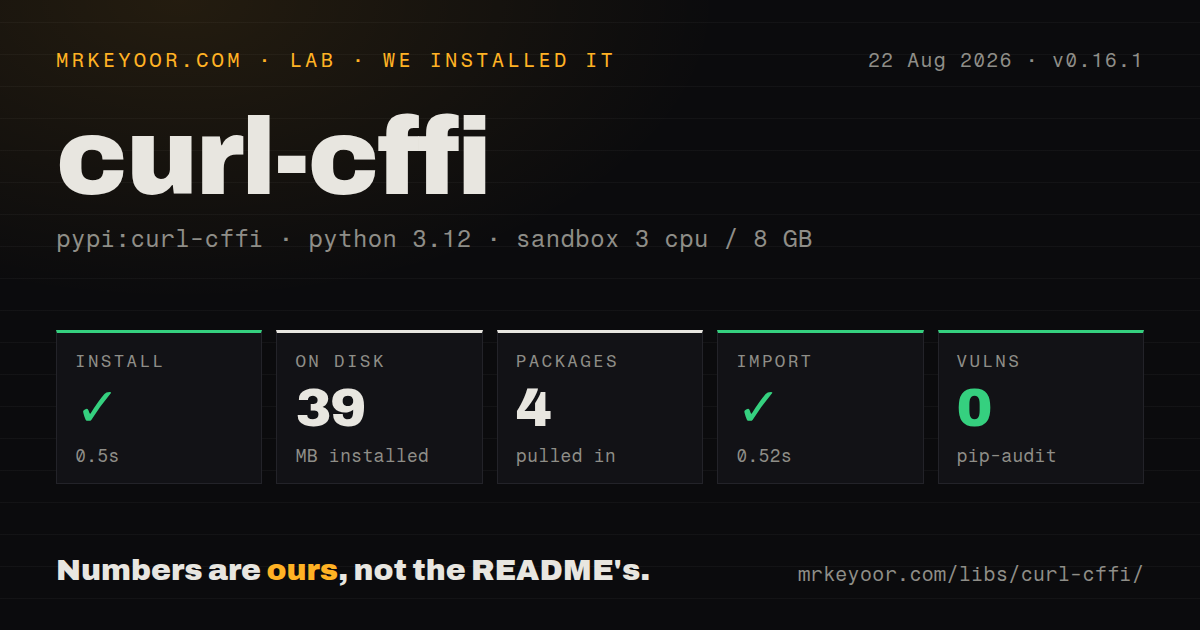
| Install | ✓ · 0.5s | 4 packages on disk · 39 MB |
| Import | ✓ | import curl_cffi in 0.52s · compiled extensions · py.typed · requires Python >=3.10 |
| Known vulns | 0 | (pip-audit) |
Answers from our run
Does curl-cffi install cleanly?
Yes. In a fresh container with an empty cache, pip install curl-cffi finished in 0.5s, leaving 4 packages and 39 MB on disk. pip-audit reported no known vulnerabilities.
What does curl-cffi need to run?
Python >=3.10, and a platform wheel with compiled extensions. In our run import curl_cffi succeeded in 0.52s, and the package ships py.typed for type checkers.
curl-cffi or httpx: which should you use?
httpx: Use it for ordinary sync and async HTTP, optional HTTP/2, and a smaller pure-Python-facing workflow. Install curl-cffi when transport fingerprinting is the documented problem and you are authorized to imitate a browser.
When should you not use curl-cffi?
You call an API you control or a public endpoint that accepts normal clients. requests or HTTPX avoids the bundled compiled curl layer and browser fingerprint maintenance.
Use it if
- A permitted target distinguishes automated clients by TLS or HTTP/2 fingerprint after headers and cookies have already been checked.
- Existing requests-style code needs browser impersonation with only a small change to request and session calls.
- One client must combine async requests, per-request proxies, HTTP/3, and WebSocket connections.
- You have a known JA3 or Akamai fingerprint to supply instead of relying on a built-in browser preset.
- You call an API you control or a public endpoint that accepts normal clients. requests or HTTPX avoids the bundled compiled curl layer and browser fingerprint maintenance.
- The target requires JavaScript execution, DOM state, or a challenge token produced by browser code. A matching transport fingerprint does not run the page, and the README points those cases toward outside challenge services.
- The deployment must run on BSD. The installation section says BSD support first needs libcurl-impersonate compilation; Android and Termux support is marked beta.
- Your dependency policy requires a confirmed SPDX license. PyPI's installed package metadata did not identify a license in our check, so legal review cannot rely on that field.
- The service terms or your authorization do not permit browser impersonation. Technical access does not grant permission to bypass traffic controls.
Setup reality
We installed curl-cffi 0.16.1 in a fresh Python 3.12 Bookworm container. pip completed in 0.5 seconds, left 4 packages occupying 39 MB, and pip-audit found no known vulnerabilities. Metadata reported 35 direct dependencies and Python 3.10 or newer. The wheel includes compiled .so files and py.typed; import curl_cffi worked in 0.52 seconds. The installed license field was unknown.
Common Linux, macOS, and Windows setups use published wheels that bundle the impersonating curl build. Platforms without a matching wheel face native compilation and libcurl-impersonate work. The README calls Android support beta and says BSD needs the underlying curl fork compiled first, so confirm a wheel exists for every production architecture before choosing this client.
Set impersonate='chrome' or another moving family name when current browser behavior matters. Pin a numbered preset only when repeatability outweighs how quickly a fingerprint ages. Version 0.16.1 moved to curl-impersonate 2.1.1 and added Chrome 150. Some fingerprint updates come from the maintainer's service, with a wider catalog sold commercially, so decide whether an offline package pin or that update channel owns your production behavior.
Session objects retain cookies and curl handles. AsyncSession must be closed with an async context manager, and large crawls still need an application-level concurrency cap. Proxy credentials belong in secret configuration rather than logs or snippets. Browser impersonation only changes the network signature and selected headers; it does not execute JavaScript or manufacture challenge cookies.
Patterns
Send a request with a current browser family impersonate-browser
from curl_cffi import requests

response = requests.get(
    'https://tls.browserleaks.com/json',
    impersonate='chrome',
    timeout=20,
)
response.raise_for_status()
print(response.json())
The unnumbered family follows the newest preset shipped or installed for that family. Test it when upgrading because the wire signature can change.
Pin an exact browser preset pin-fingerprint
from curl_cffi import requests

response = requests.get(url, impersonate='chrome150')
Version 0.16.1 added Chrome 150. A numbered preset is repeatable but becomes dated as real browser traffic moves on.
Keep cookies and connections in a session reuse-session
from curl_cffi import requests

with requests.Session(impersonate='chrome') as session:
    session.get('https://httpbin.org/cookies/set/theme/dark')
    response = session.get('https://httpbin.org/cookies')
    print(response.json())
Put the impersonation choice on the session so related calls share cookies and the underlying curl resources.
Post JSON with a timeout post-json
from curl_cffi import requests

response = requests.post(
    'https://httpbin.org/post',
    json={'job': 'status'},
    impersonate='chrome',
    timeout=30,
)
response.raise_for_status()
data = response.json()
The high-level API accepts familiar `json`, `data`, `headers`, and `timeout` arguments. Keep status handling explicit.
Route HTTPS through a proxy use-proxy
proxies = {
    'http': 'http://127.0.0.1:3128',
    'https': 'http://127.0.0.1:3128',
}
response = requests.get(
    url,
    proxies=proxies,
    impersonate='chrome',
)
Keep proxy passwords outside source control. A proxy changes the network path; the `impersonate` option controls the client fingerprint.
Close an async session correctly async-request
from curl_cffi.requests import AsyncSession

async def fetch(url: str):
    async with AsyncSession(impersonate='chrome') as session:
        response = await session.get(url, timeout=20)
        response.raise_for_status()
        return response.text
Create and enter AsyncSession inside a running event loop. The context manager closes its curl multi resources.
Bound concurrent async requests limit-concurrency
import asyncio
from curl_cffi.requests import AsyncSession

async def fetch_all(urls):
    limit = asyncio.Semaphore(8)
    async with AsyncSession(impersonate='chrome') as session:
        async def one(url):
            async with limit:
                return await session.get(url)
        return await asyncio.gather(*(one(url) for url in urls))
The client can open many transfers, but your proxy and target may not accept them. Set a limit that matches the service and retry policy.
Force an HTTP/3 request request-http3
from curl_cffi import requests
from curl_cffi.const import CurlHttpVersion

response = requests.get(
    'https://example.com',
    impersonate='chrome',
    http_version=CurlHttpVersion.V3,
)
HTTP/3 depends on server, network, proxy, and bundled curl support. Test the production path instead of assuming a local success transfers to it.
Supply JA3 and Akamai strings set-custom-fingerprint
response = requests.get(
    url,
    ja3=my_ja3,
    akamai=my_akamai,
    extra_fp={'tls_signature_algorithms': algorithms},
)
Use captured values that match the intended client. Mixing unrelated TLS and HTTP/2 settings produces a distinctive signature rather than a convincing one.
Read a response as it arrives stream-response
with requests.Session() as session:
    response = session.get(url, stream=True)
    for chunk in response.iter_content():
        if chunk:
            consume(chunk)
    response.close()
Close streamed responses when the loop ends early so the curl handle and connection can be reused or released.
Receive messages on an async WebSocket open-websocket
from curl_cffi.requests import AsyncSession

async def listen():
    async with AsyncSession() as session:
        async with session.ws_connect('wss://example.com/socket') as ws:
            await ws.send_str('hello')
            async for message in ws:
                print(message)
                break
Use the WebSocket API documented for your installed release; its message objects and close behavior differ from the HTTP response API.
Inspect one request from the shell debug-from-cli
curl-cffi get https://tls.browserleaks.com/json --impersonate chrome
curl-cffi list
The list command shows presets available to that installation. CLI extras may be needed for the full command-line experience.
Alternatives
| Package | Registry | Pick it when |
|---|---|---|
| httpx | PyPI | Use it for ordinary sync and async HTTP, optional HTTP/2, and a smaller pure-Python-facing workflow. |
| requests | PyPI | Use it for straightforward synchronous calls where the server accepts a normal Python TLS fingerprint. |
| playwright | PyPI | Use it when page JavaScript, DOM interaction, or browser-produced challenge state is required. |
| pycurl | PyPI | Use it for direct libcurl control without curl-cffi's browser preset layer or requests-like response model. |
More utils guides
lru-cache · type-fest · ajv · zod · p-limit · find-up · the whole shelf →
How this guide is made: grounded in the library's documentation, release notes, changelog, and issue history, on a fixed rubric — not a hands-on install of every release. The 50 most-downloaded entries are additionally install-verified in clean containers. Corrections: contact the desk.