playwright review
Playwright 1.62.1 is Microsoft's Node API and test framework for Chromium, Firefox, and WebKit. It launches browser processes, isolates sessions with browser contexts, locates controls by user-facing semantics, retries assertions, intercepts network traffic, and records traces for failed runs. Scripts can import `playwright`; end-to-end suites usually import `@playwright/test`. The 1.62 line added `AbortSignal` cancellation, lossless WebP snapshots, isolated retry scheduling, passkey storage state, and a new story-and-gallery component-test model. Patch 1.62.1 repairs TypeScript config resolution and accessibility snapshot regressions from 1.62.0.
Our Playwright 1.62.1 package install took 2.2 seconds and 19 MB with 0 audit findings, but the browser build failed and usable CI still needs matched browser binaries plus OS libraries. Install it for browser-level journeys and automation, then keep faster checks below the browser boundary.
We installed it
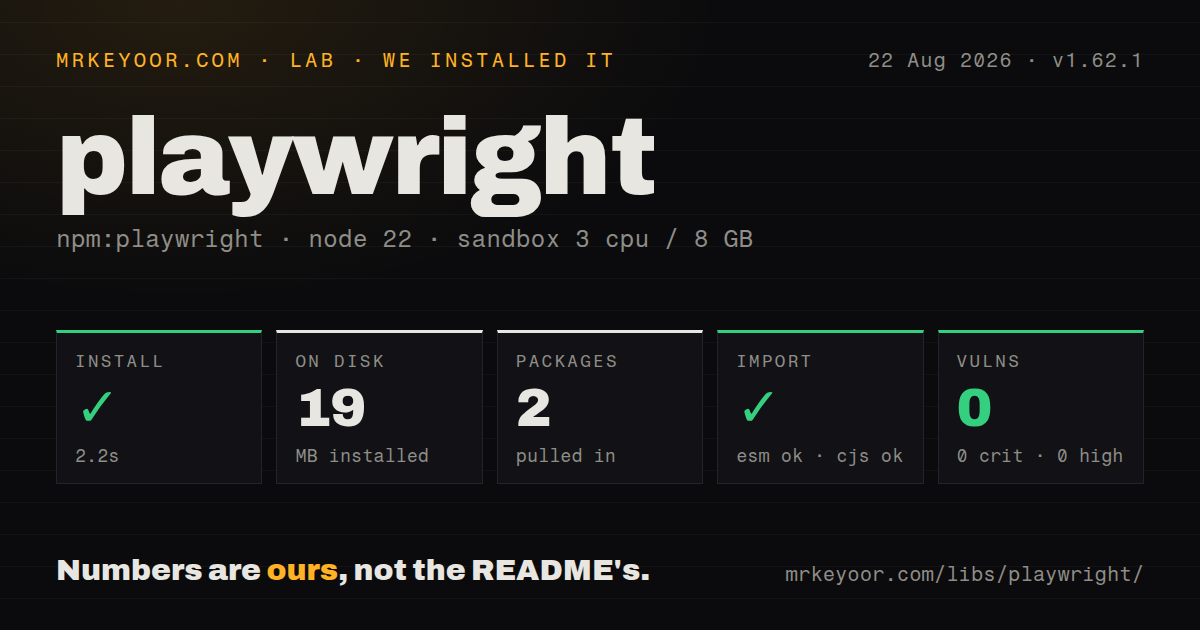
| Install | ✓ · 2.2s | 2 packages on disk · 19 MB |
| Import | ✓ | ESM import works · require() works · CommonJS package with exports map |
| Browser | n/a | could not be bundled for the browser (Node-only code, most likely) |
| Types | ✓ | TypeScript types bundled |
| Known vulns | 0 | 0 critical · 0 high · 0 moderate · 0 low (npm audit) |
Answers from our run
Does playwright install cleanly?
Yes. In a fresh container with an empty cache, npm install playwright finished in 2 seconds, leaving 2 packages and 19 MB on disk. npm audit reported no known vulnerabilities.
Can playwright run in a browser?
Not directly: esbuild could not bundle it for the browser in our run, which normally means it depends on Node built-ins. Use it on the server, or find a browser-targeted alternative.
Does playwright work with both ESM and CommonJS?
Yes. Both import 'playwright' and require('playwright') worked in Node 22 in our run. The package is published as CommonJS with an exports map.
Does playwright include TypeScript types?
Yes, type declarations ship inside the package, so no @types install is needed.
playwright or puppeteer: which should you use?
puppeteer: Use it for focused Chromium automation when Playwright Test and WebKit are unnecessary. Our Playwright 1.62.1 package install took 2.2 seconds and 19 MB with 0 audit findings, but the browser build failed and usable CI still needs matched browser binaries plus OS libraries.
When should you not use playwright?
The behavior is fully testable at the function, component, or HTTP layer. Browser processes and retained traces cost more CPU, wall time, and failure triage than lower-level tests.
Discussed on
- hnTracking supermarket prices with Playwright467 points
- hnWeb automation: Don't use Selenium, use Playwright408 points
- hnPlaywright: Automate Chromium, WebKit and Firefox383 points
- hnTheheadless.dev – open source Puppeteer and Playwright knowledge base255 points
- hnShow HN: Rmux – A programmable terminal multiplexer with a Playwright-style SDK194 points
Use it if
- A user journey must pass in Chromium, Firefox, and WebKit through one Node test API.
- Tests need role or label locators, automatic actionability waits, and assertions that retry against live page state.
- A Node job must render client JavaScript, create screenshots or PDFs, or inspect and replace browser requests.
- CI failures need a portable trace containing actions, DOM snapshots, console entries, and network records.
- The behavior is fully testable at the function, component, or HTTP layer. Browser processes and retained traces cost more CPU, wall time, and failure triage than lower-level tests.
- You require a physical iPhone, Android device, or branded Safari. Device profiles alter viewport and input settings; Playwright's WebKit build is not Mobile Safari hardware.
- Your deployment cannot download browser revisions or install Linux libraries. The 19 MB npm result from our lab did not include a launch-ready browser environment.
- An existing Selenium Grid and vendor-browser matrix is a fixed requirement. Playwright normally downloads browser builds matched to each package version.
- The target code runs in a browser bundle. Our esbuild browser build failed because Playwright contains Node-side process and transport code.
Setup reality
We installed playwright 1.62.1 in a fresh Node 22 Bookworm container. npm completed in 2.2 seconds, placed 2 packages on disk, and used 19 MB. The package has 1 direct dependency, 0 peer dependencies, and 5,148 KB unpacked. npm audit reported 0 findings across all 4 severities. It requires Node 20 or newer, bundles TypeScript declarations, has an exports map, and loaded through both CommonJS require() and ESM import().
That 19 MB install did not establish that Chromium, Firefox, or WebKit could launch. Run npx playwright install for the required revisions. Linux CI may need npx playwright install --with-deps chromium or an official image. A package update can require a new browser download because Playwright pins compatible revisions. Proxies, private mirrors, custom certificate authorities, and download timeouts each have documented environment variables. Keep the npm version and cached browser directory in step.
Authentication state can contain cookies, local storage, IndexedDB data, and passkeys. Keep those files out of Git and use accounts created for tests. Playwright gives each test a fresh browser context, while databases and remote APIs remain shared. Parallel workers can still update the same record or exhaust one account. Allocate data by parallelIndex or generate a unique identifier per test. Put limits on traces, screenshots, videos, downloads, and HTML reports because retries duplicate artifacts.
The browser bundle check failed in our sandbox, which is expected for Node-only automation code. Keep Playwright out of frontend dependency paths. Locators already wait for actionability, and web-first assertions poll until their timeout; fixed sleeps tend to hide the missing condition. Start response waits before the click that triggers them. Version 1.62 accepts an AbortSignal on many operations, but the signal does not replace the ordinary timeout.
Patterns
Test a form through accessible locators test-user-journey
import { test, expect } from '@playwright/test';

test('places an order', async ({ page }) => {
  await page.goto('/orders/new');
  await page.getByLabel('Quantity').fill('2');
  await page.getByRole('button', { name: 'Place order' }).click();
  await expect(page.getByRole('status')).toHaveText('Order placed');
});
`@playwright/test` supplies fixtures and retrying assertions. Role and label locators also test the page's exposed semantics.
Run one suite in three engines configure-browser-matrix
import { defineConfig, devices } from '@playwright/test';

export default defineConfig({
  projects: [
    { name: 'chromium', use: { ...devices['Desktop Chrome'] } },
    { name: 'firefox', use: { ...devices['Desktop Firefox'] } },
    { name: 'webkit', use: { ...devices['Desktop Safari'] } },
  ],
});
The projects use Playwright's browser builds. The WebKit project does not turn the CI machine into branded Safari or an iPhone.
Install one CI browser with Linux dependencies install-ci-browser
npm ci
npx playwright install --with-deps chromium
npx playwright test --project=chromium
Browser revisions follow the Playwright package version. Refresh the cached browser files whenever that version changes.
Persist a test account session reuse-login-state
// authentication setup
await page.goto('/login');
await signIn(page);
await page.context().storageState({ path: 'playwright/.auth/user.json' });

// playwright.config.ts
use: { storageState: 'playwright/.auth/user.json' }
The state file may grant account access and must stay out of source control. Session storage is not persisted by this API.
Replace an API response before navigation mock-json-endpoint
await page.route('**/api/inventory/42', async route => {
  await route.fulfill({
    status: 200,
    contentType: 'application/json',
    body: JSON.stringify({ id: 42, available: true }),
  });
});
await page.goto('/inventory/42');
Register the route before navigation or another action that can start the request.
Capture the response caused by a click pair-action-response
const responsePromise = page.waitForResponse(
  response => response.url().endsWith('/api/orders') &&
    response.request().method() === 'POST'
);
await page.getByRole('button', { name: 'Place order' }).click();
const response = await responsePromise;
expect(response.ok()).toBeTruthy();
Create the promise before clicking. A fast response can finish before a later wait begins.
Abort a long-running browser action cancel-action
const controller = new AbortController();
shutdown.on('requested', () => controller.abort());

await page.getByRole('button', { name: 'Generate' }).click({
  signal: controller.signal,
  timeout: 30_000,
});
Playwright 1.62 added signals to many actions and assertions. The configured timeout still applies alongside the signal.
Retain a trace only on the first retry trace-first-retry
import { defineConfig } from '@playwright/test';

export default defineConfig({
  retries: process.env.CI ? 2 : 0,
  use: { trace: 'on-first-retry' },
  reporter: [['html', { outputFolder: 'playwright-report' }]],
});
Open a trace with `npx playwright show-trace`. Apply a CI retention policy because retry artifacts accumulate quickly.
Run failed tests later in one worker isolate-retry-worker
import { defineConfig } from '@playwright/test';

export default defineConfig({
  retries: 2,
  retryStrategy: 'isolated',
});
The 1.62 isolated strategy schedules retries at the end and runs them serially, reducing interference while extending the tail.
Store a lossless WebP comparison take-webp-baseline
await expect(page).toHaveScreenshot('checkout.webp', {
  animations: 'disabled',
  fullPage: true,
});
WebP snapshots arrived in 1.62. Stable pixels still depend on fixed fonts, viewport, animations, browser revision, and operating system.
Take a screenshot without the test runner capture-page-script
import { chromium } from 'playwright';

const browser = await chromium.launch();
try {
  const page = await browser.newPage();
  await page.goto('https://example.com', { waitUntil: 'domcontentloaded' });
  await page.screenshot({ path: 'example.png', fullPage: true });
} finally {
  await browser.close();
}
The `playwright` package fits standalone automation. Closing the browser in `finally` prevents a failed script from leaving child processes.
Print a ready page from Chromium generate-pdf
const browser = await chromium.launch();
try {
  const page = await browser.newPage();
  await page.goto(invoiceUrl);
  await page.getByTestId('invoice-ready').waitFor();
  await page.pdf({ path: 'invoice.pdf', format: 'A4', printBackground: true });
} finally {
  await browser.close();
}
PDF output is a headless Chromium feature. Wait for an application state because navigation can finish before rendering or data loading.
Alternatives
| Package | Registry | Pick it when |
|---|---|---|
| puppeteer | npm | Use it for focused Chromium automation when Playwright Test and WebKit are unnecessary. |
| webdriverio | npm | Use it when WebDriver infrastructure, mobile automation, or vendor grids determine the test architecture. |
| cypress | npm | Use it when the team already depends on Cypress's interactive runner and browser-embedded execution model. |
More testing guides
pytest · chai · vitest · jsdom · axe-core · @testing-library/react · the whole shelf →
How this guide is made: grounded in the library's documentation, release notes, changelog, and issue history, on a fixed rubric — not a hands-on install of every release. The 50 most-downloaded entries are additionally install-verified in clean containers. Corrections: contact the desk.