@ctrl/tinycolor review
Our @ctrl/tinycolor 4.2.0 browser build came to 17.3 KB minified and 6.4 KB gzipped. The package parses forgiving color input, converts among hex, RGB, HSL, HSV, and CMYK, changes alpha or brightness, builds color combinations, and calculates WCAG 2.0 contrast. It is a TypeScript fork of tinycolor2 with a named TinyColor class and standalone helpers such as readability, fromRatio, and random. Version 4.2.0 changed the release process to publish with npm provenance; the latest user-facing addition is CMYK input from 4.1.0.
@ctrl/tinycolor 4.2.0 installed in 1.5 seconds and added 6.4 KB gzipped in our browser build, with bundled types and no audit findings. Install it for forgiving UI color entry and familiar manipulation methods; skip it when strict validation, immutable values, or OKLCH-class color work sets the requirements.
We installed it
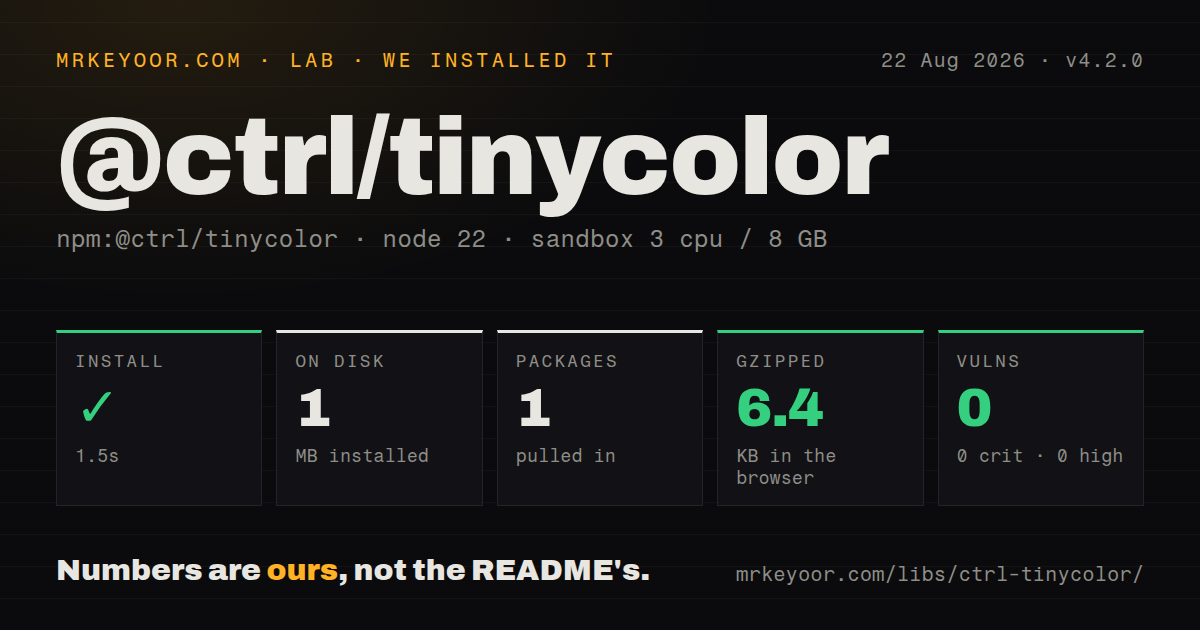
| Install | ✓ · 1.5s | 1 package on disk · 1 MB |
| Import | ✓ | ESM import works · require() works · CommonJS package |
| Browser | 6.4 KB | gzipped (17.3 KB minified), bundled with esbuild |
| Types | ✓ | TypeScript types bundled |
| Known vulns | 0 | 0 critical · 0 high · 0 moderate · 0 low (npm audit) |
Answers from our run
Does @ctrl/tinycolor install cleanly?
Yes. In a fresh container with an empty cache, npm install @ctrl/tinycolor finished in 2 seconds, leaving 1 package and 1 MB on disk. npm audit reported no known vulnerabilities.
How much does @ctrl/tinycolor add to a browser bundle?
6.4 KB gzipped (17.3 KB minified) when the whole package is bundled for the browser with esbuild. Importing only part of it is usually smaller.
Does @ctrl/tinycolor work with both ESM and CommonJS?
Yes. Both import '@ctrl/tinycolor' and require('@ctrl/tinycolor') worked in Node 22 in our run. The package is published as CommonJS.
Does @ctrl/tinycolor include TypeScript types?
Yes, type declarations ship inside the package, so no @types install is needed.
@ctrl/tinycolor or culori: which should you use?
culori: Choose it when modern perceptual color spaces, gamut mapping, or individually imported functions matter more than tinycolor-style chaining. @ctrl/tinycolor 4.2.0 installed in 1.5 seconds and added 6.4 KB gzipped in our browser build, with bundled types and no audit findings.
When should you not use @ctrl/tinycolor?
Unrecognized input must stop immediately. The README says parsing is permissive, and an invalid instance behaves like black unless code checks the isValid property.
Use it if
- A color input field must accept several familiar CSS-like forms and return one normalized representation.
- UI code needs tints, shades, complements, alpha compositing, or small palettes without a larger visualization toolkit.
- You need typed WCAG 2.0 contrast calculations and can supply the correct text-size threshold yourself.
- A tinycolor2 migration can accommodate named imports, standalone helpers, and the TinyColor class name.
- Unrecognized input must stop immediately. The README says parsing is permissive, and an invalid instance behaves like black unless code checks the isValid property.
- Your data flow assumes immutable color values. lighten(), darken(), setAlpha(), spin(), and mix() alter the TinyColor instance they are called on.
- The design system works in Lab, LCH, OKLab, OKLCH, color(), or color-mix(). Those modern spaces and CSS Color 4 forms are outside the documented parser and conversion set.
- A translucent foreground must be judged without knowing its background. Contrast is meaningful only after onBackground() composites the displayed color.
- A 6.4 KB gzipped browser addition is too much for one conversion or validation check. A focused function or a plugin-based package such as culori may ship less code for a narrow path.
Setup reality
We installed @ctrl/tinycolor 4.2.0 in a clean Node 22 Bookworm container. npm completed in 1.5 seconds, left 1 package, and used 1 MB on disk. The package itself was 348 KB unpacked, with 0 direct dependencies and 0 peers. npm audit found 0 known vulnerabilities. It bundles TypeScript declarations. require() and ESM import both worked even though the package is CommonJS and has no exports map. Our esbuild check produced 17.3 KB minified and 6.4 KB gzipped for a namespace import.
There is no config file, native compilation, credential, or runtime setup. Node 14 is the declared minimum. Import TinyColor by name because version 4 has no default export. Helpers that tinycolor2 users may remember as class methods have moved: readability and fromRatio are standalone exports, while the old random behavior is exposed separately from the newer random() helper. isValid and format are properties, so calling either as a function is an API mistake.
Input parsing deliberately accepts loose punctuation and several numeric forms. Bad input does not throw; it creates an invalid object whose other methods produce black-like results. Check color.isValid at the boundary before saving a value. HSL object output uses fractions for saturation and lightness, while formatted HSL strings use percentages. Alpha can also change the chosen string form, such as rgb() becoming rgba().
Most adjustment methods mutate and return the same object for chaining. Call clone() before creating variants from a shared base. For translucent colors, use onBackground() before readability() or isReadable(). The accessibility helpers calculate WCAG 2.0 ratios, but your code must choose AA or AAA and small or large text. Pass an integer seed to random() when server rendering or snapshots need the same color on every run.
Patterns
Reject a bad color at the boundary parse-and-reject-invalid
import { TinyColor } from '@ctrl/tinycolor';

const color = new TinyColor(userInput);
if (!color.isValid) throw new Error('Invalid color');
console.log(color.toHexString());
An invalid TinyColor does not throw and behaves like black in later methods. Check the isValid property first.
Normalize mixed input to hex normalize-to-hex
import { TinyColor } from '@ctrl/tinycolor';

function normalizeHex(input: string) {
  const color = new TinyColor(input);
  return color.isValid ? color.toHexString() : null;
}

console.log(normalizeHex('rgb(54, 153, 204)'));
toHexString() drops alpha. Use toHex8String() when the stored value must preserve transparency.
Convert RGBA to eight-digit hex preserve-alpha-channel
import { TinyColor } from '@ctrl/tinycolor';

const color = new TinyColor('rgba(255, 0, 0, 0.5)');
console.log(color.toHex8String()); // #ff000080
Eight-digit hex puts alpha in the final byte; rounding maps an alpha of 0.5 to 0x80.
Read HSL components and text convert-to-hsl
const color = new TinyColor('#ff8000');
console.log(color.toHsl());
console.log(color.toHslString());
toHsl() returns saturation and lightness as 0-to-1 fractions, while toHslString() writes percentages.
Lighten without changing the source derive-with-clone
const base = new TinyColor('#2563eb');
const lighter = base.clone().lighten(15);

console.log(base.toHexString());
console.log(lighter.toHexString());
lighten() mutates its receiver. clone() keeps the original TinyColor unchanged.
Blend two colors by percentage mix-two-colors
const mixed = new TinyColor('#ff00ff')
  .mix('#00ff00', 50)
  .toHexString();

console.log(mixed);
mix() changes the first TinyColor instance, and its amount is a percentage between 0 and 100.
Generate four wheel positions build-tetrad-palette
const palette = new TinyColor('#ef4444')
  .tetrad()
  .map((entry) => entry.toHexString());
Palette methods return TinyColor objects. Convert every entry to the output form your UI or database expects.
Measure foreground contrast calculate-contrast-ratio
import { readability } from '@ctrl/tinycolor';

const ratio = readability('#111827', '#ffffff');
console.log(ratio);
readability() returns the numeric WCAG 2.0 ratio; passing criteria still depend on text size and target level.
Test an AA small-text pair check-aa-small-text
import { isReadable } from '@ctrl/tinycolor';

const passes = isReadable('#111827', '#ffffff', {
  level: 'AA',
  size: 'small',
});
The package cannot inspect font size or weight. Your code must choose small or large correctly.
Pick black or white text choose-readable-foreground
import { mostReadable } from '@ctrl/tinycolor';

const foreground = mostReadable('#7c3aed', ['#000', '#fff'], {
  level: 'AA',
  size: 'small',
});
console.log(foreground.toHexString());
mostReadable() returns a TinyColor object. With includeFallbackColors enabled, it may return black or white even if neither was supplied.
Resolve alpha before contrast composite-transparent-color
import { TinyColor, readability } from '@ctrl/tinycolor';

const background = '#ffffff';
const displayed = new TinyColor('rgba(37, 99, 235, 0.5)')
  .onBackground(background);
console.log(readability(displayed, background));
A translucent color has no single displayed contrast until it is composited over a known background.
Seed random color output generate-repeatable-random-color
import { random } from '@ctrl/tinycolor';

const color = random({
  seed: 42,
  hue: 'blue',
  luminosity: 'light',
});
console.log(color.toHexString());
An integer seed makes random() repeatable for snapshots and server-rendered markup.
Alternatives
| Package | Registry | Pick it when |
|---|---|---|
| culori | npm | Choose it when modern perceptual color spaces, gamut mapping, or individually imported functions matter more than tinycolor-style chaining. |
| color | npm | Choose it when an immutable chainable object is preferable and its supported CSS conversion set covers the application. |
| chroma-js | npm | Choose it for data-visualization scales, interpolation modes, and numeric color analysis beyond UI color adjustments. |
More web frontend guides
postcss · react · react-dom · tailwindcss · clsx · htmlparser2 · the whole shelf →
How this guide is made: grounded in the library's documentation, release notes, changelog, and issue history, on a fixed rubric — not a hands-on install of every release. The 50 most-downloaded entries are additionally install-verified in clean containers. Corrections: contact the desk.