colorjs.io review
Color.js is a JavaScript color engine for parsing CSS Color 4 values, converting coordinates across RGB and perceptual spaces, mapping colors into a display gamut, interpolating gradients, and calculating contrast or Delta E. It includes an object API for exploratory code and a procedural entry for selective imports. Version 0.7 added gamut-relative LCH and OKLCH spaces, P3 and Rec.2020 HSL variants, a raytrace gamut mapper, Helmlab calculations, and browser-aware display fallbacks. Version 0.7.1 fixes property access such as `color.oklch.l` in bundlers and makes `steps()` apply its selected Delta E method consistently. Our full-package browser build measured 32.9 KB gzipped, so import choice has a visible cost in frontend code.
Install Color.js when wide-gamut conversion, perceptual interpolation, or color-difference math is part of the product rather than a one-off styling helper. Basic RGB interfaces should use a smaller tool or native CSS and avoid paying 32.9 KB gzipped for methods they never call.
We installed it
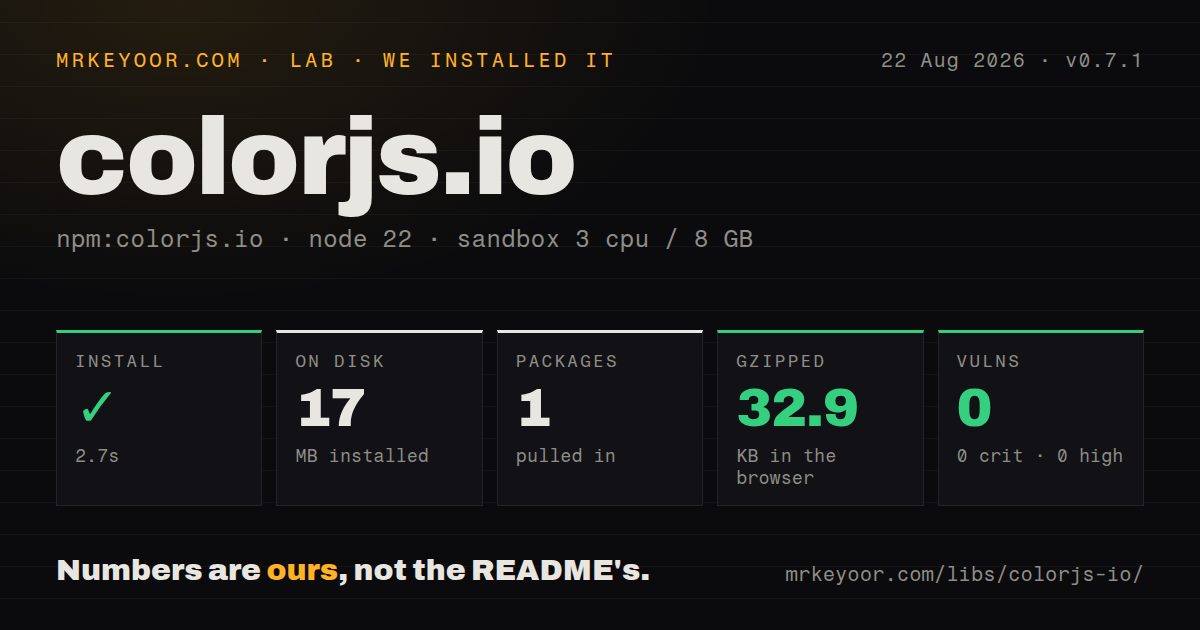
| Install | ✓ · 2.7s | 1 package on disk · 17 MB |
| Import | ✓ | ESM import works · require() works · ESM package with exports map |
| Browser | 32.9 KB | gzipped (81.6 KB minified), bundled with esbuild |
| Types | ✓ | TypeScript types bundled |
| Known vulns | 0 | 0 critical · 0 high · 0 moderate · 0 low (npm audit) |
Answers from our run
Does colorjs.io install cleanly?
Yes. In a fresh container with an empty cache, npm install colorjs.io finished in 3 seconds, leaving 1 package and 17 MB on disk. npm audit reported no known vulnerabilities.
How much does colorjs.io add to a browser bundle?
32.9 KB gzipped (81.6 KB minified) when the whole package is bundled for the browser with esbuild. Importing only part of it is usually smaller.
Does colorjs.io work with both ESM and CommonJS?
Yes. Both import 'colorjs.io' and require('colorjs.io') worked in Node 22 in our run. The package is published as ESM with an exports map.
Does colorjs.io include TypeScript types?
Yes, type declarations ship inside the package, so no @types install is needed.
colorjs.io or culori: which should you use?
culori: Use it when a functional API and selective modern color-space imports fit the codebase better. Install Color.js when wide-gamut conversion, perceptual interpolation, or color-difference math is part of the product rather than a one-off styling helper.
When should you not use colorjs.io?
The application only parses hex and RGB or changes opacity. A full import cost us 32.9 KB gzipped, while colord covers common UI transforms with a narrower surface.
Use it if
- A color editor or design system must convert among OKLCH, Lab, Display P3, Rec.2020, XYZ, and HDR-related spaces with named methods.
- You need to compare colors with a chosen Delta E formula or audit contrast with an explicitly selected algorithm.
- CSS Color 4 strings must be parsed and serialized even when the runtime cannot natively display every syntax.
- Gradient generation needs a deliberate interpolation space, hue route, output space, and maximum perceptual difference between steps.
- The application only parses hex and RGB or changes opacity. A full import cost us 32.9 KB gzipped, while colord covers common UI transforms with a narrower surface.
- A stable 1.x contract is a release requirement. Color.js is still on 0.7.1, and 0.7 removed prebuilt ESM bundles while changing several distribution paths.
- Callers expect immutable values. Coordinate setters, `set()`, and `toGamut()` change a Color instance, so shared objects need an explicit clone first.
- Server code must resolve `var()`, `calc()`, relative colors, or stylesheet-driven `color-mix()` expressions. Those values depend on browser CSS context rather than plain string parsing.
- Nobody on the team can own choices such as interpolation space, gamut mapping, white point, Delta E formula, or contrast method. Different settings can produce different answers from the same input colors.
Setup reality
We installed colorjs.io 0.7.1 in a fresh Node 22 Bookworm container. npm finished in 2.7 seconds and left one package using 17 MB on disk. The package has no direct or peer dependencies and is 16672 KB unpacked. npm audit found zero known vulnerabilities. It is an ESM package with an exports map; both CommonJS require and ESM import worked, and declarations are included.
Importing the package root registers the object API and its color spaces. Our minified esbuild browser test produced 81.6 KB, or 32.9 KB gzipped. The colorjs.io/fn entry exposes procedural functions that bundlers can prune more easily, while colorjs.io/src/* allows narrower imports. Version 0.7 points ESM exports at source files and keeps CommonJS bundles under dist, so code that reached into removed minified files should move to documented exports.
Parsing and display are separate decisions. A P3 or OKLCH string can parse correctly even when the browser cannot paint it. display() checks browser support and chooses a supported ancestor space; Node has no browser support table. Converting to sRGB can produce coordinates outside its gamut. Decide whether serialization should map those values, preserve them with inGamut: false, or use a named toGamut() method.
Several object operations mutate their receiver. Clone a color before changing coordinates or mapping its gamut when other code retains the original. Interpolation also needs explicit policy: space, outputSpace, hue behavior, and Delta E method affect intermediate colors. The steps count is a minimum when maxDeltaE forces extra samples. Keep numeric fixtures for branded palettes rather than checking only that serialization succeeds.
Patterns
Read a CSS Color 4 value parse-css-color
import Color from 'colorjs.io';

const color = new Color('oklch(72% 0.18 250 / 0.9)');
console.log(color.spaceId);
console.log(color.coords, color.alpha);
Successful parsing says nothing about whether the current display supports the syntax or contains the color in its gamut.
Create a Display P3 color construct-with-coordinates
const green = new Color('p3', [0, 1, 0], 0.9);
const sameGreen = new Color({
  space: 'p3',
  coords: [0, 1, 0],
  alpha: 0.9,
});
Coordinate meaning and range come from the chosen space. Validate external numeric input before constructing the object.
Convert into OKLCH convert-color-space
const source = new Color('slategray');
const converted = source.to('oklch');

console.log(converted.coords);
console.log(converted.toString({ precision: 4 }));
to() returns another Color. Conversion alone does not force the coordinates into a later output gamut.
Inspect raw sRGB coordinates preserve-out-of-gamut-values
const p3 = new Color('color(display-p3 0 1 0)');
const srgb = p3.to('srgb');

console.log(srgb.toString());
console.log(srgb.toString({ inGamut: false, precision: 5 }));
Disabling inGamut keeps converted coordinates even when they sit outside the normal sRGB range, which can produce invalid display values.
Map a color into sRGB map-color-gamut
const original = new Color('color(display-p3 0 1 0)');
const mapped = original.clone().toGamut({
  space: 'srgb',
  method: 'css',
});

console.log(mapped.toString());
toGamut() mutates the receiver and loses out-of-gamut information. Clone when the wider original is still needed.
Write a supported browser color choose-browser-fallback
const color = new Color('color(display-p3 0.2 0.8 0.4)');
const rendered = color.display({ precision: 4 });

button.style.backgroundColor = String(rendered);
console.log(rendered.color.spaceId);
display() returns a String object carrying the chosen Color on its color property. Node cannot perform the same browser support check.
Change OKLCH on a copy edit-color-coordinates
const base = new Color('slategray');
const edited = base.clone().set({
  'oklch.l': (lightness) => Math.min(1, lightness + 0.08),
  'oklch.c': (chroma) => chroma * 1.15,
});

console.log(edited.to('srgb').toString());
set() changes and returns its receiver. A space prefix lets you edit coordinates without first converting the stored Color.
Interpolate through OKLCH mix-in-oklch
const red = new Color('#ff3b30');
const midpoint = red.mix('#007aff', 0.5, {
  space: 'oklch',
  outputSpace: 'srgb',
});

console.log(midpoint.toString());
The selected interpolation space controls the path and midpoint. RGB, Lab, and OKLCH mixes need not match visually.
Limit difference between gradient steps generate-color-steps
const colors = new Color('oklch(85% 0.12 100)').steps(
  'oklch(35% 0.16 280)',
  { space: 'oklch', outputSpace: 'srgb', steps: 7, maxDeltaE: 4 },
);

const css = colors.map((color) => color.toString());
When maxDeltaE requires more samples, the returned array can exceed the requested seven-step minimum.
Build an interpolation function reuse-color-range
const range = new Color('p3', [0, 1, 0]).range('red', {
  space: 'lch',
  outputSpace: 'srgb',
});

const quarter = range(0.25);
const middle = range(0.5);
The function extrapolates for inputs below zero or above one. Clamp untrusted progress values when extrapolation is unwanted.
Calculate Delta E 2000 measure-delta-e
const reference = new Color('lab(60% 20 30)');
const sample = new Color('lab(61% 18 31)');

const delta = reference.deltaE2000(sample);
console.log(delta);
Store the Delta E formula beside any acceptance threshold. Other formulas produce different numeric scales and rankings.
Use the functional package entry use-procedural-entry
import { parse, to, serialize } from 'colorjs.io/fn';

const parsed = parse('oklch(70% 0.15 240)');
const srgb = to(parsed, 'srgb');
const css = serialize(srgb, { precision: 4 });
The procedural entry gives bundlers a narrower graph than the full Color class. Check the emitted bundle because import style affects the result.
Alternatives
| Package | Registry | Pick it when |
|---|---|---|
| culori | npm | Use it when a functional API and selective modern color-space imports fit the codebase better. |
| chroma-js | npm | Use it for data-visualization scales and palette operations built around a familiar chainable API. |
| colord | npm | Use it for compact immutable manipulation of common web colors with optional plugins. |
| tinycolor2 | npm | Use it in older or small applications that need forgiving basic color parsing and transforms. |
More utils guides
lru-cache · type-fest · ajv · zod · p-limit · find-up · the whole shelf →
How this guide is made: grounded in the library's documentation, release notes, changelog, and issue history, on a fixed rubric — not a hands-on install of every release. The 50 most-downloaded entries are additionally install-verified in clean containers. Corrections: contact the desk.