tinycolor2 review
tinycolor2 1.6.0 parses forgiving color strings and objects, converts among RGB, HSL, HSV, hex, alpha hex, and CSS color names, and applies operations such as lighten, darken, spin, mix, and setAlpha. It also calculates WCAG 2 contrast and picks a readable candidate from a list. Version 1.6.0 added ESM and CommonJS entry points with an exports map and removed the package's Node engine restriction. That release dates to February 2023; it does not support OKLCH, OKLab, Lab, LCH, Display P3, gamut mapping, or perceptual mixing.
tinycolor2 1.6.0 installed in 0.6 seconds and bundled to 5.3 KB gzipped in our sandbox, but its February 2023 release and missing modern color spaces make it a legacy-compatible choice. Keep it for established RGB, HSL, and contrast code; do not start a new OKLCH or wide-gamut design system on it.
We installed it
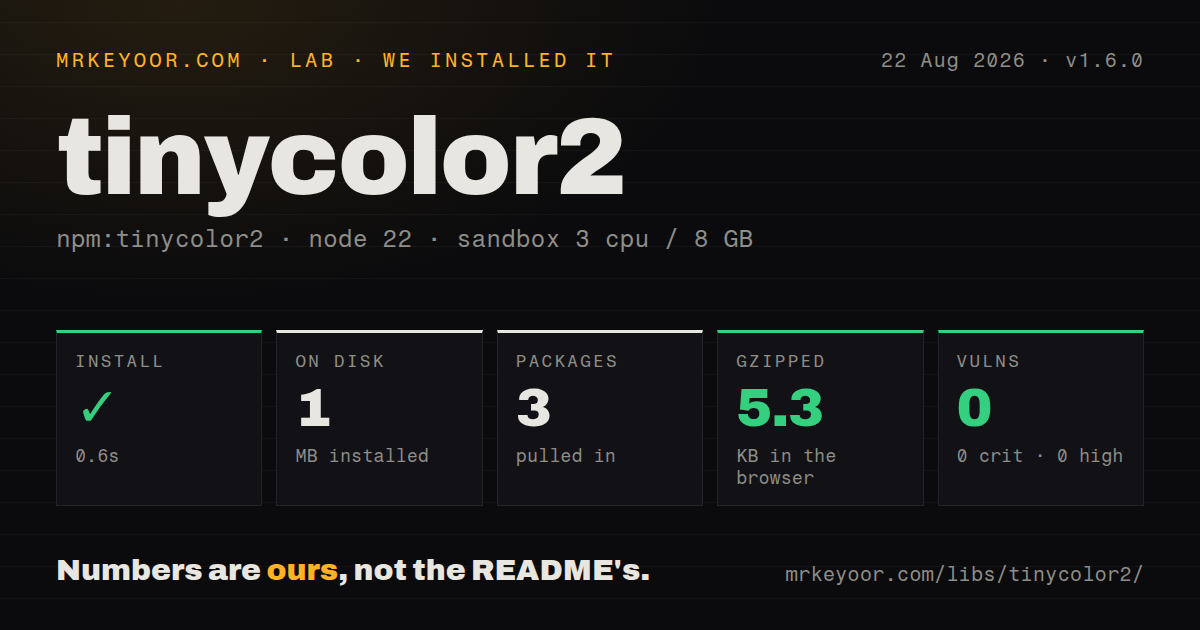
| Install | ✓ · 0.6s | 3 packages on disk · 1 MB |
| Import | ✓ | ESM import works · require() works · CommonJS package with exports map |
| Browser | 5.3 KB | gzipped (15 KB minified), bundled with esbuild |
| Types | — | no TypeScript types found |
| Known vulns | 0 | 0 critical · 0 high · 0 moderate · 0 low (npm audit) |
Answers from our run
Does tinycolor2 install cleanly?
Yes. In a fresh container with an empty cache, npm install tinycolor2 finished in 0.6s, leaving 3 packages and 1 MB on disk. npm audit reported no known vulnerabilities.
How much does tinycolor2 add to a browser bundle?
5.3 KB gzipped (15 KB minified) when the whole package is bundled for the browser with esbuild. Importing only part of it is usually smaller.
Does tinycolor2 work with both ESM and CommonJS?
Yes. Both import 'tinycolor2' and require('tinycolor2') worked in Node 22 in our run. The package is published as CommonJS with an exports map.
Does tinycolor2 include TypeScript types?
No type declarations were found in our install, so TypeScript users need their own declarations.
tinycolor2 or color: which should you use?
Pick color when color 5.x fits when an immutable-style API and additional conversion coverage are more important than tinycolor2 compatibility. tinycolor2 1.6.0 installed in 0.6 seconds and bundled to 5.3 KB gzipped in our sandbox, but its February 2023 release and missing modern color spaces make it a legacy-compatible choice.
When should you not use tinycolor2?
New design tokens use OKLCH, OKLab, Lab, LCH, Display P3, gamut mapping, or perceptual interpolation. tinycolor2 implements none of them.
Use it if
- tinycolor2 1.6.0 fits existing code that needs permissive RGB, HSL, HSV, hex, or named-color parsing with a chainable API.
- A small UI utility needs WCAG 2 contrast ratios or a black-or-white fallback from a fixed candidate list.
- Legacy code already depends on mutating lighten, darken, saturate, spin, and setAlpha methods.
- The project accepts separate community TypeScript types and has no requirement for modern perceptual color spaces.
- New design tokens use OKLCH, OKLab, Lab, LCH, Display P3, gamut mapping, or perceptual interpolation. tinycolor2 implements none of them.
- Invalid input must throw or fail closed. isValid() returns false, but conversion methods on an invalid instance can still yield black-like output if callers forget the check.
- Color values must be immutable. lighten, darken, spin, saturate, and setAlpha change the instance unless clone() is called first.
- TypeScript declarations must ship with runtime code. Our package check found none, so typed projects depend on @types/tinycolor2 separately.
- Active releases are a policy requirement. Version 1.6.0 was published in February 2023, and GitHub's last push was June 2024.
- A 5.3 KB gzipped utility is too much for one conversion or contrast calculation. A narrower function or modern smaller package may fit better.
Setup reality
We installed tinycolor2 1.6.0 in a fresh Node 22 Bookworm sandbox. npm finished in 0.6 seconds, left 3 packages, and used 1 MB. npm audit found 0 known vulnerabilities. The package has 0 direct and 0 peer dependencies, with 328 KB unpacked. It declares CommonJS with an exports map. Both require() and ESM import worked under Node 22.23.2. We found no bundled TypeScript declarations.
Our browser import measured 15 KB minified and 5.3 KB gzipped with esbuild. TypeScript users normally add @types/tinycolor2, which creates separate version ownership for runtime and declarations. Input parsing is permissive: hex, rgb(), hsl(), hsv(), named colors, and objects are accepted. Always call isValid() at trust boundaries, because an invalid instance still has conversion methods and can quietly become a black-looking value in downstream code.
Modifier methods mutate the TinyColor instance and return it for chaining. Clone first when the original token must remain unchanged. lighten and darken adjust HSL lightness by percentage points; they are not perceptual operations. mix uses RGB-style interpolation and does not handle modern wide-gamut spaces. Alpha is a 0 to 1 value, while fromRatio treats RGB and hue inputs as ratios too.
The README's readability helpers use WCAG 2 contrast math and thresholds. They do not implement APCA or solve palette accessibility by themselves. mostReadable can return black or white only when includeFallbackColors is enabled. Version 1.6.0 remains current after more than 3 years, so new work should compare a maintained library that supports the color spaces your design system actually stores.
Patterns
Reject invalid user input first validate-color
import tinycolor from 'tinycolor2';

const color = tinycolor(input);
if (!color.isValid()) throw new Error('invalid color');
const hex = color.toHexString();
Call isValid before conversion. Invalid instances still expose conversion methods and can produce black-like output.
Convert one value to several formats convert-color
const color = tinycolor('rgba(255, 0, 0, 0.5)');
console.log(color.toHex8String());
console.log(color.toHsl());
console.log(color.toRgbString());
toHex8String includes alpha. toHsl and toRgb return objects whose alpha field may be ignored accidentally.
Clone before deriving a variant avoid-mutation
const base = tinycolor('#336699');
const lighter = base.clone().lighten(12).toHexString();
console.log(base.toHexString(), lighter);
lighten mutates its receiver. clone keeps the original design token unchanged.
Apply an explicit alpha channel set-alpha
const overlay = tinycolor('#336699').setAlpha(0.4);
console.log(overlay.toRgbString());
setAlpha mutates the instance and accepts a 0 to 1 value. Clone first when the opaque color is reused.
Read a WCAG 2 contrast ratio measure-contrast
const ratio = tinycolor.readability('#111827', '#ffffff');
if (ratio < 4.5) throw new Error('insufficient normal-text contrast');
4.5 is the WCAG 2 normal-text AA threshold. This helper does not calculate APCA contrast.
Pick black or white text choose-text-color
const text = tinycolor.mostReadable(background, ['#000', '#fff'], {
  includeFallbackColors: true,
  level: 'AA',
  size: 'small',
});
includeFallbackColors permits black or white even when neither candidate list entry passes the requested threshold.
Mix two legacy RGB colors mix-colors
const middle = tinycolor.mix('#ff0000', '#0000ff', 50).toHexString();The amount is a 0 to 100 percentage. This is not perceptual OKLCH interpolation or gamut mapping.
Rotate hue without changing the original rotate-hue
const accent = tinycolor('#0ea5e9');
const opposite = accent.clone().spin(180).toHexString();
spin mutates and wraps hue around 360 degrees. RGB gamut conversion can change perceived lightness.
Alternatives
| Package | Registry | Pick it when |
|---|---|---|
| color | npm | color 5.x fits when an immutable-style API and additional conversion coverage are more important than tinycolor2 compatibility. |
| tinycolor | npm | Use tinycolor only for projects already tied to that older package name; verify its API and maintenance before migrating. |
| color2k | npm | Use color2k when a smaller functional API covers the required CSS color operations and modern space support is still unnecessary. |
More utils guides
lru-cache · type-fest · ajv · zod · p-limit · find-up · the whole shelf →
How this guide is made: grounded in the library's documentation, release notes, changelog, and issue history, on a fixed rubric — not a hands-on install of every release. The 50 most-downloaded entries are additionally install-verified in clean containers. Corrections: contact the desk.