cli-color review
cli-color 2.0.4 is a CommonJS toolkit for producing ANSI-styled terminal strings and control sequences. Its callable styles can be chained, nested, and saved for reuse. The same package also strips or slices styled text, lays out columns, moves the cursor, erases terminal regions, reads the window size, and runs a one-character throbber. Version 2.0.4 adds no user-facing feature; its release notes describe dependency and license maintenance. Our browser build measured 51.8 KB minified and 17.5 KB gzipped, which is a lot if a project only wants colored labels.
cli-color 2.0.4 installed in 2.8 seconds but left 15 packages and 5 MB in our sandbox, so it earns its place only when a CLI uses its column, slice, or cursor helpers as well as color. For colored labels alone, install a smaller formatter with modern types and terminal detection.
We installed it
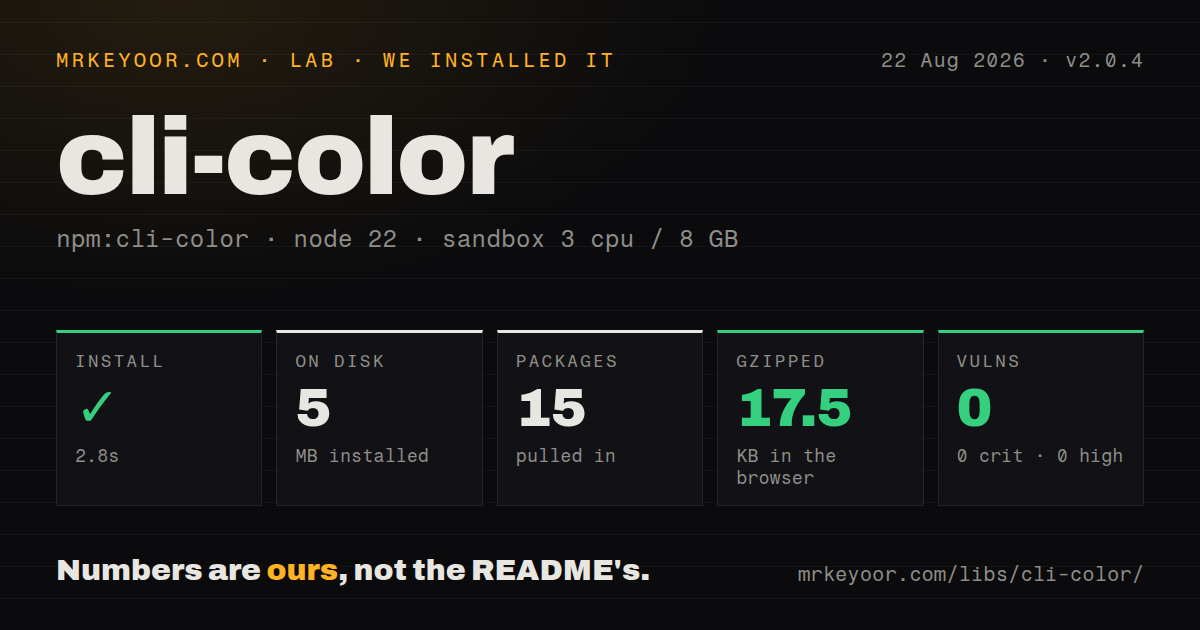
| Install | ✓ · 2.8s | 15 packages on disk · 5 MB |
| Import | ✓ | ESM import works · require() works · CommonJS package |
| Browser | 17.5 KB | gzipped (51.8 KB minified), bundled with esbuild |
| Types | — | no TypeScript types found |
| Known vulns | 0 | 0 critical · 0 high · 0 moderate · 0 low (npm audit) |
Answers from our run
Does cli-color install cleanly?
Yes. In a fresh container with an empty cache, npm install cli-color finished in 3 seconds, leaving 15 packages and 5 MB on disk. npm audit reported no known vulnerabilities.
How much does cli-color add to a browser bundle?
17.5 KB gzipped (51.8 KB minified) when the whole package is bundled for the browser with esbuild. Importing only part of it is usually smaller.
Does cli-color work with both ESM and CommonJS?
Yes. Both import 'cli-color' and require('cli-color') worked in Node 22 in our run. The package is published as CommonJS.
Does cli-color include TypeScript types?
No type declarations were found in our install, so TypeScript users need their own declarations.
cli-color or picocolors: which should you use?
picocolors: Pick it for dependency-free color formatting when you do not need cursor or table helpers. cli-color 2.0.4 installed in 2.8 seconds but left 15 packages and 5 MB in our sandbox, so it earns its place only when a CLI uses its column, slice, or cursor helpers as well as color.
When should you not use cli-color?
You only need colored strings: our install pulled 15 packages onto disk, while picocolors, kleur, and ansi-colors publish with no runtime dependencies
Use it if
- Your existing CommonJS CLI already depends on cli-color styles or its documented subpath modules
- One dependency must cover color, ANSI-preserving slices, aligned columns, cursor movement, and a basic throbber
- You support Node versions older than the engines required by newer terminal styling packages
- Your application already owns TTY detection and can keep terminal controls out of redirected output
- You only need colored strings: our install pulled 15 packages onto disk, while picocolors, kleur, and ansi-colors publish with no runtime dependencies
- You need terminal capability detection: the README documents NO_COLOR, but the formatter does not consult stdout.isTTY, TERM, CI settings, or color depth
- You require TypeScript declarations or a package exports map: our 2.0.4 install contained neither
- Your table contains emoji, CJK, or combining marks: getStrippedLength and columns count JavaScript string units after removing ANSI codes, not terminal display cells
- You need truecolor or browser output: the public API stops at the 16-color and xterm 256-color palettes, and our browser bundle was 51.8 KB minified
Setup reality
Our install of cli-color 2.0.4 finished in 2.8 seconds and left 15 packages using 5 MB on disk. npm audit reported 0 known vulnerabilities. The package itself is 116 KB unpacked, declares five direct dependencies and no peers, and requires no native build step.
There are no credentials or config files. It is CommonJS without an exports map; both require() and ESM import worked in our Node 22 sandbox. No TypeScript declarations were present. The declared engine is Node >=0.10, and much of the dependency tree supports that old baseline. Version 2.0.4 only refreshed dependencies and license metadata.
Color suppression is narrower than many developers expect. A formatter checks NO_COLOR, but cli-color does not decide whether stdout is a TTY. Pipes, CI logs, and files will receive escape codes unless the calling program disables styling. xterm values are limited to 0 through 255, with a basic-color fallback on Windows documented by the README.
The layout helpers remove ANSI codes before counting, yet they do not calculate terminal cell width. Emoji and wide characters can break columns or slices. Cursor movement, erase, reset, and throbber output should only reach an interactive terminal. The throbber starts an interval and writes backspaces, so every success, error, and shutdown path must call stop().
Patterns
Reuse named status formatters define-status-styles
const clc = require('cli-color');

const failure = clc.red.bold;
const warning = clc.yellow;
const success = clc.green;

console.error(failure('Error:'), 'request failed');
console.warn(warning('Warning:'), 'using defaults');
console.log(success('Done'));
Each chained style is a callable formatter object, so saving it once avoids rebuilding the same chain at each log call.
Put a bright phrase inside an outer color nest-styles
const clc = require('cli-color');

const line = clc.red(
  'failed ' + clc.whiteBright.bold('authentication') + ' check'
);
console.error(line);
cli-color reopens the outer red style after the nested formatter closes, so the trailing word stays red.
Keep ANSI codes out of redirected output disable-color-for-pipes
const clc = require('cli-color');

if (!process.stdout.isTTY) process.env.NO_COLOR = '1';
process.stdout.write(clc.cyan('build complete') + '\n');
NO_COLOR disables styles at formatting time, while cli-color itself does not inspect process.stdout.isTTY.
Apply a 256-color pair use-xterm-color
const clc = require('cli-color');

const badge = clc.xterm(202).bgXterm(236).bold;
console.log(badge(' DEPLOY '));
xterm() and bgXterm() accept values from 0 through 255; the README says Windows receives a nearby basic color when xterm colors are unsupported.
Store a plain copy of styled output strip-ansi
const clc = require('cli-color');
const strip = require('cli-color/strip');

const terminalLine = clc.red.bold('failed');
fileLogger.write(strip(terminalLine));
The strip subpath removes recognized ANSI sequences, but it does not sanitize every control character that untrusted input could contain.
Count characters without style bytes measure-styled-text
const clc = require('cli-color');

const label = clc.bold('Status') + ': ' + clc.green('ready');
console.log(clc.getStrippedLength(label));
getStrippedLength returns JavaScript string length after removing ANSI codes, not the number of display cells occupied by emoji or CJK text.
Cut a styled string without losing its colors slice-styled-text
const clc = require('cli-color');

const value = clc.bold('foo') + 'bar' + clc.red('hello');
process.stdout.write(clc.slice(value, 1, 7) + '\n');
slice closes and reopens known styles around the selected range, but its indices can split surrogate pairs and combining sequences.
Align a small terminal table render-columns
const clc = require('cli-color');

const output = clc.columns(
  [[clc.bold('Package'), clc.bold('Count')], ['alpha', 1200], ['beta', 42]],
  { sep: '  ', columns: [{ align: 'left' }, { align: 'right' }] }
);
process.stdout.write(output);
columns ignores ANSI bytes while padding cells, but wide Unicode characters can still make the rendered columns drift.
Replace one interactive progress line update-status-line
const clc = require('cli-color');

function renderStatus(text) {
  if (!process.stdout.isTTY) return process.stdout.write(text + '\n');
  process.stdout.write(clc.move.lineBegin + clc.erase.lineRight + clc.cyan(text));
}

renderStatus('Uploading 40%');
move.lineBegin and erase.lineRight emit terminal controls, so the non-TTY branch must avoid both sequences.
Write at a fixed terminal coordinate move-cursor
const clc = require('cli-color');

if (process.stdout.isTTY) {
  process.stdout.write(clc.move.to(0, 0));
  process.stdout.write(clc.bold('Top-left'));
}
move.to() accepts zero-based x and y values and converts them to the terminal's one-based coordinate sequence.
Clear the current line before repainting erase-current-line
const clc = require('cli-color');

if (process.stdout.isTTY) {
  process.stdout.write(clc.move.lineBegin + clc.erase.line);
  process.stdout.write(clc.green('ready'));
}
erase.line clears the whole current row; clc.reset is broader and clears the screen before moving the cursor home.
Stop the throbber even when work fails run-throbber
const setupThrobber = require('cli-color/throbber');
const clc = require('cli-color');

const spinner = setupThrobber((chunk) => process.stdout.write(chunk), 120, clc.cyan);
spinner.start();
try {
  await runTask();
} finally {
  spinner.stop();
  process.stdout.write('\n');
}
The throbber owns a setInterval timer and writes backspaces; stop() clears the timer and erases its current character.
Alternatives
| Package | Registry | Pick it when |
|---|---|---|
| picocolors | npm | Pick it for dependency-free color formatting when you do not need cursor or table helpers. |
| chalk | npm | Pick it for a modern ESM styling API with bundled TypeScript declarations and color-level handling. |
| kleur | npm | Pick it for a small chainable formatter with explicit enabled or disabled state. |
| ansi-colors | npm | Pick it when a CommonJS CLI needs colors but none of cli-color's terminal layout features. |
More cli & tooling guides
commander · chalk · typescript · esbuild · yargs · click · the whole shelf →
How this guide is made: grounded in the library's documentation, release notes, changelog, and issue history, on a fixed rubric — not a hands-on install of every release. The 50 most-downloaded entries are additionally install-verified in clean containers. Corrections: contact the desk.