bmp-js review
bmp-js 0.1.0 is a small Node codec for one old image format. It reads 1, 4, 8, 16, 24, and 32-bit BMP files, including RLE4, RLE8, and bitfield branches in the decoder, then returns header fields plus four bytes per pixel in ABGR order. Its writer accepts that same byte order but always emits an uncompressed 24-bit BMP, so alpha, palettes, compression, and the source bit depth do not survive a round trip. The current version is still the 2018 release. It has no runtime dependencies or TypeScript declarations, and our browser bundle test produced 9.2 KB minified and 2.3 KB gzipped even though the package was written for Node Buffers.
bmp-js 0.1.0 installed in 0.5 seconds with 1 package, 1 MB on disk, and 0 audit findings in our sandbox, making it cheap for a Node job that only has to decode BMP or emit 24-bit BMP. Skip it for untrusted uploads without your own limits, alpha-preserving output, or a general image pipeline.
We installed it
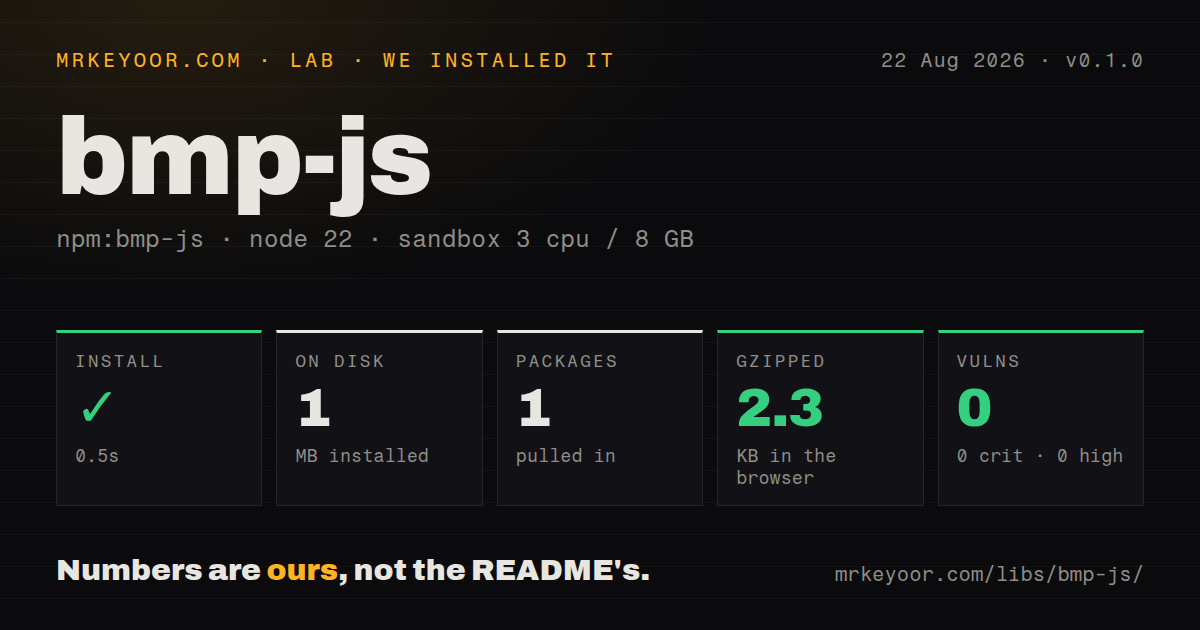
| Install | ✓ · 0.5s | 1 package on disk · 1 MB |
| Import | ✓ | ESM import works · require() works · CommonJS package |
| Browser | 2.3 KB | gzipped (9.2 KB minified), bundled with esbuild |
| Types | — | no TypeScript types found |
| Known vulns | 0 | 0 critical · 0 high · 0 moderate · 0 low (npm audit) |
Answers from our run
Does bmp-js install cleanly?
Yes. In a fresh container with an empty cache, npm install bmp-js finished in 0.5s, leaving 1 package and 1 MB on disk. npm audit reported no known vulnerabilities.
How much does bmp-js add to a browser bundle?
2.3 KB gzipped (9.2 KB minified) when the whole package is bundled for the browser with esbuild. Importing only part of it is usually smaller.
Does bmp-js work with both ESM and CommonJS?
Yes. Both import 'bmp-js' and require('bmp-js') worked in Node 22 in our run. The package is published as CommonJS.
Does bmp-js include TypeScript types?
No type declarations were found in our install, so TypeScript users need their own declarations.
bmp-js or sharp: which should you use?
sharp: Use it for production resizing, conversion, metadata work, and a wider set of image formats when native binaries are acceptable. bmp-js 0.1.0 installed in 0.5 seconds with 1 package, 1 MB on disk, and 0 audit findings in our sandbox, making it cheap for a Node job that only has to decode BMP or emit 24-bit BMP.
When should you not use bmp-js?
Choose sharp or Jimp when the job includes resizing, compositing, metadata edits, or formats such as PNG, JPEG, WebP, GIF, and TIFF; bmp-js only handles BMP coding
Use it if
- A Node job must read legacy BMP files without installing native image binaries
- Your inputs include paletted, RLE4, RLE8, 16-bit, 24-bit, or 32-bit BMP variants
- Your output requirement is limited to an uncompressed 24-bit BMP
- You can convert the package's ABGR bytes at the boundary of an RGBA-based pipeline
- Choose sharp or Jimp when the job includes resizing, compositing, metadata edits, or formats such as PNG, JPEG, WebP, GIF, and TIFF; bmp-js only handles BMP coding
- Avoid it when output alpha matters because the encoder skips each alpha byte and writes 24-bit pixels
- Use another codec when your surrounding API requires RGBA without conversion; decode returns alpha, blue, green, red for every pixel
- Put a validating wrapper in front of untrusted files or walk away; decoder.js multiplies header width by height by 4 for its allocation and sets no pixel ceiling
- Pick bmp-ts or maintain a local declaration when strict TypeScript support is required; v0.1.0 ships no types, export map, or native ESM entry
Setup reality
Our install of bmp-js 0.1.0 finished in 0.5 seconds and left 1 package using 1 MB on disk. npm audit reported 0 known vulnerabilities. The package has 0 direct dependencies and 0 peer dependencies, occupies 720 KB unpacked, and uses the MIT license. require() and ESM import both worked in Node 22, although the published package is CommonJS with no exports map or TypeScript declarations.
There are no credentials, environment variables, native builds, or config files. The setup trap is the pixel contract: decode(buffer) returns ABGR, and encode({ data, width, height }) expects ABGR. A 24-bit decode places 0 in the alpha byte. Convert channel order explicitly before passing pixels to an RGBA consumer, and choose whether that zero should become 255.
Both operations are synchronous and take a complete Node Buffer. The API has no stream, abort signal, worker pool, or cache. A large conversion therefore holds the source and decoded pixel buffer in memory while blocking its event-loop thread. Move unpredictable workloads to a worker or offline queue. The source derives its allocation from BMP header dimensions, so enforce file-byte and pixel-count limits before decode.
Encoding has a smaller feature set than decoding. It writes a top-down, uncompressed 24-bit BMP and drops alpha, palette data, original compression, and original bit depth. The optional quality argument defaults to 100 in source but never changes the bytes. The README example also calls fs.WriteFileSync; Node's actual method is fs.writeFileSync. Our esbuild browser test reached 9.2 KB minified and 2.3 KB gzipped, but Buffer-based file handling still needs a browser adapter.
Patterns
Decode a BMP buffer decode-buffer
const fs = require('node:fs')
const bmp = require('bmp-js')

const source = fs.readFileSync('./scan.bmp')
const image = bmp.decode(source)
console.log({ width: image.width, height: image.height, bitPP: image.bitPP })
`decode()` runs synchronously and returns 4 bytes per pixel in `image.data`; the byte order is ABGR.
Load the CommonJS package from ESM import-from-esm
import bmp from 'bmp-js'
import { readFile } from 'node:fs/promises'

const image = bmp.decode(await readFile('./scan.bmp'))
Node 22 can import this CommonJS default export, but bmp-js 0.1.0 has no native ESM entry or exports map.
Read one ABGR pixel read-pixel
function readPixel(image, x, y) {
  if (x < 0 || y < 0 || x >= image.width || y >= image.height) {
    throw new RangeError('pixel outside image')
  }
  const i = (y * image.width + x) * 4
  return {
    a: image.data[i],
    b: image.data[i + 1],
    g: image.data[i + 2],
    r: image.data[i + 3],
  }
}
The first byte is alpha and the fourth is red; 24-bit source files decode with alpha set to 0.
Convert decoded pixels to RGBA convert-abgr-to-rgba
function abgrToRgba(image) {
  const rgba = Buffer.alloc(image.data.length)
  for (let i = 0; i < image.data.length; i += 4) {
    rgba[i] = image.data[i + 3]
    rgba[i + 1] = image.data[i + 2]
    rgba[i + 2] = image.data[i + 1]
    rgba[i + 3] = image.bitPP === 24 ? 255 : image.data[i]
  }
  return rgba
}
This conversion changes 24-bit alpha from the decoder's 0 to opaque 255, which is an application choice rather than package behavior.
Prepare RGBA pixels for encoding convert-rgba-to-abgr
function rgbaToAbgr(rgba) {
  const abgr = Buffer.alloc(rgba.length)
  for (let i = 0; i < rgba.length; i += 4) {
    abgr[i] = rgba[i + 3]
    abgr[i + 1] = rgba[i + 2]
    abgr[i + 2] = rgba[i + 1]
    abgr[i + 3] = rgba[i]
  }
  return abgr
}
The encoder expects 4 input bytes per pixel in ABGR order even though its BMP output contains only 3 color bytes per pixel.
Write an uncompressed BMP encode-file
const fs = require('node:fs')
const bmp = require('bmp-js')

const result = bmp.encode({ data: abgr, width, height })
fs.writeFileSync('./result.bmp', result.data)
bmp-js 0.1.0 always writes top-down, uncompressed 24-bit BMP data and discards the input alpha bytes.
Create a solid-color BMP create-solid-image
const width = 80
const height = 50
const abgr = Buffer.alloc(width * height * 4)
for (let i = 0; i < abgr.length; i += 4) {
  abgr.set([255, 30, 120, 220], i)
}
const file = require('bmp-js').encode({ data: abgr, width, height }).data
Each pixel uses 4 ABGR bytes in memory; the leading 255 is ignored when the 24-bit file is encoded.
Change a decoded pixel in place edit-pixel
function paintRed(image, x, y) {
  const i = (y * image.width + x) * 4
  image.data[i] = 255
  image.data[i + 1] = 0
  image.data[i + 2] = 0
  image.data[i + 3] = 255
}

paintRed(image, 0, 0)
bmp-js performs no coordinate or channel validation, and a later encode drops the alpha byte at offset 0.
Inspect the decoded BMP format inspect-header
const image = bmp.decode(buffer)
console.log({
  fileSize: image.fileSize,
  width: image.width,
  height: image.height,
  bitsPerPixel: image.bitPP,
  compression: image.compress,
  paletteSize: image.palette?.length ?? 0,
})
`decode()` exposes input header values, but `encode()` does not preserve the input palette, compression code, or bit depth.
Reject oversized dimensions before decode limit-pixel-count
function decodeBmpWithLimit(buffer, maxPixels = 16_000_000) {
  if (buffer.length < 26 || buffer.toString('ascii', 0, 2) !== 'BM') {
    throw new Error('invalid BMP header')
  }
  const width = buffer.readUInt32LE(18)
  const height = Math.abs(buffer.readInt32LE(22))
  if (!width || !height || width > Math.floor(maxPixels / height)) {
    throw new Error('BMP exceeds pixel limit')
  }
  return require('bmp-js').decode(buffer)
}
The decoder allocates `width * height * 4` bytes from header values, so callers must set their own pixel and upload-byte limits.
Return encoded BMP from an HTTP handler serve-http-response
const output = bmp.encode({ data: abgr, width, height }).data
res.statusCode = 200
res.setHeader('Content-Type', 'image/bmp')
res.setHeader('Content-Length', output.length)
res.end(output)
`encode()` returns the complete file as a Buffer, so this response path holds the whole BMP in memory instead of streaming it.
Decode outside the server event loop move-to-worker
// bmp-worker.cjs
const { parentPort } = require('node:worker_threads')
const bmp = require('bmp-js')

parentPort.on('message', (buffer) => {
  const image = bmp.decode(Buffer.from(buffer))
  parentPort.postMessage({ width: image.width, height: image.height, data: image.data })
})
Both codec functions are synchronous; a worker thread keeps a large 4-byte-per-pixel decode off the request-handling event loop.
Alternatives
| Package | Registry | Pick it when |
|---|---|---|
| sharp | npm | Use it for production resizing, conversion, metadata work, and a wider set of image formats when native binaries are acceptable. |
| jimp | npm | Use it when a pure JavaScript image API needs transforms as well as decoding and encoding. |
| pngjs | npm | Use it for focused PNG parsing and writing with synchronous and asynchronous APIs. |
| bmp-ts | npm | Use it when a BMP-only workflow needs a package written in TypeScript with published declarations. |
More utils guides
lru-cache · type-fest · ajv · zod · p-limit · find-up · the whole shelf →
How this guide is made: grounded in the library's documentation, release notes, changelog, and issue history, on a fixed rubric — not a hands-on install of every release. The 50 most-downloaded entries are additionally install-verified in clean containers. Corrections: contact the desk.