black review
Black rewrites Python source into one opinionated format. It handles whole files, directories, stdin, notebook cells through an extra, and selected line ranges, with most project settings stored under [tool.black] in pyproject.toml. Version 26.5.1 fixes unstable handling around inline comments in annotated assignments and preserves comments placed just before a fmt: skip line. The 26.5 series also understands Python 3.15 unpacking in comprehensions and lazy imports. Black checks that its output parses to an equivalent AST unless you opt into the faster check-free mode.
Install Black when a fixed Python format is the point and pin its version in automation. Skip it if the team wants stylistic control, lint diagnostics, or a formatter runtime below Python 3.10.
We installed it
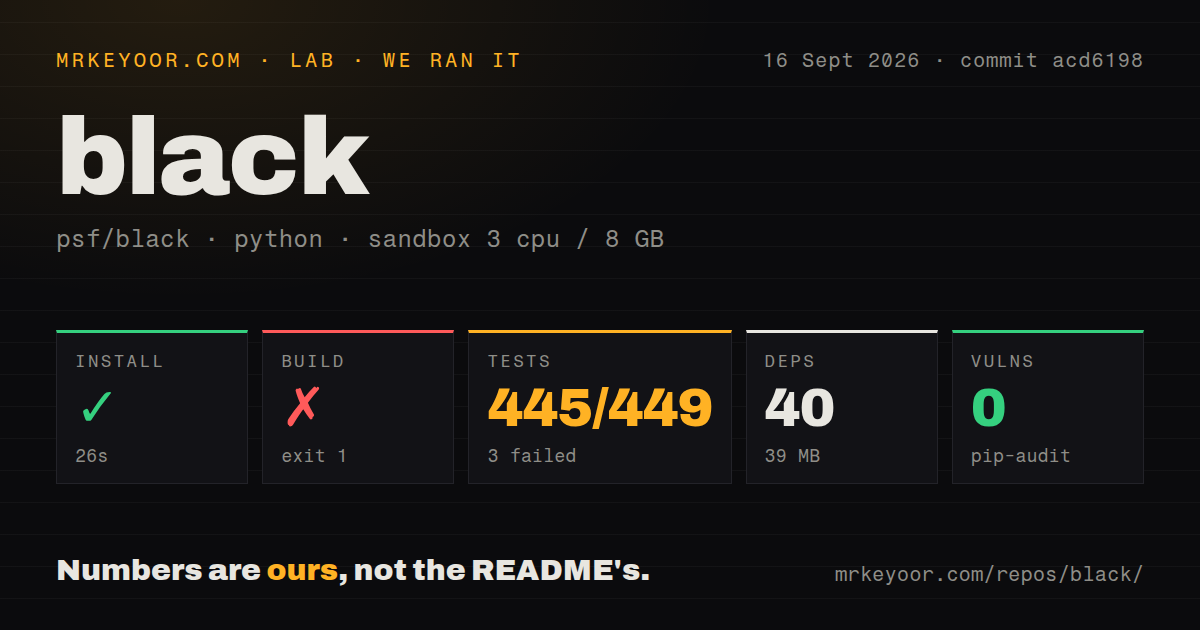
| Install | ✓ · 0.3s | 7 packages on disk · 9 MB |
| Import | ✓ | import black in 0.47s · compiled extensions · py.typed · requires Python >=3.10 |
| Known vulns | 0 | (pip-audit) |
Answers from our run
Does black install cleanly?
Yes. In a fresh container with an empty cache, pip install black finished in 0.3s, leaving 7 packages and 9 MB on disk. pip-audit reported no known vulnerabilities.
What does black need to run?
Python >=3.10, and a platform wheel with compiled extensions. In our run import black succeeded in 0.47s, and the package ships py.typed for type checkers.
black or ruff: which should you use?
ruff: Choose it when one fast tool should provide both lint rules and Black-compatible formatting. Install Black when a fixed Python format is the point and pin its version in automation.
When should you not use black?
You need control over alignment, quote style, or many individual PEP 8 choices. Black deliberately keeps its formatting options narrow; YAPF exposes more knobs.
Discussed on
- hnPython's Black is finally non-beta software4 points
- hnCVE-2026-31900, my 0-click RCE in the psf/black GitHub Action3 points
- hnBlack: The uncompromising Python code formatter3 points
- hnBlack violates pep8 recommendation with long argument list (2019)3 points
- hnFirst stable release of Black: the uncompromising Python code formatter3 points
Use it if
- You want one formatting result on laptops, in pre-commit, and in CI without debating local style choices.
- Your repository targets Python 3.10 or newer and needs current syntax support through Python 3.15.
- You need a formatter that can check, diff, or rewrite files from the same command.
- Your team can accept Black's fixed style and keep the small set of exceptions in pyproject.toml.
- You need control over alignment, quote style, or many individual PEP 8 choices. Black deliberately keeps its formatting options narrow; YAPF exposes more knobs.
- Your tooling environment is Python 3.9 or older. Black 26.5.1 requires Python 3.10 or newer even when the code being formatted targets an older version.
- You expect a linter that reports unused imports, undefined names, or unsafe code. Black only formats; Ruff or Flake8 handles diagnostics.
- You want formatting limited to touched syntax nodes in every editor save. Black normally reformats complete files, while line ranges come with documented limitations.
- You cannot tolerate formatting changes after upgrades. Stable style limits churn, but bug fixes and new syntax support can still change output, and preview mode is intentionally less settled.
Setup reality
Our clean Python 3.12 install of black 26.5.1 completed in 0.3 seconds. It left seven packages consuming 9 MB on disk. We counted 14 declared dependencies across the package metadata, including optional and environment-specific entries. pip-audit found zero known vulnerabilities. import black worked in 0.47 seconds.
Black requires Python 3.10 or newer. The installed distribution included compiled .so extensions and a py.typed marker, so type checkers can inspect its public Python API. The package metadata did not give us a license value, although the repository identifies MIT. Prebuilt wheels cover common platforms; a platform without a matching wheel may fall back to the pure Python wheel and run more slowly.
Configuration belongs in pyproject.toml. Put options under [tool.black], and remember that command-line flags override the file. Black searches upward from the inputs for a project root, then reads one configuration file for the run. Regular expressions used by include and exclude can behave differently when written as multiline TOML strings, so test them with verbose output before relying on them in CI.
A normal run rewrites files. Use --check for CI and add --diff when reviewers need to see the proposed change. The default safety check compares the AST before and after formatting; --fast skips it. Caches make repeat checks quicker, but separate Black versions keep separate cache data. Notebook formatting needs the jupyter extra, and pre-commit should pin a revision so developer machines do not silently format with different releases.
Patterns
Format a package and its tests format-project
black src testsThis rewrites matching Python files in place. Commit or stash unrelated edits before running it across an existing repository.
Fail CI when formatting differs check-in-ci
black --check src testsThe command exits nonzero when a file would change and leaves the working tree untouched.
Print the proposed changes show-format-diff
black --check --diff src testsPairing --diff with --check gives CI logs a patch without rewriting the checkout.
Set project defaults in pyproject.toml configure-pyproject
[tool.black]
line-length = 100
target-version = ['py312']
extend-exclude = '''
/(
  migrations
  | generated
)/
'''
Black reads one project configuration per invocation. Run separate commands when independent trees require different settings.
Format code supplied on stdin format-stdin
printf 'value={"a":1,"b":2}\n' | black - --stdin-filename app/config.pyThe synthetic filename lets include, exclude, and notebook detection rules apply to stdin input.
Format for more than one Python target target-python-versions
black --target-version py310 --target-version py312 srcBlack chooses syntax that works across every listed target. If targets are omitted, it can infer them from project metadata and per-file syntax.
Restrict a run to selected lines format-line-range
black --line-ranges 40-75 app/service.pyLine ranges are useful for editor integrations, but Black may expand beyond the exact range to produce valid formatting and its docs list cases where the result differs from a full-file run.
Preserve one statement skip-one-line
matrix = [[1, 0], [0, 1]] # fmt: skipVersion 26.5.1 fixes preservation of inline comments placed immediately before a fmt: skip line.
Leave a generated block alone disable-format-block
# fmt: off
TABLE = [
    ('legacy',       1),
    ('new',          2),
]
# fmt: on
The off and on comments must appear at the same indentation level, with no unmatched dedent between them.
Install notebook support and format a notebook format-notebook
python -m pip install 'black[jupyter]'
black analysis.ipynb
The base install is not enough for .ipynb files; the jupyter extra adds the notebook dependencies.
Run a fixed Black release in pre-commit pin-pre-commit-hook
repos:
  - repo: https://github.com/psf/black-pre-commit-mirror
    rev: 26.5.1
    hooks:
      - id: black
Pin rev to the formatter version used in CI. The mirror is the project-documented faster hook source.
Use fast mode after measuring the risk skip-ast-safety-check
black --fast srcFast mode omits Black's AST equivalence check. Use the default mode unless the saved time matters and your tests can catch a formatter regression.
Alternatives
| Package | Registry | Pick it when |
|---|---|---|
| ruff | PyPI | Choose it when one fast tool should provide both lint rules and Black-compatible formatting. |
| autopep8 | PyPI | Choose it when formatting should follow pycodestyle fixes and allow more selective changes. |
| yapf | PyPI | Choose it when the team wants a configurable formatter with tunable style settings. |
| blue | PyPI | Choose it only if your project specifically wants a Black-derived style that prefers single quotes. |
More cli & tooling guides
commander · chalk · typescript · esbuild · yargs · click · the whole shelf →
How this guide is made: grounded in the library's documentation, release notes, changelog, and issue history, on a fixed rubric — not a hands-on install of every release. The 50 most-downloaded entries are additionally install-verified in clean containers. Corrections: contact the desk.