@angular/core review
@angular/core 22.1.3 is the runtime center of Angular: components, dependency injection, signals, lifecycle control, rendering hooks, and change detection live here. A real application also pulls from the coordinated Angular package set for the browser platform, routing, HTTP, forms, and server rendering. Version 22 made OnPush the default when a component does not specify changeDetection, requires TypeScript 6.0 or newer, and added APIs such as injectAsync and signal debouncing. The 22.1.3 patch fixes re-entrant effect scheduling, improves hydration mismatch errors, accepts readonly decorator metadata arrays, and stops further effects after one destroys its view.
@angular/core 22.1.3 installed in 3.5 seconds with 9 packages, 19 MB on disk, and 0 audit findings in our sandbox, but its full browser import reached 142.7 KB gzipped. Install it as part of an Angular application when the coordinated framework and migration tooling pay for that runtime and upgrade contract, not as a casual component helper.
We installed it
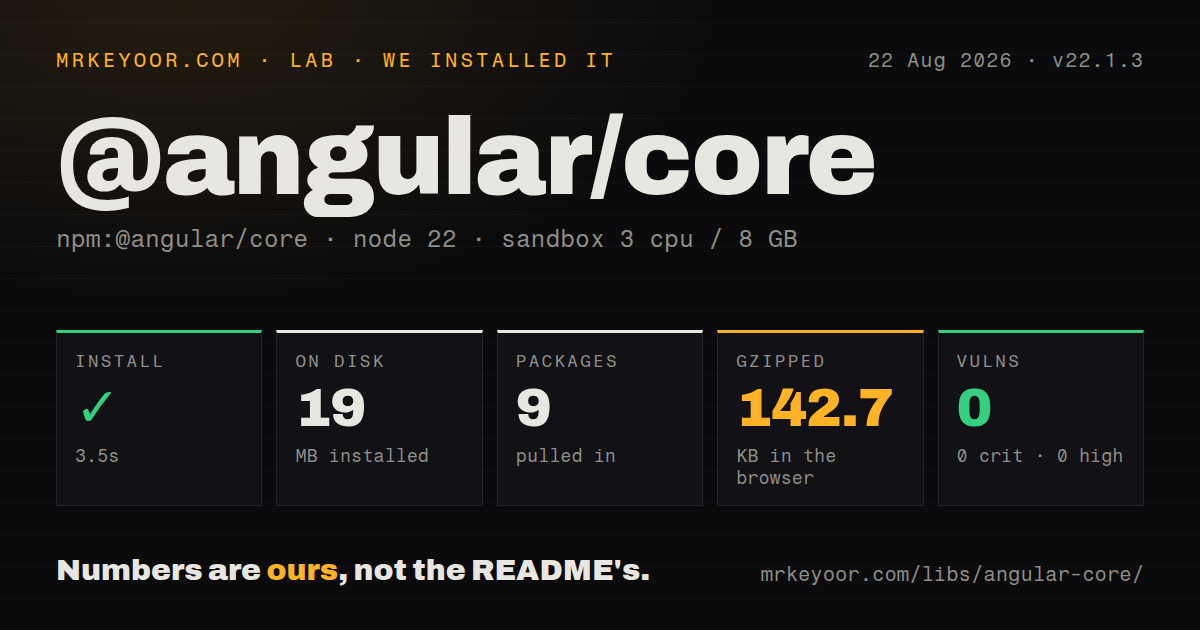
| Install | ✓ · 3.5s | 9 packages on disk · 19 MB |
| Import | ✓ | ESM import works · require() works · ESM package with exports map |
| Browser | 142.7 KB | gzipped (429.7 KB minified), bundled with esbuild |
| Types | ✓ | TypeScript types bundled |
| Known vulns | 0 | 0 critical · 0 high · 0 moderate · 0 low (npm audit) |
Answers from our run
Does @angular/core install cleanly?
Yes. In a fresh container with an empty cache, npm install @angular/core finished in 4 seconds, leaving 9 packages and 19 MB on disk. npm audit reported no known vulnerabilities.
How much does @angular/core add to a browser bundle?
142.7 KB gzipped (429.7 KB minified) when the whole package is bundled for the browser with esbuild. Importing only part of it is usually smaller.
Does @angular/core work with both ESM and CommonJS?
Yes. Both import '@angular/core' and require('@angular/core') worked in Node 22 in our run. The package is published as ESM with an exports map.
Does @angular/core include TypeScript types?
Yes, type declarations ship inside the package, so no @types install is needed.
@angular/core or react: which should you use?
react: Choose it when the team wants a view library and is prepared to select routing, forms, and data tools separately. @angular/core 22.1.3 installed in 3.5 seconds with 9 packages, 19 MB on disk, and 0 audit findings in our sandbox, but its full browser import reached 142.7 KB gzipped.
When should you not use @angular/core?
You need a small widget or mostly static site. Our full-package browser import measured 429.7 KB minified and 142.7 KB gzipped before application code or the rest of Angular.
Use it if
- You want a TypeScript application framework with components, dependency injection, routing, forms, HTTP, and build migrations maintained as one release family.
- The application has enough screens and services that constructor or inject()-based dependencies make ownership and testing clearer.
- Signals, computed state, OnPush change detection, and compiler-checked templates fit the team's preferred state model.
- A long-lived codebase benefits from ng update migrations and a documented version-to-version upgrade path.
- You need a small widget or mostly static site. Our full-package browser import measured 429.7 KB minified and 142.7 KB gzipped before application code or the rest of Angular.
- Your runtime is Node 20 or an early Node 22 release. @angular/core 22.1.3 declares Node ^22.22.3, ^24.15.0, or 26 and newer.
- Your team cannot upgrade TypeScript yet. Angular 22 dropped TypeScript 5.9 support and requires the 6.0 line.
- You depend on eager change detection by omission. Version 22 treats an undefined component changeDetection setting as OnPush, so older assumptions need an explicit Eager setting or a migration.
- Your upload UI relies on HttpClient progress events with the default backend. Angular 22 uses fetch by default; upload progress requires HttpXhrBackend through provideHttpClient(withXhr()).
Setup reality
We installed @angular/core 22.1.3 in a fresh Node 22 Bookworm sandbox in 3.5 seconds. The install left 9 packages and 19 MB on disk; npm audit reported 0 known vulnerabilities. Core itself declares 1 direct dependency and 3 peers, occupies 7132 KB unpacked, and includes TypeScript declarations. It is an ESM package with an exports map, and both require() and ESM import worked in our Node 22.23.2 check.
The peer set is part of the job: @angular/compiler must be exactly 22.1.3, while rxjs and zone.js have declared compatible ranges. In an application, keep the @angular/* packages on the same release and let Angular CLI plus ng update change them together. The package requires Node ^22.22.3, ^24.15.0, or >=26.0.0, so our 22.23.2 runtime cleared the floor. No credentials or package-specific config file are needed.
A minified esbuild import of the whole package measured 429.7 KB and 142.7 KB gzipped in our sandbox. That is a stress measurement, since Angular's compiler and bundler can remove unused exports from an application build. It still shows why importing broad namespaces or treating core as a drop-in widget dependency is a poor fit. Build the production app and inspect its emitted chunks instead of quoting the unpacked package size as a browser cost.
Version 22 changes runtime expectations. Components with no changeDetection value now use OnPush, so async mutations outside signals or Angular-aware events can leave a view stale. The default HttpClient backend is fetch; select withXhr() when upload progress is required. Version 22.1.3 fixes a re-entrant requestIdleCallback scheduling handle and stops an effect flush after a view destroys itself, but application effects still need cleanup for timers, subscriptions, and DOM listeners.
Patterns
Define a component with OnPush behavior define-component
import { Component, signal } from '@angular/core';

@Component({
  selector: 'app-counter',
  template: `<button (click)="count.update(n => n + 1)">{{ count() }}</button>`,
})
export class CounterComponent {
  count = signal(0);
}
Angular 22 uses OnPush when changeDetection is omitted. Signal writes schedule the component update expected by this template.
Derive state with computed derive-signal
import { computed, signal } from '@angular/core';

const price = signal(25);
const quantity = signal(2);
const total = computed(() => price() * quantity());
computed() tracks the signals read during evaluation and caches its value until one of those dependencies changes.
Reset linked state when its source changes preserve-derived-selection
import { linkedSignal, signal } from '@angular/core';

const options = signal(['small', 'large']);
const selected = linkedSignal(() => options()[0]);

selected.set('large');
options.set(['medium', 'wide']);
linkedSignal remains writable, then recomputes from its source when options changes. After the 2-item replacement, selected becomes medium.
Require a typed component input declare-required-input
import { Component, input } from '@angular/core';

@Component({
  selector: 'app-user-name',
  template: `<strong>{{ user().name }}</strong>`,
})
export class UserNameComponent {
  user = input.required<{ id: string; name: string }>();
}
input.required() has no fallback value. Angular reports a missing required binding during template checking.
Expose a two-way model signal bind-two-way-model
import { Component, model } from '@angular/core';

@Component({
  selector: 'app-volume',
  template: `<input type="range" [value]="value()" (input)="value.set(+$any($event.target).value)">`,
})
export class VolumeComponent {
  value = model(50);
}

// Parent template: <app-volume [(value)]="volume" />
model() creates an input and matching change output. The parent may bind with [(value)] or pass a writable signal.
Send a typed event to a parent emit-output
import { Component, output } from '@angular/core';

@Component({
  selector: 'app-delete-button',
  template: `<button (click)="removed.emit(itemId)">Delete</button>`,
})
export class DeleteButtonComponent {
  itemId = 'item-42';
  removed = output<string>();
}
output() emits synchronously through an OutputEmitterRef. A parent listens with (removed)="handleRemove($event)".
Read a dependency with inject inject-service
import { Injectable, inject } from '@angular/core';
import { HttpClient } from '@angular/common/http';

@Injectable({ providedIn: 'root' })
export class UserStore {
  private readonly http = inject(HttpClient);
  load() {
    return this.http.get('/api/users');
  }
}
inject() needs an injection context such as a field initializer, constructor, provider factory, or runInInjectionContext callback. Calling it in load() would throw NG0203.
Dispose effect-owned work clean-up-effect
import { effect, signal } from '@angular/core';

const query = signal('angular');

effect((onCleanup) => {
  const timer = setTimeout(() => search(query()), 250);
  onCleanup(() => clearTimeout(timer));
});
The cleanup runs before the effect executes again and when its owning injection context is destroyed, preventing old 250 ms timers from firing.
Tie manual cleanup to a component destroy-subscription
import { DestroyRef, inject } from '@angular/core';

const destroyRef = inject(DestroyRef);
const controller = new AbortController();

destroyRef.onDestroy(() => controller.abort());
DestroyRef belongs to the current injection context. Its callback runs once when Angular destroys that component, directive, or service context.
Run code after the next render render-dom-dependent-code
import { ElementRef, afterNextRender, inject } from '@angular/core';

const host = inject(ElementRef<HTMLElement>);

afterNextRender(() => {
  host.nativeElement.focus();
});
afterNextRender runs in the browser after Angular completes the next render. It does not execute during server rendering.
Track rows in built-in template control flow render-control-flow
@if (users().length) {
  <ul>
    @for (user of users(); track user.id) {
      <li>{{ user.name }}</li>
    }
  </ul>
} @else {
  <p>No users</p>
}
@for requires a track expression. A stable id lets Angular retain the correct DOM row when the array is reordered.
Defer a view until it enters the viewport defer-expensive-view
@defer (on viewport) {
  <app-chart />
} @placeholder {
  <div class="chart-skeleton">Loading chart</div>
} @error {
  <p>Chart failed to load</p>
}
The viewport trigger needs a single root node in the placeholder so Angular can observe it. The deferred dependency is split from the initial bundle when it is eligible for deferral.
Alternatives
| Package | Registry | Pick it when |
|---|---|---|
| react | npm | Choose it when the team wants a view library and is prepared to select routing, forms, and data tools separately. |
| vue | npm | Choose it for a component framework with single-file components and less framework-specific machinery at the start. |
| svelte | npm | Choose it when compile-time components and a smaller client runtime matter more than Angular's DI and package family. |
More web frontend guides
postcss · react · react-dom · tailwindcss · clsx · htmlparser2 · the whole shelf →
How this guide is made: grounded in the library's documentation, release notes, changelog, and issue history, on a fixed rubric — not a hands-on install of every release. The 50 most-downloaded entries are additionally install-verified in clean containers. Corrections: contact the desk.