A RedNote archive needs more than downloaded files
XHS-Downloader's documented appeal is its control over the archive: filenames, author folders, metadata storage and records of downloaded post IDs. The Chinese and English READMEs describe image, video, Live Photo and video-cover downloads, with desktop, terminal, API, MCP and Tampermonkey workflows. Our recorded run covers setup steps, not those live download capabilities.
Download records deserve particular attention. The English README says a recorded post ID can cause a download to be skipped even when its local file no longer exists. To download that post again, it instructs users to delete the corresponding database record. A repeat run that skips old IDs therefore does not establish that an archive still contains every file.
Cookies are optional, with a video-quality tradeoff
The README says Cookies are optional and that video downloads without a Cookie are limited to low resolution. It recommends supplying a Cookie for higher quality and says account login is not required to obtain one. This is more specific than treating a logged-in session as mandatory for every download.
Browser Cookie reading is marked unavailable. The documented alternative is to copy a Cookie through browser developer tools and enter it into the program or configuration. Settings are stored in Volume/settings.json. The documentation also recommends freshly obtained post links because older links may encounter RedNote risk controls.
These are upstream instructions, not outcomes verified in our sandbox.
What our September run establishes
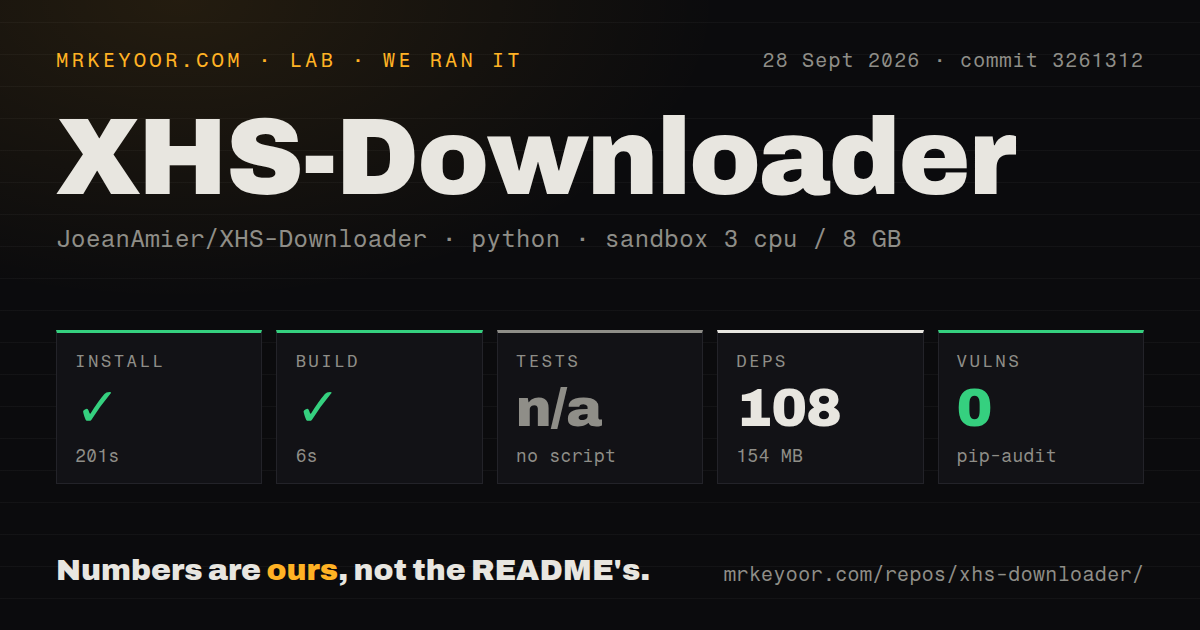
Our recorded run began on 28 September 2026 at commit 3261312721f0b37c705ba6515885bc7f34349f2f, dated 16 September 2026. The recorded environment had 3 CPUs, 8 GB of memory and image ghcr.io/astral-sh/uv:python3.12-bookworm. The install output identifies Python 3.12.12.
The install step took 200.5 seconds. Its summary reports exit 0 and success, but the retained output contains a dependency download rejected with HTTP 429 and a package build-backend failure with ModuleNotFoundError: No module named 'cx_Freeze'. Without complete command logs reconciling those messages, we cannot describe the step as a clean installation or confirm that the CLI was installed. The errors also do not prove that RedNote extraction is broken.
A separate build step returned exit 0 in 6.026 seconds. Its retained output is empty, so the record does not identify a built artifact or demonstrate that an executable launched. Tests were skipped with reason "no script". The detector found no tests directory or Python test configuration; that is a limit of the recorded detection, rather than proof that the project has no tests anywhere.
The parser summary recorded 108 dependency packages and 154 MB. The checkout summary recorded 111 files, approximately 13,925 source lines and 6.6 MB, plus six CI workflow files and a Dockerfile. These counts do not establish runtime success or test coverage.
Pip-audit recorded an advisory total of 0. Audit coverage is unknown because the record does not establish how many packages it inspected. That result is not evidence that the dependency environment is safe.
No installed-binary check, live RedNote download, authenticated API request, MCP request or measured archival workload is established by the supplied run. No new execution was performed for this correction.
Current server instructions differ from the measured checkout
The current English README documents Bearer-token authentication for API and MCP requests. API requests without a valid token return 403. Tokens are printed at startup, remain valid indefinitely by default and are tied to Volume/auth_secret.key; the README describes deleting that file to rotate the token. Userscript-to-server jobs also require token configuration.
The documented API route is POST /xhs/detail, with interactive documentation on port 5556. Requests can select downloads, image indexes, Cookies, proxies and whether to skip existing records. The current MCP endpoint is http://127.0.0.1:5556/mcp. Source-based MCP use requires the optional fastmcp>=4.1.0 dependency or the documented MCP extra.
The README pinned to our September commit instead shows /mcp/ and lacks the current authentication instructions. Follow the documentation for the revision you actually deploy. Our run does not verify the newer authentication behavior, and this review makes no security finding about either revision.
Browser exports need supervision
The userscript can collect links from account, discovery and search pages, then pass download jobs to the program when script_server is enabled. Automatic scrolling is disabled by default. The README warns that enabling it may be detected as automation and lead to account restrictions or a ban.
Issue 442 describes a user's large liked-post export being interrupted by verification requests or a sleeping computer. The maintainer replied that download records skip already downloaded posts. The issue was closed as not planned after inactivity on 19 September 2026. That exchange does not establish recovery of an interrupted link-collection session.
Historical failure reports also need their outcomes. In issue 441, users reported video-download failures with release 2.7, while the reporter and another commenter said source-based 2.8 Beta worked for them. The issue was closed as completed on 14 September 2026. Issue 387 concerned userscript 2.3.2 on rednote.com; its reporter later said link collection worked again, and it too was closed as completed on 14 September. These reports document particular experiences, not a current universal failure or independently verified compatibility.
Issue 339 remains a request for comment content. Its proposed fields and endpoint are suggestions, not an available API contract.
Choose a runtime, then verify a small archive
The README documents packaged builds for Windows 10 and newer and macOS. It says the macOS executable is unsigned and describes using xattr -cr to remove its security flag. Docker is another documented path, but command-line call mode, clipboard reading and clipboard monitoring are unavailable there. We did not test the packaged or container paths.
Release 2.7 has its own release notes, including MCP download repairs, Cookie changes and userscript-to-server support. Those notes should not be treated as proof that a release package matches the current branch or our measured checkout.
For a first evaluation, choose one revision and its matching instructions. Download a small set of posts you are permitted to save, inspect the files and metadata, and check how download records behave when a local file is missing. Verify API or MCP authentication separately if your workflow needs it. These are recommended next checks, not tests we completed.
How the ratings work
The ratings are editorial judgments about setup, documentation, community evidence and operational maturity. On this five-point scale, 1 means substantial documented obstacles, 2 means important unresolved evidence gaps, 3 means a usable documented path with material limits, 4 requires strong supporting evidence in that category, and 5 requires broad independent validation. Unknown adoption and untested compatibility do not earn a high score. The scores are not benchmarks or security assessments.