Worktrunk turns branch names into working directories
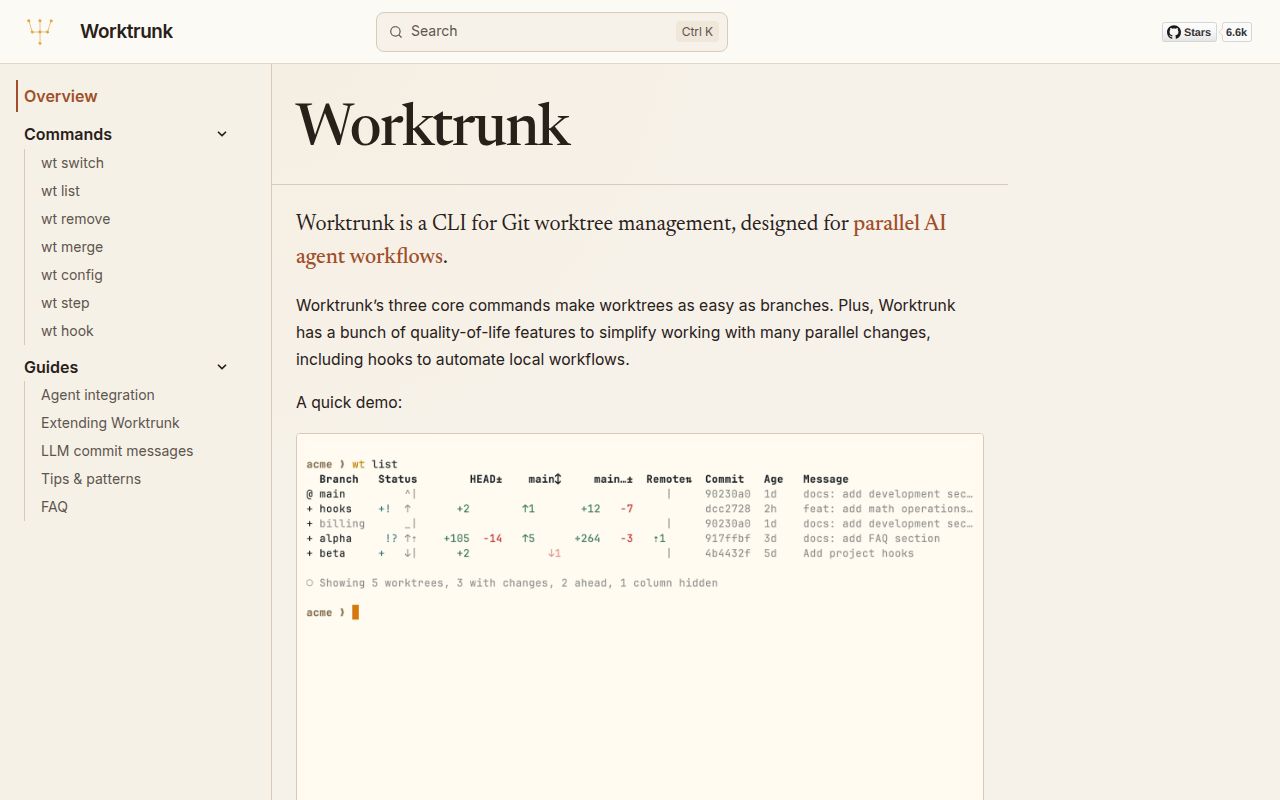
Git worktrees let several branches exist in separate directories without cloning the repository repeatedly. The underlying command is capable, but creating a branch, choosing a sibling path, moving into it, and later cleaning both the worktree and branch takes care. Worktrunk computes paths from branch names and wraps that sequence in wt switch, wt list, wt merge, and wt remove. For frequent parallel work, the saved bookkeeping is real.
The clearest use case is agent concurrency. One command can create a branch and worktree, enter it through shell integration, launch Claude Code or another process, and pass the task text. Developers can start 3 agents on separate branches without sharing a working directory. wt list then shows dirty state, ahead and behind counts, commits, age, CI status, and optional activity markers instead of only printing filesystem paths.
Hooks save setup time after you approve their commands
A new worktree often needs dependencies, copied environment files, caches, a database, and a development server. Worktrunk hooks can run on creation, before or after start, and around merge steps. It can copy ignored build caches such as node_modules or Rust's target directory so every branch does not pay the same cold start. Per-worktree port templates help several servers coexist.
Those hooks execute commands on the machine, so Worktrunk asks users to approve project configuration. Release 0.74.0 added wt config approvals add --yes for non-interactive containers and CI, while still failing if it cannot save the approval. Treat approval as code review, especially in a repository you just cloned. A convenient post-start command can install dependencies or launch a server because it has the same local process access as your shell.
What happened when we ran it
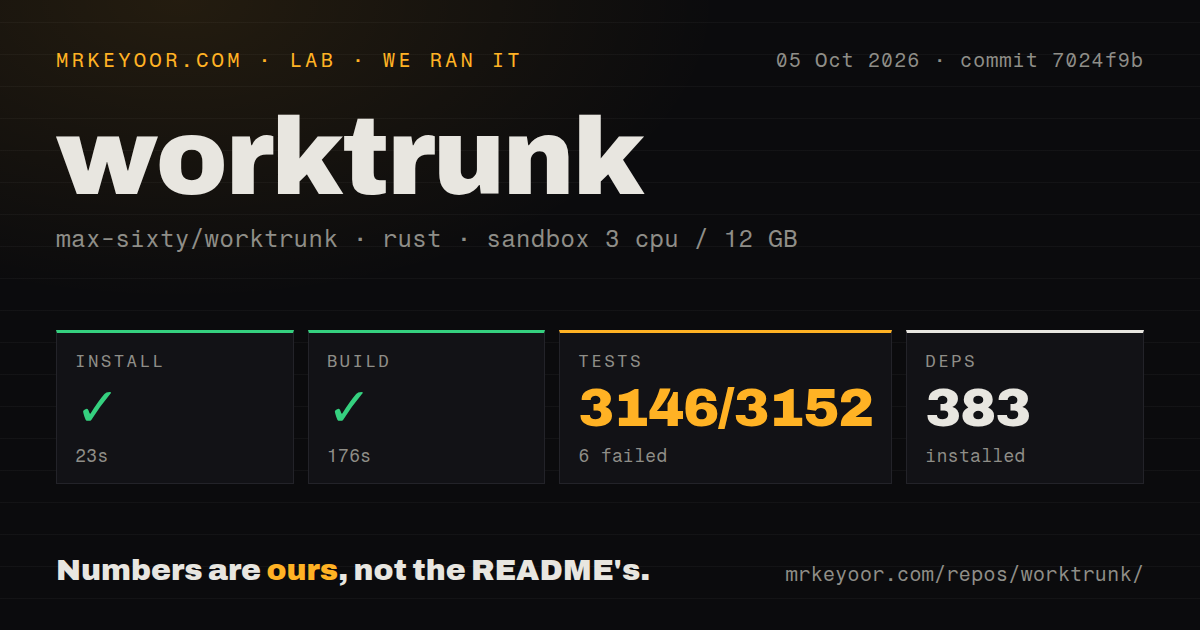
Our Rust sandbox installed 382 packages in 43 seconds and built Worktrunk in 169 seconds. The test command ran for 180 seconds and exited 101. Cargo's aggregate result was 3,054 passed and 2 failed out of 3,056. That is broad passing coverage, but the command itself failed and should remain red in an adoption report.
The displayed failure was branches_for_completion_includes_unborn_linked_worktree. Its temporary repository ran git worktree add -b feature, which returned fatal: not a valid object name: 'HEAD'. The sub-suite summary showed 1,527 passed and 1 failed. The supplied log does not say why the temporary repository lacked a valid object or whether both aggregate failures shared that condition, so we do not infer more.
commit 50245a5 contained 1,659 files and about 253,876 lines of source in a 15.1 MB checkout. The repository had 15 CI workflow files and a tests directory, with no Dockerfile. Source installation and compilation are heavier than downloading a binary, which is the sensible route for most users. Our build and test together took 349 seconds before any real worktree workflow was exercised.
Merge and removal deserve more respect than switch
wt switch is mostly organizational. wt merge can generate a commit message, commit changes, rebase onto a target, fast-forward the target, then remove the worktree and branch. That is attractive when the policy matches your team. It also concentrates several state-changing Git operations behind one command. Use a protected remote, inspect the preview, and understand how conflicts and dirty files stop the sequence.
The 0.74.0 release notes describe a fixed case where wt remove --force could delete a live sibling worktree that had moved onto another registered path, including uncommitted work. The fix now requires the directory and registration to name each other. The same release tightened cross-filesystem promotion so a source is not deleted after an incomplete copy. These fixes show careful maintenance and why updates matter for a tool that cleans directories.
Agent integration is useful but uneven
The documentation links dedicated workflows for Claude Code and supports agent-oriented summaries and markers. The README also uses Codex in its explanation of parallel work. Issue 3847 says GitHub Copilot CLI did not have an activity-tracking plugin in version 0.74.0. Users can set and clear markers manually through Worktrunk state, but lifecycle automation is absent unless that agent exposes suitable hooks.
LLM-generated commit messages are optional. They can save time after a diff is ready, yet the generated text still needs review before it becomes history. Worktrunk's lasting value comes from worktree paths, status, hooks, and safe cleanup. Teams should be able to use those pieces even if a model provider, CLI integration, or credential is unavailable.
August 2026 activity is unusually fast
GitHub recorded a push on August 26, 2026, 12 days after release 0.74.0. The repository had 6,648 stars and 43 combined open issues and pull requests when fetched. Issue discussions include detailed reproduction, design, and performance analysis rather than only short feature requests. The same day also had a nightly-test failure report, which gives adopters a current signal to inspect before upgrading.
The README says Worktrunk launched near the start of 2026, so the high version number does not mean years of stability. Rapid iteration has produced deep workflows and many safety fixes quickly. Pin a release across a team, read removal-related notes, and upgrade deliberately. The project is active enough that behavior and configuration can change faster than an occasional user expects.
Worktrunk pays off when worktrees are daily infrastructure
For 1 extra branch every few months, plain git worktree is easier to reason about. For several simultaneous agents, Worktrunk removes repeated path typing and makes the whole set visible. Our 3,054 passing tests and current release activity support a serious trial, while the 2 failures and recent deletion fixes argue for cautious rollout.
Install the binary, create a disposable repository, configure shell integration, and rehearse switch, list, merge, and remove. Add hooks only after the core lifecycle is predictable. If the team can explain where every worktree lives and what cleanup will delete, Worktrunk is a productive layer over Git rather than hidden magic.