Should you try Voice-Pro?
Consider a supervised trial when your main goal is to move from media to translated subtitles and generated speech within one interface. Voice-Pro combines YouTube downloading, voice separation, speech recognition, translation, and text-to-speech in one web application. That breadth is its practical attraction, but our recorded command outcomes do not establish output quality or a completed dubbing workflow.
The README says Windows with NVIDIA works well, while Mac and Linux operation has not been verified. It also announces that development and updates are paused because of WeConnect work. These limits matter before you commit a production workflow to the application.
What our sandbox established
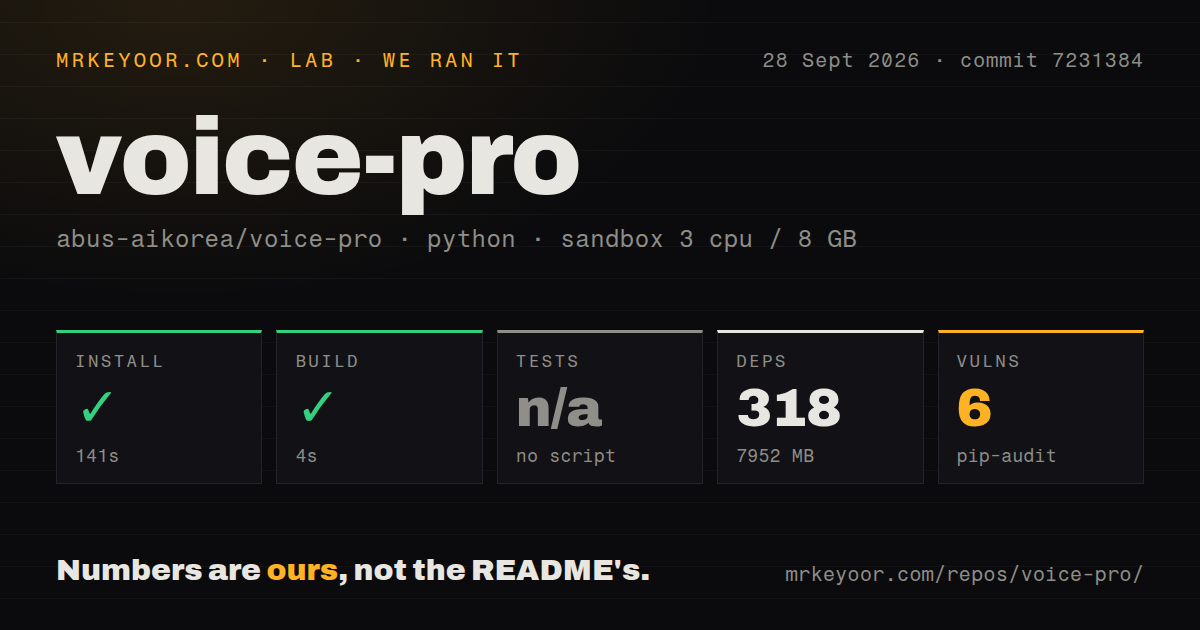
Our run on 2026-09-28 at commit 7231384 recorded a successful install in 141 seconds and a successful build in 4 seconds in our sandbox. The full recorded commit is 7231384f797091dc0d6d0470360fc6fcc2095d0c. The sandbox used the Python 3.12 Bookworm uv image with 3 CPUs and 8 GB of memory.
The attached stored parser summaries report 318 installed packages and a 7,952 MB dependency footprint. They describe this dated environment; they are not runtime performance measurements or a final storage requirement after model downloads.
Our harness records command success, exit code, elapsed time, timeout status, and a trailing log excerpt. Install and build each returned exit code 0 without timing out. The build tail contains a SyntaxWarning about an invalid escape sequence in rvc/infer/pipeline.py. That warning did not make the recorded command fail, and the supplied record does not identify the exact build command.
Tests were skipped with the reason "no script". Detection also recorded no CI workflows or root tests directory. Those observations do not prove that every form of testing is absent from the repository. No new execution or complete-log reconciliation was performed, and the parser summaries do not establish exhaustive unique test coverage.
We did not validate the Gradio interface, Windows launcher, GPU execution, transcription, translation, voice cloning, subtitle alignment, or a rendered dubbed video. A successful command cannot substitute for those checks.
The MrKeyoor testing methodology explains how command outcomes and their limits reach a review. That page provides provenance context; its current text does not establish which methodology version governed this September run.
Read the audit as an advisory record
The attached pip-audit summary records 6 advisories and a packages value of 2. It supplies neither advisory identifiers nor severity, and it does not contain scannedPackages. Scan coverage is therefore unknown; neither the packages value nor the installed dependency count establishes how many packages were scanned.
This is an advisory result, not a security assessment of Voice-Pro or proof that a particular media-processing path is exploitable. Before using sensitive material, obtain the detailed audit output for the intended environment and assess the affected components. Our supplied record cannot settle that question.
The documented Windows path still needs a workload trial
The v4.0.0 release describes a move to uv and a committed lockfile, with Python 3.12, Torch 2.8.0+cu128, and Gradio 6.20. It says start.bat can obtain portable ffmpeg and that CUDA Toolkit and Visual Studio Build Tools are no longer required. These are documented installation properties, not outcomes demonstrated by our Linux sandbox.
The README requests at least 4 GB of VRAM, preferably 8 GB or more, and 20 GB of free storage. Its installation instructions describe additional model downloads. Budget beyond the dependency footprint recorded by our harness.
Issue 90 reports Linux installer failures involving the older conda-based stack. It is useful historical troubleshooting evidence, but it does not demonstrate that the v4 uv installer has those same failures. The current README's explicit platform warning is the clearer basis for deciding whether to attempt Linux or Mac deployment.
A local interface can use external services
The README identifies Deep-Translator through Google's free web endpoint and Edge-TTS as defaults. Azure Translator and Azure Speech are optional services configured with your own credentials. Choose the processing path according to where your material may be sent; opening a local browser interface does not establish that the workflow stays offline.
The README warns that restricted networks can block or rate-limit the free translation endpoint. It describes retries and preservation of original text for failed lines. Include a network-failure check in your trial and inspect the translated subtitles rather than assuming that every line was replaced.
For voice cloning, establish permission for the reference recording and intended use before generating or distributing speech. A reference voice appearing in a repository does not establish those rights.
Choose an alternative by the job
Whisper-WebUI is a subtitle-focused alternative with file, YouTube, and microphone inputs. Its README also documents subtitle translation, audio preprocessing, and speaker diarization. Consider it when transcription and subtitle preparation are the main task; its supplied documentation does not establish a replacement for Voice-Pro's complete dubbing workflow.
pyVideoTrans documents a workflow from speech recognition through subtitle translation, speech synthesis, and video synthesis. It is the closer replacement candidate when you need a video translation pipeline. Its README also describes manual proofreading between stages, a Windows package, and optional CLI and WebUI routes. We did not execute either alternative, so these are comparisons of documented roles, not comparative reliability or speed results.
How to read the scores
The scores are editorial judgments, not benchmarks or adoption measurements. The rubric is: 1 means the evidence shows a blocked or largely undocumented path; 2 means substantial gaps require operator work; 3 means a documented route exists with material caveats; 4 means detailed guidance addresses the main setup questions; 5 requires strong corroboration across the assessed dimension.
Setup ease receives 2 because the installed dependency footprint and later model downloads remain substantial, while the Windows launcher was not tested. Documentation receives 4 for its detailed installation, service configuration, and troubleshooting instructions, qualified by the platform warning. Community receives 3 for the documented issue and contribution routes alongside the development pause; this does not rate adoption or response speed. Maturity receives 2 because the recorded run lacks workload validation and a detected test target, records advisories, and sits alongside an announced update pause.
A useful first trial
Use a short recording you have permission to process. On the intended Windows and NVIDIA machine, check transcription, translation, generated speech, subtitle timing, and final video output separately. Record the selected models and service settings so a failed stage can be reproduced. Proceed only after that trial answers the questions our sandbox did not test.