Short answer: choose the home screen before the cleanup
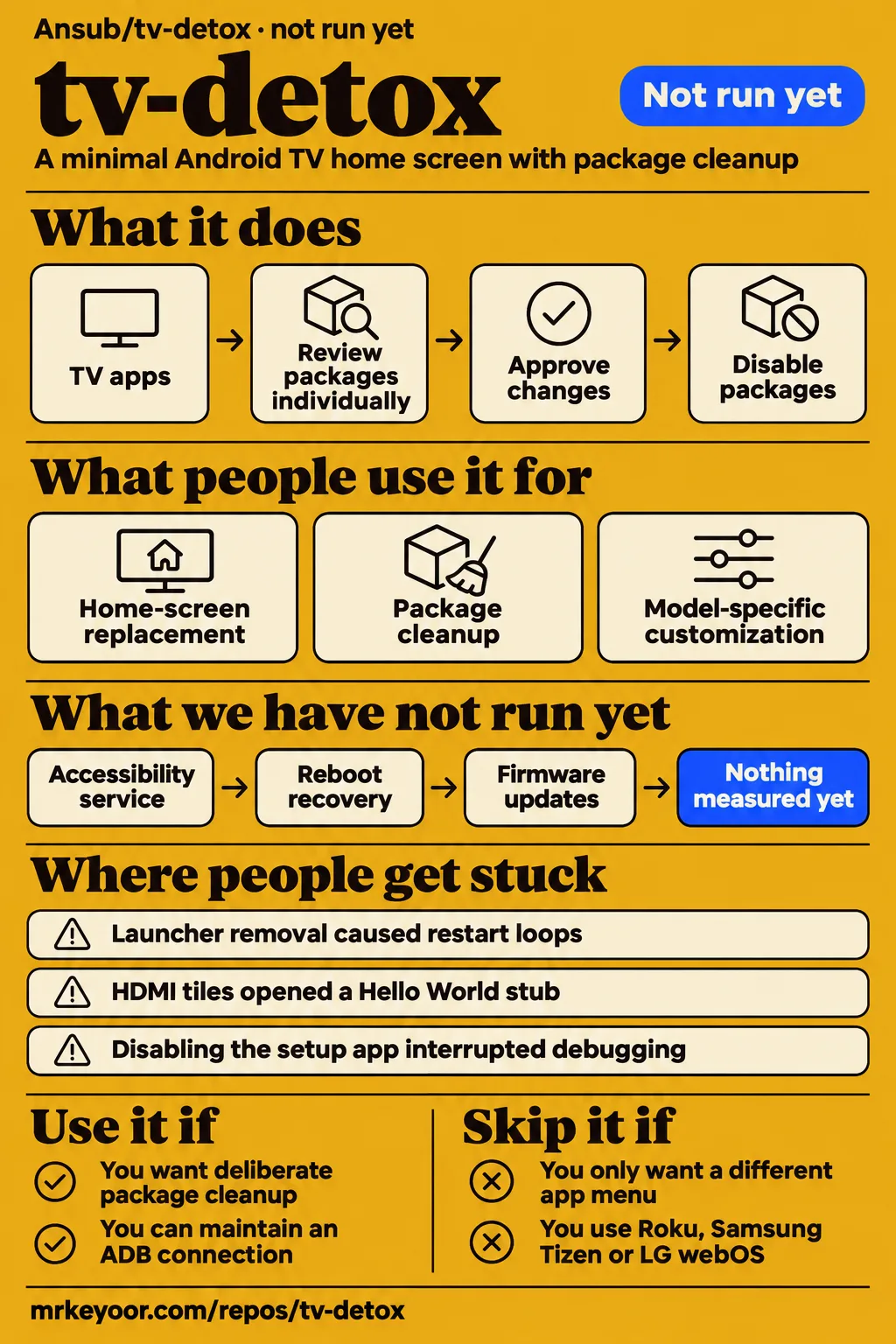
Use TV Detox for deliberate package cleanup if you can maintain an ADB recovery connection; choose a separate launcher if changing the app menu is enough. TV Detox combines a minimal Android TV home screen with scripts and an optional AI-guided cleanup workflow. Our sandbox assessment at commit b22a1e3 stopped before installation because its runner recorded no supported Java ecosystem and no Dockerfile. That result belongs to the execution record below, separate from the TV owners' reports.
Google TV owners should retain Google's launcher, as the current upstream instructions prescribe. Since v1.4.1, install.sh leaves it enabled unless the owner explicitly opts into disabling it. The Home-button accessibility service opens tv-detox over Google's home screen. This makes the current installation route different from older reports in which owners disabled both the launcher and Google's setup app. Follow the current instructions for your device rather than copying those older package choices. Upstream setup and Google TV instructions.
Attention is easier to count than dependable TVs
The supplied GitHub facts record 2,372 stars on November 16, 2026, a last push on October 30 and latest release v1.5.7 on October 28. Those facts identify the repository snapshot and release activity. The release notes describe Wi-Fi safeguards, MediaTek package protection and Philips HDMI-label fixes. For a TV owner, the useful next question is which of those changes concerns their model, rather than how much attention the repository received. Repository metadata and v1.5.7 release notes.
The supplied Midorreal comparison separately lists 2,371 stars for its November 16 snapshot. Its comparison partner is ai-startup-skills, a different project whose presence supplies little help with a TV installation decision. Keep that historical snapshot distinct from the fresh GitHub metadata. A model, Android version, package list and reboot outcome make a more useful compatibility report than a star total because they describe what someone actually changed and what happened afterward.
What people use tv-detox for
Owners have reported using tv-detox for home-screen replacement, package cleanup and model-specific customization. The following accounts identify the device and action where the supplied evidence provides them. They also show why launcher installation and package cleanup deserve separate decisions: one owner wants a plain menu, another changes background services, and another builds a customized interface. Each report remains attached to the person who supplied it rather than becoming an outcome from our sandbox.
| Who used it | TV and action | Reported outcome |
|---|---|---|
| Project author Ansub Khan | Cleaned up an old Android TV and replaced its home screen | Describes removing background services and building a new home screen. Author's account |
| GitHub user casualducko | Sony BRAVIA 4K VH2, Android 12; disabled the stock launcher and setup wizard | Home and Back opened tv-detox after a restart. Sony issue #11 |
| GitHub reporter romain5246, with the owner confirming changes | Philips 65PUS7303/12, Android 8; followed the README workflow | Reports the scripts working and a normal restart onto the new home screen. Philips issue #107 |
| X user wallacex227 | A 2020 TCL running Android TV 9; approved package changes in groups and adapted the launcher from source | Reports disabling packages rather than uninstalling them. Portuguese-language TCL account |
Upstream's TCL Smart TV Pro notes report free memory rising from about 660 MB to about 1 GB, with the first reading taken after 15 days of uptime. The contributor explicitly credits restarting for part of the difference. These are upstream observations, not our measurements. A useful before-and-after comparison needs equal restart conditions, so an owner repeating this check should take both readings at the same interval after a restart. Otherwise, the comparison mixes package changes with the effect of restarting. TCL Smart TV Pro memory account.
The author's setup video describes asking permission before changes, and his written account describes turning off background services before replacing the home screen. The upstream prompt makes that process more concrete: inventory apps, identify critical services, ask before each change and keep an undo list. Those steps give the owner a chance to preserve the features they use. Casting, voice search, phone control and console inputs belong in that inventory alongside the streaming apps shown on the home screen. Author's walkthrough and upstream cleanup prompt.
What happened when we ran it
Our run stopped before installation at commit b22a1e3 on November 16, 2026: the harness recorded no supported ecosystem for Java and no Dockerfile. The sandbox configuration was 3 CPUs, 8 GB of RAM and image n/a. These are recorded runner settings. The separate hands-on log records a clone step of 1 s, a failed planning step and successful teardown, all of which remain part of the execution account.
| Assessment item | Recorded result | What it means for this review |
|---|---|---|
| Installation, build and tests | Not run | The harness stopped before these stages |
| Runner support | No supported ecosystem, language Java | The project had no supported execution path in this runner |
| Container route | No Dockerfile | The harness found no repository Dockerfile |
| Device operation | No TV session recorded in the supplied harness measurement | Device reports below come from their named contributors |
The planning step failed with this recorded explanation: "hands-on step plan: FAILED; no install method we can run: the README offers no apt/npm -g/pipx/uv tool/cargo install/go install command and no manifest names a binary (brew, source builds and pipe-to-shell scripts are not used)". The clone record reads "hands-on step clone: recipe quickstart-cli in 1 s", and teardown reads "teardown: ok". These describe the runner's workflow and policy, rather than an Android installation error.
The supplied hands-on run label also says the repository was deployed with its own Docker Compose configuration on the lab server, with every port bound to 127.0.0.1, at commit b22a1e368ee5. That label conflicts with the harness outcome above. The harness records dockerfile:false, compose:false and null installation, build and test results. The execution outcome used for this review is therefore the explicit no-run result.
Where people get stuck: Home routing and system packages
The Acer R3G report describes a correctly drawn tvhome screen underneath RecoveryActivity while system_server crashed repeatedly. Re-enabling Google's launcher stopped the reported crashes immediately. This is a practical distinction between drawing the interface and making Home routing work: a screenshot can show the intended menu while another activity owns the foreground. The issue's foreground-activity check explains more than the image alone. Acer recovery-activity report #21.
| Report | What the person hit | Resolution shown in the record |
|---|---|---|
| casualducko, Sony #11 | Home selected Google's setup wizard after launcher removal | The maintainer reports v1.3.0 added confirmation before disabling the setup app and restoration through undo.sh; current Google TV instructions retain the stock launcher |
| Acer R3G author, #21 | RecoveryActivity and repeated system_server crashes after launcher removal | Re-enabling launcherx stopped the reported crashes; the issue is open |
| arevindh, Vu VIBE #5 | An HDMI tile opened a Hello World stub | The maintainer reports a v1.2.0 input-player fix; the reporter's local change opened all three inputs |
| BobbanDuVet, Philips #73 | Home returned to the stock screen | The supplied synthesis records success with Philips' Home router retained and only tvlauncher disabled |
| webolim, MiTV4A #60 | Brightness did nothing, with extra navigation to TV Settings | The supplied synthesis records an open issue and a separate OnePlus-specific change |
The TCL Smart TV Pro and Q651G notes say to keep com.tcl.tv enabled because it displays HDMI as well as Live TV. The TCL 32S4K uses different packages: com.mediatek.wwtv.tvcenter and com.mediatek.tvinput handle television inputs, while com.mediatek.tv.service handles remote keys. Identify your model's dependencies before applying package advice. A TCL badge does not select the package list. The current README explicitly says the 32S4K has neither com.tcl.tv nor com.tcl.tvinput and tells owners to keep its three MediaTek packages enabled. Model-specific TCL dependencies.
The TCL documentation also records a Wireless debugging connection ending when the setup app was disabled, followed by reconnection through port 5555 on that TV. The Q651G notes describe forgotten Wi-Fi networks and the installer subsequently retaining the app that owns them. These failures concern network ownership as well as Home routing. Release v1.5.7 documents the corresponding safeguard: install.sh leaves the setup app enabled while it owns the saved Wi-Fi network, or when ownership is unclear. TCL connection history and Wi-Fi safeguard release notes.
Google TV's accessibility route preserves its launcher
The documented Home-button service opens tv-detox over Google TV while Google's launcher stays enabled. Holding Back returns to Google's screen, which stays until the owner opens the Home tile or restarts. On Android 13 and later, enabling a sideloaded accessibility service can first require Allow restricted settings in App info. The README also describes a Play Protect warning associated with the accessibility service. Those steps belong to the documented route rather than the older launcher-removal workflow. Google TV Home-button instructions.
Repeated failures to open tv-detox stop the redirects; opening its Home tile retries them. Turning off the Home-button service or uninstalling the app provides an exit. For a frozen Accessibility settings screen, the README supplies an ADB method that adds this service while preserving TalkBack and other enabled services, plus a selective removal command. Preserve that behavior when following the instructions: replacing the entire enabled-services setting would discard the existing list. The public draft directs readers to the supplied commands rather than reproducing a shortened substitute. Accessibility setup and removal instructions.
undo.sh has a smaller job than restoring every preference
The README explicitly says undo.sh does not reverse the optional TCL phone-keyboard workaround. That workaround changes the selected keyboard and disables Google's phone-remote service. The documented consequence is loss of typing, voice search and control through Google TV or Google Home on the phone. Its manual restoration instructions require the previously selected keyboard, so recording that value is part of the procedure. Treat this optional preference change separately from installation and the agent's package-cleanup list. Phone-keyboard workaround and manual restoration.
The upstream cleanup prompt asks the agent to keep a list of changes and their undo commands. Use that record to connect a proposed disable to the feature it serves, rather than approving packages solely because their names are unfamiliar. Google's Play services, Settings, System UI, keyboards, Bluetooth and the input framework appear in the protected list. Model-specific dependencies add another layer: the TCL platform and MediaTek examples above show why one household-wide blacklist would lose information that the documentation supplies. Protected packages and change-record instructions.
tv-detox vs Projectivy, FLauncher and manual ADB
Projectivy is a documented alternative for owners whose main requirement is a different app menu. PCWorld describes its simple menu and customization potential, while HotRepo describes tv-detox as deliberately minimal beside established launchers such as FLauncher and Projectivy. TV Detox's separate contribution is its package-cleanup workflow. Choose between those tasks before choosing an interface, because changing the menu and selecting background packages address different parts of the television. PCWorld's Projectivy description and HotRepo's launcher comparison.
| Option | Why choose it | Decision boundary |
|---|---|---|
| Projectivy | PCWorld describes a simple app menu with customization | Choose it for a different home screen |
| FLauncher | HotRepo names it among established alternatives | Consider it for a fuller launcher feature set |
| Manual ADB and a documented package list | The upstream planner supports owner decisions about packages | Maintain your own change and undo records |
| tv-detox | A minimal home screen plus an explanatory cleanup workflow | Choose it for package-by-package decisions with explicit approval |
| tv-detox tvOS Edition | The fork adds a tvOS-style home screen and changing wallpapers | Its tvOS-style option requires a local build with Java and the Android SDK |
TV Detox tvOS Edition adds an interface styled after Apple's tvOS; its README identifies it as a fork based on Ansub/tv-detox. The basic option downloads a ready-made release, while the tvOS-style option is built on the owner's computer. The supplied instructions specify Java and the Android SDK for that build. This is a choice of home-screen implementation, with a different installation path from downloading the basic APK. TV Detox tvOS Edition build and interface documentation.
What the other reviews get wrong
The Verge's October 23 account says the featured projects replace the built-in launcher by default, whereas current tv-detox instructions retain Google's launcher on Google TV. The distinction is specific to that platform and the supplied current instructions. Likewise, PCWorld's description of an expected AI coding agent covers the guided workflow too broadly for home-screen installation: the supplied documentation offers install.sh without AI. Package selection remains a separate task requiring decisions about the TV's apps. The Verge's October account and current upstream workflow.
DebloatTV's blanket reversibility language needs the manual-change distinction explained above. The older custom_tv_home fork also contains screensaver advice that conflicts with upstream's instruction to keep it enabled on OLED televisions. Its treatment of com.tcl.tv as optional for owners who skip broadcast television misses that package's HDMI role on the documented TCL-platform models. The 32S4K exception makes model identification equally important: correcting one broad package rule should not produce another. Older fork documentation and current OLED and TCL guidance.
HotRepo's six-day-old, roughly 1,487-star description is a historical snapshot, while the supplied November 16 sources record later totals. The author's phrase about no ads anywhere also exceeds the home-screen change described in his account. Keep the practical distinction clear: a replacement menu changes what appears before opening a streaming application. The supplied research identifies streaming-service ads as a separate surface. HotRepo snapshot, author's account and PCWorld's ad-scope discussion.
FAQ
Ansub/tv-detox on GitHub is the official Android TV project addressed by the supplied repository search intent. Its README contains the current setup, platform guidance and recovery instructions, while the tvOS Edition and custom_tv_home repositories are separate forks. Use the upstream repository as the starting point for this software, rather than search results about reducing television viewing. The questions below come from the supplied synthesis and distinguish installation, platform support and package decisions. Official Ansub/tv-detox repository.
Where is the official Ansub/tv-detox GitHub repository?
The official repository is Ansub/tv-detox on GitHub. Its README supplies the cleanup prompt and current Google TV instructions, and its release page identifies v1.5.7 in the supplied evidence. The repository assessed by our harness was commit b22a1e3. Keep those identifiers separate when following a report or discussing an installation: a release APK, a source commit and another owner's TV configuration describe different parts of the workflow. Official repository and v1.5.7 release.
What is TV Detox and how do I use it?
TV Detox combines a minimal TV launcher with an optional guided package-cleanup workflow over ADB. The documented route starts by enabling debugging, connecting a computer on the same network and inventorying the TV's apps before approving changes. Installing the home screen is one step within that prompt. Owners choosing cleanup alone can omit that step while retaining the inventory, approval and change-record requirements. Upstream getting-started prompt.
Where do I start when using tv-detox to remove Google TV home-screen ads?
Start with the upstream Google TV instructions, which retain Google's launcher and describe the Home-button accessibility service. The APK supplies the home-screen application, while ADB setup and the accessibility instructions address how Home reaches it. The maintainer makes that distinction in the EasyTV Partner discussion, asking the developer to link to the repository rather than offering only an APK installation. Google TV setup and EasyTV Partner discussion #76.
Is TV Detox safe to run?
The README reports TVs stuck at the logo or restarting after system-app changes, and its Google TV instructions retain the stock launcher by default. It requires approval before changes, preservation of critical services and a restart check after cleanup. Read those steps as part of the workflow rather than treating successful APK installation as completion. The specific recovery outcomes and the scope of this review are collected in the final section. Upstream warnings and setup checks.
Which TVs does tv-detox work on?
The README lists Android TV 9, 11 and 12 and Google TV 14. Issue #107 adds a report for a Philips 65PUS7303/12 on Android 8, using commit b22a1e3 and the tvhome 1.5.7 release APK. That report identifies firmware TPM171E_R.107.001.143.000 and network ADB on port 5555. Use those details when comparing your device with the report, together with the current model-specific instructions. Upstream coverage and Philips Android 8 report.
Can I use tv-detox on Fire TV, Roku, Samsung or LG?
Upstream describes Fire TV support as partial cleanup with Amazon's home screen retained, and excludes Roku, Samsung Tizen and LG webOS from this Android workflow. The operating system determines which instructions apply. The README points owners to Settings > About because a manufacturer can sell Android or Google TV products alongside products running other systems. Establish that identity before treating a brand name as a compatibility answer. Upstream platform guidance.
Can a Samsung television running Tizen be made to run Android?
TV Detox supplies no Android operating-system installation procedure for a Samsung Tizen television. Its README excludes Samsung Tizen from this workflow. The Samsung question in issue #70 received a reply pointing to a separate forthcoming video, rather than an Android conversion procedure. For deciding whether to use this repository, the relevant answer is its documented Android TV and Google TV scope. Platform guidance and Samsung question #70.
How do I enable developer mode and connect my TV to my laptop?
The README says to press Build seven times in About, then enable debugging in Developer options. Newer Google TVs use Wireless debugging: pair with the displayed pairing port, then connect using the different port on the debugging screen. Pass that connected address to the scripts. The README says the port changes after a restart, so use the address displayed by the TV when reconnecting. Developer mode and Wireless debugging instructions.
Can I run tv-detox from a phone without a laptop?
The documented guided workflow requires a computer on the TV's local network. A phone hotspot can supply that network when both the TV and laptop join it. Ethernet also works because the computer connects to the TV's IP address over the local network. These details answer two separate setup questions: which device runs the workflow, and which connection carries its ADB traffic. Computer, hotspot and Ethernet guidance.
Can I clean up packages while keeping my existing TV home screen?
Yes. The current upstream README says to omit step 6, Install the home screen, from its cleanup prompt. The older fork numbers that instruction as step 5, which explains the different number in its FAQ. Follow the named action in the prompt you are reading rather than borrowing a step number from another repository. The remaining inventory and approval steps still apply to package changes. Current cleanup-only instructions and older fork prompt.
How do I know which apps are safe to disable?
The upstream planner labels packages never, keep, safe or review and reads the TV without changing it. The README also describes supports.sh as a read-only device assessment. Use those outputs alongside model-specific notes and the protected-package list, especially for HDMI, remote keys and Wi-Fi ownership. The TCL 32S4K's MediaTek dependencies show why a package's absence or an unfamiliar name needs device context before any action. Planner and device-assessment instructions.
Why use tv-detox instead of Projectivy Launcher?
TV Detox includes a guided package-cleanup workflow as well as its minimal home screen. Projectivy is the customization alternative described by PCWorld; upstream also says cleanup can work with another home screen. That lets an owner separate the two decisions: choose the menu they prefer, then decide whether to undertake package cleanup. The comparison table above maps those choices to the supplied documentation. Upstream Projectivy answer and PCWorld's launcher description.
What we have not tested yet
Our assessment reached no installation, build, test run or TV session, so setup ease and device operation are unassessed. The sandbox image label n/a supplies no runtime or operating-system version. The contradictory Docker Compose run label supplies no successful deployment evidence against the explicit harness result. We have not tested the accessibility service, reboot recovery, firmware updates, streaming applications, OLED behavior or restoration ourselves, and no corrected command or procedure in this review was executed by us.
The supplied evidence provides no controlled speed percentage, project-specific tracking-traffic measurement or firmware-specific compatibility matrix spanning the reported devices. The TCL Smart TV Pro readings used different restart conditions, and the comparison table assembles documented choices rather than competing-launcher benchmarks. Star counts measure repository attention. The Philips success is a device report, the MiTV issue remains open, and the Acer issue contains no confirmed outcome for the linked quiettv suggestion. The Vu fix was initially checked by the maintainer on an emulator; the separate OnePlus change supplies no MiTV result.
Recovery also has concrete boundaries. Upstream reports a Chromecast requiring a factory reset after launcher removal; undo.sh excludes the optional phone-keyboard workaround; and the documented port-5555 reconnection succeeded on a particular TCL device. The supplied reports provide no general remote-button fix or guarantee of future firmware behavior. Record your model, firmware, required features and change list before proceeding. No independently inspectable existing-page inventory or rendered-site checks were supplied, so this correction makes no claim about duplicate coverage, layout, resolved links or publication readiness.