mrkeyoor.com_
Wed 02 Sept 16:54 UTC
Dev Toolsevaluationupdated 02 Sept 2026

trippy review

Trippy is a terminal network diagnostic that combines repeated ping statistics with traceroute hop discovery. It traces with ICMP, UDP, or TCP, shows changing routes and latency in an interactive interface, and can export results for scripts or incident notes.

trackingstars / 7d
Verdict

Our Trippy build took 87 seconds and all 1,616 tests passed, making it the best-tested project in this group and an easy recommendation for interactive route diagnosis. Use it when protocol choice, ECMP visibility, and exportable reports justify raw-socket privileges. Keep MTR for a familiar minimal workflow, and choose another method for QUIC destination checks or hosts where administrative network access is off limits.

We ran it

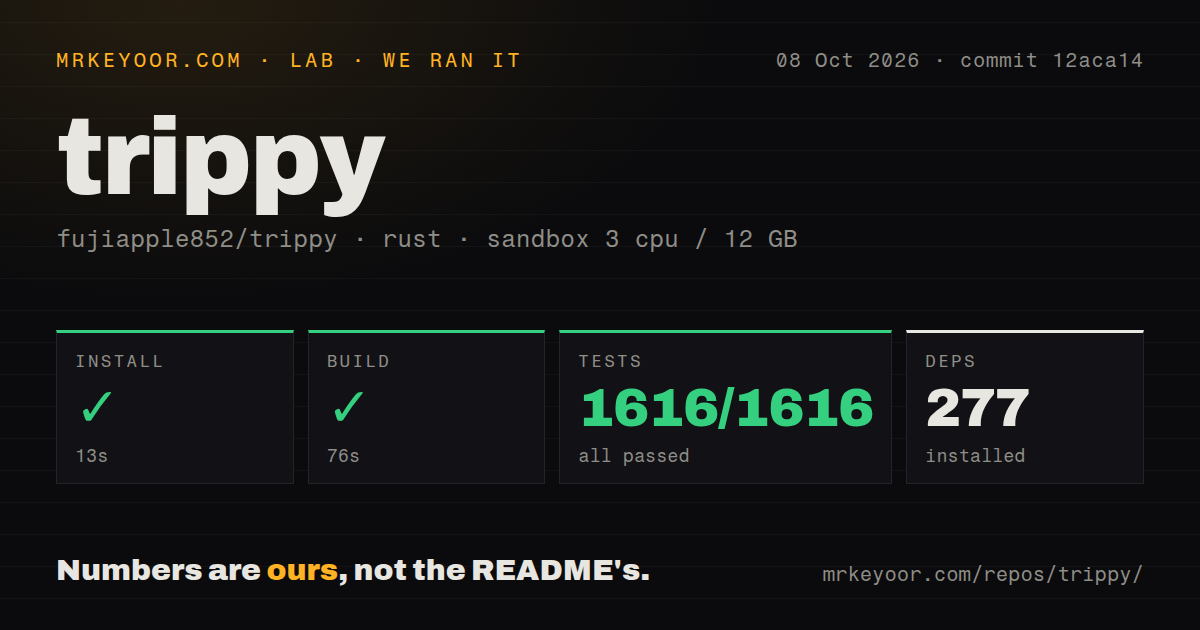
Lab card: what happened when we ran trippyScreenshot of trippy (trippy.rs)
Install✓ · 22s272 packages
Build✓ · 87s
Tests✓ · 50s1616 passed · 0 failed of 1616 (cargo test)
Repo328 files~32,584 lines of source · 33.5 MB · 3 CI workflows · Dockerfile

Answers from our run

Does trippy build from source?

Dependencies installed in 22 seconds (272 packages), and the build succeeded in 87 seconds. We cloned commit 2e69fcf into a clean Debian container with 3 CPUs and no project-specific setup.

Do trippy's tests pass?

Yes: 1616 of 1616 passed when we ran the project's own test command (cargo test). Some failures need services or credentials a bare container does not have.

Who should not use trippy?

Locked-down Linux, BSD, or Windows hosts where raw-socket access and administrator rights are forbidden; unprivileged mode is currently macOS-only.

What are the alternatives to trippy?

MTR, gping, Netshoot. Our Trippy build took 87 seconds and all 1,616 tests passed, making it the best-tested project in this group and an easy recommendation for interactive route diagnosis.

Setup4/5Many packages exist; raw-socket privileges are the main hurdle
Docs5/5Privileges, protocols, reports, firewalls, and caveats are explicit
Community4/57,784 stars, a September push, and active issue work
Maturity5/51,616 tests passed across a cross-platform Rust workspace

Who it’s for

Network engineers who need to compare ICMP, UDP, and TCP paths from one terminal.
Operators investigating ECMP routes, NAT behavior, per-hop latency, or packet-response loss.
Developers who want JSON, CSV, Markdown, flow, or Graphviz output from repeatable traces.
Cross-platform teams that need the same diagnostic on Linux, BSD, macOS, and Windows.

Who it’s NOT for

Locked-down Linux, BSD, or Windows hosts where raw-socket access and administrator rights are forbidden; unprivileged mode is currently macOS-only.
macOS users planning to trace from Docker Desktop: the guide says it resets outgoing TTL to 64, so intermediate hops are not discovered.
HTTP/3 troubleshooting that depends on reaching the QUIC destination hop: open issue 1791 reports ??? at the destination on macOS and Linux.
Readers who will treat intermediate ICMP loss as proof of forwarding loss: the guide warns that router rate limiting can make those columns misleading.
Services embedding trippy-core after opening more than 1,024 file descriptors: open issue 1790 documents a select() limit panic.

Setup reality

Our sandbox installed Trippy in 22 seconds, adding 272 Rust packages. The build succeeded in 87 seconds. Cargo test finished in 50 seconds with all 1,616 tests passed and 0 failed.

Prebuilt packages exist for major desktop systems, while a source install needs Rust. Tracing normally needs root, Administrator, or Linux CAP_NET_RAW; no API credentials are required. Optional ASN lookup uses DNS, and GeoIP display needs a local MaxMind or IPinfo database.

The Docker image needs raw-socket capability, which restrictive runtimes may remove. Docker Desktop on macOS cannot discover intermediate hops because of its TTL handling. Windows also needs an inbound ICMP firewall rule. The checkout had 3 CI workflow files and a Dockerfile, but no separate tests directory because Rust tests can live beside source.

ICMP, UDP, and TCP traces share one terminal

Trippy runs repeated traces and turns each hop into live statistics for sent and received probes, loss percentage, recent and average latency, jitter, and status. It supports IPv4 and IPv6 over ICMP, UDP, or TCP. The terminal interface can trace several targets, display multiple hosts at one hop, isolate individual flows, plot round-trip-time history, and show a GeoIP map when a local database is configured.

The export story makes it useful beyond an interactive incident. JSON, CSV, Markdown tables, Graphviz DOT, and flow reports can run for a configured number of cycles. Version 0.13.0 added start and end timestamps to JSON reports and exposed DSCP and ECN values from returned packet headers. A saved trippy.toml can hold tracing strategy, columns, theme, bindings, timezone, DNS resolver, and report choices.

Raw sockets determine where Trippy can run

A basic trace in the README uses sudo trip example.com. On Linux, an administrator can instead grant the binary CAP_NET_RAW; Trippy says it drops all capabilities after creating its raw sockets. Windows requires Administrator privileges. The documented unprivileged mode supports ICMP, UDP, and TCP only on macOS, and it excludes the Paris and Dublin ECMP strategies because they need header control.

Containers inherit the same constraint. The official image normally receives raw-socket capability on Linux Docker, while restrictive runtimes may need --cap-add=NET_RAW. Docker Desktop on macOS resets outgoing TTL values to 64 according to the guide, preventing discovery of intermediate hops. Windows users must also allow inbound ICMP in Defender Firewall or the interface can sit at Awaiting data... despite sending probes.

What happened when we ran it

Our sandbox installed commit 2e69fcf in 22 seconds and added 272 Rust packages. The build completed in 87 seconds. We used an unprivileged container with 3 CPUs, 12 GB of RAM, no secrets, and the lab Rust image. Those timings describe repository setup and compilation rather than a live trace across the internet.

Cargo test finished in 50 seconds with 1,616 passed and 0 failed out of 1,616. The checkout contained 328 files, roughly 32,584 lines of source, and occupied 33.5 MB. It had 3 CI workflow files and a Dockerfile. There was no tests directory, which is unsurprising for a Rust workspace whose unit tests can sit in source modules. We did not measure probe latency, route accuracy, or packet-loss behavior.

Loss columns need protocol context

Trippy defaults to ICMP, which often gives one easy-to-read path. Its own recommendations warn that routers may rate-limit ICMP responses, making intermediate Loss% and receive counts easy to misread. ICMP may also take a different ECMP path from an application using UDP or TCP. The status column distinguishes target loss from intermediate responses, but the operator still has to choose a probe that resembles the traffic under investigation.

UDP with the Dublin strategy can keep source and target ports fixed while encoding sequence information elsewhere, which helps stabilize one forward path. Paris offers a similar approach, although the guide says NAT commonly rewrites the UDP checksum it depends on. Return paths remain uncontrolled for every strategy. Trippy therefore recommends tracing both directions for a fuller view, a step that requires access to a host at the far end.

QUIC and high-descriptor embedding have open limits

Open issue 1791 reports that UDP traces to port 443 end with an unknown destination hop for several HTTP/3 services on both IPv4 and IPv6. Issue 1834 asks to raise the maximum packet size from 1,024 to 1,248 octets so a probe can carry the minimum 1,200-byte QUIC Initial payload plus headers. Until that work lands, Trippy is a poor choice for proving that a path reaches a QUIC service itself.

The trippy-core crate can also be embedded, though issue 1790 documents a panic when its host process already has more than 1,024 open file descriptors. The report attributes this to the select() descriptor ceiling and uses a child process as a workaround. Most people running the CLI will never meet that condition. High-concurrency services should reproduce it before placing the crate inside a long-running process.

A September 2 push outweighs the older 0.13.0 tag

GitHub recorded a push on September 2, 2026 and listed 79 open issues and pull requests. The latest tagged release, 0.13.0, dates to May 5, 2025, yet current dependency updates, packet-parser work, locale additions, and protocol discussions show that development continued after the tag. The open count combines issues with pull requests and should not be read as 79 defects.

Trippy earns a place beside MTR when a route needs more than one protocol or a screenshot. The 1,616-test run, platform packages, protocol guidance, and machine-readable reports reduce trial risk. Administrative privileges and trace interpretation remain part of the job. Install the native package, match the probe to the application, save a short report, and confirm suspected loss from the destination before blaming an intermediate router.

Alternatives

ProjectWhat it isPick it when
MTRThe established command-line tool that combines traceroute with repeated ping statistics.pick this instead when broad package availability and a familiar classic interface matter more than Trippy's richer TUI and reports.
gpingA graphing ping tool for watching latency to one or more hosts.pick this instead when you only need a clear latency graph and do not need hop or ECMP analysis.
NetshootA container image containing many network troubleshooting utilities for Docker and Kubernetes.pick this instead when diagnosis happens inside container networks and you need a toolbox beyond tracing.

What people are saying

  1. [github-trending] fujiapple852/trippy

Sources

  1. Trippy README
  2. Trippy privilege guide
  3. Trippy recommended tracing settings
  4. Trippy Docker guide
  5. Trippy 0.13.0 release
  6. Trippy QUIC destination issue 1791
  7. Trippy file-descriptor issue 1790

More dev tools reviews

Magisk · FFmpeg · portless · 30-Days-Of-Python · fmt · herdr · the whole board →