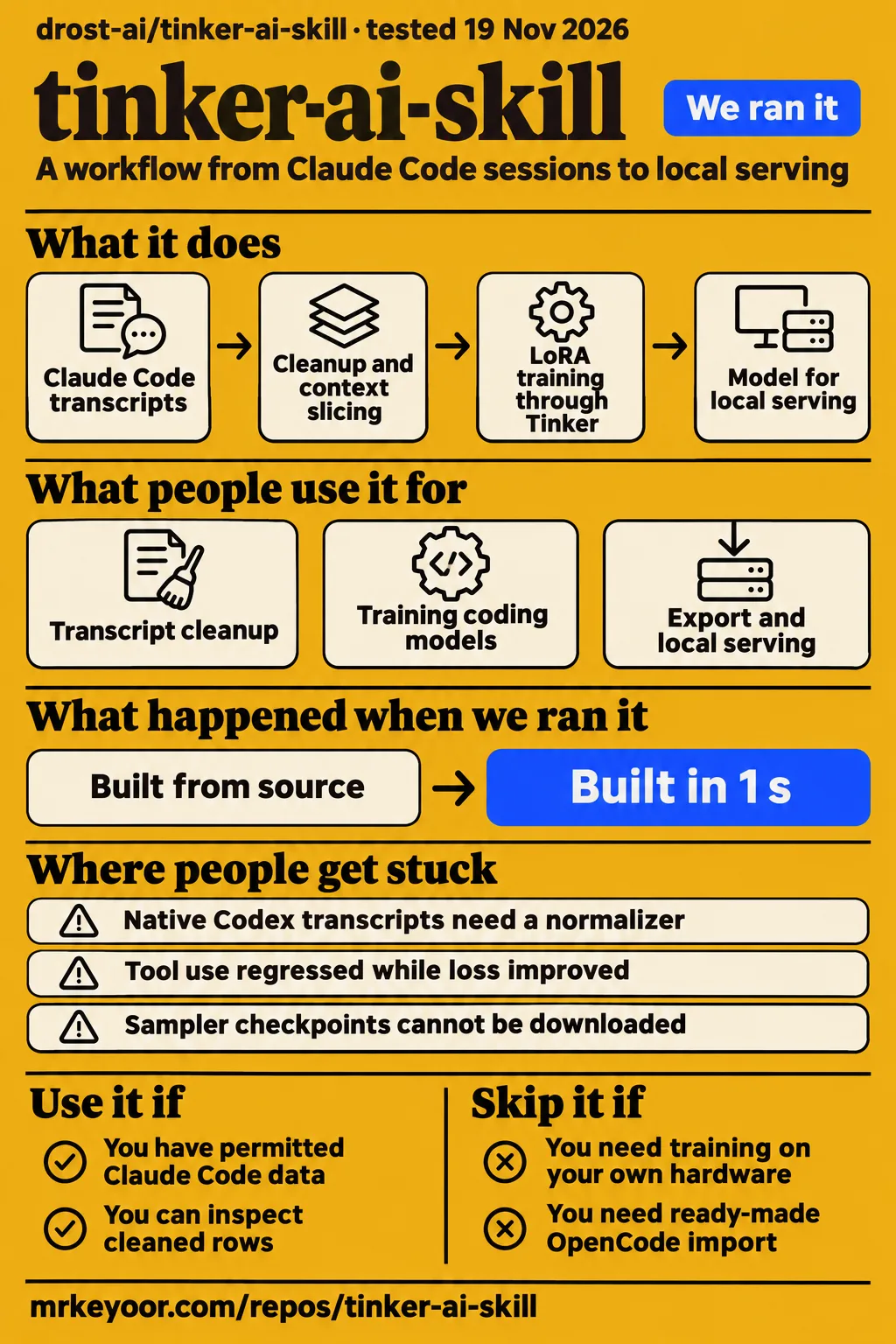
Short answer: use it when you can own the training decisions
Our run installed tinker-ai-skill in 48 seconds and completed its build step in 1 second. Use it if you have Claude Code sessions worth learning from, permission to use them, and someone who can judge the trained model's tool behavior. Skip it if training data must stay entirely on your own hardware: training and sampling call Tinker and cost money. The repository supplies a procedure; the operator chooses the data, model, tools, budget, and checkpoint.
tinker-ai-skill documents a Claude Code transcript-to-LoRA workflow, followed by export and local serving. A LoRA is a set of trained model adjustments that can be merged into the base model. The README's recipe pays particular attention to coding-agent conversations: tool calls must retain their results, long sessions need continuation context, and training rows need the system prompt and tool definitions intended for serving. Those are concrete reasons to consider this recipe when your starting material is coding history.
What people use tinker-ai-skill for
The authors report that this method produced the open-weight Tess-4-27B and Tess-4.5-27B releases. Their README calls this repository the cleaned-up version of that pipeline. That gives the workflow an author-reported use case: learning coding-agent behavior from the authors' own Claude Code sessions. It also explains why the documentation spends time on mistakes that survived apparently healthy training runs.
| Who used the method | Input | Reported outcome |
|---|---|---|
| Migel Tissera and the project authors | Their own Claude Code coding sessions | Tess-4-27B and Tess-4.5-27B, released as open weights, according to the project README |
For your own sessions, the skill instructions begin with collecting main-session transcripts and recording checksums. Normalization retains assistant text, thinking, tool calls, and selected tool-result content while removing harness noise and image bytes. The dataset builder slices conversations without separating a tool call from its answer, adds working context to continuation slices, and holds out whole sessions for validation. These are documented processing choices that address the structure of coding conversations.
The intended serving environment also shapes the dataset. The instructions accept --tools-file for the actual tool definitions of the harness that will use the trained model; otherwise, they infer minimal schemas from observed usage. That makes this workflow most useful when you already know which tools the model should call. A transcript records what happened, while the tool definitions explain the interface the model must learn to use.
What happened when we ran it
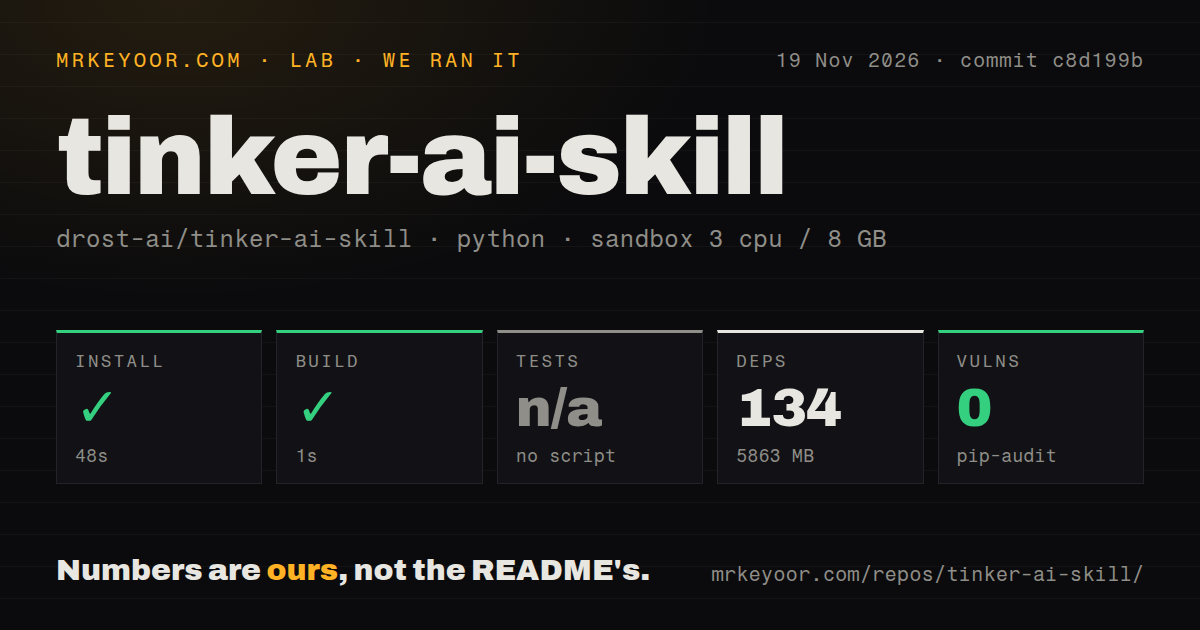
Our November 19, 2026 sandbox run at commit c8d199b installed successfully in 48 seconds and built successfully in 1 second. The environment recorded 134 dependencies and 5863 MB on disk, compared with a 0.2 MB checkout. Those measurements give a concrete installation footprint before model files enter the picture. The repository scan found 25 files, approximately 2193 source lines, zero CI workflow files, no Dockerfile, and no tests directory.
| November 19 repository check | Recorded result |
|---|---|
| Install | Succeeded in 48 seconds |
| Installed environment | 134 dependencies recorded; 5863 MB on disk |
| Build | Succeeded in 1 second |
| Tests | No tests script/target; skipped |
| pip-audit | 0 known vulnerabilities |
| Repository scan | 25 files, approximately 2193 source lines, 0.2 MB checked out |
| Development signals | 0 CI workflow files, no Dockerfile, no tests directory |
The sandbox configuration recorded 3 CPUs, 8 GB RAM, and image label ghcr.io/astral-sh/uv:python3.12-bookworm. Installation expanded the checkout into a much larger environment, so dependencies belong in the disk budget alongside the base model and merged copy. The test step was skipped because there was no tests script/target. The dependency audit reported zero known vulnerabilities; its recorded result concerns dependency advisories.
The separate November 20 attempt stopped at its safety step with this Compose-file error: unsafe repo: none of compose.yaml, compose.yml, docker-compose.yaml, docker-compose.yml exists (rule: a compose file is required). The runner required Compose, while the documented workflow starts with Python scripts. The failed step therefore identifies a mismatch between the runner's entry requirement and this repository's documented entry point.
That attempt also contains conflicting entries. Its setup entry describes deployment with its own Docker Compose and every port bound to 127.0.0.1, while the specific safety result records the missing Compose file. We classify the attempt as blocked. The teardown entry reports "teardown: ok". Keeping the failure and the conflicting setup description together prevents the generic deployment wording from becoming a successful-run claim.
Where people get stuck: matching training to the agent that will use it
Codex and OpenCode can host the skill, but their native transcripts require a custom normalizer that emits the documented per-session schema. The ready-made normalizer reads Claude Code JSONL, which stores one structured record per line. Loading the instructions in an assistant and importing that assistant's conversation history are separate compatibility questions. The later dataset stages operate on the normalized session format.
The README's troubleshooting account describes several failures from the authors' training work. These include memorized replacement identities, degraded tool use despite improving loss, missing historical thinking, context overflow after a tokenizer change, and garbled serving output. Each has a corresponding processing or serving choice in the recipe. A successful training command is therefore only one stage in the documented workflow.
| Author-reported problem | Documented response | What to carry forward |
|---|---|---|
| One fixed replacement identity was memorized | Randomize identities separately for each session | Per-session anonymization |
| Tool use regressed while loss improved | Include the system prompt and tool definitions on every row | The intended serving harness's definitions |
| Earlier reasoning disappeared into empty thinking blocks | Rebuild hybrid-thinking renderers to retain thinking in history | Matching rendering during dataset creation, training, and sampling |
| A tokenizer change moved row lengths by 14% | Rebuild the dataset for each model | That model's renderer and tokenizer |
| A usable checkpoint became garbled during serving | Match the thinking template and base-model sampling settings | The relevant serving-script flags |
A renderer converts a conversation into the sequence the model reads, and a tokenizer divides that sequence into the units the model processes. The authors' 14% row-length change explains why rebuilding for each model matters even when the human-readable conversation looks unchanged. The instructions also record that falling loss concealed a behavioral regression twice. They call for comparing base-model and checkpoint outputs on actual work prompts, judging valid tool calls, retained thinking, and obedience to the system prompt.
Learning-rate selection is another operator decision. The skill instructions use Tinker's calibrated default for Qwen and Llama, but require an explicit --learning-rate for Inkling, Nemotron, DeepSeek, Kimi, and GLM. They recommend comparing short runs by behavior. That distinction belongs beside checkpoint selection because both decisions affect what the trained model does, rather than merely whether the training process completes.
Privacy checks still need you to read the cleaned rows
The anonymizer checks listed identity strings and credential candidates, and the instructions require human inspection afterward. It replaces credentials by value across the corpus, then assigns each session its own random identity. The identity file supplies names, emails, handles, organizations, and domains for replacement. A documented exception flag can preserve a service-account username after the operator reviews the detected usernames.
Project selection comes before that cleanup. The collector accepts --exclude-slug for projects that must stay on the machine, including client work and security research. The README also requires consent before publishing a transcript-derived dataset belonging to someone else. These instructions put exclusion, identity configuration, and inspection at different points in the workflow: first decide which sessions enter the collection, then inspect what the cleanup produces.
Dataset preparation runs offline, while training and sampling contact Tinker. The workflow requires a Tinker API key; a Weights & Biases key is optional. Export and local serving require a built llama.cpp checkout, disk for the base model plus the merged copy, and RAM for the largest shard. Local serving describes the destination of the exported model, while hosted training describes where the training step runs.
Token costs and checkpoint expiry change the workload
The README's roughly $6 estimate covers 100 rows, about five million training tokens, for one epoch of 64K rows on Qwen3.6-35B-A3B. The trainer defaults to two epochs. An epoch is one pass through the dataset, and a row is a context-sized slice of a session. Counting original sessions alone therefore does not reproduce the README's budgeting assumptions.
| README estimate at November 2026 prices: one epoch of 64K rows | Training tokens | Qwen3.6-35B-A3B | Inkling 2 Small | Qwen3.8-27B |
|---|---|---|---|---|
| 100 rows | About 5M | About $6 | About $8 | About $21 |
| 1,000 rows | About 45M | About $55 | About $70 | About $185 |
These figures are the README's estimates. It lists sampling and periodic evaluation as extra costs. The offline trainer prints token counts and the resolved configuration before launch, and the instructions calculate training cost from tokens multiplied by the selected model's training price. Read the epoch setting alongside those counts: the one-epoch table and the two-epoch default describe different configurations.
Checkpoint export has a seven-day deadline for periodic training checkpoints, according to the skill instructions. Sampler checkpoints cannot be downloaded. export_checkpoint.py downloads a training checkpoint and merges the LoRA into a standalone Hugging Face model, with an optional PEFT adapter. The following script converts and quantizes the model into GGUF for llama.cpp. Checkpoint selection and export scheduling therefore belong in the same plan.
tinker-ai-skill vs a generic SFT tutorial, Tinker Cookbook, and TRL
tinker-ai-skill focuses on coding-agent transcripts, while its README positions session cleanup, compaction, tool definitions, and matched serving as reasons to choose it over a generic supervised fine-tuning tutorial. That is the authors' workflow argument. The practical choice is whether to follow their transcript recipe or assemble a procedure from broader training components.
| Option | Why choose it | Work you take on |
|---|---|---|
| tinker-ai-skill | Follow a documented Claude Code transcript-to-local-model recipe | Review identities, supply real tools, select the model and checkpoint |
| Generic SFT tutorial | Learn or design an example-based training procedure | Add the transcript-specific processing emphasized by this project's authors |
| Tinker Cookbook | Work with fine-tuning examples and common abstractions on the Tinker API | Design the transcript-processing procedure around those components |
| TRL | Use supervised fine-tuning and other post-training methods in the Transformers ecosystem | Choose a trainer and assemble data preparation and execution |
Tinker Cookbook provides realistic fine-tuning examples and common abstractions on the Tinker API. Its own README describes supervised-learning and reinforcement-learning recipes, along with reusable rendering and training components. tinker-ai-skill already builds on it. Choose the cookbook directly when you want to design the procedure around those components rather than follow this particular transcript workflow.
TRL offers SFT, GRPO, and DPO in the Transformers ecosystem. The TRL README describes dedicated trainer classes for custom datasets and support for distributed training. Choose it when those training methods and that ecosystem fit the procedure you intend to build. The comparison concerns documented scope: a focused transcript recipe, its underlying Tinker components, and a broader post-training library.
Outdated claims, corrected
The work-log training video's approximately $6-per-session wording differs from the README's estimate for 100 rows. The video transcript attributes that price to the author, while the written cost table specifies one epoch of 64K rows, about five million training tokens, and Qwen3.6-35B-A3B for the roughly $6 example. Those units are the useful correction; the transcript also contains caption errors.
RRweb3's X post describes roughly $6 for 100 coding-agent sessions. The README says 100 rows, and the builder slices long sessions into model-sized rows. Sessions and rows therefore refer to different things in this workflow. The resolved token count, selected model, and epoch setting provide a firmer budgeting basis than either short social summary.
TypingMind says bundled files are read-only and never executed. That describes its handling of skill resources. The repository's workflow requires Python and shell scripts for preparation, training, export, and serving. Installing instructions in a chat makes those instructions available to the model; the executable stages remain the stages described by the repository.
The README's "fail if anything leaks" shorthand should be read alongside the narrower SKILL.md procedure: checks for listed identity strings and credential candidates, followed by inspection of anonymized rows. The precise procedure tells the operator what the automated check looks for and what must happen next. It is more useful than treating the short README phrase as a complete description of data review.
The name also overlaps with other products. Thinking Machines' Tinker documentation describes a training API; this repository identifies itself as an independent guide built on Tinker and tinker-cookbook. The unrelated TINKER desktop application's installation guide concerns plugin tools and a tray-menu skill installer. Its installation steps concern that application's skill, rather than this fine-tuning recipe.
Questions people ask
The instructions require project exclusions and inspection of anonymized rows before training. That answers the work-log video's privacy question with concrete actions: choose which records enter the dataset, configure identity replacement, and read the cleaned results. The skill instructions also make behavior checks part of checkpoint selection, so data review and model evaluation have separate jobs.
If you trained an AI on your own work records, what would matter most to you?
Privacy and useful tool behavior are the priorities in our recommendation. The video asks about using personal work records after mentioning names and nicknames. The documented response is to exclude sensitive projects, supply identities for replacement, inspect cleaned rows, and compare base and trained models on real prompts. Those actions connect the question to decisions the operator can make before and after training.
Is your .claude folder included in your .gitignore?
This project's README lists generated data, runs, exports, tracking files, and .env as ignored paths. It does not promise that every repository ignores its entire .claude folder. The question appears in the recorded X discussion; the answer for a particular checkout comes from that checkout's ignore rules and tracked files. The README's list describes this project.
Is tinker-ai-skill free to use?
The skill is MIT-licensed; training and sampling use the paid Tinker service. The README documents offline dataset preparation and a synthetic-transcript walkthrough, while the skill instructions identify the service calls and requirements. Export and local serving also require model files and a llama.cpp environment. The software license and the cost of running the training service are separate parts of the decision.
What we have not tested yet
Our run measured installation and build at commit c8d199b; it did not complete transcript preparation, paid training, checkpoint evaluation, merging, quantization, or local serving. The synthetic-data walkthrough also remains outside our execution results. The blocked Compose attempt produced no known-answer task results, memory profile, or model screenshots, and its conflicting setup entry needs reconciliation before supporting a deployment claim. Actual runtime and operating-system versions require the raw toolchain logs; the image label records configuration.
Anonymization recall, surviving sensitive information, checkpoint quality, and matched comparisons with the alternative training routes remain unmeasured here. We also lack an all-in bill and total elapsed time covering preparation through serving. The authors' Tess release account supports an attributed history of the method, rather than an independent evaluation of the packaged skill. The video and social material discussed above contain introductions and questions rather than independently reproduced training outcomes.
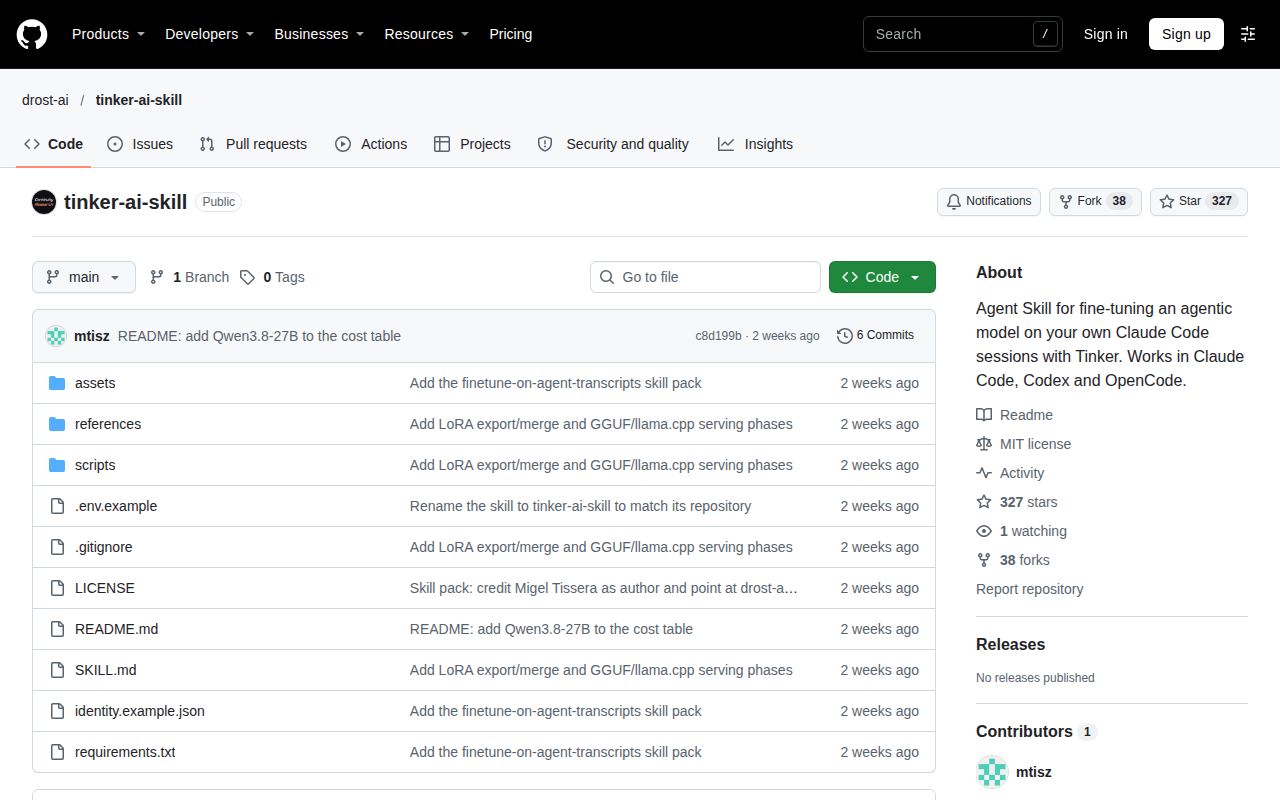
The November 20 GitHub snapshot records 327 stars, zero open issues and PRs, and a last push on November 7, 2026. The latest-release value is null, which leaves release status unresolved. Those metadata do not provide a support-response history. For an initial evaluation, the README's synthetic transcript offers a documented starting point before real work logs enter the workflow.