Short answer: inspect the download claims before choosing a workstation
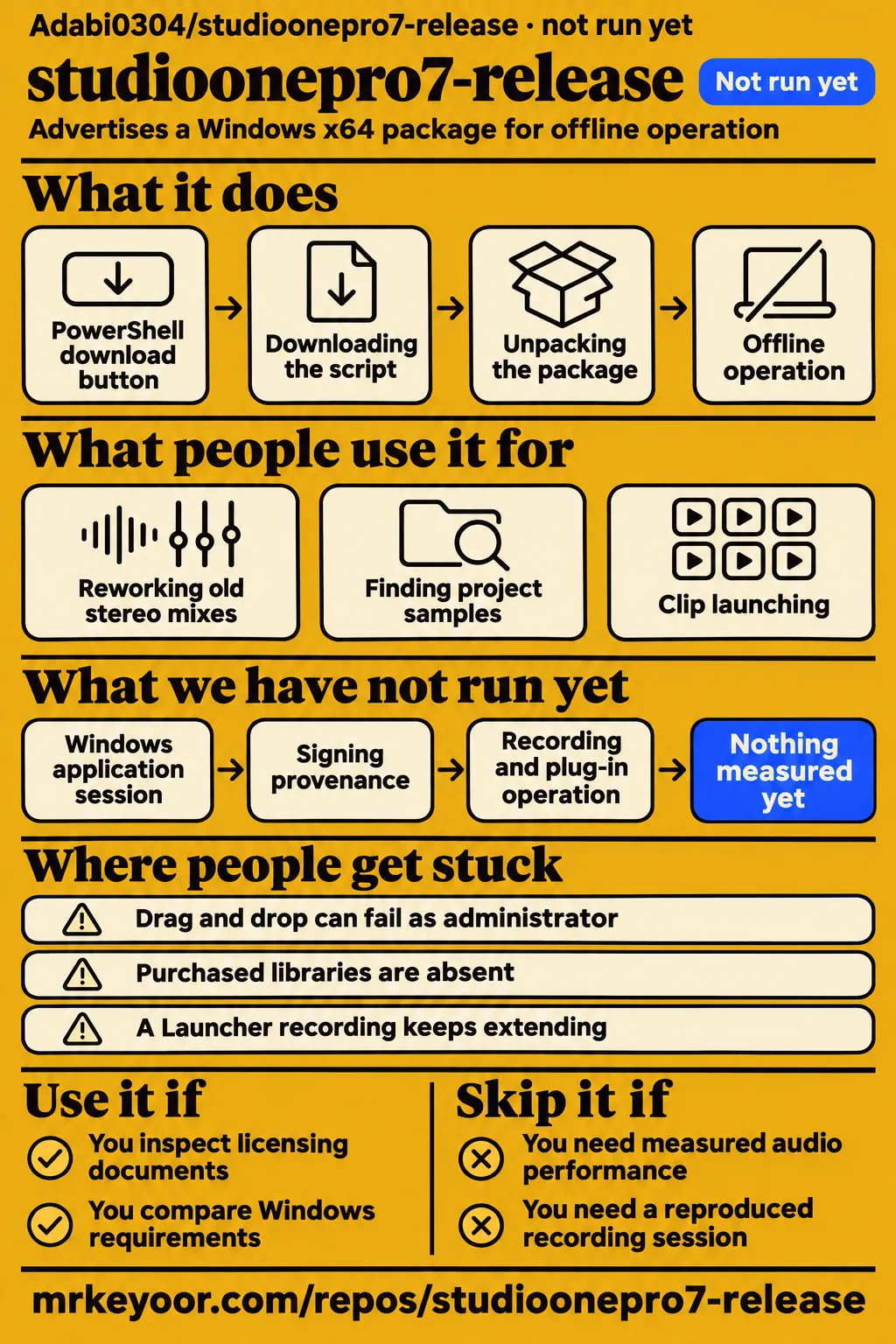
Adabi0304/studioonepro7-release received NOT RUN at commit 1064e48; use this review to inspect its download claims, rather than to choose a demonstrated recording workstation. The repository advertises a Windows x64 package, while the commercial reviews discussed here assess PreSonus Studio One Pro 7. Those are separate subjects. Musicians choosing recording software should start with the vendor's distribution and documentation; readers investigating this GitHub listing can compare its requirements, licensing language and recorded setup outcome below.
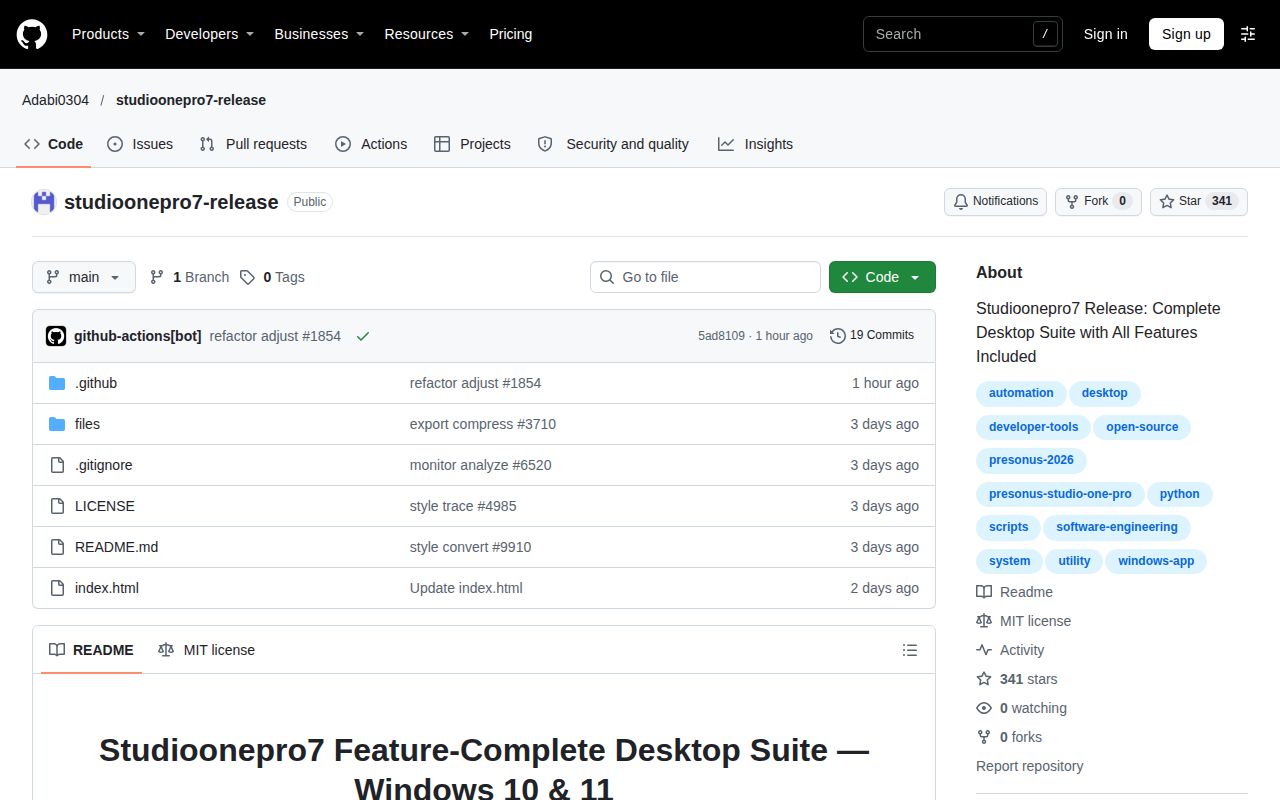
The repository README presents a PowerShell download button and calls the package complete, self-contained and ready for offline operation. It also describes signing, integrity checks, silent deployment and configuration migration. These are the author's descriptions of the package. Our review's original result is narrower and concrete: a 2-second harness check ended at ecosystem detection, and a separate deployment route failed its Compose prerequisite. That makes the download description, rather than audio performance, the useful starting point.
What people use studioonepro7-release for
Commercial Studio One Pro 7 reviewers used stem separation, sample search and clip launching for specific music tasks. Robin Vincent described reworking old mixes and finding samples; Hollin Jones tested separation on dense recordings; MusicRadar explored clips alongside the timeline. Their accounts help explain the workflows behind interest in the product name. Each use case below retains the reviewer and source so readers can distinguish a listening judgment from a repository setup result.
| Who used the commercial DAW | What they did | What happened |
|---|---|---|
| Robin Vincent, Sound On Sound | Reworked old stereo mixes | He found separation useful for reworking mixes, isolating samples and developing ideas. |
| Hollin Jones, MusicTech | Separated dense recordings, including Coldplay tracks | Vocal harmonies produced artifacts and phasing. |
| Robin Vincent, Sound On Sound | Used Search With Sound to find project samples | He started a seven-day Splice trial to try the results. |
| MusicRadar's reviewer | Used the Launcher alongside the timeline | Clip launching was intuitive and quantized well, with track handoffs between the two views. |
The useful distinction between these tasks is the material the musician starts with. Stem separation works on an existing recording; Search With Sound searches for material to add; the Launcher changes how clips and a timeline share playback. MusicRadar describes an arrow on each track that hands responsibility between the timeline and Launcher. That is a concrete arrangement operation, allowing a few elements to run as clips while the rest of the timeline continues or loops.
What happened when we ran it
Our harness took 2 seconds at commit 1064e48 and recorded NOT RUN, producing no installation, build or test result. The November 24, 2026 check reported no supported ecosystem for HTML and no Dockerfile. We measured the duration of that harness check, rather than a Windows installation or application launch. Its configuration listed 3 CPUs, 8 GB RAM and image n/a, which describe the sandbox allocated to the check.
| Lab check | Recorded result | What you can conclude |
|---|---|---|
| Repository execution | NOT RUN; harness duration 2 seconds | Ecosystem detection ended without an installation, build or test result: HTML had no supported ecosystem and no Dockerfile existed. |
| Sandbox configuration | 3 CPUs, 8 GB RAM, image n/a | These fields describe the configured sandbox. |
| Actual runtime versions | The measurement says raw toolchain logs are required | The image field is n/a and supplies no runtime version. |
The separate deployment step recorded "hands-on step safety: FAILED; unsafe repo: none of compose.yaml, compose.yml, docker-compose.yaml, docker-compose.yml exists (rule: a compose file is required)". This failure identifies the exact missing filenames and the deployment rule that stopped the operation. A Compose requirement belongs to that deployment route; the README describes a Windows desktop package. The error therefore explains why this route stopped without diagnosing the advertised desktop application.
The run summary nevertheless says "deployed with its own docker compose on our lab server, every port bound to 127.0.0.1". That wording conflicts with the failed prerequisite and the harness's NOT RUN status, so the successful-deployment summary is rejected. The last operation records "teardown: ok". Cleanup succeeded in the record; the sequence contains a failed safety step and a contradictory deployment description, rather than a supported successful launch.
Where people get stuck: installation and creative workflow
PreSonus identifies administrator mode as a likely cause of Windows drag-and-drop failures in Studio One. Its support article directs readers to Studio One.exe in C:\Program Files\PreSonus\Studio One 7, then Properties, Compatibility, and the option "Run this program as administrator." The instructions say to clear that option and close and reopen Studio One. This is a vendor troubleshooting procedure tied to a specific Windows setting.
| Problem in the commercial DAW | Documented response | Status of that response |
|---|---|---|
| Purchased libraries are absent or activation fails | Keep library and Studio One registrations in the same account; PreSonus directs split-registration cases to support for a license transfer. | Vendor troubleshooting guidance |
| Instruments, stem separation or Splice components are missing | MusicRadar describes returning to PreSonus online to download individual missing components. | Reviewer's described installation route |
| A Launcher recording keeps extending | Vincent describes stopping manually or using recording and playback key commands. | December 2024 workflow finding |
| A hardware knob cannot overdub Launcher automation | Vincent describes capturing automation initially, editing modulation lanes or importing timeline events containing automation. | Alternatives described by the reviewer |
Account recovery is a separate problem from installing missing content. The note.com author ちゃんずえずえ reports losing access exactly one year after upgrading from Studio One 6 Artist to 7 Pro, with the product absent from the account listing. The article describes using the upgrade account and an activation code as part of recovery. Its proposed explanation involves different account addresses; the author's own heading labels that explanation "Speculated Cause."
What the README gets wrong about prerequisites
The README says no external runtime dependencies are required, but its Windows FAQ names a .NET desktop runtime. The same README also gives a 4 GB RAM minimum and recommends 8 GB or more for larger projects. Those are advertised requirements, distinct from our sandbox's 8 GB allocation. A reader preparing a Windows machine encounters two different descriptions of runtime prerequisites on one page.
The network wording describes two stages rather than a contradiction: internet access is listed for downloading the script, while offline operation is described after unpacking. Likewise, the redistribution wording prohibits activity outside the distribution terms and later permits unmodified redistribution subject to conditions. The correction is specific: the runtime descriptions conflict, whereas conditional redistribution and an initial network download can coexist with the surrounding statements. This reading avoids turning every qualification in the README into an inconsistency.
The README and LICENSE name different terms
The README names the Studioonepro7 Release License, while the repository's LICENSE file contains MIT terms credited to Fast Dev. The README license section describes a non-exclusive, non-transferable installation right, conditions for redistribution and restrictions on the name and branding. The LICENSE file grants MIT permissions subject to retaining its copyright and permission notices. These documents use different terms rather than a single consistent license description.
The README permits redistribution of an unmodified package when its license text stays intact and the distribution is not presented as official. It permits modification for personal or organizational use but restricts redistribution under the Studioonepro7 name. MIT, meanwhile, expressly includes rights to modify, distribute, sublicense and sell copies subject to its notice condition. Listing the permissions side by side is more useful than treating GitHub's MIT label as a complete explanation of the downloaded package's terms.
GitHub metadata records attention and repository activity
GitHub metadata observed on November 24, 2026 lists HTML, 341 stars and zero open issues and pull requests for Adabi0304/studioonepro7-release. The repository metadata records a push at 21:04:48 UTC that day. The harness examined commit 1064e48, whose recorded commit date is November 24, 2026 at 10:49:00 UTC. These timestamps identify separate observations rather than implying that the later repository state was the state checked by the harness.
The latest-release field is null, and the README points to a PowerShell download route. A null lookup value is different from an HTTP 404 or an inventory of available downloads. The recorded X search returned an empty data array. Together, these observations describe what the metadata and search returned: a repository with recorded attention, a download description in its README and no discussion returned by that particular X search.
Commercial Studio One Pro 7 vs alternatives
Reviewers compared commercial Studio One Pro 7 with FL Studio, Logic Pro, Ableton Live and Cubase Pro 14 on named features. Sound On Sound compared separation results; MusicTech discussed separation and scoring; MusicRadar described the Launcher alongside Ableton's Follow Actions. The table organizes those judgments by the task that would make each comparison useful. Its recommendations follow the reviewers' attributed observations rather than assigning an overall winner across unrelated music workflows.
| Alternative | What the reviewer found | When it should affect your choice |
|---|---|---|
| FL Studio | Vincent found broadly similar separation, with FL Studio sometimes isolating vocals better and both leaving artifacts. | Vocal extraction is a deciding task. |
| Logic Pro | Jones judged its separation more effective than Studio One's. | Separation quality drives the purchase. |
| Ableton Live | MusicRadar identified Follow Actions as an extra absent from the Studio One Launcher it reviewed. | Automatic clip progression is part of the arrangement. |
| Cubase Pro 14 | Jones identified it as the closest feature comparison and noted advanced score editing. | Preparing scores is central to the work. |
For separation, the reviewers describe differences in degree rather than clean extraction from every recording. Vincent's FL Studio comparison says results varied with source material and that all the compared results suffered separation artifacts. Jones heard artifacts and phasing in dense vocal harmonies. The purchase question is therefore whether the material you need to extract resembles those examples, and whether the resulting audio is intended for rebuilding a mix, sampling or a finished exposed part.
What the other reviews get wrong
PreSonus's launch terms include one year of new feature releases with each perpetual purchase, qualifying MusicRadar's blanket update wording. MusicRadar says buyers receive every Studio One Pro 7 update, while the vendor announcement specifies the one-year feature-release period. A perpetual license and entitlement to subsequent feature releases answer different purchasing questions. The dated launch terms supply the missing duration in that comparison.
MusicTech's score-editing criticism also needs narrower wording. The review lists integrated score editing among omissions but also describes notation, score editing and printing tools. Its comparison with Cubase concerns the depth of scoring functionality. Magnetic Magazine's claim that Studio One Pro 7 delivers every tool needed for complex live performances is similarly too broad beside Vincent's specific recording-length and automation findings. Those operations give readers something concrete to assess instead of a completeness promise.
FAQ
A perpetual Studio One Pro 7 purchase included one year of new feature releases under PreSonus's launch terms. That is the concrete distinction behind the licensing question below. The remaining questions address separation, Splice access and a documented Windows interaction problem. Each comes from recorded reader questions or the research synthesis, and each answer stays with the named announcement, reviewer account or support instructions rather than extending their findings to another release.
How do perpetual licenses, annual Pro+ plans and monthly subscriptions differ?
PreSonus's launch announcement includes one year of feature releases with a perpetual purchase and describes an option with 12 months of Pro+ extras. The announcement names cloud tools, content, samples and partner offers among those extras. MusicRadar describes monthly subscription access as lasting while the subscription is active. The useful distinction is the duration of the feature entitlement and additional services, alongside the perpetual license itself.
How well does Studio One Pro 7 stem separation work?
Jones heard artifacts and phasing in dense vocal harmonies, while Vincent found separation useful for reworking mixes and extracting samples. The MusicTech account and Sound On Sound account describe results that depend on the recording. Vincent's comparison sometimes favored FL Studio for vocal isolation, with artifacts across the compared tools. These listening accounts support extraction as an editing aid rather than a promise of perfectly isolated material.
How does Splice integration work, and do I need another subscription?
Search With Sound finds sounds from project audio, and PreSonus announced selected free samples without a Splice subscription. Vincent started a seven-day trial during his Search With Sound test. He described an Included filter in ordinary browsing but no equivalent filter within Search With Sound. The launch announcement describes sample entitlement; his account explains why finding a matching result could still lead to a premium-content prompt.
Why is dragging files into Studio One not working on Windows?
PreSonus says running Studio One as administrator is a likely cause of Windows drag-and-drop failures. Its support procedure changes the executable's Compatibility setting, then closes and reopens Studio One. The named control is "Run this program as administrator." This answer supplies the vendor's specific troubleshooting path; the word "likely" comes from its diagnosis and leaves room for drag failures with a different cause.
What we have not tested yet
commit 1064e48 produced no Windows application session; package execution, binary contents, signing provenance, security, recording and plug-in operation remain untested here. The downloaded application's identity, maintainers, relationship to PreSonus, distribution authority and applicable license scope are unresolved. Commercial review findings concern the vendor's application. Installation success, code quality, actual repository users, support outcomes and application maturity need evidence from this distribution before they can support a recommendation to execute its download.
Windows on Arm has a separate documented boundary: PreSonus describes version 7.2 or higher as a public beta primarily for plug-in developers, with no Arm-related support. Its guidance requires native Arm64 plug-ins and lists unavailable features including Splice and Melodyne integration. It also says Arm64 and x86 installers default to the same program folder, recommending one installed version or explicitly separate folders. Neither Windows installation route was assessed in this review.
Later releases were not checked against Vincent's December 2024 Launcher and Splice findings. The access-loss report's frequency and cause are unresolved, and its account-deletion suggestion is not adopted as troubleshooting advice. The official What's New page returned storefront text rather than usable feature documentation. Current purchasing terms, rendered layout, assets, keyboard behavior, automatic related links and recommendation modules also fall outside this assessment. The next useful evidence would identify the release artifact, explain its distribution rights and record a Windows session naming the package executed.