mrkeyoor.com_
Tue 20 Oct 10:39 UTC
Dev Toolsevaluationupdated 16 Oct 2026

serverless review

Serverless Framework deploys application code and the AWS resources it needs from a service configuration file. It helps you ship APIs and event-driven jobs without wiring each resource together by hand, though v4 requires CLI authentication and includes proprietary components.

+7stars / 7d
Verdict

Our Serverless source install pulled 869 packages and used 518 MB, then its test command failed after 166 seconds with a packaging suite failure in the log. Use it for AWS applications when its service configuration saves enough infrastructure work to justify mandatory CLI authentication and the distribution's licensing. Resolve the packaging failure on your chosen revision before adopting it as a deployment standard, and choose another tool if multi-cloud support or an entirely permissive distribution is mandatory.

We ran it

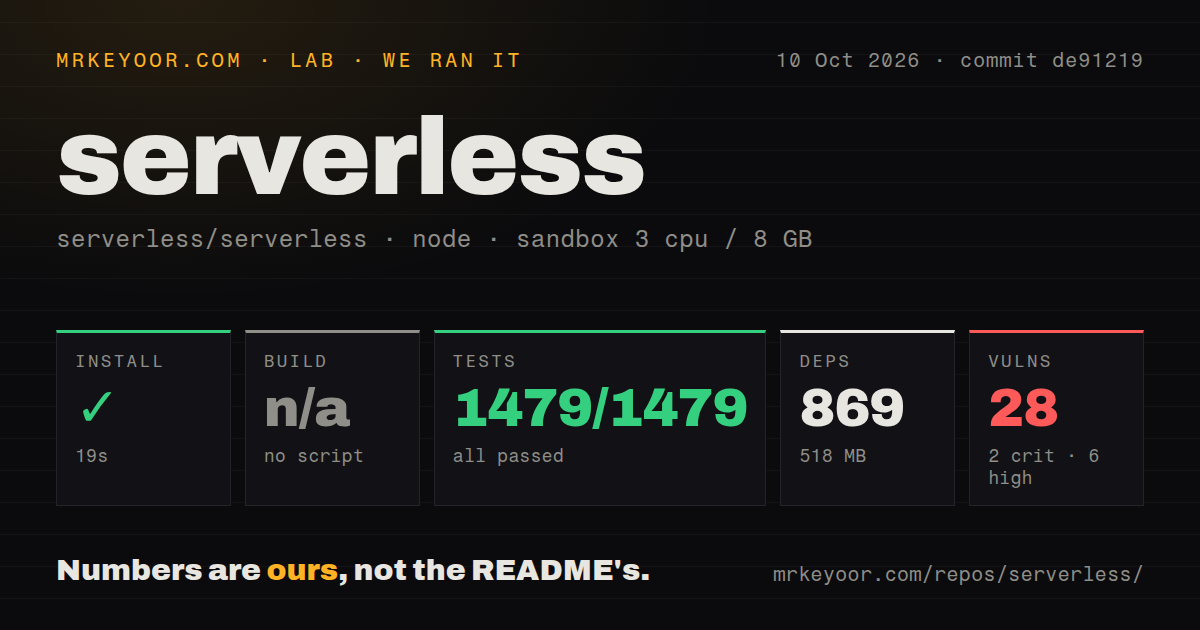
Lab card: what happened when we ran serverlessScreenshot of serverless (serverless.com)
Install✓ · 19s869 packages · 518 MB
Buildn/ano build script
Tests✗ · 166s1479 passed · 0 failed of 1479 (jest)
Known vulns282 critical · 6 high · 19 moderate · 1 low (npm audit)
Repo2242 files~279,792 lines of source · 12.6 MB · 11 CI workflows

Answers from our run

Does serverless build from source?

Dependencies installed in 19 seconds (869 packages), and the project has no separate build step. We cloned commit de91219 into a clean Debian container with 3 CPUs and no project-specific setup.

Do serverless's tests pass?

No. The project's own test command finished in 166 seconds and reported 1479 passed, 0 failed (jest).

Does serverless have known vulnerabilities in its dependencies?

npm audit flagged 28 known advisories in the dependency tree, including 2 critical at the time of our run.

Who should not use serverless?

Teams requiring an entirely permissive distribution: the README says the npm product includes proprietary software, even though parts of the source remain MIT-licensed.

What are the alternatives to serverless?

AWS SAM CLI, AWS CDK, Pulumi. Our Serverless source install pulled 869 packages and used 518 MB, then its test command failed after 166 seconds with a packaging suite failure in the log.

Setup3/519-second source install; AWS and CLI credentials still required
Docs4/5Useful service examples and explicit v4 migration requirements
Community5/546,924 stars, recent fixes, and October 15 repository activity
Maturity3/5Active AWS tooling; measured packaging failure and 28 audit findings

Discussed on

  1. hnServerless DNS: Self-hosted DNS resolver at the edge262 points
  2. hnServerless-registry: A Docker registry backed by Workers and R2169 points
  3. hnShow HN: Serverless Postgres159 points
  4. hnRethinkDNS Resolver That Deploys to CF Workers, Deno Deploy, Fastly, Fly.io106 points
  5. hnShow HN: RealtimeApp – Deploy a realtime app using serverless components98 points

Who it’s for

Developers shipping Lambda APIs or scheduled jobs who want code and infrastructure deployed together.
AWS teams that need stage-specific configuration and shared outputs across services.
Teams comfortable with Serverless authentication and licensing who want live development events routed to local handlers.
Existing Serverless users prepared to review v4 credentials and plugin compatibility before upgrading.

Who it’s NOT for

Teams requiring an entirely permissive distribution: the README says the npm product includes proprietary software, even though parts of the source remain MIT-licensed.
Organizations that prohibit deployment tools from requiring vendor authentication: v4 requires CLI sign-in, including credentials for noninteractive pipelines.
Teams seeking one deployment framework across several clouds: the README says v4 deprecated non-AWS providers.
Developers expecting Dev Mode to be an offline AWS emulator: it routes real events from a deployed stage, and the README limits it to development or personal environments.

Setup reality

Our sandbox installed commit de91219 in 19 seconds, adding 869 packages and using 518 MB. No build script or target was found, so that step was skipped. Tests exited 1 after 166 seconds. The log names zip-service.test.js and reports 1 failed test with 4,416 passing tests, despite a separate headline summary listing 1,479 passes and zero failures. Npm audit reported 28 vulnerabilities: 2 critical, 6 high, 19 moderate, and 1 low.

Deploying needs an AWS account, authorized AWS credentials, a service configuration, and Serverless CLI authentication. Dashboard features are optional, but authentication remains required. Noninteractive pipelines need an access key or license key. Installing source dependencies in our container did not demonstrate a working cloud deployment.

The README requires Node.js 18.17.0 or newer for the CLI. Dev Mode uses real deployed resources and is intended for development stages. Automatic updates need an explicit version policy through frameworkVersion. The npm distribution includes proprietary components, so check its terms before standardizing on it.

AWS deployment gets simpler, but v4 requires a sign-in

Run serverless deploy and the framework updates your application code and the AWS resources around it together. A serverless.yml file describes functions, their triggers, and supporting infrastructure such as database tables. That's a useful deal for a developer shipping an HTTP API or scheduled job. Before accepting it, read the README's authentication and licensing sections: v4 requires CLI authentication, and the distributed npm product includes proprietary software.

Our source checkout installed 869 packages and occupied 518 MB. That measures the contributor environment, so don't treat it as the footprint of the globally installed CLI. It does show that working on the framework means maintaining a substantial Node workspace. The larger adoption question is whether its AWS workflow saves enough work to justify another vendor relationship alongside your cloud account.

One service file can describe an API and its infrastructure

The README's service example puts a Lambda application and its supporting AWS resources under one configuration. You can keep a small application together, then use Compose to order deployments and pass outputs between services when it grows. I like that the README recommends starting with a single service until splitting it becomes necessary. There's no reward for turning a small API into several deployment units prematurely.

The 12.6 MB checkout contained 2,242 files and roughly 279,792 source lines. Users needn't learn that whole implementation: the service file is the interface. Stage-specific parameters let development and production share a definition, while per-function permissions can limit what each handler accesses. Read the generated infrastructure changes with serverless diff before deploying. Shorter YAML still creates real AWS resources, with their own permissions and bills.

What happened when we ran it

Our sandbox installed commit de91219 in 19 seconds on October 10, 2026, adding 869 packages and using 518 MB on disk. We used a fresh Debian container with 3 CPUs, 8 GB of RAM, the lab-node:22 image, no secrets, and no elevated privileges. The build step was skipped because the run found no build script or target. That is a skipped step, not a successful build.

The test command exited 1 after 166 seconds. Its log names test/unit/lib/plugins/package/lib/zip-service.test.js as the failing suite and reports 1 failed suite alongside 227 passing suites. That summary lists 1 failed test and 4,416 passing tests out of 4,417, with 174 passing snapshots. The supplied tail does not include the failed assertion, so it cannot establish why packaging failed.

The run's headline summary separately lists 1,479 passing tests and zero failures. Another summary in the tail lists 19 passing suites and 130 passing tests. These are distinct reported summaries, not figures we can add into a trustworthy overall total. The tail also contains a CloudWatch Alarms tool error. It doesn't establish that this error caused the packaging failure. The command's failed exit remains the finding.

Npm audit reported 28 known vulnerabilities: 2 critical, 6 high, 19 moderate, and 1 low. Those counts describe this checkout's dependency environment, without establishing an exploitable deployment path. They warrant dependency review before adoption. The run also found 11 CI workflow files. Neither those workflows nor the many passing tests turn this particular run green, and the sandbox supplied no evidence of a successful AWS deployment.

Dev Mode sends live AWS events to your local code

The sf-core@4.44.0 release, published October 14, describes Dev Mode routing a deployed stage's invocations to your working copy. Responses go back to the original callers, and handlers use their deployed environment and IAM role. That makes a queue-triggered bug easier to investigate than an isolated local invocation. It also means your laptop participates in an actual cloud application while the session runs.

Those release notes postdate our October 10 sandbox run. We haven't measured the new workflow. The README restricts Dev Mode to personal or development stages and says it refuses stages named prod and production. Use a separate development stage, check what it can access, and learn the restoration command before attaching it. A local editor doesn't make the incoming events or cloud credentials disposable.

Skipping Dashboard features does not remove authentication

The v4 upgrade guide requires authentication even for CLI use. Access keys or license keys handle noninteractive pipelines. Omitting the optional app property avoids Dashboard features, but doesn't remove that requirement. The README also distinguishes MIT-licensed source under packages/serverless from proprietary components covered at the repository root. Teams requiring an entirely permissive deployment tool have a concrete reason to choose something else.

Maintenance is active: GitHub records a push on October 15, 2026, following the October 14 release. The repository had 46,924 stars and 1,208 open issues and PRs when checked. Recent activity includes merged Dev Mode fixes, while open reports cover packaging and deployment behavior. That shows ongoing work alongside unresolved reports. Our 28 audit findings belong to the older measured checkout and should not be presented as an audit of the newer release.

Choose SAM for a narrower AWS workflow, Pulumi for several clouds

AWS SAM CLI is my first comparison for a Lambda application using SAM templates. AWS CDK fits infrastructure expressed through code and reusable constructs. Pulumi is worth comparing when the same team manages several clouds. Serverless v4 deprecated non-AWS providers, so its name shouldn't suggest a portable deployment contract. Choose it when its service configuration and AWS development loop match your work. Before making it your deployment standard, resolve the failed packaging check on the exact revision you'll maintain.

Alternatives

ProjectWhat it isPick it when
AWS SAM CLIAWS tooling for developing and deploying applications described with SAM templates.pick this instead when your Lambda application already uses SAM templates and you want to stay with AWS tooling.
AWS CDKDefines AWS infrastructure in programming languages using reusable constructs.pick this instead when infrastructure logic and reusable code matter more than a compact service YAML file.
Pulumi gh↗Manages cloud infrastructure through general-purpose programming languages.pick this instead when your infrastructure spans several clouds and you want a common programming model.

What people are saying

  1. [hackernews] Cloudflare K2: serverless event streams

Sources

  1. Serverless Framework README
  2. Serverless repository facts
  3. Serverless Framework v4 upgrade guide
  4. sf-core@4.44.0 release notes
  5. Open Serverless issues
  6. AWS SAM CLI repository
  7. AWS CDK repository
  8. Pulumi repository

More dev tools reviews

Codync · easy-vibe · guzzle · claude-code-pro-course · deck-as-controller · Seep-Reverse-Lab · the whole board →