SSH config remains the source of truth
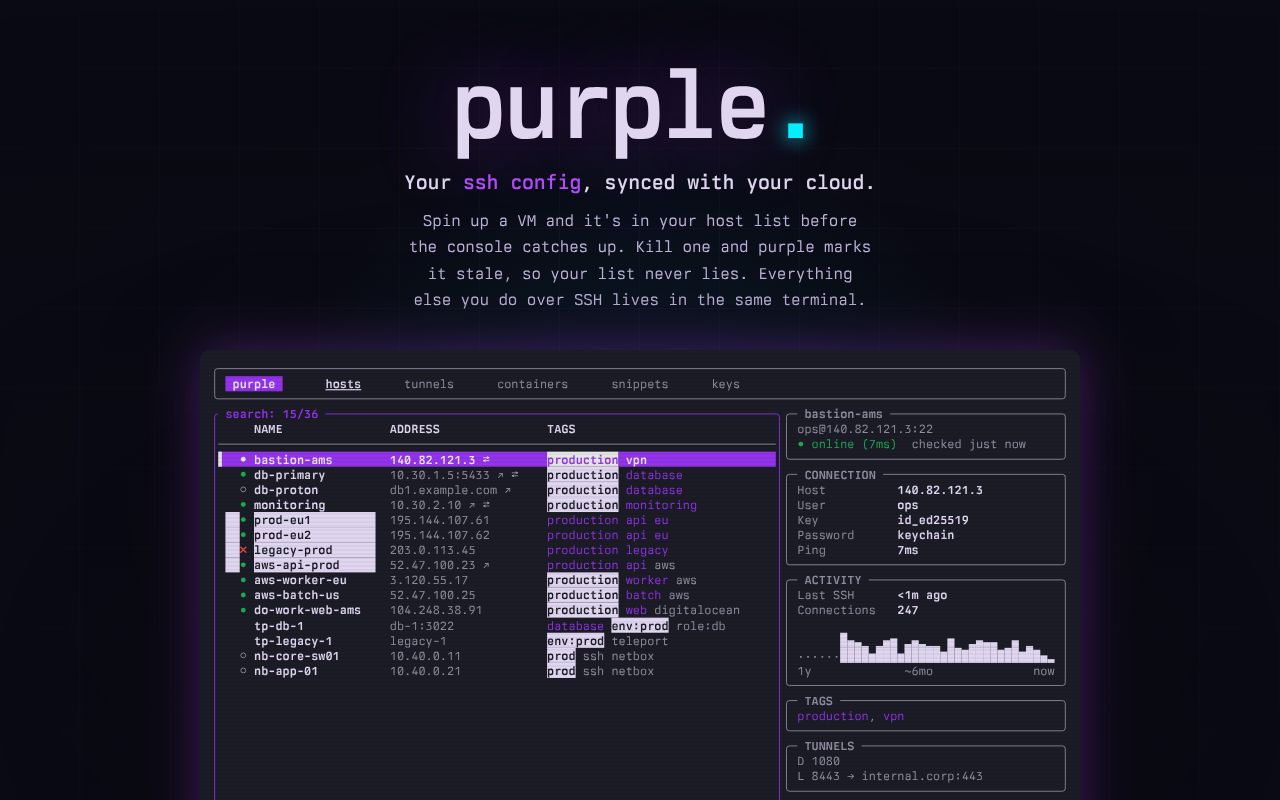
Purple reads and edits ~/.ssh/config instead of importing hosts into a private database. The README says comments, indentation, include files, and unknown directives survive edits. That choice matters because ordinary ssh, scp, scripts, and other clients can keep using the same file. Purple adds a terminal interface around it rather than forcing every connection through a new service.
The risk is equally direct: a sync or editor bug touches the file that controls access. Back it up before the first run and inspect the diff after adding a provider. Purple marks decommissioned hosts stale instead of immediately pretending they never existed, which gives an operator a chance to verify inventory changes. A local file also avoids an account dependency, though it does not remove the need to protect that machine.
Eighteen provider adapters replace manual host updates
The README documents 18 cloud and infrastructure providers, including AWS, GCP, Azure, Hetzner, DigitalOcean, Proxmox, Teleport, and NetBox. Each provider takes an API token, and multiple accounts are supported. New machines can enter the host list, changed IPs can follow the instance, and provider metadata becomes searchable tags and details.
Release v3.27.0, published August 26, 2026, added NetBox inventory. Primary IPs become host names, tag slugs become Purple tags, and site, role, platform, and status appear in the detail view. NetBox filters can restrict sync, with status=active as the default. Self-signed TLS is an option, which should be enabled only when the operator understands the trust tradeoff.
What happened when we ran it
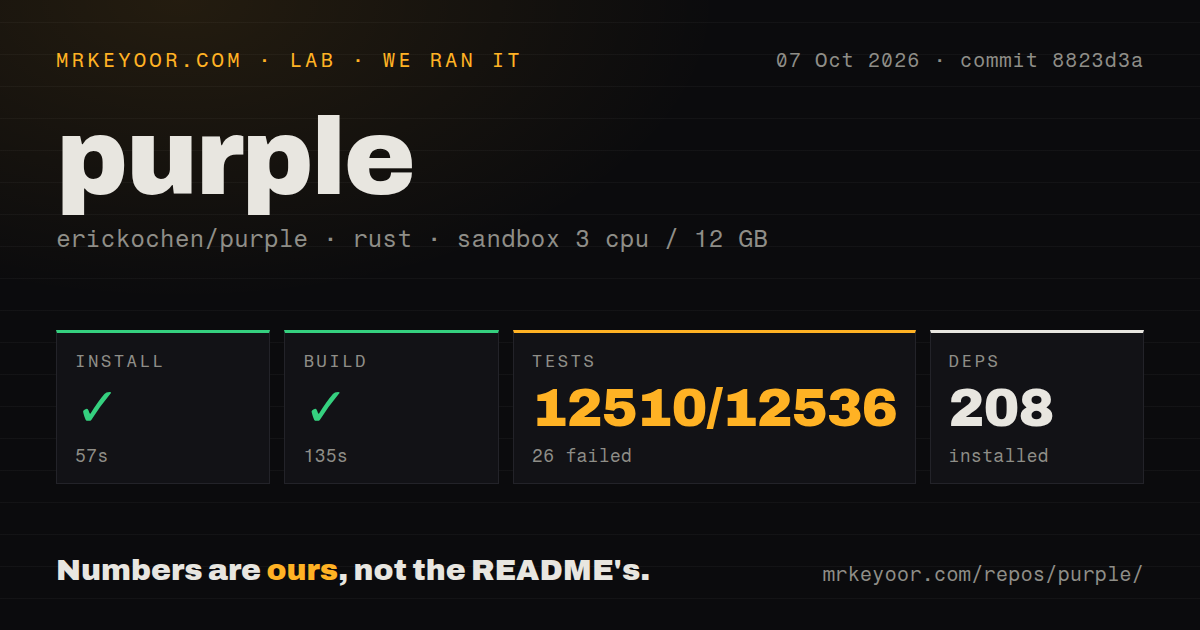
Our sandbox installed 212 Rust packages in 28 seconds and built commit c26b368 in 97 seconds. The unprivileged container had 3 CPUs, 12 GB of RAM, no secrets, and the lab's Rust image. The 21.1 MB checkout contained 522 files and about 210,702 lines of source.
Cargo test ran for 187 seconds and exited with code 101. It reported 5,834 passing tests and 6 failures out of 5,840. The failure list names ensure_vault_ssh_chain_signs_proxy_before_target plus five proxy-chain resolution cases covering cycles, comma-separated proxies, explicit ProxyJump, multiple hops, and wildcard inheritance. One assertion expected bastion before web-prod-01 but received only the target.
The log is unusually specific, so the decision impact is clear without guessing at cause. Basic compilation succeeded, and nearly all tests passed. Vault users who depend on bastions or inherited proxy rules should not treat this commit as verified. Reproduce those 6 cases with the full log and test a disposable target through the same jump topology before changing a production certificate workflow.
Remote containers work through existing SSH access
Purple groups Docker and Podman containers by host and can open shells, stream logs, stop or restart containers, run commands, and operate Compose members. It installs no agent and opens no extra remote port. That keeps the network model familiar: the local machine connects over SSH and uses whatever container permissions the remote user already has.
This is convenient for a modest fleet, not a replacement for orchestration policy. A saved snippet can run one command across several hosts, and Purple shows the blast radius before execution plus a per-snippet history. The operator still decides whether the command is safe, whether partial success is acceptable, and how to recover host 29 when 28 of 29 runs succeed.
Tunnel, file, key, and secret tools reduce context switching
The TUI includes split-pane file transfer, live views of local, remote, and dynamic SOCKS forwards, SSH key inventory, multi-host key push, and short-lived Vault SSH certificates with remaining TTL. Password retrieval can connect to OS Keychain, 1Password, Bitwarden, pass, Vault KV, or Proton Pass. These integrations bring common SSH chores into one screen.
They also enlarge the trust boundary. Purple may hold cloud tokens, read password-manager entries, edit SSH configuration, push public keys, and run commands remotely. Use the least privileged provider tokens available, keep secret-manager permissions narrow, and review its local state directories. The README supports XDG paths and Purple-specific directory variables, which helps separate configuration, data, state, and cache for backup or inspection.
MCP is safe by default but coarse when writable
Claude Desktop can install the release's MCP bundle, and the README says it starts read-only with a JSON Lines audit log. Purple also names Claude Code and Cursor as clients. Read-only access is a useful way for an agent to search hosts or inspect state without running commands. This integration requires the mcp and claude-code tags because it is directly exposed as an agent tool.
Open issue 97 describes the current permission boundary plainly: leave read-only mode on, or turn it off and permit the AI to run anything on any host. Per-tag levels for look, change, sudo, or all are a feature request, not present behavior. Keep writes disabled unless that fleet-wide authority is truly intended and separately controlled by SSH accounts.
Same-day release activity offsets the small community
GitHub showed 656 stars, 4 combined issues and pull requests, and a last push on August 26, 2026. Version 3.27.0 was released minutes before that recorded push. The repository has 6 CI workflow files, a tests directory, and an MIT license. The combined open count is not a defect count.
Purple is unusually capable for a local terminal program, and its 5,834 passing tests support confidence in much of the surface. The 6 Vault proxy failures land in a sensitive feature, so they cannot be waved away as cosmetic. Adopt it first for host discovery and read-only MCP, review every config diff, then add remote writes and certificate chains only after targeted verification.