Prettier replaces hand-arranged layout with a shared formatter
Prettier takes the long function call in its README and breaks the arguments onto separate lines. That small example captures the decision you're making: let a program choose the layout whenever someone saves a file. The parser reads your source and the printer applies Prettier's rules. Its built-in languages cover JavaScript and TypeScript alongside HTML, CSS, Markdown, and other common web files. You can use the same formatter across code and documentation.
The project behind that simple command is substantial. Our checkout contained 9,481 files and roughly 172,934 lines of source in 24.9 MB. For a team tired of layout comments in pull requests, the attraction is a shared answer to routine formatting questions. For a team attached to carefully placed line breaks, the same behavior can be a daily irritation. Agree to the printer's choices before adding it to everyone's editor.
What happened when we ran it
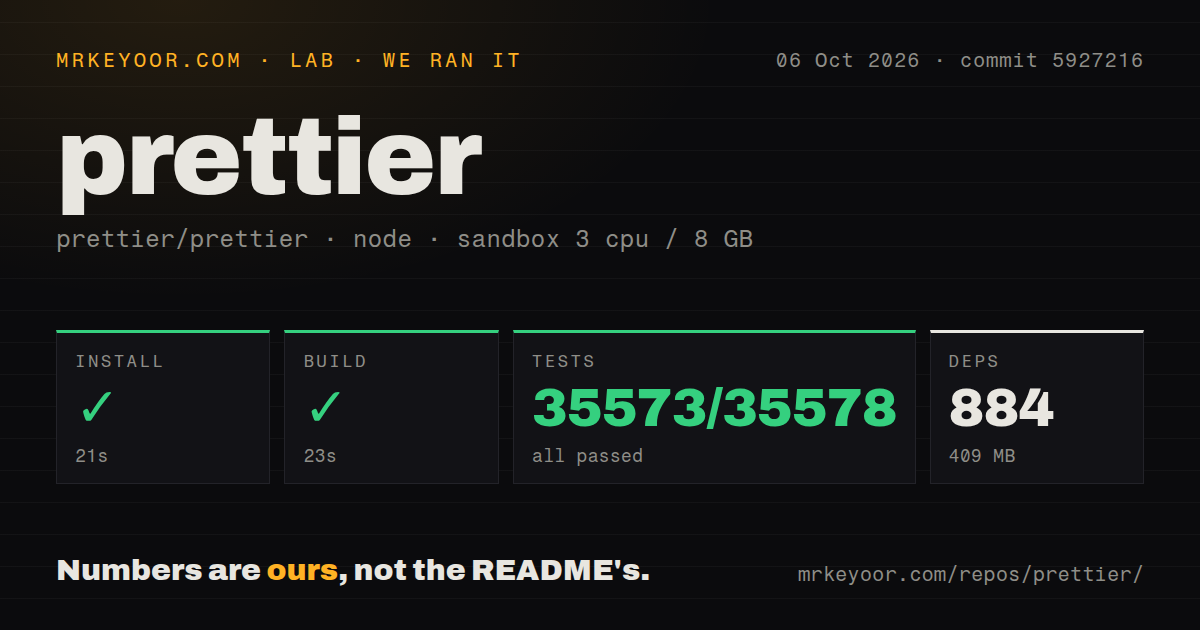
Our run installed 884 packages in 21 seconds and used 409 MB on disk, then completed the build in 23 seconds. We cloned commit 5927216 on October 6, 2026, into a fresh Debian container using image lab-node:22. The sandbox had 3 CPUs and 8 GB of RAM, ran without elevated privileges, and contained no secrets. The repository used Yarn. Both the install and build succeeded.
Jest completed successfully in 216 seconds: 35,573 tests passed, none failed, and 5 were skipped out of 35,578. Our scan found 17 CI workflow files and a tests directory, with no Dockerfile. That is useful evidence for someone considering source contributions. The result doesn't measure formatting throughput on your application, editor response time, or the behavior of every third-party plugin. Those would require their own workloads.
The 409 MB environment is a contributor cost
The 884-package install belongs to a cloned Prettier development checkout. It should not be presented as the dependency cost of adding the published formatter to an application. The official installation guide takes a different route: add an exact local development dependency and create a project configuration file. Ordinary users need neither a hosted service account nor an API key to format their files.
A source contributor can use our 23-second build and 216-second suite as a record of this particular sandbox run. They aren't promises about a laptop or another checkout. Keeping that boundary clear matters here: the large repository exists to develop parsers and printers for many file types. An application team mostly needs to decide which files Prettier should own and which version every contributor will run.
Pinning the version keeps editor and CI output aligned
Prettier's installation guide recommends an exact local version because even patch releases can change formatting. Add .prettierrc so editor integrations can recognize the project, then define exclusions in .prettierignore before formatting the repository. Generated files and build output deserve that attention. Run prettier . --check in CI to detect differences, and use --write when you intend to change files.
Our measured commit passed 35,573 tests, but that doesn't make an unpinned formatter reproducible. An editor using another release can still produce a different diff. Keep the first repository-wide rewrite separate from behavior changes so reviewers can see what happened. The ignore guide also supports comments that exclude individual syntax nodes, which helps preserve a deliberately arranged matrix without exempting its whole file.
Custom line-break policies are outside the project's remit
The option policy says new formatting preferences and requests to preserve input layout are generally out of scope. Existing options cover choices such as quotes and trailing commas, but you cannot expect a setting for every arrangement your team likes. This is a concrete reason to walk away. If a house style depends on custom alignment or particular manual breaks, evaluate a more configurable formatter.
The passing 216-second suite doesn't change that policy. Nor does printWidth enforce a strict maximum: the rationale explains that long strings and other constructs can exceed it. A repository with a hard line-length requirement will need separate checks or a different workflow. Prettier also intentionally avoids sorting imports and object keys. Those changes need another tool if your review rules require them.
Formatting leaves code-quality checks to your linter
Prettier's integration guide assigns formatting to Prettier and code-quality rules to linters. For ESLint, it recommends eslint-config-prettier to disable conflicting style rules. The guide generally discourages running the formatter through a linter plugin because that adds another integration layer and noisy diagnostics. Keeping a direct formatting command is easier to understand when an editor and CI disagree about which tool changed a file.
The 409 MB we measured also says nothing about the plugins your repository may need. Additional languages use separately installed plugins, configured through the CLI, API, or configuration file. Prettier's own passing suite cannot establish that those combinations suit your templates. Biome is worth comparing if you want formatting and linting together. dprint suits teams that want a configurable platform connecting several formatters.
October maintenance includes a Markdown parser fix
GitHub recorded Prettier's last push on October 14, 2026, with 1,442 open issues and PRs. Release 3.9.10 arrived on October 10 and included a Markdown table parsing fix. Recent activity also includes work on HTML whitespace and JavaScript comment handling. Those dates and specific changes show ongoing maintenance. The combined queue count is a workload indicator, not a count of confirmed formatter defects.
I'd choose Prettier for a web repository whose contributors will accept its layout and share an exact version. The successful source run supports that choice without settling every plugin or syntax edge case. Before enabling format-on-save across the team, format representative application files and review the diff together. If everyone wants a different exception, settle that disagreement before the formatter starts rewriting their work.