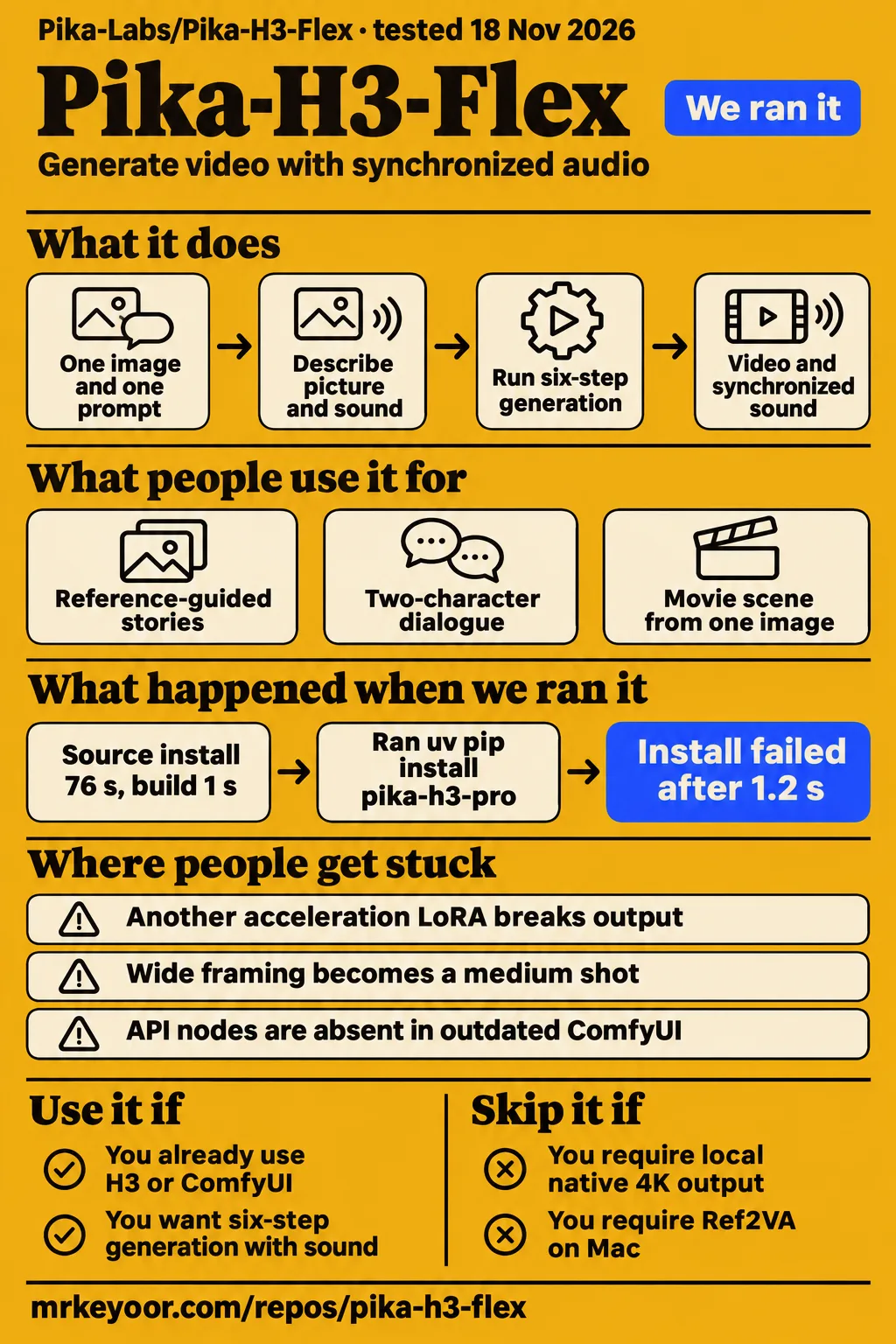
Our sandbox installed Pika-H3-Flex in 76 seconds, but pytest stopped at collection because it could not import pika_h3. For creators already running local video models, Flex is a candidate for six-step generation with synchronized sound. For operators selecting an unattended renderer, this run ends at a setup problem that needs investigation. The README's approximately 210 GB of base files plus 5.5 GB of adapters also makes model storage an early decision, separate from installing the Python environment.
This review adds repository measurements, a failed registry-install recipe, attributed Mac timings and an audio-regression report to the launch story. Our existing Pika H3 Flex release coverage explains the announcement and local-versus-hosted split. Here, the question is which workflow deserves your next trial: the official local package, a community implementation or Pika's hosted service. Their requirements and results need separate treatment.
What people use Pika-H3-Flex for
Creators report using Pika-H3-Flex for reference-guided stories, dialogue scenes and Apple Silicon rendering with synchronized sound.
| Who tried it | What they did | What their report supports |
|---|---|---|
| Mr Bizarro, the Phosphene developer | Ported FL2VA to MLX with synchronized sound | About five minutes for a 640×384, five-second clip on an M4 Max with 64 GB. Mac port report |
| RTX 4060 walkthrough author | Generated locally with 8 GB VRAM and 32 GB RAM | Reference-guided storytelling and direct generation at 0.6 megapixels. RTX 4060 walkthrough |
| Wan2GP tutorial author | Presented difficult lip-sync examples and two-character dialogue | The author's favorable assessment of those examples. Wan2GP dialogue tutorial |
| Single-image ComfyUI tutorial author | Created a movie scene from one image and one prompt | Shots, dialogue, audience sound and music generated together on the author's test GPU. Single-image scene tutorial |
The storytelling report supplies a practical reason to try reference conditioning: its author found it easier to construct stories and described generating directly at 0.6 megapixels instead of following a separate draft-and-upscale routine. The dialogue tutorials offer another starting point for creators whose shot depends on several speakers. These are attributed examples from different workflows, so choose the tutorial that matches the task and implementation you intend to use.
Kōda, posting as @aimikoda on X, shared a Halloween character clip and a frame-break effect attributed to Flex, with prompts described as available in replies. Pika supplies product-film, motion-transfer and selective-editing demonstrations, including a lip-gloss commercial and choreography transferred to a new character and setting. Pika also announced Enact as a research preview built on Flex for interacting with actors, restaging scenes and manipulating the camera. Kōda posts and Enact announcement, Pika demonstrations.
What happened when we ran it
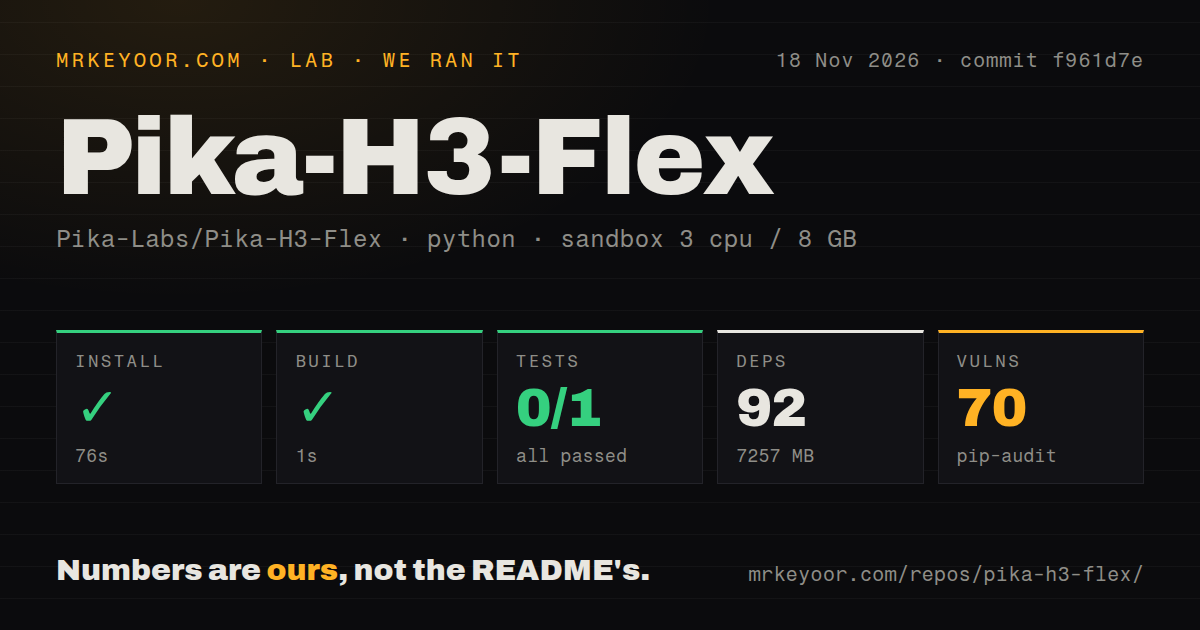
Our November 18, 2026 run at commit f961d7e installed in 76 seconds and built in 1 second, then pytest exited 1 after 20 seconds.
| Check in our sandbox | Recorded result | How to read it |
|---|---|---|
| Install | Succeeded in 76 seconds | 92 dependencies recorded, 7,257 MB on disk |
| Build | Succeeded in 1 second | Recorded build step completed |
| Tests | Exit 1 after 20 seconds | 0 passed, 0 failed, 1 collection/setup error |
| Dependency audit | 70 known vulnerabilities | pip-audit advisory total |
| Repository scan | 64 files, about 3,209 source lines, 1.1 MB checked out | Source checkout size |
| Automation signals | 0 CI workflow files, a Dockerfile and a tests directory | Recorded repository contents |
Our run used a sandbox configured with 3 CPUs, 8 GB RAM and image label ghcr.io/astral-sh/uv:python3.12-bookworm. The audit JSON records five vulnerable packages among 89 scanned packages, with 92 reported packages and three skipped packages. These installation, build, test and audit figures are our measurements. Keep them separate from creator render timings and from the README's model-download figures.
Pytest stopped while collecting tests/test_text_encoder_truncation.py. Its import of TEXT_ENCODER_LAYER and truncate_text_encoder from pika_h3.core.conditioning ended with ModuleNotFoundError: No module named 'pika_h3'. The outer test step took 20 seconds; pytest's own summary reported one error in 15.70 seconds. Both timings belong to the same recorded failure, at different levels of the harness.
The separate pack recipe quickstart-lib records cloning in 1 second, then a failed registry command. The failed step records an elapsed time of 1.2 s; it produced no installed package. It ran uv pip install pika-h3-pro in a fresh environment reporting Python 3.12.12. The resolver said the package was absent from the registry. Its run summary names commit f961d7ed09a5, 2 CPUs and 4 GB RAM, while also claiming installation succeeded; the explicit failed step contradicts that summary. Teardown succeeded.
Where people get stuck: sampling is part of the adapter
Flex requires its published sampling schedule, including separate video and audio shifts and fresh intermediate noise.
ComfyUI documents lcm, ManualSigmas and CFG 1.0 through BasicGuider, with adapter strength 1.0. The original schedule uses knots 1000/750/500/250/100/40/0, video shift 12 and audio shift 3. Start with the matching template so that sampler, schedule and adapter agree. The repository likewise states that generic six-step Euler sampling is different from its released procedure. ComfyUI local workflow guide, Adapter sampling contract.
| Symptom | Evidence-backed next step | Status of the advice |
|---|---|---|
| Output breaks after another acceleration adapter is added | Remove the extra turbo or Lightning LoRA and retain the Flex schedule | ComfyUI warns that a second acceleration LoRA breaks output |
| Templates or API nodes are absent | Use the documented version, then inspect startup imports and release availability | Local templates require 0.44.0+; API instructions require 0.44.1+ |
| Wide framing becomes a medium shot | Describe a small subject inside a large room and give the camera a stopping point | ComfyUI prompting guidance |
| Ref2VA adds meaningless speech | Retain the prompt and base-model comparison when reporting the case | Issue #10 records the comparison |
The Chinese-language author of GitHub issue #10 reports clean audio from the base model with the same prompt, followed by meaningless speech after adding the six-step Flex LoRA. That report identifies a specific before-and-after case worth preserving when submitting a reproduction. The version and prompting advice above comes from the local ComfyUI guide and ComfyUI API guide; the audio observation comes from the issue #10 extract.
Local output and model storage
The README reports approximately 210 GB of base files plus 5.5 GB of adapters when downloading both task families.
Those downloads are separate from our harness's 7,257 MB installed environment. The README calls for additional dependency and staging space, Python 3.12, an NVIDIA GPU and a compatible driver. Its representative qualification uses one H100 80GB per request. The package runs one request on one GPU, and the documented starting point is 480p for five seconds. These are the official package's planning figures, distinct from the smaller configurations described in community implementations. Official installation and hardware guidance.
The source-install recipe clones the repository, installs requirements.txt, applies the supplied Diffusers patches and installs the local package. The CLI and Python distribution are named pika-h3-pro. Authentication, when required, uses HF_TOKEN or the Hugging Face cache at runtime. The README also documents CPU offload, which exchanges lower sampling VRAM use for host RAM and transfer time. Its 768p, fifteen-second offload example passed on a single H100 80GB. Official setup instructions.
Local video and hosted finishing
Local Flex generates native 480p or 768p video with mixed stereo audio; Pika hosts higher-resolution finishing and stem separation.
FL2VA handles text and endpoint frames, while Ref2VA accepts multimodal references. The README allows nine images, three videos and three standalone audio clips, with twelve files total and at least one image or video. Each video or audio reference lasts two to fifteen seconds; combined video duration and combined standalone-audio duration each stay within fifteen seconds. A video's embedded soundtrack stays with that video. Repository input specifications.
ComfyUI's API nodes call Pika's hosted service and download no weights. Its prompt guide separates integrated_multimodal_description, overall_soundscape and non_diegetic_music, allowing the prompt to describe picture and sound together. For a single-image scene, the supplied tutorial offers an example of shots and soundtrack generated in one request. Choose the hosted route when the immediate decision concerns the resulting shot, and the local route when operating the model is part of the work. API workflow and prompt guide, Single-image scene example.
Mac timings and longer clips
Mr Bizarro reports a 55-minute render for a 1024×576, fifteen-second clip made from three chained windows on an M4 Max with 64 GB.
The same report gives about five minutes for a 640×384, five-second clip and sixteen minutes for a 1024×576, five-second clip. For the latter, the author reports 36.5 minutes for base H3 at fifteen steps using the same seed. These timings belong to the Phosphene MLX port. A Pika contributor thanked the author in the closed GitHub issue #1. Mac timing record.
Longer official-package jobs also change resource planning. The README recommends choosing clip length and resolution from its hardware table and documents CPU offload for requests exceeding GPU memory. AIReiter separately reports a 768p, fifteen-second case using offload and around 94 GiB of system memory. Keep the implementation and hardware beside each figure when comparing options: the Mac timings, the consumer-GPU walkthrough and the official H100 qualification describe different routes. Repository offload guidance, AIReiter hardware report.
Security, licensing and service policies
Our pip-audit run reported 70 known vulnerabilities; the repository assigns separate licenses to code and model adapters.
The inference and loader code uses Apache-2.0. The adapters are MiniMax H3 model derivatives distributed under its Community License Agreement. ComfyUI directs users to the agreement's territorial and commercial-use conditions. Read those terms for the intended deployment, treating code reuse and model use as separate decisions. The repository's license split is more useful here than describing the entire release with a single open-source label. Repository licensing, ComfyUI model-license guidance.
The README says authentication tokens belong at runtime and warns against putting them in image layers. Generation metadata includes the final prompt, so review that JSON before sharing it. The third-party pikah3flex.net studio has its own policies: failed generations refund credits automatically, another accepted Generate request incurs another charge, and completed files are retained for thirty days. Its studio rejects video and audio references. Those policies belong to that service. Repository operational notes, Third-party studio troubleshooting.
Pika-H3-Flex vs alternatives
Downloadable MiniMax H3-Base generates 768p; its full 2K workflow combines local generation with hosted APIs.
| Option | Why consider it | What the supplied comparison says |
|---|---|---|
| MiniMax H3 | Local H3-Base baseline or a hosted-assisted 2K workflow | H3-Base produces 768p; H3-Regenerate-2K regenerates that result through the documented full workflow. MiniMax model card |
| fal H3 Max | Another post-trained H3 candidate | The supplied pikah3flex.net comparison identifies it as fal Research's model and describes competing vendor claims. H3 Max comparison |
| Alibaba PDD distillation | Another accelerated workflow shown by the dialogue tutorial | The tutorial author calls it their previous favorite before Pika. PDD comparison |
| LightX2V and DMAD | Other acceleration adapters named in a comparison listing | AI-PanSir's Chinese-language Bilibili title compares them with six-step Flex. Bilibili comparison listing |
MiniMax's model card separates three components: H3-Context-IR, H3-Base and H3-Regenerate-2K. It describes local H3-Base output at 768p and a full 2K workflow combining the locally deployed base with hosted preprocessing and regeneration APIs. That makes H3-Base a relevant local baseline, while the complete MiniMax workflow is a different deployment choice. For either comparison, use the same scene, references and desired soundtrack so the result answers a practical production question. MiniMax workflow documentation.
Outdated claims, corrected
Pika's supplied product page lists three audio stems, while its launch announcement and MyClaw's launch review describe five.
The product page names Dialogue, Music and Effect, with mono separation by default and stereo available on request. The launch announcement names Dialogue, Score, SFX, Foley and Ambience. Duration also depends on the documented interface: the product page permits three to fifteen seconds, while the ComfyUI API guide specifies five to fifteen. Read the limits for the interface you plan to use. Product specifications, Launch announcement, MyClaw review, ComfyUI API limits.
The pack flags Kompozy's H100 attribution for the seven-second result and its description of H3 Max as a Pika tier. Pika's launch footnote defines seven seconds as controlled transformer computation for a fifteen-second 768p clip. The separately described research speed experiment uses eight B300 GPUs for a five-second task. The supplied comparison identifies H3 Max as fal Research's separate model. Pika's abbreviated launch X post also needs the longer announcement's compute-only qualification. Kompozy record, Launch qualification, Research experiment, H3 Max ownership comparison.
AIReiter's older template-version advice differs from the supplied ComfyUI documentation: all three local templates specify 0.44.0+, and the API guide specifies 0.44.1+. The Hugging Face page's generated DiffusionPipeline example also conflicts with Diffusers' own integration documentation, which specifies Modular Diffusers. Follow the integration's loading instructions and use the matching adapter format. AIReiter review, Local templates, Generated example, Diffusers integration.
FAQ
Pika's seven-second figure measures transformer computation for a fifteen-second 768p clip; total API completion includes additional work.
Is the seven-second generation claim end-to-end latency?
Pika's launch footnote explicitly excludes total end-to-end API latency. Reference inputs, higher-resolution finishing, stem separation, hardware and service overhead affect completion time. Read the figure as a controlled compute result for a fifteen-second 768p clip, and use completion time for the actual task when choosing a workflow. The launch figure and the separately specified five-second research experiment describe different workloads. Official benchmark qualification.
Why does Ref2VA produce meaningless speech with the Flex LoRA when the base model produces clean audio?
Issue #10 records a user's clean-base-audio versus Flex-speech comparison with the same prompt. It is the relevant report for this symptom, rather than a general assessment of all Flex audio. Preserve the prompt and both outputs when reporting a similar case, so the comparison remains inspectable. The issue's response status and unresolved diagnosis are collected in the testing-limits section below. Audio regression report.
Were SFT and PDMD trained with full-parameter updates or LoRA?
Issue #9 asks separately about SFT and PDMD parameterization, including whether a LoRA student began from the SFT teacher weights. Its author distinguishes those stages from the blog's description of ReFL and DPO as LoRA training. For researchers, these are concrete reproduction questions to retain when reading the training account. The same thread collects requests about shifts, adapter composition and training artifacts. Training parameterization questions.
Did PDMD training use the released inference shifts of video 12 and audio 3?
The released inference schedule specifies video shift 12 and audio shift 3. Issue #9 asks whether PDMD training used those same values and requests the training-time settings if they differed. Keep the inference settings attached to inference instructions: the question concerns a different stage of the process. The published knots and fresh-noise behavior remain the relevant configuration for a compatible generation workflow. Training-shift question, Inference schedule.
Does the released adapter contain SFT and distillation changes as well as ReFL and DPO?
Issue #9 asks whether adapter.safetensors contains only ReFL and DPO deltas or also the SFT and PDMD changes. It frames the practical question as whether the six-step capability is fully contained in the adapter over vanilla MiniMax H3. That is a question about the released artifact's composition, separate from its documented inference schedule and the instructions for loading it. Adapter-composition question.
Will Pika release training code, configurations and intermediate checkpoints?
Issue #9 requests training code or configurations for the stages and intermediate SFT and PDMD checkpoints. These requests concern reproducing training, while the repository's documented installation concerns running released adapters. A reader evaluating research reproducibility should track those requested artifacts together with parameterization, training shifts and adapter composition. The supplied thread's response status appears once in the limits section below. Training-artifact requests.
Can Pika H3 Flex run locally on an RTX 4060 with 8 GB VRAM?
The supplied YouTube author reports local generation on an RTX 4060 with 8 GB video memory and 32 GB RAM. The author also describes reference-guided storytelling and direct generation at 0.6 megapixels. Use that walkthrough for its particular implementation and configuration, and keep the official package's H100 qualification beside it when planning a different installation. They are separate hardware and software reports. RTX 4060 walkthrough.
Can Pika H3 Flex run on Apple Silicon, and how long does it take?
Mr Bizarro reports running FL2VA with synchronized sound through the Phosphene MLX port on an M4 Max with 64 GB. The reported five-second timings are about five minutes at 640×384 and sixteen minutes at 1024×576. A fifteen-second 1024×576 clip took 55 minutes as three chained windows. Those figures identify the port, machine, canvas and duration needed to interpret the result. Apple Silicon report.
How do I generate difficult lip sync and two-character dialogue with Pika H3 Flex?
The Wan2GP tutorial author presents difficult lip-sync and two-character examples, then explains the workflow used to generate them. Start with that matching workflow and retain Flex's published sampling schedule. For a useful trial, write the intended speakers and dialogue into one short scene and judge the resulting picture and sound together. The tutorial's assessment belongs to its author and examples. Dialogue tutorial.
How do I direct a movie scene with dialogue and sound from a single image in ComfyUI?
The single-image tutorial author reports generating a scene's shots, dialogue, audience sound and music from one image and one prompt. ComfyUI's API guide describes separate fields for the visual description, overall soundscape and non-diegetic music. Use those fields to express the combined scene and keep its events inside the requested duration, following the guide's prompt structure. Single-image tutorial, Prompt format.
How does six-step Pika Flex compare with LightX2V and DMAD?
AI-PanSir's Chinese-language Bilibili listing explicitly compares six-step Flex with LightX2V and DMAD. The supplied record identifies the comparison and its creator. For readers selecting an acceleration workflow, that listing is a route to the named comparison; the local-versus-hosted and base-model distinctions in this review answer separate deployment questions. The available result coverage is described in the limits section. Bilibili comparison listing.
Can six-step Pika H3 Flex create Pixar-style animation?
A Bilibili listing by cheer-man describes a six-step Flex test making Pixar-style animation. That wording identifies the creator's test topic. It does not identify an official Pixar product or relationship. If stylized animation is your task, retain the intended character, scene and soundtrack as the basis for your own shot comparison, alongside the reference-guided examples documented elsewhere in this review. Animation-test listing.
What we have not tested yet
Our run covers installation, a build step, test collection and a dependency audit; it produced no rendered-video benchmark or listening-test result.
We have not rendered the released adapters on NVIDIA hardware, reproduced the RTX 4060 or Mac reports, measured API completion time, compared finished outputs against alternatives or qualified unattended serving. The sandbox image label alone supplies no actual runtime or operating-system version. The import log identifies collection failure without assigning a package or environment cause. The registry recipe's success summary contradicts its explicit failed installation step. The audit totals provide no package-level remediation or exploitability analysis.
The Mac port report lists missing Ref2VA support, drifting sets and side characters across chained windows, and disappearance of unnamed first-frame people. Issue #10 supplies no diagnosis or fix for its audio regression. Issue #9 remains unanswered in the supplied sample on SFT and PDMD parameterization, training shifts, adapter composition, training code, configurations and intermediate checkpoints. The RTX 4060 extract supplies no render duration, and the dialogue tutorial supplies no measured success rate. Mac port boundaries, Audio issue, Training questions.
The ComfyUI upload validates file integrity and tensor conversion, explicitly excluding an end-to-end render from that validation. Pika's showcases leave seeds, exact checkpoint revisions and service preprocessing unspecified. ComfyUI reports camera directions and cut timestamps landing 0.2 to 0.3 seconds off or in the opposite direction, and fine contact constraints failing. We have not measured those behaviors, identity retention or dialogue accuracy. Adapter-validation boundary, Showcase reproduction boundary, ComfyUI prompting observations.
MiniMax's model card says H3-Regenerate-2K is not open-sourced; its 2K workflow therefore is not a local native-2K replacement. The competing vendor comparisons supply no independent quality winner, and the Bilibili listings supply no evaluated results. The records also leave the date of the stem-count change unresolved. Enact is a separate research preview whose general availability and behavior we have not tested. A useful next trial is one saved short scene with its prompt, assets, model revision and complete audio/video output. MiniMax model card, Enact announcement.