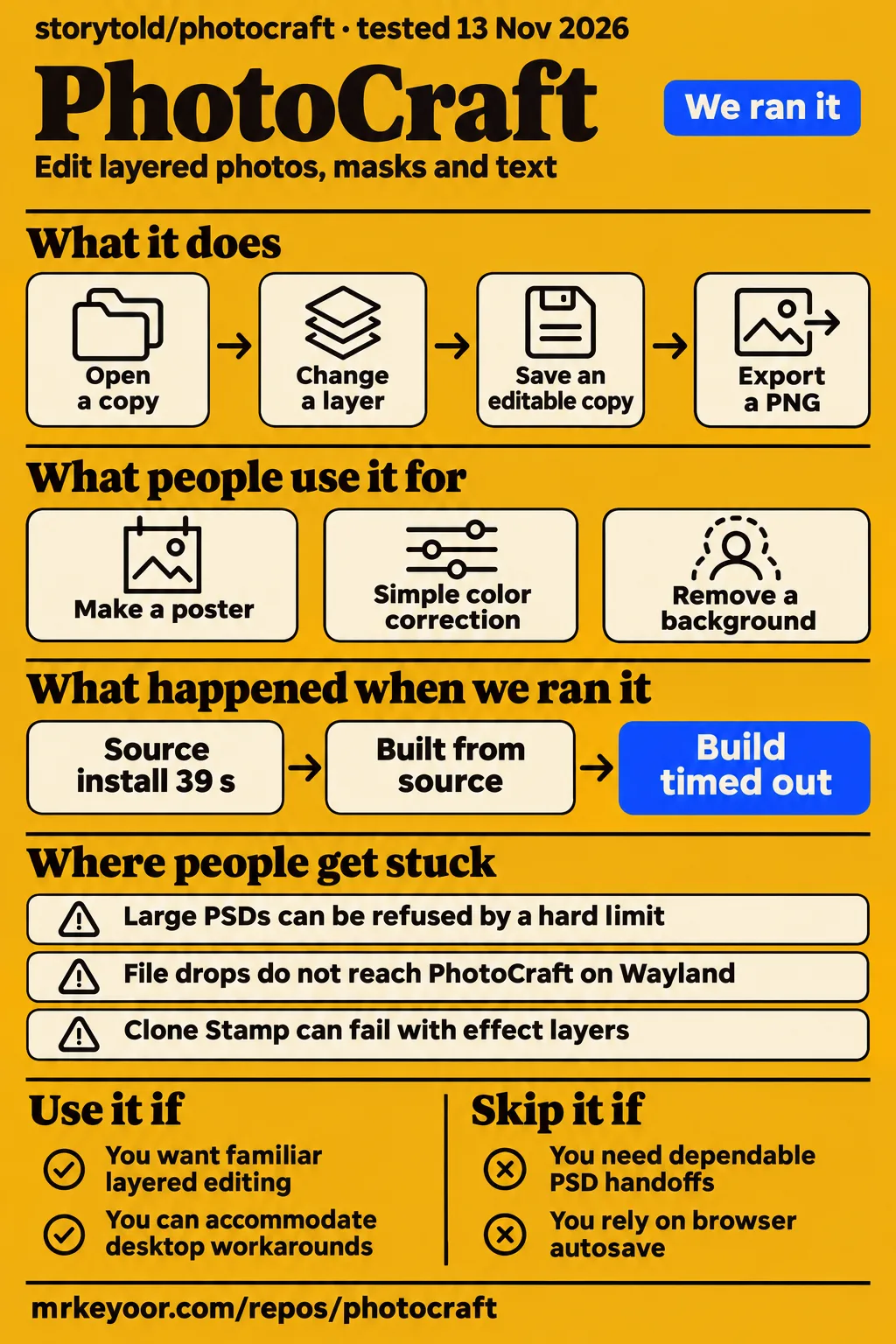
PhotoCraft is a free, open-source image editor with Photoshop-style controls, and its own README calls it early alpha. Try it on copies of everyday images if you want familiar layered editing without a subscription. Keep your existing editor for deadline work until PhotoCraft completes your actual save-and-reopen workflow. Our source run installed dependencies in 39 seconds, but both the build and test commands timed out at 900 seconds.
The Photoshop layout is a starting point, not a switching decision
PhotoCraft's README explicitly says it is not yet a replacement for daily professional Photoshop work. That matters more than whether its toolbar looks familiar. You can know where Curves lives and still lose time to a selection that cuts off clothing, a document that refuses to open, or a layer effect that behaves differently. The sensible first job is a duplicate of something you have already finished elsewhere. Compare the saved document as well as the exported picture. PhotoCraft repository.
The latest-release endpoint returned v0.23.1, published November 12, 2026, and the repository API records a push on November 13. Recent releases and active issue discussions show continuing work. The more useful adoption evidence here is specific: a Linux poster maker, a Mac user who reports leaving Photoshop, and an agency describing its browser and MCP deployment. None supplies a controlled comparison of reliability across editors. Latest release, repository metadata.
What people use photocraft for
People in the supplied records completed posters, photo corrections and stylized images, with sharply different experiences once selections and layers became demanding.
| Who used it | What they did | Reported outcome |
|---|---|---|
| Additional-Leg-7403 on r/ArtCraftAI | Made a poster and used background-removal workflows on Linux | Said drag and drop worked and their own work left them missing no Photoshop feature. Linux user report |
| Wrathwilde on r/ArtCraftAI | Edited images, including larger files, on an Intel Mac mini | Reported better stability for their workload and said they canceled Photoshop. This is one person's experience. Mac user report |
| David Fekke, a software engineer and longtime Photoshop user | Tried Levels and Curves for simple color correction | Got familiar corrections working, but paths, selections and layer-effect behavior blocked professional use. Fekke's review |
| PCMag's reviewer | Masked a tuxedo cat and stylized a water-lily photograph | Needed extra selections for the cat's dark fur; the simpler water-lily edit worked easily. PCMag's editing account |
| mindmeltde, describing an agency deployment | Used the browser build and headless MCP | Asked for Generative Fill for daily work. The comment supplies a deployment report, without a productivity measurement. Agency comment in issue #41 |
The cat is a useful switching test. PCMag's reviewer asked automatic masking to separate a black-and-white animal from its background. The white fur was selected, while the dark fur needed additional work. The reviewer could repair the selection, so this was neither a total failure nor an automatic cutout you could send straight to a client. Use a similarly awkward photograph from your own workload, rather than a high-contrast demonstration image, when deciding whether the editor saves you effort.
Fekke's October 11 review gives the other half of that story. Familiar color corrections were easy to reproduce, but a drop shadow on a smaller object could make the layer's bounds span the image. Someone making a casual poster may tolerate that. Someone selecting, positioning and handing off layered artwork needs the document behavior to be predictable. These are different recommendations because the tasks differ, not because one reviewer must be wrong.
What happened when we ran it
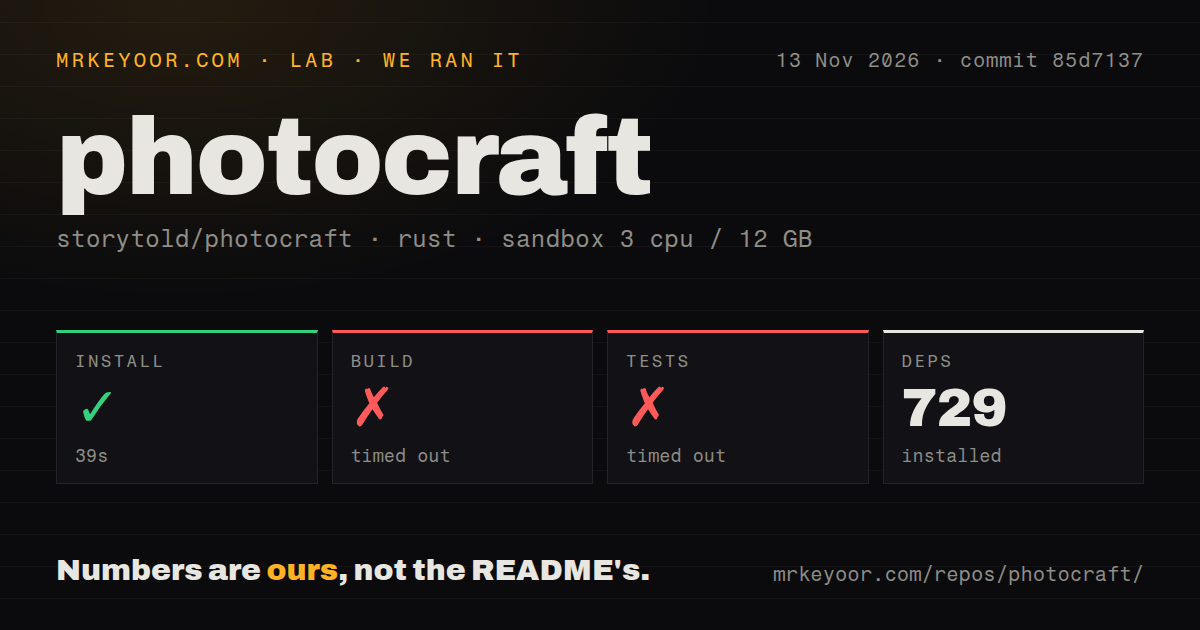
Our hands-on attempt on November 13 stopped at route selection; a separate source harness installed dependencies in 39 seconds and hit both 900-second caps.
The hands-on record identifies commit c8a651eeb370 and a quickstart-cli recipe, with its container configuration binding ports to 127.0.0.1. Despite the run header's deployment wording, the step log records a clone followed by a failed plan, not a running editor. The recipe found no supported package-manager install command or manifest-declared binary. It excluded brew, source builds and pipe-to-shell scripts. That is a mismatch between the recipe and the documented distribution paths, rather than an application crash.
| Hands-on record | Outcome | What it means |
|---|---|---|
| Clone | Completed | The repository was retrieved. |
| Plan | FAILED: no install method the recipe could run | The recipe stopped before an editing task. |
| Teardown | ok | Cleanup completed. |
The separate source harness used commit 85d7137, 3 CPUs, 12g RAM and image label lab-rust:1 on November 13, 2026. The label identifies the sandbox image, not the actual Rust or operating-system version. Those versions require the raw toolchain logs.
| Source-harness step | Our recorded result | Decision consequence |
|---|---|---|
| Install | SUCCEEDED in 39 seconds; 729 dependencies recorded | Dependency retrieval completed. |
| Build | TIMED OUT in 900 seconds | The command exceeded the allotted source-build window. |
| Tests | TIMED OUT in 900 seconds | The command supplied no completed suite result. |
The test-log tail was still compiling dependencies, ending with lopdf v0.38.0 after rand, AES-related crates and rangemap. It shows compilation in progress, without a failing assertion or a diagnostic explaining the timeout. We cannot turn that tail into a memory-exhaustion diagnosis. For contributors, the practical finding is that this sandbox allowance did not produce a completed build or suite. For editors, the sensible next route is an official application download rather than treating our source run as a desktop usability test.
Our checkout scan recorded 3,295 files, approximately 1,038,029 source lines and 78.1 MB, plus 10 CI workflow files, a Dockerfile and a tests directory. Those are repository observations. They say nothing about whether a particular PSD survives an edit or whether the CI workflows currently pass. The two runs also used different commits and different recipes, so they should stay separate in any account of setup effort.
Where people get stuck: identify the operation before applying a fix
Issue reports distinguish file admission, desktop shortcuts and painting errors, and their workarounds solve different problems.
| Symptom and attributed source | Useful next action | Reported resolution |
|---|---|---|
| Large PSD refused by a memory hard limit, issue #11465 | Keep the original file and record the exact build and error. Raising Performance settings did not override the reported limit. | Two users confirmed that 0.18.0 opened their files. A proposed fix and a community build were discussed, but the reporter said that build still failed. |
| Alt-click moves the window instead of setting Clone Stamp's source, issue #7996 | On Cinnamon, change the window-move modifier to Super, or try Window → Modifier Keys. | Users confirmed the desktop-setting workaround. |
| Clone Stamp selects a source but makes white traces or no useful stroke, also issue #7996 | Try a disposable flattened copy to distinguish the layered-document case. | One user reported success with flattened pixels and failure with effect layers. The modifier fix alone did not solve that case. |
| Dropping a file does nothing on Wayland, issue #386 | Use File → Open or paste a copied image. XWayland is another documented path. | An X11 display preference was merged, but a GNOME 51 reporter still reproduced failure under confirmed XWayland. |
| Legacy Intel Mac on macOS 15 through OCLP fails at startup, issue #4011 | Compare your exact hardware and Metal error with the tracker before choosing its compatibility workaround. | SYSTEM_VERSION_COMPAT=1 worked on reported machines. An unofficial patched build started, while an official v0.15.1 report still failed normally. |
The large-PSD report deserves attention before you migrate an archive. Its contributor tracing says the Performance setting can lower the effective limit, but cannot raise the underlying admission ceiling. A later user reported the same refusal with substantial free RAM, and both that user and the original reporter said rolling back to 0.18.0 worked. The discussion therefore gives you a historical escape route, not a reason to keep increasing one slider. It also separates the admission error from another GPU-compositor failure recorded in a linked report.
Background removal has its own evidence. In issue #2788, HassanJb961 described a kitchen-product cutout that kept cabinets and counter edges, making it unusable. Another report lost pale clothing against a pale backdrop. A contributor says merged #4462 narrowed some classical-selection failures, while later photo reports still show trouble. If your work is catalog cutouts, include pale fabric and cluttered backgrounds in the trial. A Remove Background button tells you where the operation starts, not whether its mask is ready to deliver.
Brush cursors and animation panels can overstate what is working
Issue #1343 separates a faster brush outline from the painted stroke, while issue #3263 separates a Timeline playhead from frame animation.
The brush thread reports that native cursor work improved the outline on supported sizes, with larger outlines falling back to the painted path. A separate stroke-rendering delay remained in the discussion. That distinction matters for drawing: a pointer can follow your hand while the mark still arrives late. Try both a small retouching brush and the largest tip you routinely use, then inspect the actual stroke rather than just the outline. Brush-latency tracker.
The animation tracker describes a document-level playhead without Photoshop-style per-frame delays and visibility state. texjer reported that a community frame-animation branch worked well, and the thread includes further fork work and preview feedback, including failed animated-GIF export. A working branch is useful development evidence. It is not a release guarantee. If animated assets are your deliverable, require opening, editing and exporting the same animation from the exact application build you intend to keep. Frame-animation tracker.
PhotoCraft AI means separate upstream and plugin choices
The supplied upstream tracker puts generative editing on hold until a provider interface lands; a community ComfyUI plugin documents a separate route.
For a search such as “photocraft ai,” distinguish an agent controlling editing commands from a model generating new image content. The README documents CLI, JSON control and MCP access to the editing engine. Issue #41 covers Generative Fill, Expand and related provider work. Its maintainer update holds those features pending the interface, including proposals for an OpenAI key or ChatGPT sign-in. An existing ChatGPT subscription is therefore no basis for assuming those proposals work in upstream PhotoCraft.
The phil-haderer community plugin describes a small separate window connecting PhotoCraft to ComfyUI and returning generated output as a new layer. Its documented requirements include Windows or Linux, an NVIDIA card with 16 GB VRAM, Python, PhotoCraft 0.22.0 and ComfyUI 0.42 or newer. Those are that plugin's requirements, not a minimum specification for ordinary PhotoCraft editing. Someone seeking free local layers and someone seeking local generative fill are choosing very different amounts of software and hardware.
Local editing and hosted storage have different safety boundaries
The documented browser offering edits local files without automatically uploading them, but its free cloud versions expire seven days after upload, including the latest version.
The operational choice is whether the file stays on your device, enters a cloud workspace or becomes available to an agent. The photo-craft.online page says cloud and agent features send files you authorize. It describes optional paid workspace features separately from free local editing. Download the editable project when you finish a session. Temporary cloud storage is a transfer convenience, and its expiry policy makes it a poor place for the only copy of artwork.
The browser guide also says its web build has no document autosave or crash recovery. Save before refreshing, changing editor-language pages or closing the tab. For automation, the repository describes an authenticated, loopback-only desktop control channel. These are documented boundaries, not a security certification. Give an agent a duplicate working file, inspect its exported image and reopen its editable result before replacing an original. The supplied evidence contains no security-audit result from our sandbox.
PhotoCraft vs Photoshop, GIMP, Affinity and Photopea
PhotoCraft's strongest case is familiar open-source layered editing; the supplied comparisons favor different alternatives for established workflows or browser use.
| Choice | Why someone would choose it | Evidence behind that choice |
|---|---|---|
| PhotoCraft vs Photoshop | Try PhotoCraft for familiar local editing without a subscription. Retain Photoshop when the exact selection, path or document workflow already earns your living. | Linux and Mac success reports sit alongside Fekke's professional-workflow failures and PCMag's masking comparison. User accounts, Fekke, PCMag |
| PhotoCraft vs GIMP | Consider GIMP if dependability matters more than Photoshop muscle memory. | ProjeDefteri favors GIMP for established stability and PhotoCraft for its familiar layout and agent control. This is that page's assessment. Comparison |
| PhotoCraft vs Affinity | Treat Affinity as a candidate to evaluate against your actual documents, rather than assume either application wins from a feature list. | The r/antiai discussion recommends Affinity and GIMP as alternatives in an argument about AI-developed software. It supplies preferences, without comparative performance results. Discussion |
| PhotoCraft vs Photopea | Consider Photopea for an established browser workflow, or PhotoCraft for an open-source desktop route. | ProjeDefteri describes that distinction, although its self-hosting-only description of PhotoCraft web use is dated by the supplied hosted-browser guide. Comparison, browser guide |
The useful comparison is the file you must return tomorrow. Duplicate it, make a normal correction, change a mask and save an editable copy. Open that copy in the application used by the next person in your workflow. A plausible-looking PNG answers whether the composite looks right. It leaves unanswered whether the handoff retains the text, layers and effects that person expects. That is why neither a familiar interface nor a reviewer's estimate of feature coverage should decide a production switch.
What the other reviews get wrong
The ArtCraft product page's byte-for-byte PSD claim conflicts with the repository's explanation of editor saves, and several comparison claims describe older snapshots.
| Published claim | Correction supported by these records |
|---|---|
| ArtCraft's product page says real-world documents round-trip byte for byte through the editor. | The repository says editor saves rewrite document structures. Byte identity applies to the standalone PSD crate without the editor's document model. Product page, repository explanation |
| Uptodown says PhotoCraft can do everything traditionally done in Photoshop. | The animation and generative-provider trackers document specific gaps. Familiar menus do not supply those missing behaviors. Uptodown, animation, generative tools |
| ProjeDefteri calls 0.5.0 current. | The anonymous latest-release endpoint returned v0.23.1, published November 12, 2026. Release record |
| ProjeDefteri lists AVIF reading, while a fork describes reading and writing. | The target repository says AVIF decoding is unavailable and writing requires its optional build feature. Target repository |
| A tutorial diagnoses a flat-opening PSD as probably exported without layers. | That diagnosis cannot settle a file's history when the repository preserves data it does not model. Inspect the original in its source editor. Tutorial, PSD explanation |
| MakeUseOf's older description rules out equivalent generative tools. | Keep that statement scoped to upstream. The supplied November community plugin documents a separate generative path. MakeUseOf, plugin |
The distinction between rendered appearance and byte identity is especially consequential. The repository explicitly says a re-saved file is not byte-identical to its source because image resources, layer records and the composite are rewritten. Preserving an unfamiliar block is helpful, but it doesn't prove that every production document remains editable in exactly the same way. Keep the source PSD and compare the round trip that matters to your team, rather than importing a corpus claim into a guarantee about your files.
Questions people ask
PhotoCraft downloads and source code belong to the storytold/photocraft project; browser offerings, plugins and similarly named apps need their own identity checks.
Where can I download PhotoCraft and find its official GitHub repository?
The PhotoCraft download route in the README is getartcraft.com/apps/photocraft, and the PhotoCraft GitHub repository is storytold/photocraft. Its releases carry platform-specific application files. Start from those linked destinations when a search for “photocraft website” or “photocraft app” returns several domains. A same-name iPad listing and an image-generator website appear in the pack, but their names alone do not demonstrate that they distribute this repository's editor. README, iPad listing, generator page.
How do I install PhotoCraft?
The README lists Windows installers and portable archives, a universal macOS disk image, and Linux AppImage, Flatpak, deb, rpm and tarball options. Choose the format and architecture for your machine through the official release page. The source quickstart uses Cargo, which is a different route from downloading an application. Our incomplete source run is a reason to start with packaged software when your goal is editing rather than contributing. Download instructions.
How do I use PhotoCraft for my first edit?
The supplied browser guide starts with File → Open, changing a layer, using Undo and exporting a PNG. It also recommends saving an editable project copy, then reopening it to check the saved result. That makes a useful first exercise: hide one layer, restore it, export and reopen. You learn both how the canvas behaves and where the files land before risking an image with hours of work in it. First-edit guide.
How do I remove a background in PhotoCraft?
Issue #2788 identifies Select → Subject, Object Selection and the Properties panel's Remove Background action, with heuristic selection behind them. Begin with a duplicate and inspect the resulting mask around hair, fabric and narrow gaps. The product-photo and cat reports above show why a successful command is different from a deliverable cutout. Refine the mask manually when automatic selection keeps background or discards part of the subject. Subject-selection tracker.
How do I change PhotoCraft's language?
The browser guide says website language and editor language are separate settings, so translating the surrounding website does not by itself select the editor's language. It also instructs readers to save before changing editor-language pages. Use that guide's English menu labels to orient yourself, and download the project before navigating away. The records support this distinction without supplying a universal desktop language-menu path. Browser language guidance.
Can PhotoCraft replace Photoshop for my regular work?
Some users report that PhotoCraft already covers their regular edits, while its own README rejects a blanket professional-replacement claim. The PhotoCraft Reddit accounts are useful examples of posters and Mac editing, not a promise about your documents. Make the replacement decision after completing your normal selection, correction and editable-file handoff in the exact release you plan to use. Keep the current tool if one required step still needs repair elsewhere. User experiences, upstream status.
How does PhotoCraft compare with GIMP, Affinity and Photopea?
The supplied comparison favors GIMP for established dependability and Photopea for a mature browser workflow, while PhotoCraft offers familiar open-source desktop editing and agent control. Affinity appears as a recommendation in an ethics discussion, without an equivalent task comparison. Use the table above to choose which editor to try next. It is a shortlist based on attributed evidence, rather than a ranking derived from a shared benchmark. Comparison, Affinity discussion.
How do PhotoCraft, LightCraft and ArtCraft differ?
PhotoCraft handles layered image editing, while the repository's family table assigns photo-library and RAW-development work to LightCraft. ArtCraft is the umbrella linked from the repository and also appears in branding for other creative offerings. A search for “photocraft studio” should therefore resolve to the specific editor or service you intend to use. PCMag's LightCraft library and RAW results belong to LightCraft, and should never be presented as PhotoCraft performance. Application family, PCMag comparison.
What we have not tested yet
Our runs reached dependency installation and a stopped CLI recipe, without an editor session, completed build or completed test suite. We have not tested a released desktop binary, browser editing, a real PSD round trip, masking, drawing latency, printing, animation export or agent permissions. The pack has no screenshots or known-answer editing questions from our runs, so there is no visual demonstration or task-accuracy score to report.
The issue evidence is historical and build-specific. We have not replayed those cases against v0.23.1, confirmed a general resolution for large-PSD admission or legacy-Mac startup, or tested the unofficial generative plugin. Actual runtime versions, peak build memory, installed application size, vulnerability status and comparative editor performance also remain unmeasured. The repository's own corpus results are upstream claims, never our passing-test totals.
Setup, documentation quality in use, support capacity and production maturity receive N/A cards because our evidence does not support numerical ratings across those dimensions. We read documentation and active issue discussions, but those cannot substitute for completing the workflows. Before dropping your current editor, make PhotoCraft open, edit, save and reopen a copy of the most troublesome document you actually need to deliver.