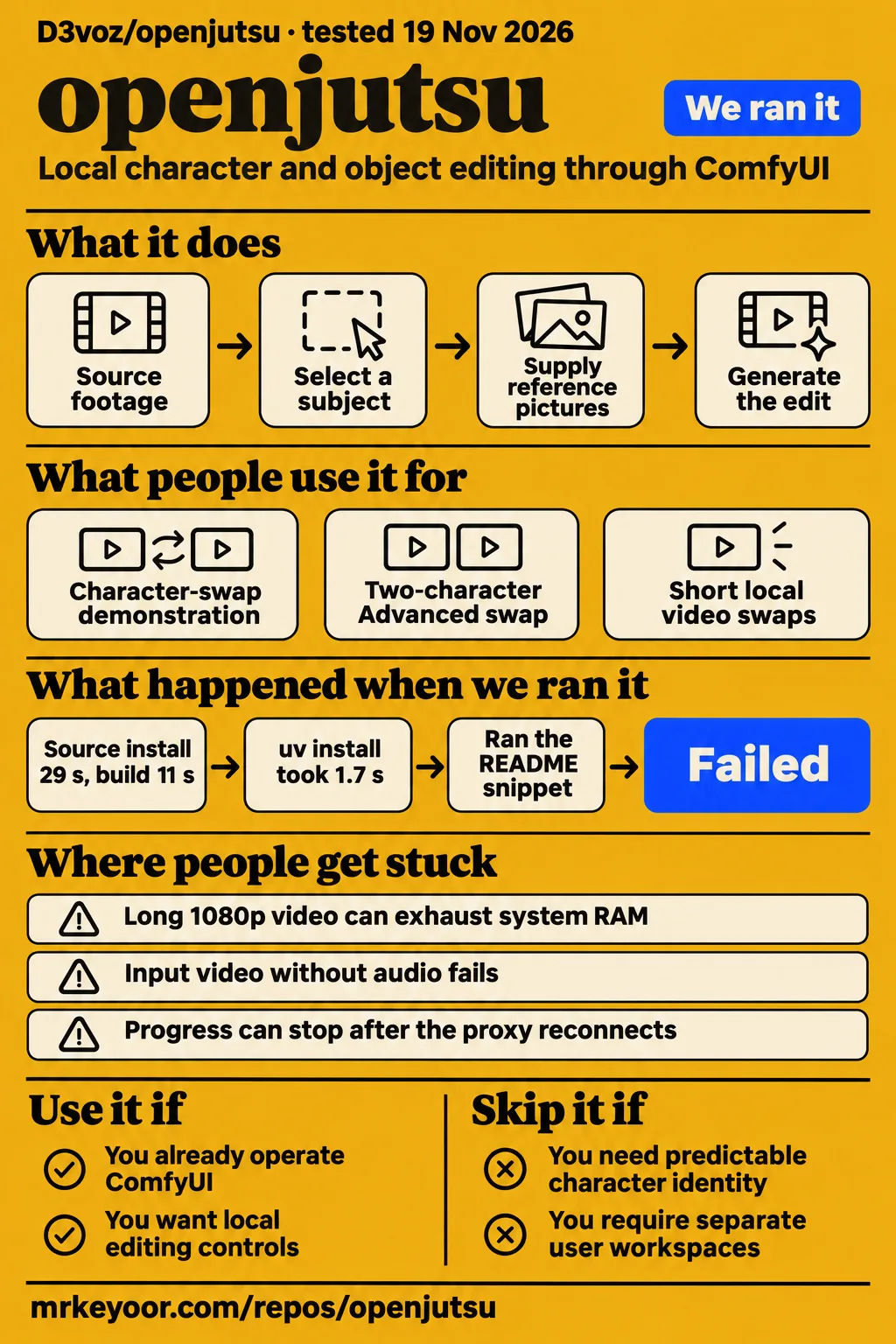
Short answer: use it when you already operate ComfyUI
D3voz/openjutsu suits existing ComfyUI operators who want local character and object editing controls on NVIDIA hardware. Its interface brings together tracking, masks, reference pictures and generation settings. Choosing it also means maintaining the models and custom nodes behind those controls. Editors whose delivery depends on predictable character identity should choose a workflow against their actual footage before committing; teams requiring separate access to different users' jobs should avoid this app's shared-job access model.
The app is a small Next.js front end over a ComfyUI workflow. The README assigns video generation to MiniMax H3, tracking to SAM 3.1 and image and shot descriptions to Qwen3-VL. Simple mode replaces the main person, Advanced mode matches tracked people to character references, and Object swap changes a selected area. D3voz's README describes these editing routes and the components that run them.
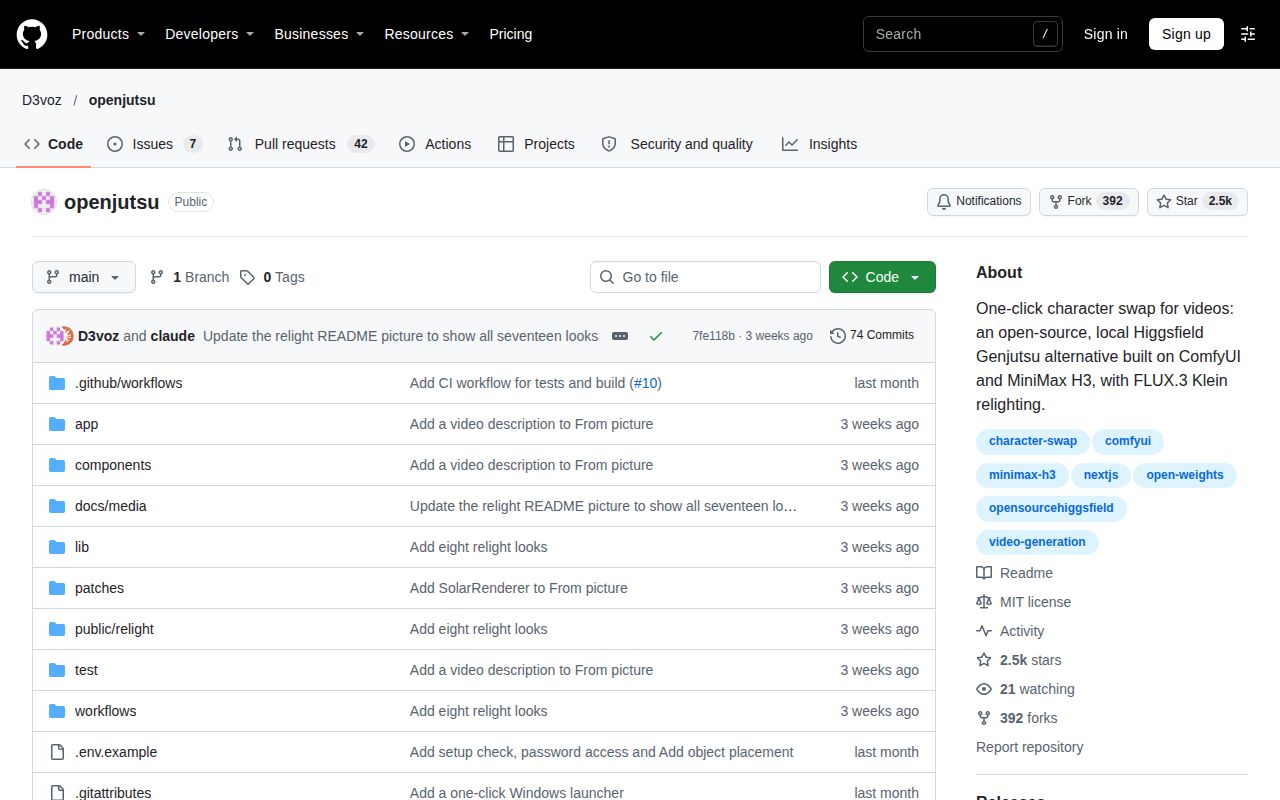
Repository attention: 2,481 stars at the recorded snapshot
The November 19, 2026 repository snapshot records 2,481 stars and 49 open issues and pull requests combined. It records the last push as October 30, 2026, and identifies the repository language as TypeScript and its code license as MIT. These figures date the repository's public activity and attention. The recorded GitHub metadata endpoint is the source for those facts.
The issue reports offer more practical selection criteria than the star count. They describe native-resolution video loading, face-selection validation, silent input and missing face-model files. A prospective user can turn those reports into concrete input checks: source dimensions and duration, audio presence, required post-processing and installed model files. The importance of each problem depends on the edit; face repair matters more for small faces in wide shots than for footage that already provides a clear close-up.
What people use openjutsu for
The recorded uses include a local challenge demonstration, a two-character Advanced swap and character-swapping attempts with consistency problems. The author explains how the workflow is assembled, while users describe what happened with their own footage. Together, these accounts show the kinds of edits people attempt and the points they inspect afterward. Each use below links to its own report so the outcome stays attached to the person who described it.
| Who used it | What they did and what happened |
|---|---|
| Project author Devajyoti1231 | Demonstrated a local character-swap app for Comfy's challenge and described packaging tracking, masking, motion references and generation. Author's challenge discussion |
| Facebook commenter Ahmed Nabil | Reported a two-character Advanced swap on a 30-second video, split into five video and five audio segments, with results below his expectations compared with Higgsfield. Two-character swap report |
| Reddit user Exciting-Income-5840 | Reported using Openjutsu for character swapping and finding character consistency difficult. Character-consistency discussion |
The author's explanation names SAM tracking, grey-mannequin motion references, Qwen role matching and overlapping clips as the mechanisms around H3 generation. Those mechanisms explain the app's controls: select a subject, inspect the tracked area, supply references and generate the edit. Nabil also wondered whether his settings explained his poor result. His report makes settings worth recording alongside output, particularly when comparing a two-character edit with another service.
What happened when we ran it
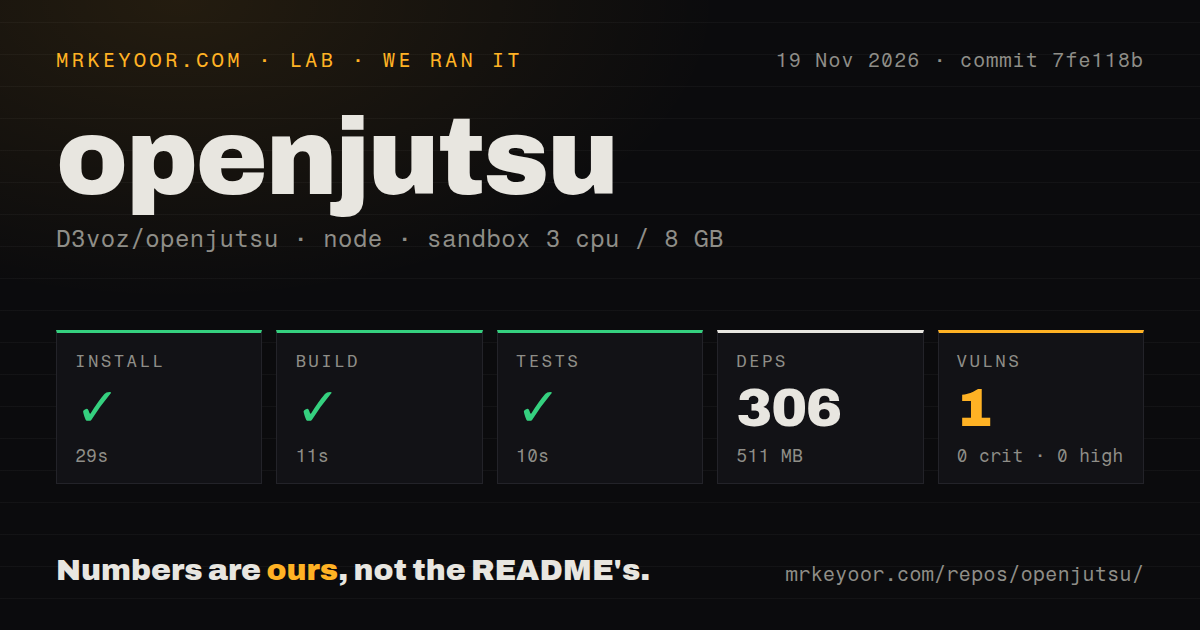
Our run completed the Node installation, build and test steps at commit 7fe118b on November 19, 2026. Installation took 29 seconds, the build took 11 seconds, and the test step took 10 seconds. The harness recorded 306 dependencies and 511 MB on disk. Its sandbox configuration was 3 CPUs, 8 GB RAM and image label lab-node:22. The following table separates the checks and their recorded outcomes.
| Our recorded Node harness check | Result |
|---|---|
| npm installation | Succeeded in 29 seconds; 306 dependencies; 511 MB on disk |
| Build | Succeeded in 11 seconds |
| Tests | Succeeded in 10 seconds; no test count supplied |
| npm audit | One moderate vulnerability; zero critical, high or low vulnerabilities |
| Checkout and scan | 103 files, approximately 8,025 source lines and 11.1 MB; one CI workflow; tests directory; no Dockerfile detected |
A separate proxy probe used recipe quickstart-lib at commit 7fe118bb5a61 on November 19, 2026. It ran in a fresh unprivileged ghcr.io/astral-sh/uv:python3.12-bookworm container with 2 CPUs, 4 GB RAM, no published ports and no secrets. The run record describes installing the latest PyPI proxy version; the installation step identifies it as comfy-api-proxy 0.1.6. Proxy probe configuration and proxy installation record document the environment and package.
| Recorded proxy probe step or finding | Result |
|---|---|
| Clone | quickstart-lib clone completed in 2 seconds. |
| Install | uv pip install comfy-api-proxy installed version 0.1.6 into a fresh virtual environment in 1.7 seconds. |
| Installed size | Virtual-environment site-packages occupied 23.5 MB. |
| Dependency count | 16 packages besides comfy-api-proxy. |
| Snippet step | Failed because the README had no Python code block to run. |
| No-snippet finding | Recorded the same missing Python example. |
| Teardown | Cleanup recorded as successful. |
The proxy recipe stopped because it found no Python code block to execute. The README's manual startup route instead starts ComfyUI, the proxy and the Node app as separate processes. The 23.5 MB figure describes the proxy virtual environment's site-packages; the 511 MB figure describes the Node installation. Keeping those components separate gives a useful account of what occupied disk space during each recorded check.
Where people get stuck: import size and face repair
Issue #44 reports a MemoryError while loading a 1920×1080, 125-second, 30 fps VP9 WebM source on a machine with 24 GB VRAM and 64 GB system RAM. The reporter says the loader decodes every frame at native dimensions before scaling. The selected 736p setting reaches the Swap Plan instead of the loader, which explains why that selection did not reduce the allocation described in the report.
| Report or documented symptom | Useful next action | Evidence status |
|---|---|---|
| Issue #44: native-size decoding | Trim and downscale before import; the report proposes loader-sizing changes | Open issue report |
| Issue #45: face-selection validation | Chardrolls recommends changing largest to largest_face in face.api.json | Commenter workaround |
| Issue #46: input without audio | The reporter added a silent audio track | Reporter workaround |
| Issue #51: missing YOLO files | Compare the named files and destination folders with the README | Reporter asks whether separators explain the paths |
| Progress stops after proxy reconnect | Follow the documented reconnect-pack and proxy-patch instructions | Documentation remedy |
| Windows preview seeking stalls file delivery | Set AIOHTTP_NOSENDFILE=1 before launching ComfyUI | README workaround |
In issue #45, Chardrolls recommends changing largest to largest_face in face.api.json. That advice targets a prompt-validation error. Issue #46 concerns an input without audio and records the reporter's silent-track workaround. Issue #51 names face_yolov8m.pt and person_yolov8m-seg.pt under the ultralytics folders and asks whether backslashes explain the missing-model message. The face-model report is a file-location question, so compare the actual installation with the README's model table before changing paths.
An installed pack can appear missing when it fails to import. The custom-node installation notes direct users to ComfyUI's startup console, where failed imports are marked. Update the required core or pack, install its requirements into the Python environment that runs ComfyUI, and restart ComfyUI. Openjutsu's .venv-proxy serves a different purpose: it runs comfy-api-proxy rather than the generation environment.
Hardware and settings start with the author's configuration
The README records an RTX 4060 Ti with 16 GB VRAM and 64 GB system RAM as the author's tested configuration. It says H3 INT8 models stream from RAM and reports approximately 6 to 13 minutes for a six-second 480p clip on a 4060 Ti. These author-reported figures make host memory part of the hardware decision alongside VRAM and provide a concrete reference for a short local edit.
The documented requirements are an NVIDIA GPU, ComfyUI 0.41.2 or newer, Node.js 22.6 or newer and Python for comfy-api-proxy. The default generation settings use a pruned INT8 H3 model, a DMAD speed LoRA and six steps. Without a speed LoRA, the README recommends at least 20 steps. Advanced mode accepts role names and appearance descriptions to help match people to references. README requirements and settings provide these starting values.
From picture prepares an image before rendering the video. Users can review or regenerate that picture, then select models, LoRAs, resolutions, steps and seed. The README says H3 rounds the requested duration down to its valid frame grid. The author also reports adding visual-describer passes after earlier conditioning lost the meaning of a cake and actions such as blowing out candles. The From picture update explains the action-description change and the editable description presented before rendering.
Local storage and shared access need explicit decisions
Proxy cleanup leaves uploaded files in ComfyUI's input directory after a job ends. The README describes removing uploads from comfy-api-proxy while retaining those ComfyUI copies. A retention process therefore needs to cover source footage and reference pictures in that directory as well as outputs. Decide which files belong in the local archive and remove the others deliberately; finishing a job and clearing proxy uploads are separate operations from deleting retained media.
The README describes a single-owner app in which everyone given the password shares access to its jobs. It also says npm start listens on 127.0.0.1 and warns that the startup check cannot detect a tunnel or reverse proxy on the same machine. Enable the password before forwarding access. The README deployment instructions explain the shared-job model and the same-machine tunnel warning, both of which matter when deciding who can reach the app.
Openjutsu vs Higgsfield Genjutsu and the other Openjutsus
D3voz's H3 app, Comfy-Org's character-swap app and SydFloyd's Wan app are separate projects with different deployment instructions. Match the repository to the workflow before choosing a setup guide. The comparison also includes two hosted services and an existing H3 graph workflow described by a Reddit user. Their accounts, models and deployment requirements belong to the individual options listed below.
| Option | Why consider it | What changes in your decision |
|---|---|---|
| Higgsfield Genjutsu | The comparison-page operator describes a hosted paid editing product | Higgsfield accounts and credits; Nabil preferred its result in his reported attempt |
| Comfy-Org/comfy-openjutsu | A separate character-swap app with a hosted entry and developer deployment | Developer setup needs an account, API key and prepared deployment |
| Genjutsu AI at genjutsuai.dev | Its operator describes a browser editing route | Independent operation, with its own quotes and service terms |
| SydFloyd/openjutsu | Wan-based Recast, Swap and Restyle workflows | Separate FastAPI architecture and Apache-2.0 code license |
| Character Swap LoRA 1.5 with the H3 relay template | Reddit commenter Bitlovin describes using this existing workflow | Compare the app's controls with the graph you already operate |
Comfy-Org's deployment instructions require a Comfy Developer Platform account, an API key and a deployment containing the listed nodes and models. Its reported test hardware was a 96 GB RTX PRO 6000. SydFloyd's README describes Wan 2.2 Animate for Recast and Wan 2.1 VACE for Swap and Restyle. Its architecture places a FastAPI app between the browser and the SDK/proxy route to ComfyUI. The Comfy repository record and SydFloyd README document those separate environments.
Genjutsu AI's operator identifies the service as independent of Higgsfield and describes Higgsfield Genjutsu as a paid feature with its own accounts and credits. Those product descriptions come from a page selling an alternative service. The operator's comparison explains its positioning. For existing ComfyUI users, Bitlovin's H3 workflow account raises a simpler decision: whether Openjutsu's interface adds useful controls to a process they already know.
What the other reviews get wrong
Tokenstrom describes nine Relight moods, while the author's October 30 update reports 17 built-in presets and the current README describes seventeen looks. Tokenstrom also says camera work, cuts, motion and audio stay intact. The author's challenge discussion acknowledges H3 inconsistency, so preservation should be described as the intended workflow result. The Tokenstrom review and author's Relight update identify the preset-count discrepancy.
ArtRealmAI's launch account reports early visitors finding Comfy's hosted page unavailable. Ordalin later records that separate Comfy beta as accessible after sign-in on November 1, 2026. The early access report therefore needs its date and project name. ArtRealmAI's launch account concerns Comfy-Org/comfy-openjutsu; Ordalin's dated account supplies the later observation. D3voz's local app has its own installation route.
Genjutsu AI's comparison advertises up to 28 free credits, while its installation guide advertises up to 40 over a seven-day check-in streak. Those conflicting offers concern the independent service. Use its actual quote when considering that route. The comparison offer and installation-guide offer should stay separate from D3voz's app, just as Comfy-Org's developer deployment requirements should stay separate from D3voz's local hardware guidance.
FAQ
The author's documented configuration is an RTX 4060 Ti with 16 GB VRAM and 64 GB system RAM. Hardware, settings, character consistency and face-repair errors recur in the recorded questions. The answers below use the README for documented behavior and name the reporter when describing an issue or attempted edit. Questions about reproducing demonstrated results and completed RTX 3060 renders are answered in the testing section that follows.
How much VRAM and system RAM does Openjutsu actually need?
The author tested an RTX 4060 Ti with 16 GB VRAM and 64 GB RAM, with H3 INT8 models streaming from host memory. Plan for both host RAM and GPU memory. Issue #44 describes a separate source-decoding problem on a machine with 24 GB VRAM and 64 GB RAM: native-size loading exhausted memory before the selected scaling stage. README hardware requirements and issue #44 describe the two configurations.
What makes Openjutsu more consistent than other MiniMax H3 character-swap workflows?
The author identifies SAM tracking, grey-mannequin references, Qwen role matching and overlapping clips as the app's mechanisms. Those details explain how it handles subject selection and motion references. The practical comparison for an existing H3 user is whether those controls improve their editing process. The author's challenge discussion describes the implementation, while the same discussion includes Bitlovin's account of already using a Character Swap LoRA and relay template.
How does Openjutsu differ from Higgsfield Genjutsu besides running locally?
D3voz's README exposes object edits, picture preparation, face and colour processing, model settings and workflow choices through ComfyUI. The comparison-page operator describes Higgsfield Genjutsu as a hosted paid product with its own accounts and credits. Choosing the local app involves maintaining model files, custom nodes and retained media. The local feature list and attributed hosted-product comparison describe those different operating arrangements.
Which settings work well for character swaps and two-person Advanced swaps?
The README starts with the pruned INT8 H3 model, a DMAD speed LoRA and six steps; without a speed LoRA, it recommends 20 steps or more. Advanced mode uses roles to help match people to references. One pass per person gives each of two characters a separate H3 pass. Record those choices with the output when comparing attempts. README generation settings describe the controls available for that comparison.
Can Openjutsu animate a character image while keeping its background and following an actor's lips and body movement?
The author identifies From picture as the route for this task and says that tab is limited to one person. The README describes preparing the character image in the source frame's pose, reviewing it, and rendering with motion guidance and the source soundtrack. Review the prepared image and action description before generation. The author's answer identifies the mode, and the README workflow description explains its preparation and rendering stages.
Could Openjutsu's consistency components be combined with an H3 video-regeneration workflow?
StoutimonO proposed combining Openjutsu or its elements with an H3 regeneration workflow on X. That proposal gives developers a concrete integration question to investigate: which tracking, reference or workflow components could be reused. The X discussion record contains the suggestion. D3voz's README describes the existing modes and workflow exports, providing the implementation map for examining that proposal without treating it as an existing feature.
Where are the official download links for the required models?
The README provides a model table with filenames and destination folders, including SolarRenderer download links. Issue #41 requests official model links, and a reply points to SolarRenderer. Start with that table and the custom-node notes so model files and node-pack requirements remain separate installation tasks. The model-link request and custom-node installation notes explain the download and environment details available to users.
Why does Simple mode run out of RAM on a long 1080p input even with 24 GB VRAM?
Issue #44 says the video loader decodes frames at native dimensions before scaling. In that report, the 736p selection reaches the Swap Plan rather than the loader. Trim and downscale the source before import, as the troubleshooting guide recommends. The native-resolution memory report describes the failure sequence, and the installation and troubleshooting guide supplies the source-preparation workaround.
How do I fix the largest versus largest_face validation error in Fix faces?
Chardrolls recommends replacing largest with largest_face in face.api.json. The issue concerns a selection value rejected during prompt validation, making this a targeted workflow configuration change. Record the edit when troubleshooting so it can be compared with later workflow updates. The validation report and reply contain the recommendation; the relevant setting is the face-selection value, rather than a general control for improving face quality.
Are backslashes in the missing face-model paths causing face post-processing to fail?
Issue #51 presents backslashes as the reporter's suspected explanation for a missing-model message. The named files are face_yolov8m.pt and person_yolov8m-seg.pt under ComfyUI's ultralytics folders. Compare installed filenames and destinations with the README's model table before editing the workflow paths. The face-model path report records the question, while the README model table supplies the expected files and folders.
What we have not tested yet
Our measurements cover Node repository checks and a proxy probe that stopped at its missing-snippet step. They contain no generated video, completed clean-machine ComfyUI deployment, full model-download measurement, identity-retention assessment, motion-fidelity assessment or matched comparison with Higgsfield. The image label lab-node:22 identifies the configured sandbox image rather than an actual runtime or operating-system version. The audit summary supplies no advisory identifier or exploitability assessment, and the latest-release lookup is inconclusive.
Can an ordinary user reproduce Openjutsu's demonstrated results?
We have not established reproducibility of the demonstrated results; our checks did not generate a video. The README provides a Windows launcher and manual startup instructions after ComfyUI, custom nodes and model files are prepared. The launcher installs the proxy and Node packages, then builds and starts the app. The README startup instructions and custom-node notes provide setup guidance; the Bilibili listing supplies no reproducible procedure or output assessment.
Will Openjutsu run on an RTX 3060 with 12 GB VRAM and 32 GB RAM?
Completed-render compatibility on an RTX 3060 with 12 GB VRAM and 32 GB RAM is unverified in this evidence. The YouTube presenter reports that hardware and selects a dance clip and cartoon reference, but the available transcript ends before a completed render. The author's 16 GB VRAM and 64 GB RAM configuration is a tested setup rather than a certified minimum. The YouTube setup transcript supplies the attempted lower-hardware configuration.
A lower-hardware compatibility matrix, peak decoding memory, reliable settings for two-person identity retention, total setup duration and complete model-download size remain outside our results. The custom-node notes leave some revisions, direct model links and clean-PC validation open. Preflight checks registered nodes and listed filenames rather than Python dependencies, model integrity or available VRAM. Quriosity-agent reports 65 unit tests across seven files, but those are that reviewer's checks rather than our passing-test count or a GPU quality assessment.
We have not reproduced the issue workarounds or established their upstream integration. Issue #51 provides no confirmed path diagnosis, the X proposal provides no completed integration report, and the author's action-description update lacks an independent output assessment here. Character consistency and exact preservation also lack a matched quality benchmark. The supplied Transformers comparison provides popularity figures and opinion rather than a character-swap task evaluation, so it supplies no basis for choosing Transformers as a substitute for this app.
The README says mirrors and person reflections do not work yet. It also describes a face-repair tradeoff: Match the photo prioritizes likeness while inventing expressions and mouth movements; Follow the mouth preserves more source performance at some cost to likeness. These source-documented limits belong in an output trial. Assess identity, expression, mouth movement and duration separately, including the effect of H3's frame-grid rounding when an edit must fill an exact slot.
Authentication, deployment security and model-license compliance remain unassessed here. The app's MIT code license does not resolve the permissions of each model component, and the evidence provided here does not support specific buffalo_l or YOLO license restrictions. D3voz's cloud deployment instructions are described as untested in the record, and our checks supply no production-throughput or simultaneous-generation measurement. Begin with one short clip you have permission to use, record inputs and settings, inspect the mask, and compare the resulting performance with the edit you need.