OMX adds persistent workflow state around Codex
Oh-my-codex earns consideration when you keep losing the plan between coding sessions. It stores plans, logs, and runtime state under .omx/, with workflows for clarifying requirements, approving a plan, and carrying work through checkpoints. Codex remains the execution engine. You adopt OMX to organize that engine's work, so a developer already happy with a prompt and a diff has less reason to add it.
Our checkout had 1,453 files and roughly 477,127 source lines, occupying 22.4 MB before dependencies. Persistent task records can help with a refactor that crosses several sessions, but they introduce another set of files and ownership rules to understand. The payoff should be a specific recurring problem, such as restoring agreed requirements after an interrupted task.
What happened when we ran it
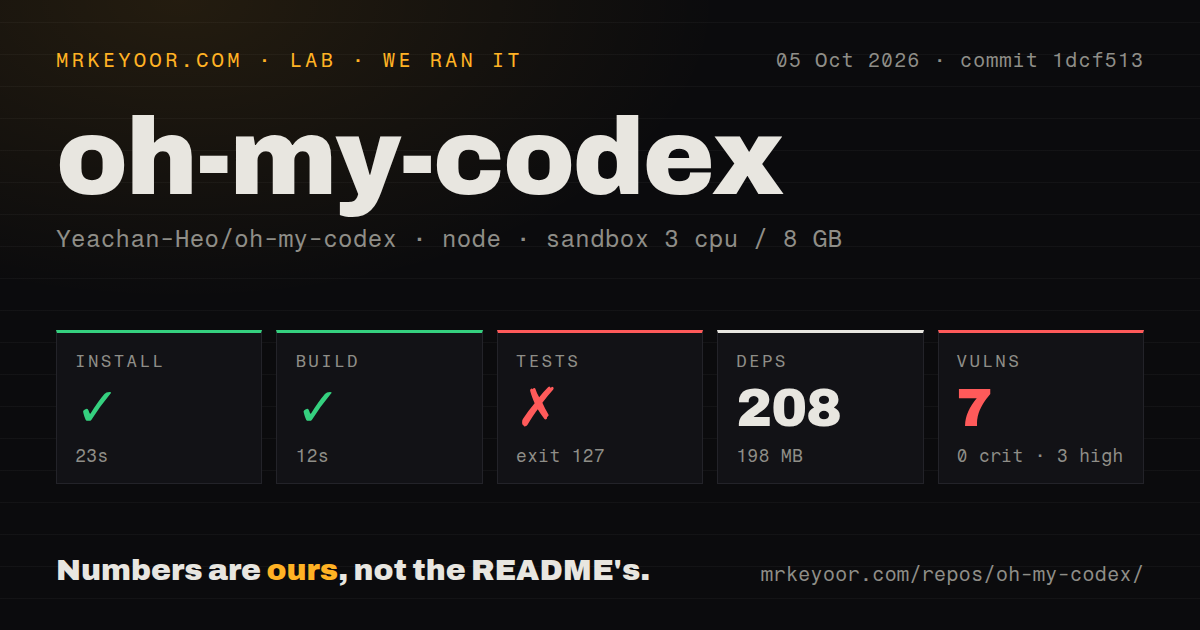
Our run installed oh-my-codex commit 1dcf513 in 23 seconds, adding 208 packages and occupying 198 MB. The build succeeded in 12 seconds. We cloned it on October 5, 2026, into an unprivileged Debian sandbox with 3 CPUs, 8 GB of RAM, the lab-node:22 image, and no secrets. The lab used Bun for the Node project. This measurement setup confirms that dependency installation and the measured build completed in that environment.
The test command failed after 11 seconds with exit 127. Its chain ran the TypeScript build, then reached cargo build -p omx-runtime. Bash reported cargo: command not found, and both build:runtime and the outer test script exited with code 127. Execution stopped at that prerequisite, before the later Node test stage. The log supplies no assertion results, so this finding cannot support a pass count or a claim that application assertions failed. Npm audit reported 7 known vulnerabilities: 0 critical, 3 high, 3 moderate, and 1 low. The repository scan found 4 CI workflow files, no Dockerfile, and no tests directory. These are observations from the supplied run. They neither identify which dependency paths are exposed during ordinary use nor show that upstream has no test coverage.
The contributor checklist leaves Cargo unstated
The development setup checklist names Node and npm, then asks contributors to build and run tests. Our log shows that following the full test path also requires Cargo, Rust's build tool. That is a documentation gap for source contributors. It doesn't establish that users of the published package must compile Rust themselves, and installing Cargo alone wouldn't prove that every later check passes.
The 12-second successful build covered the earlier TypeScript step, while the test script separately attempted the native runtime. Treat those as different boundaries. Someone evaluating a fork needs the native toolchain and a fresh full-suite run. Someone adopting the released CLI needs a working Codex login in the same shell and profile. The README distinguishes installation checks with omx doctor from an execution smoke test that makes a real model request.
Setup writes guidance and hooks at the chosen scope
OMX setup manages durable AGENTS.md guidance and Codex configuration, with legacy and plugin modes handling prompts and hooks differently. The README recommends project scope inside the actual Git repository or user scope for broader setup. It warns against project setup in a home directory that already holds global rules. This deserves care on a workstation where other projects depend on existing instructions. The scoped setup guidance explains what each choice owns.
The 198 MB source installation says nothing about whether your active Codex profile can authenticate. Nor does the official plugin replace the global OMX CLI and scoped setup. Optional MCP compatibility servers and apps are disabled by default in the plugin metadata. Start with the workflow you need, inspect the generated guidance, and check the actual execution environment before asking it to edit an important repository.
Team mode needs tmux, and worktrees do not restore permissions
The README recommends macOS or Linux with Codex CLI, adding tmux for durable team coordination. Native Windows uses psmux and receives less support, while Codex App isn't the default experience. Team workers use dedicated worktrees, and the leader owns the durable Ultragoal state. Those choices address coordination across parallel edits, but they also explain why OMX is a poor addition to a simple desktop chat workflow.
A 23-second install doesn't make the recommended launch command harmless. Its --madmax flag maps to Codex's option that bypasses approvals and the sandbox. A separate worktree keeps edits away from the original checkout, but it doesn't recreate those permission controls. I would choose launch permissions deliberately and reserve parallel workers for work that can be divided and reviewed. The README itself advises against team orchestration for very small tasks.
The October release fixes diagnosed compatibility problems
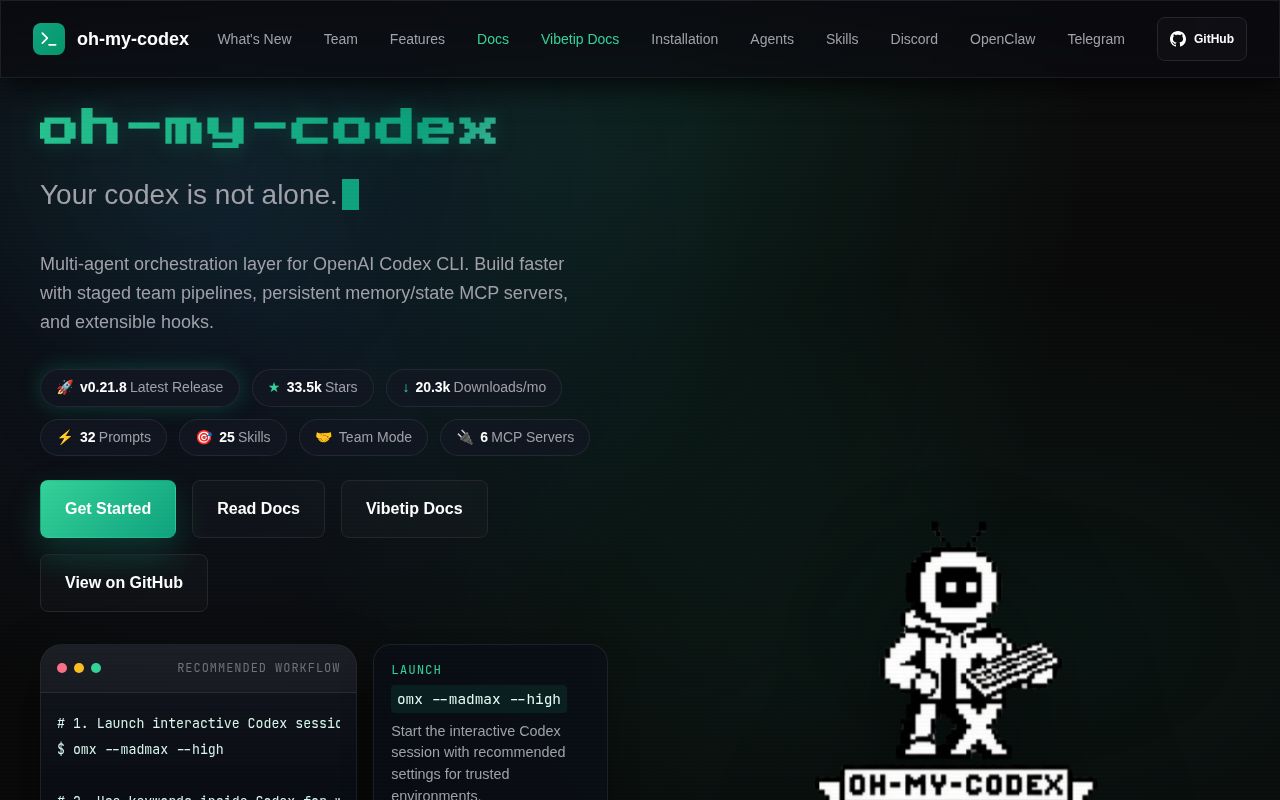
The last push was October 8, 2026. GitHub listed 33,508 stars and 2 open issues and PRs, while v0.21.8 shipped October 6. Recent closed reports cover Windows state writes and a doctor warning that confused ordinary Codex sessions with broken OMX bindings. The release notes name fixes for both. Recent activity and closed reports show current maintenance.
Those repairs don't change our 11-second test failure: the measured commit lacked an available Cargo executable in our container. Use the newest release notes to decide what to retest, without treating them as evidence from our sandbox. For a recurring multi-session refactor, OMX's persistent state and explicit ownership rules justify a trial. For an isolated bug fix, plain Codex leaves fewer runtime surfaces to manage.
Plain Codex is the first alternative for smaller tasks
Codex CLI provides the execution engine OMX wraps, without requiring OMX's setup or state conventions. Aider is worth considering for terminal editing across different model providers. Oh-my-claudecode offers related orchestration for Claude Code users. These choices change the workflow or underlying engine, so choose around how you already review code. Begin an OMX trial with one interrupted task to resume and one generated configuration diff to inspect.