A model file becomes a navigable graph without a framework install
Open a model in Netron and you get a graph of operators and connections instead of a binary file or a screenful of serialized data. Selecting a node reveals its type, attributes, input and output shapes, and stored values where the format exposes them. That is the useful trick: you can inspect what an exporter produced before installing the training framework or writing inference code.
The project gives you several ways in. The hosted app opens models in a browser, packaged releases cover macOS, Linux, and Windows, and the Python package starts a local viewer with netron [FILE] or netron.start('[FILE]'). Our checkout at commit df0d2df contained 277 files, about 226,646 lines of source, and occupied 31.5 MB, yet a user can avoid that source tree entirely.
Fourteen main formats make breadth the reason to choose it
The README names 14 formats in its main support list. They include ONNX, TensorFlow Lite, PyTorch, torch.export, ExecuTorch, TorchScript, TensorFlow, Core ML, OpenVINO, Keras, Caffe, Darknet, Safetensors, and NumPy. That range is why Netron works well as a first inspection tool in mixed ML shops: one interface can open artifacts produced by several otherwise unrelated stacks.
Another 8 formats are explicitly experimental: MLIR, JAX, GGUF, RKNN, ncnn, MNN, PaddlePaddle, and scikit-learn. Treat that label as a buying boundary, not small print. If your release process depends on one of them, test the exact files your exporters create. A format name in the list does not promise that every operator, container variant, or future exporter output will render as you expect.
What happened when we ran it
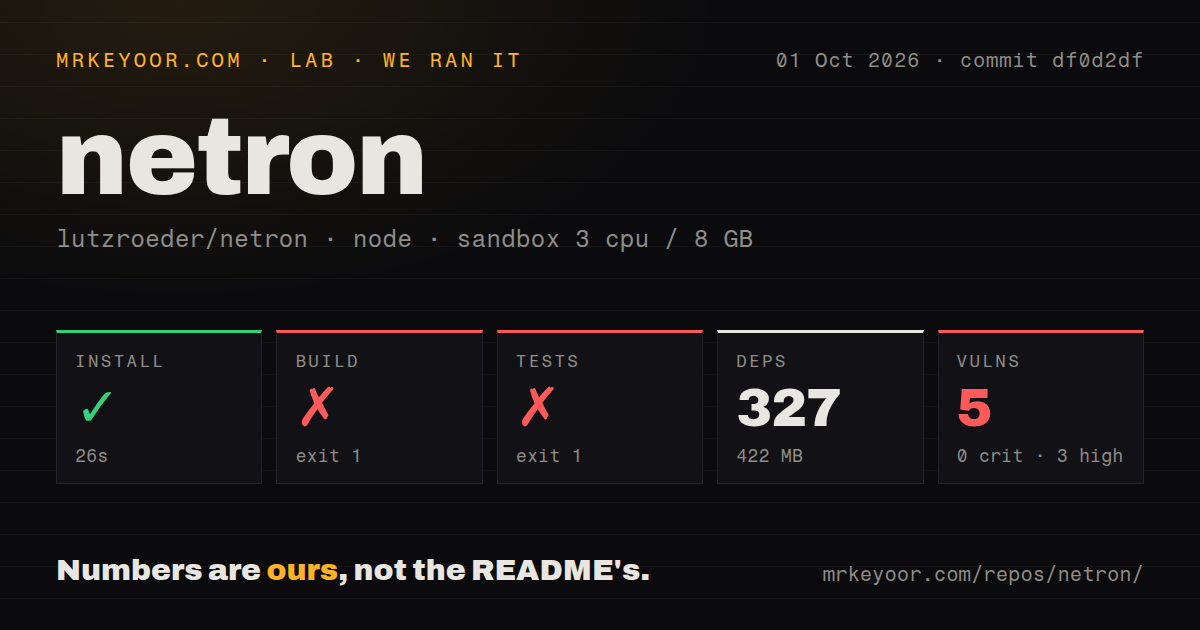
Our sandbox installed commit df0d2df in 26 seconds. Npm added 327 packages and the working environment occupied 422 MB. The fresh Debian container had 3 CPUs, 8 GB of RAM, no secrets, and no elevated privileges. Npm audit reported 5 known vulnerabilities: 3 high and 2 moderate. Those numbers describe the repository setup, not the hosted viewer or packaged desktop downloads.
The build failed after 50 seconds. Its logged command ran Electron Builder with --mac --universal, then @electron/universal stopped because universal packaging is supported only on Darwin. The log does not show a JavaScript compile failure. It shows a Linux container reaching a macOS packaging step that cannot run on that platform. Netron has 2 CI workflow files, but its checkout has no Dockerfile defining a supported build container.
Tests failed separately after 30 seconds. The model test progressed through its fixture set, then reported that third_party/test/caffe2/mobilenet_v2/predict_net.pb had no content. The command that failed was node test/models.js. We cannot tell from that tail why the file was empty, so the useful finding is narrow: the supplied test command did not pass in our clean container at this commit.
Linux can run Netron even though the default build targeted macOS
The failed build should not be confused with a failed installation of the viewer. Netron publishes .deb and .rpm downloads for Linux, an .exe installer for Windows, a macOS disk image, and the browser version. Those are the sensible routes for most users. Source contributors have a different job: choose a target their host can package, then run the relevant validation path rather than assuming the default build is portable.
That distinction also changes the risk calculation around the 5 audit findings. A browser visitor is not installing our measured 327-package development tree. A maintainer or distributor is, and should inspect the affected dependency paths before shipping anything derived from the checkout. The audit total alone does not prove that a vulnerable path is exposed in the app, but it is enough to block an automatic clean bill of health.
Large files and editing remain visible limits
Netron is a viewer. It does not claim to be a graph editor, and model editing is still an open feature request. Choose the ONNX reference tools when you need shape inference or programmatic transformations. TensorBoard makes more sense when the graph must sit beside training metrics and profiles. Google Model Explorer is the closer visual alternative when debugging and custom extensions outweigh Netron's long format list.
Open issue 1596 reports extra disk reads when opening model files larger than 256 MB. The report points to fixed-size read windows shared across several streams and provides a reproducible case. That is issue evidence, not a result from our sandbox. Still, teams working with gigabyte-scale artifacts should try their own largest files before standardizing on the viewer, because a small sample graph will not expose the same I/O behavior.
Version 9.3.0 and an October 2 push show current maintenance
GitHub showed 33,541 stars and 18 combined issues and pull requests on October 2, 2026. The repository was pushed that day, and release 9.3.0 was published on September 25. Recent issue activity includes the large-file report from August and updates to older feature requests. The dates support calling Netron active, while the open queue also records boundaries such as model comparison, tensor visualization, and graph editing.
Netron earns its place by making inspection cheap. Start with the browser app, open a representative model, and confirm that the graph answers the question you have. If it does, there is little reason to adopt a heavier dashboard. If you plan to contribute or redistribute it, our 50-second build failure and 30-second test failure are the parts to reproduce first.