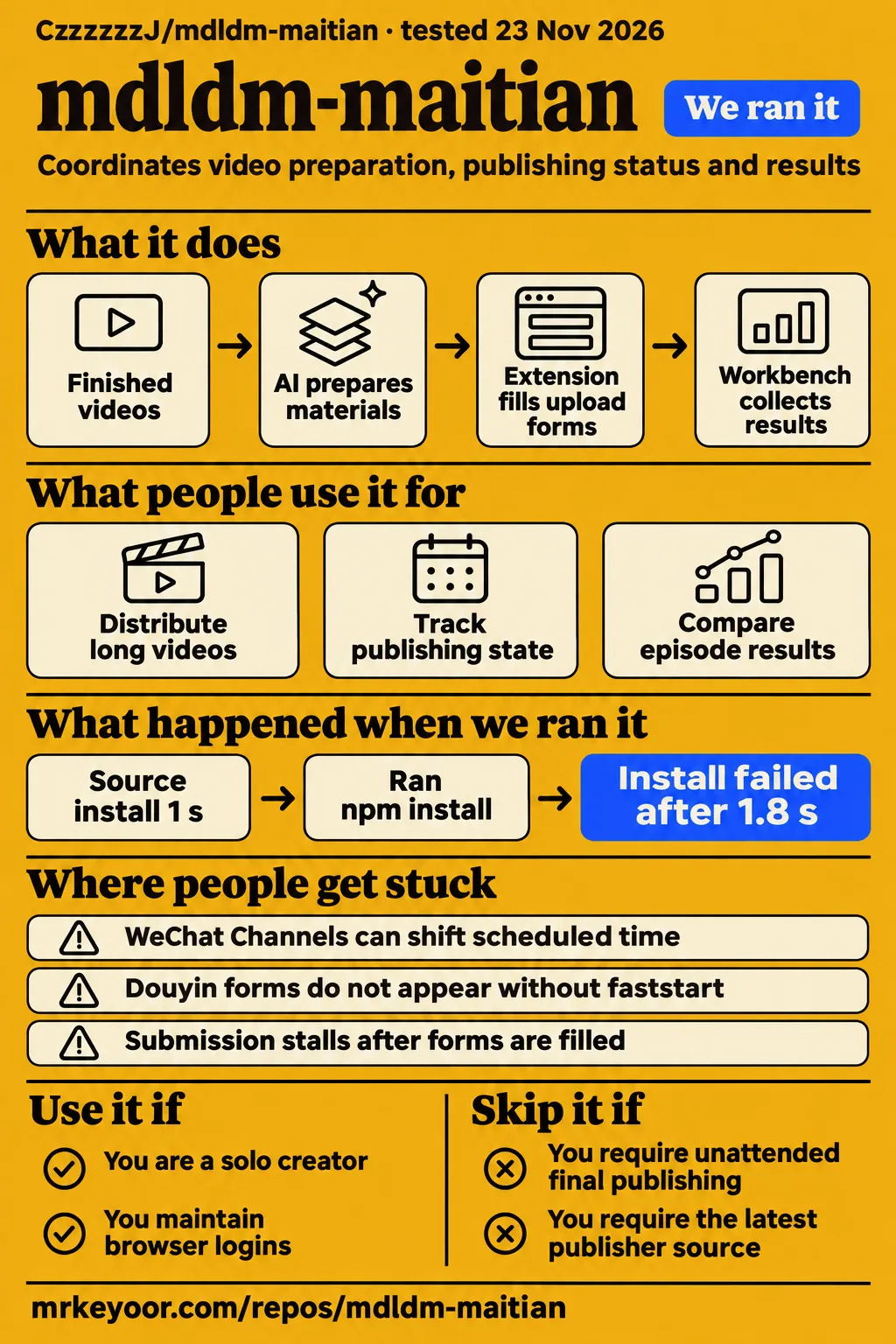
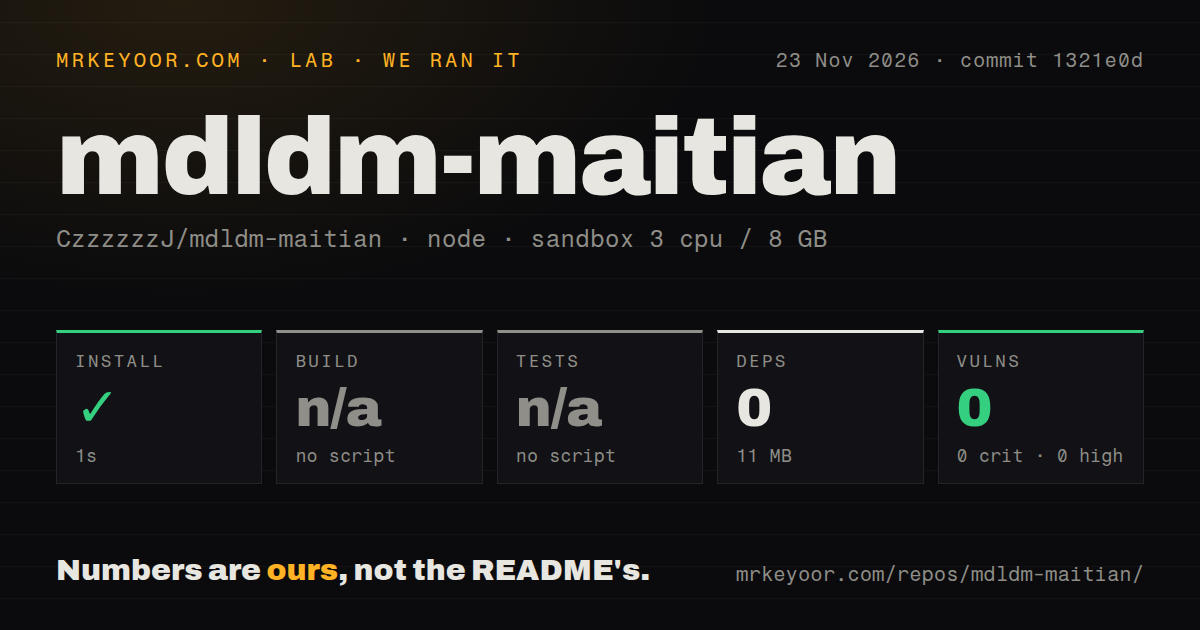

Our November 23 checkout installation of Maitian at commit 1321e0d finished in 1 second. Use Maitian if you are a solo creator distributing finished videos across Chinese and international platforms and want preparation, publishing status and results in one workbench. Skip it if you require unattended final publishing on Bilibili, Douyin, Xiaohongshu and WeChat Channels: the Maitian README assigns those four final publish clicks to you.
The workflow has three parts with distinct jobs. An AI assistant prepares platform-specific copy and a publishing project, a Chrome extension fills upload forms, and the workbench manages schedules and collects results. You maintain the signed-in accounts and review the material. Source availability also differs between the workbench and its publishing engine, so choosing the project involves both the creator workflow and the extension you will maintain.
What people use mdldm-maitian for
Author 麦当mdldm describes distributing long videos and comparing episode results on days 1, 3 and 7 in his November 16 launch account. These are concrete uses of the workbench: prepare one episode for several platforms, track its publishing state, then compare its results with an earlier episode at the same age. The account explains the author's own routine rather than presenting a customer survey.
| Who used it | What they did | Reported outcome |
|---|---|---|
| Project author 麦当mdldm | Prepared and distributed long videos to Bilibili, Douyin, Xiaohongshu, WeChat Channels, YouTube, X and his knowledge site | He reports spending about an hour per episode previously, with his main remaining action becoming the final publish click on four domestic platforms. Author's workflow account |
| Project author 麦当mdldm | Used day 1, 3 and 7 review cards to compare episodes at the same age | He reports one episode exceeding 22,000 first-day views, six times its predecessor at the same age. Author's episode comparison |
The author's launch inventory contains six social platforms plus his knowledge site. The README checked on November 23 lists seven social platforms: Bilibili, Douyin, Xiaohongshu, WeChat Channels, YouTube, X and Instagram, with a site optional. Keeping the inventory explicit avoids counting the author's site as another social platform. The service named in the README is Douyin; that inventory should guide the upload pages you expect the extension to open.
What happened when we ran it
Our run at commit 1321e0d completed the checkout installation in 1 second, recorded 0 dependencies and used 11 MB on disk. The sandbox measurement records 3 CPUs, 8 GB RAM and image label lab-node:22. Its repository scan counted 123 files, approximately 6,044 source lines and a 5.6 MB checkout. Build and test steps were skipped because the harness found no script or target for either step.
| Question | Answer | Verdict | Why |
|---|---|---|---|
| Did the checkout installation complete? | Yes: 1 second, 0 dependencies recorded, 11 MB on disk | Installation completed | The harness recorded a successful install exit |
| Did a build run? | No build script or target; skipped | Skipped | The harness had no build target to invoke |
| Did tests run? | No tests script or target; skipped | Skipped | The harness had no test target to invoke |
| What did npm audit report? | 0 known vulnerabilities: 0 critical, high, moderate or low | No known advisories reported | This is the recorded npm audit output |
| How large was the checkout? | 123 files, approximately 6,044 source lines, 5.6 MB | Repository scan completed | These figures describe the checked-out source tree |
| What automation files were found? | 0 CI workflow files, no Dockerfile, tests directory present | Mixed repository signals | The directory scan and skipped test step are separate observations |
A separate hands-on attempt used the quickstart-lib recipe at commit 1321e0df12d0 on November 23 in a fresh unprivileged lab-node:22 container with 2 CPUs, 4 GB RAM, no published ports and no secrets. Its clone step took 1 second. The registry install failed in 1.8 seconds with exit 1: npm install mdldm-maitian@latest returned E404 and 404 Not Found for the package registry request.
| Question | Answer | Verdict | Why |
|---|---|---|---|
| Did the separate clone step complete? | The quickstart-lib clone step recorded 1 second | Clone step recorded | Hands-on clone log |
| Did installing mdldm-maitian@latest from npm succeed? | No: 1.8 seconds, exit 1, E404 and 404 Not Found | Failed | The registry log says the package is not in this registry |
| Where did that attempt stop? | At installation; npm recorded a debug-log path | Stopped at install | Hands-on failure finding |
| Did teardown complete? | teardown: ok | Completed | Hands-on teardown record |
The failure finding records the npm debug log at /work/home/.npm/_logs/2026-11-23T21_40_20_571Z-debug-0.log. These were two different installation routes: the successful measurement used a repository checkout, while the failed attempt requested a package from npm. The documented manual setup begins with a Git clone and initialization wizard, which makes the registry error a specific finding about the attempted npm route.
Where people get stuck: schedules, video files and login state
The README names changed schedules, unsuitable video files and misleading upload-dialog state, with a different recovery for each. Its platform troubleshooting notes explain why a creator should inspect an existing platform result before uploading again. That distinction also appears in the publishing skill: a prepared form, a submitted post and a collected post link are separate stages represented by the workbench.
| Symptom | What the documentation says to do | Status of the remedy |
|---|---|---|
| WeChat Channels records a different scheduled time, including an observed two-hour shift | Inspect the platform's recorded schedule; sync compares it with the plan and sends a warning |
Schedule comparison and warning |
| Xiaohongshu reports missing video-stream information, or Douyin's form does not appear | Prepare faststart video with moov metadata at the beginning; validation blocks unsuitable files |
Documented file preparation |
| A YouTube upload dialog closes | Inspect the Studio list before treating the upload as failed | The video can already be scheduled |
| An overseas platform's form is filled but submission stalls | Use hub submit for Instagram, YouTube or X |
Recovery checks existing content and requires exactly one prepared posting tab |
| Windows does not start Maitian automatically | Point Task Scheduler at the installation directory's 4-start.bat |
Documented startup workaround |
The publishing skill describes hub submit as a single submission attempt after checking existing content, locating exactly one prepared posting page, saving a screenshot and checking its contents. This recovery starts from the form already open in the dedicated browser. It preserves the project's stated rule that the same video should be uploaded only once per platform, rather than starting another upload whenever the visible state is confusing.
In issue #19, a Mac user reported invisible keyboard input in the setup wizard; the maintainer says #20 fixed it and recommends pulling current main before rerunning the wizard. Issue #32 requested platform login controls and enable/disable switches. The maintainer's later reply in issue #14 confirms that #36 merged platform management, including individual login and health checks. Those replies distinguish a reported setup problem from a feature request that subsequently reached main.
A fast npm step leaves the browser setup to you
The README requires Node.js 22.5 or newer and Google Chrome, with creator accounts signed into a dedicated browser on a computer that stays on. The manual requirements identify built-in node:sqlite. The documented sequence first opens a demo with fake data, then runs initialization, then checks account login state and upload pages. This sequence gives the creator a view of the dashboard before connecting publishing accounts.
The documented commands are node src/demo.mjs, node src/init.mjs and node src/hub.mjs doctor. The README describes doctor as checking login state and upload pages without uploading or filling forms. Existing episodes can enter the dashboard through hub adopt, which registers already-published work and retrieves links by title. A creator can therefore begin with results collection before adding upload preparation to the routine.
A network drive, Feishu notifications and a Cloudflare tunnel are optional in the README's setup instructions. Site conversion reporting adds a separate integration: preserve the incoming episode marker through registration and ordering, then expose two read-only interfaces described in src/site.mjs. Windows users have a community installer for Windows 10/11 and four local launchers. Its startup workaround points Task Scheduler to 4-start.bat instead of the macOS launchd step.
Source access changes at the publisher extension
The workbench is MIT licensed, while the publisher README says its public repository stops at 0.5.1 and later source updates are in a member repository. The same publisher README says the store edition is free and receives updates. Free installation and access to current source are consequently separate parts of the choice. The workbench repository and the extension repository should be assessed as distinct components.
The workbench README describes loading the publishing engine from the store extension installed in its dedicated Chrome profile, with Chrome handling extension updates. That arrangement puts the platform adapters in the extension used by the logged-in browser. For someone selecting software on source availability, the practical distinction is the MIT workbench alongside the publisher's stated public-source cutoff at 0.5.1 and its continuing store distribution.
The standalone publisher also supports independent use. Its README describes filling video upload pages and inserting Obsidian notes into X Article drafts, with final publishing performed by the user. That is a narrower workflow than running the workbench: the extension handles editing and upload preparation, while the workbench adds scheduling coordination, post-link collection, daily metrics and review cards.
Security depends on the signed-in browser and dashboard access
Maitian's README says it operates existing signed-in browser sessions and stores no platform passwords. Its data and privacy section excludes config.json, database and log data, and Chrome login state from Git. These are concrete storage and account-handling statements from the project. The dedicated browser profile contains the platform sessions used to reach creator pages, so browser access remains part of operating the workbench.
The README documents web.key for dashboard pages and interfaces, returning 401 when the key is absent. It also describes Cloudflare Access checks and a Feishu code login for remote access, retaining the key as a fallback. The publishing skill sets a separate account-use rule: operate your own accounts and exclude automated comments, likes, private messages and follows. These controls address dashboard access and the actions the workflow is intended to perform.
Upload batches and Chinese documentation shape daily use
The README recommends domestic uploads in pairs because simultaneous transfers compete for bandwidth and can time out. Its batches configuration controls upload grouping. This setting concerns transferring finished video files through creator pages, a different stage from installing the repository. The same documentation describes login checks before a run, Feishu notifications for missing logins and continuation for the other platforms while a creator restores access.
Maitian's README is in Chinese, and the publishing skill gives Chinese-language editorial rules for platform-specific copy. It instructs the assistant to avoid links, WeChat identifiers and promotional prompts on Xiaohongshu, Douyin and WeChat Channels, with validation enforcing its rules. An English-speaking creator needs to understand these instructions or read a translation because they affect the materials generated for those upload pages.
The README describes one login per platform in the dedicated browser profile. It separately documents secondary Bilibili accounts for collection, using independent profiles and debugging ports, and explicitly excludes those accounts from publishing. This is a concrete distinction for agencies evaluating account handling: the secondary-account feature collects results, while the publishing workflow uses the platform login held in the dedicated browser.
mdldm-maitian vs manual distribution, Postiz and the standalone publisher
Postiz documents team invitations, comments and scheduling, while Maitian's documented workflow combines video preparation, browser uploads and results collection. The Postiz README describes both managed and self-hosted editions; its self-hosted route requires creating platform developer apps. Those requirements make account integration and collaboration useful comparison points alongside the final publish clicks retained by Maitian on four domestic platforms.
| Choice | Why consider it | What decides the choice |
|---|---|---|
| Manual distribution | You already operate each creator page yourself | The author reports an approximate one-hour baseline per episode |
| Maitian on your usual computer | Coordinates preparation, publishing state and results through your dedicated browser | The author recommends the usual device and network because changed login environments can trigger platform controls |
| Maitian on a desktop cloud server | The author describes this as a possible deployment | This is the author's proposed configuration |
| Postiz | Its README documents team invitations, comments and scheduling | Collaboration requirements and the developer apps required for self-hosting |
| Standalone Maitian publisher | Fills upload forms and inserts Obsidian notes into X Article drafts | Whether upload preparation alone covers the job |
The author recommends using the creator's usual computer and network, explaining that sudden device and IP changes can trigger domestic-platform controls. That recommendation connects the local installation to his account workflow. The standalone publisher's independent-use instructions offer another starting point when the main task is repeating upload fields; the workbench adds the calendar, collected links and later episode results.
What the other reviews get wrong
GitHubPlay lists Node.js 18.0+ as sufficient, while the official README requires Node.js 22.5 or newer. The GitHubPlay requirements table gives the older minimum; the project's manual requirements identify built-in node:sqlite. A machine prepared from the third-party table would therefore follow a different runtime requirement from the project's documented installation instructions.
The weekly YouTube roundup calls the dashboard real-time analytics. The README instead specifies collection every morning and every six hours during a new episode's first three days. These are different descriptions of the collection cadence. The review cards then compare an episode with its predecessor at the same age after publication, with automatic cards scheduled for days 1, 3 and 7.
LavX's November 21 installation summary says each route needs a Mac. That Mac requirement in LavX's article conflicts with the official Windows 10/11 installation instructions, which name Node.js 22.5 or newer, Google Chrome and the community installer. The README separately explains the Windows Task Scheduler workaround. This correction concerns the installation summary rather than other parts of the LavX article.
Questions people ask
Maitian uses creator-page publishing rather than official upload APIs, according to the maintainer's reply in issue #30. The maintainer describes domestic browser form filling and web publishing for YouTube and X. The three questions below concern that publishing method, the requested Threads adapter and the publisher's deliberate waiting time during image-heavy X Article imports.
Does publishing through an official API cause zero views, and does Maitian use those APIs?
The maintainer says Maitian uses web publishing and reports no systematic zero-view problem in his daily publishing. In issue #30, he requests the platform, publishing method and work URL from anyone encountering zero views. His reply distinguishes Maitian's browser workflow from other tools calling official upload APIs and identifies the details needed to investigate an individual report.
Will Maitian support Threads, and should it use the website or the official API?
Issue #14 is an open Threads request whose maintainer favors a browser posting adapter and profile-based collection. The maintainer's replies describe that direction and invite a contribution, then ask for progress and a draft pull request. The later reply also tells the contributor to register Threads in the platform-management system already merged through #36 rather than adding a separate enable/disable mechanism.
Why does importing an image-heavy Obsidian note into an X Article take so long?
The publisher waits 12 seconds by default after each image because inserting text immediately can make the image disappear. The publisher README documents the adjustable delay, temporary placeholder paragraphs to preserve structure and a later comparison for missing text. It also states that paragraphs restored by that check lose bold formatting and links, giving the creator specific formatting details to inspect in the resulting draft.
What we have not tested yet
Our measurements cover checkout installation, repository scanning, npm audit and a separate failed npm-registry installation attempt. They do not cover authenticated uploads, completed schedules, collection accuracy, Windows startup, remote authentication, English interface behavior or sustained use through platform-page changes. The image label lab-node:22 identifies the recorded sandbox configuration; actual runtime and operating-system versions require raw toolchain logs. The documented commands and recovery steps above were not executed as part of this correction.
The 1-second checkout installation and 11 MB installation footprint do not measure account setup, a browser profile or video storage. Skipped builds and tests provide no successful build or passing-suite result, and npm audit's 0 known vulnerabilities is not a security assessment of the extension, browser sessions or dashboard. Postiz's documented collaboration features also do not establish matching coverage of Maitian's Chinese-platform inventory; no comparative operation was measured.
The author's approximate one-hour baseline has no independently measured replacement completion time. His reported 22,000-plus first-day views and sixfold comparison do not isolate Maitian's effect on audience performance. Independent adoption, support capacity and the desktop-cloud configuration also lack operational measurements here. Issue #30 contains no reproducible incident establishing that an official API caused zero views, and the open Threads discussion supplies no completed adapter result.
The publisher README contains an unresolved licensing conflict: its opening labels the frozen 0.5.1 snapshot MIT, while its footer says Apache License 2.0. Which license governs each file or revision needs clarification before redistributing a modified publisher. The documented human publish clicks and account-use rules likewise provide no guarantee against platform risk controls. Rendered layout, assets, automatic related links, recommendation modules and template behavior were outside this text correction.