Should you use mcp-use?
Use it for a trial when its application tooling matches your project: TypeScript tools with interactive views, or Python clients and LangChain agents connecting multiple MCP servers. Our run on 2026-09-28 at commit 6efd104 recorded a Python test-command exit code of 1. Plan to reproduce the relevant failures and test your own tool calls before adoption.
mcp-use's TypeScript scaffold includes an Inspector and a React view pipeline. The repository README documents typed tool results, browser inspection, CLI tool invocation, screenshots, and deployment commands. These are documented capabilities; our attached run covered the Python subdirectory, not the TypeScript scaffold, rendered views, screenshot workflow, or deployment.
The Python README separates three jobs: creating servers, calling server tools programmatically, and running an agent that chooses tools over several steps. Direct client calls do not require an LLM. The agent path requires a model with tool-calling support, its LangChain provider package, and provider credentials.
What our sandbox established
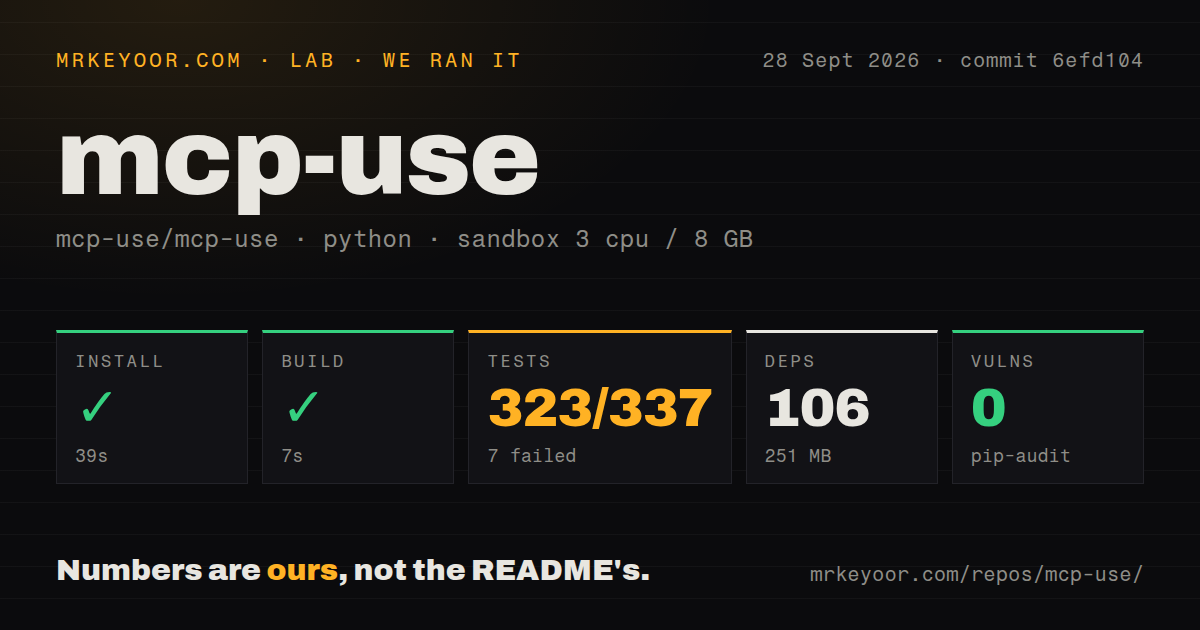
Our sandbox installed libraries/python/ at commit 6efd1046651e8357c94b39559385d58d9a9fd17d on 2026-09-28. The stored harness records successful installation in 39 seconds, a successful build step in 7 seconds, and a test step that returned exit code 1 after 124 seconds. The environment used Python 3.12 on Debian Bookworm, with 3 CPUs and 8 GB RAM. The recorded dependency footprint was 106 packages and 251 MB.
The attached stored parser summaries report 323 passed, 7 failed, 7 errors, 0 skipped, and total 337. They do not establish exhaustive unique test coverage. We have not reconciled complete logs or performed a new execution. Repeated summary lines in the supplied tail are not additional tests.
The harness records command success, exit codes, elapsed time, and parsed test counts separately. The current testing-methodology page explains this reporting approach and its limits. It is provenance context, not evidence that this September run used today's methodology version. A successful build step establishes its recorded command outcome; it does not establish that an agent workload or CLI deployment was exercised.
What the failures tell you to check
The raw tail identifies four bearer-auth client tests ending with httpx.ConnectError and the message "All connection attempts failed". It does not establish why the endpoint was unreachable or prove a defect in token validation.
Two conformance runner tests failed because npx was missing. A sandboxed stdio connector test failed because the optional E2B SDK was unavailable. These are concrete environment and dependency gaps to resolve before interpreting those tests as protocol or connector failures.
The tail also lists errors in five agent integration modules and two server-auth unit modules. Their causes are not shown in the supplied excerpt. The obsolete async-fixture explanation from the existing page does not describe this attached run.
The raw pytest footer reports 114.73 seconds, while the stored harness test step records 124 seconds. Keep the footer's suite timing separate from the harness's elapsed step timing. Neither provides a runtime-performance benchmark.
Pip-audit recorded 0 advisories. Scan coverage is unknown: the attached record supplies no scannedPackages value. This result is not a security assessment or evidence that every installed dependency was scanned.
Setup extends beyond installing the package
For a Python agent, install the appropriate LangChain provider and configure a tool-calling model and its credentials. For local MCP servers, make each configured executable available. For remote servers, verify endpoint reachability and authentication independently of the agent loop.
The Python documentation includes tool restrictions and optional E2B execution. Those features do not establish that your application's authorization rules work. Test permitted and denied tool calls with the identities your application will use. The supplied evidence does not independently verify the older issue-based claims about missing authorization hooks, scaffold warnings, or conformance allowlists, so those claims are not used here.
Which alternatives fit the same decision?
The official Python MCP SDK supports building both MCP servers and clients. Its README documents tools, resources, prompts, and standard transports. Evaluate it when those protocol-facing jobs are sufficient for your Python application. That is an alternative implementation path, not a claim that it replaces mcp-use's entire agent workflow.
FastMCP covers servers, clients, and interactive apps. Its README makes it a broader application-framework comparison than the existing page's description of concise server declarations alone. Evaluate it when Python application development, including interactive tools, is the main requirement. We did not benchmark or run either alternative for this correction.
How to read the ratings
Assessed ratings use a five-point rubric: 1 means substantial observed obstacles, 2 means major gaps, 3 means usable evidence with material caveats, 4 means broad documented coverage with limited validation, and 5 requires strong corroborated evidence for that dimension. A missing evidence base receives an unassessed result rather than a middle score.
Setup ease is 3 because installation and the build succeeded, while tests exposed missing executables and optional dependencies. Documentation is 4 for the separate TypeScript and Python workflow coverage visible in the supplied READMEs; we did not execute every example. Maturity is 3 because the recorded Python test command remained unsuccessful and several error causes are unresolved. Community is unassessed because the supplied primary extracts do not establish maintainer responsiveness or sustained contributor support.
Start with one non-destructive tool call. Verify the client connection first, then add the model-driven agent if you need it. Reproduce the relevant authentication and conformance cases in an environment with the required executables and optional packages before relying on them.