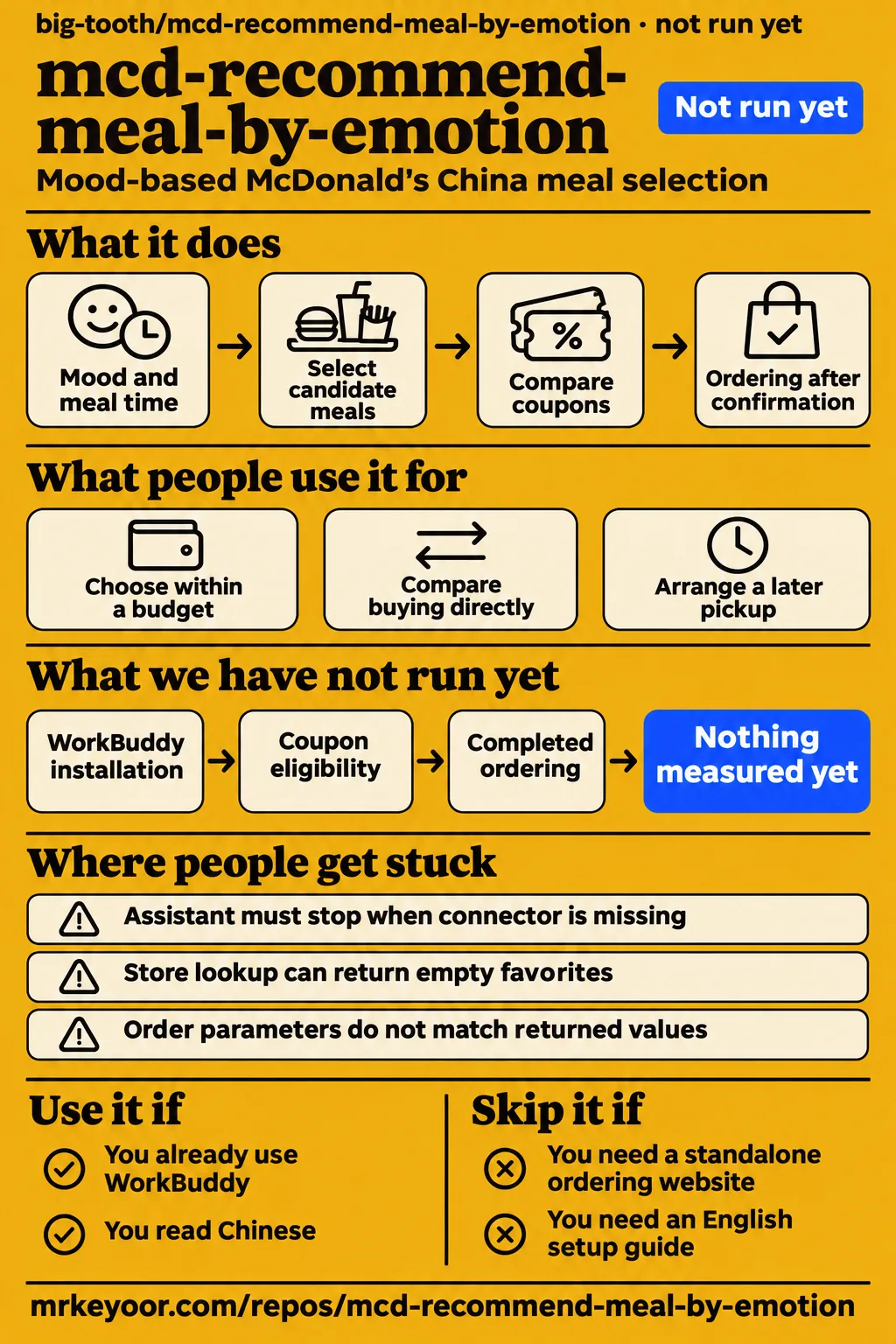
Our lab attempt at commit 4db8265 stopped before the skill executed. mcd-recommend-meal-by-emotion is worth inspecting if you already use WorkBuddy, read Chinese and want a mood-based McDonald's China meal-selection workflow. Skip it if your choice depends on demonstrated ordering reliability or dietary results. The repository contains assistant instructions and reference documents, while its account actions depend on a configured McDonald's China MCP connector.
What you can do with mcd-recommend-meal-by-emotion
The README describes mood-based meal selection, optional coupon comparisons and ordering after confirmation. It identifies the project as a Tencent WorkBuddy skill built around McDonald's MCP, with SKILL.md and reference documents as its source. WorkBuddy provides the assistant environment, and the connector provides access to restaurant and account tools. Installing the repository therefore adds a workflow to an existing assistant setup. Project README.
The conversation collects meal time, pickup method and number of diners alongside mood. Budget is optional, and the instructions tell the assistant to retain details already supplied rather than ask again. Mood is optional too: if the user declines to answer, the skill records it as unspecified and continues. Someone asking for lunch can therefore proceed without describing their feelings. Skill conversation workflow.
Selection uses the target store's returned menu, with meal-detail lookups for combinations and substitutions. The written sequence separates selecting food, calculating the payable total and obtaining approval. That sequence gives developers something specific to examine: how a preference becomes a candidate meal, how commercial data enters the answer, and which order details the assistant presents before requesting permission to act on the account.
What people use mcd-recommend-meal-by-emotion for
The README offers three example requests: choose within a budget, compare coupons and arrange pickup with a calorie constraint. Its budget example starts with tiredness and a preference for hot food. Its coupon example asks for the cheapest way to buy a particular meal. Its scheduling example combines a later pickup with calorie awareness. Each request appears in the README usage examples.
| Who the author describes | Intended task | What the example provides |
|---|---|---|
| A tired customer with a budget | Ask for a warm meal within a spending limit | An illustrative recommendation and coupon comparison |
| A member looking for savings | Compare buying directly, using a coupon or changing the combination | A proposed price-comparison workflow |
| Someone arranging a later pickup | Combine a requested time with a calorie constraint | A description of nutrition lookup and scheduling |
The first sample conversation uses a 30 yuan budget, a ¥24.5 coupon price, ¥6 savings and a further 3 yuan drink substitution. These are the author's example prices. The README directs actual nutrition and pricing answers to current official interface results. The useful pattern is the itemized explanation: show the proposed meal, identify the discount and explain how a substitution changes the amount payable.
The author's integration record reports WorkBuddy checks on October 23, 2026, for current time, membership points and nearby stores. It lists nutrition, menu, pricing and ordering tools separately as tools incorporated from official documentation v1.0.9. That version identifies the referenced documentation. The integration document also directs parameter handling to the connector's runtime inputSchema. Author's integration record.
What happened when we ran it
Our November 17, 2026 run at commit 4db8265 recorded NOT RUN because the harness found no supported ecosystem and no Dockerfile. Language was null. The recorded sandbox configuration was 3 CPUs, 8 GB RAM and image n/a. Execution stopped at the prerequisite stage, before an application task completed. The table preserves the harness outcome, separate failed safety step and cleanup result.
| Lab record | Recorded result | What it means for this review |
|---|---|---|
| Repository harness | NOT RUN: no supported ecosystem; language null; no Dockerfile | No installation, build or test result |
| Hands-on safety step | FAILED: none of compose.yaml, compose.yml, docker-compose.yaml or docker-compose.yml exists | The required Compose entry point was absent |
| Teardown | ok | Cleanup was recorded, with no completed application task |
The hands-on safety step uses the label unsafe because its rule requires a Compose file. Its stated failure is the absence of the four accepted filenames. The README's installation route instead places a skill directory inside WorkBuddy. The failed admission check therefore explains why this harness stopped; its wording identifies a missing entry point rather than a discovered malicious operation.
The hands-on run summary says deployment used the repository's own Docker Compose with every port bound to 127.0.0.1. That entry conflicts with the explicit missing-Compose failure. The measured outcome here follows the NOT RUN result and failed prerequisite. The teardown record contains only "teardown: ok", which records cleanup without resolving the deployment conflict.
Where people get stuck: the connector and order fields
The skill documents business code 600050 from query-nearby-stores as an empty-favorites response. It tells the assistant to ask for an address or use another lookup method. Connector availability is an earlier prerequisite: when mcd-mcp is missing or disabled, the assistant should explain setup and stop the ordering flow. These instructions give a reader specific recovery steps for two different situations. Skill prerequisites and recovery rules.
| Documented situation | What the skill tells the agent to do |
|---|---|
| Connector missing or disabled | Explain connector setup and stop the ordering flow |
| Store lookup returns 600050 | Treat it as empty favorites and ask for an address or change lookup |
| Order parameters do not match | Retrieve the matching values from the service again |
| Order creation fails | Explain the business code and return to meal selection or pricing without repeating the submission |
The order fields beType, orderType and beCode must retain the matching values returned by the service. The instructions prohibit assembling them from memory or mixing values across combinations. Scheduled orders use a different orderType from immediate orders and require a pickup time within opening hours. If the requested time is too close for preparation, the instructions call for an immediate order with an explanation to the user.
Security instructions put confirmation before writes
The skill requires explicit user confirmation before write operations, including ordering and coupon redemption. Before order creation, it tells the assistant to repeat the store, items, quantities, pickup method or time, original price, discounts and payable total. Scheduled orders receive another pickup-time confirmation before submission. This makes the proposed account action specific enough for the user to inspect. Skill confirmation rules.
The README warns that the token represents the user's McDonald's membership identity and must stay out of public repositories. The skill assigns token management to the connector and prohibits recording plaintext credentials in conversations or repository files. It also treats mood data as sensitive personal information, restricts its use to the current conversation and prohibits onward disclosure or separate storage. Recommendation wording should describe taste and experience without promising emotional treatment. README token warning, skill data-handling rules.
English readers face Chinese setup instructions
The supplied README and SKILL.md are Chinese, and the integration document identifies McDonald's China MCP as the service. The README names WorkBuddy's connector controls in Chinese and directs token registration to open.mcd.cn/mcp. Readers evaluating the English-named repository should start with that installation context: the workflow belongs inside WorkBuddy and uses a membership connection to the specified service. README installation instructions.
The README offers two directory placements. Copying the whole repository under ~/.workbuddy/skills/ makes it available globally; placing it under a project's .workbuddy/skills/ directory makes it available within that project. Before either placement, its setup sequence configures and enables mcd-mcp using the supplied configuration example and the user's token. The repository root, including SKILL.md, references and docs, is the skill being installed.
mcd-recommend-meal-by-emotion vs mcd-withwork-skills and mcd-mood-palette
mcd-withwork-skills emphasizes work routines and order summaries, while LobeHub describes mcd-mood-palette around emotions and fitness goals. Those different inputs and outputs give readers a reason to inspect one workflow before another. The comparison uses this project's README, the alternative's README and the supplied LobeHub listing. Its selection criteria are the tasks those sources describe.
| Project | Source-described emphasis | When to inspect it first |
|---|---|---|
| mcd-recommend-meal-by-emotion | Stated mood, optional coupon comparison and confirmed ordering | You want to read the mood-to-meal workflow |
| LittleChest/mcd-withwork-skills | Work rhythm, price and nutrition lookup, plus a local HTML care summary | You want order summaries alongside meal selection |
| mcd-mood-palette | Emotion and fitness-goal meal suggestions, with an external MCP token | You want fitness context in the proposed selection flow |
The mcd-withwork-skills README describes a standalone summary page and explicitly labels its embedded demonstration data as fictional. Its page groups selected completed orders by meal time and can load local summary data. The README reports read-only checks for time, stores and menus, and distinguishes those from ordering and payment. The summary page is the concrete additional output to inspect. mcd-withwork-skills README.
The LobeHub mcd-mood-palette listing describes matching emotions and fitness goals and requiring an external MCP token. Fitness goals therefore form part of that listing's proposed input, alongside mood. For a reader comparing designs, the useful question is which preferences they want to supply and which meal-selection explanation they want to inspect. LobeHub mood-palette listing.
What discovery listings establish
GitNova labels its feature description as an AI summary and warns that details may be inaccurate. The listed tasks include mood-based selection, coupon calculations, a calorie cap and pickup timing. Its own warning belongs beside those descriptions. The project README provides the author's direct account of the intended workflow, including optional savings assistance and confirmation before order creation. GitNova project listing.
Trendshift's supplied table records 41 stars gained on October 24, 2026. The research synthesis flags a disagreement with GitNova's daily-growth figure, but the supplied GitNova excerpt omits the disputed daily figure. GitNova does define its Magnitude value as interest growth rather than a quality score and explicitly separates its star-growth assessment from an execution-safety check. These statements describe the trackers' observations and definitions. Trendshift activity record, GitNova assessment definition.
Repository activity on November 17, 2026
GitHub metadata recorded 102 stars, zero open issues and PRs, and a last push on October 24, 2026. The observation date was November 17, 2026, and the license field was null. These values describe the repository snapshot supplied for this review. commit 4db8265 identifies the sandbox attempt, while v1.0.9 appears in the integration document as the official documentation version it references. GitHub repository metadata.
The four editorial dimensions are unassessed: setup ease concerns installing the skill in WorkBuddy, documentation concerns using its instructions, community concerns support evidence, and maturity concerns demonstrated operation. Each dimension retains a null score with its evidence gap explained. This keeps repository activity, written instructions and execution results separate when readers decide whether the workflow deserves a closer look.
Questions people ask
This skill uses stated mood and a documented nutrition lookup to select candidate meals. Its instructions specify a default 1000 kcal ceiling, while the README says its output is not medical or nutritional advice. The questions below come from the supplied research synthesis and connect those recommendation inputs to the broader diet and food-preference questions in that evidence. Skill recommendation workflow, README disclaimer.
Can you lose fat eating only McDonald's?
The project README describes meal selection and expressly disclaims medical or nutritional advice. The supplied video introduces a 30-day McDonald's food challenge and asks whether fat loss is as simple as calories in. For someone choosing this software, the relevant documented function is nutrition lookup during meal selection, followed by pricing and confirmation. That is the function to examine against a personal meal-selection requirement. Food-challenge excerpt, project disclaimer.
How can a personalized food menu account for calorie requirements, emotional preferences and nutritional value?
The skill specifies three stages: consider stated mood, prefer a nutritional composition and filter combinations against a calorie ceiling. It instructs the assistant to use list-nutrition-foods for energy and nutrient data, with a default 1000 kcal meal ceiling. The final constraint filters out unsuitable combinations rather than contributing another weighted preference. This is the mechanism written into the skill. Recommendation instructions.
How can brain activity reveal someone's emotional response to different foods?
This skill asks users to state their mood in conversation. The supplied research abstract discusses recognizing affect toward foods and planning menus around nutritional demand; it also identifies questionnaire-based, preference-aware recommendation as a possible approach. The practical distinction for this repository is its input: the WorkBuddy instructions ask a question and allow the user to leave mood unspecified. Food-recommendation research abstract, skill mood-input instructions.
What we have not tested yet
Our attempt completed zero application tasks, so it supplies no ordering-reliability evidence. WorkBuddy installation, recommendation quality, coupon eligibility, pickup scheduling and completed ordering remain untested. The supplied evidence contains no observed calculation enforcing the documented 1000 kcal ceiling, demonstrated dietary outcome or controlled comparison with the alternatives. It also supplies no latency, memory-use, load, dependency-audit or security-test result, and the recorded configuration identifies neither an actual runtime version nor an operating-system version.
Confirmation, privacy and recovery are written requirements rather than observed behavior. A useful next session would record a real menu lookup, the returned total and the confirmation boundary without exposing a token, then examine changed quantities, expired coupons, rejected orders and repeated-submission handling. Rendered layout, automatic related links, recommendation modules and other template behavior also fall outside this text-and-evidence review. The Chinese setup material and China service description supply no demonstration of English operation or worldwide ordering coverage.
The latest-release lookup is null and does not establish whether a release exists. The activity snapshot supplies no support-response history, and the supplied records contain no attributable community walkthrough of this repository. The GitNova excerpt also omits the daily-growth value needed to reproduce the synthesis's tracker disagreement. The food-challenge excerpt supplies no final outcome, and the research abstract establishes neither a brain-measurement method nor results relevant to this skill.