A working source checkout makes this worth inspecting
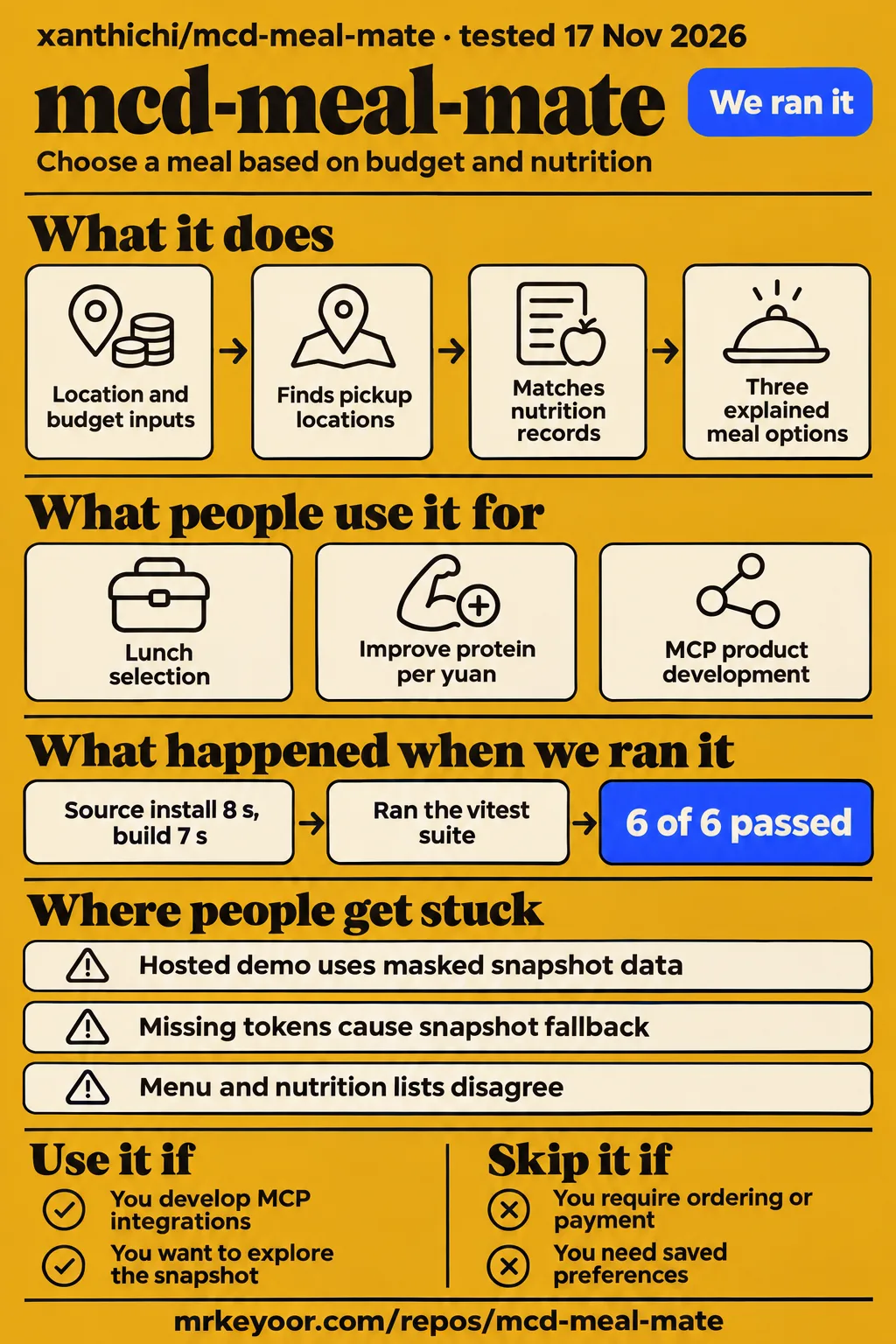
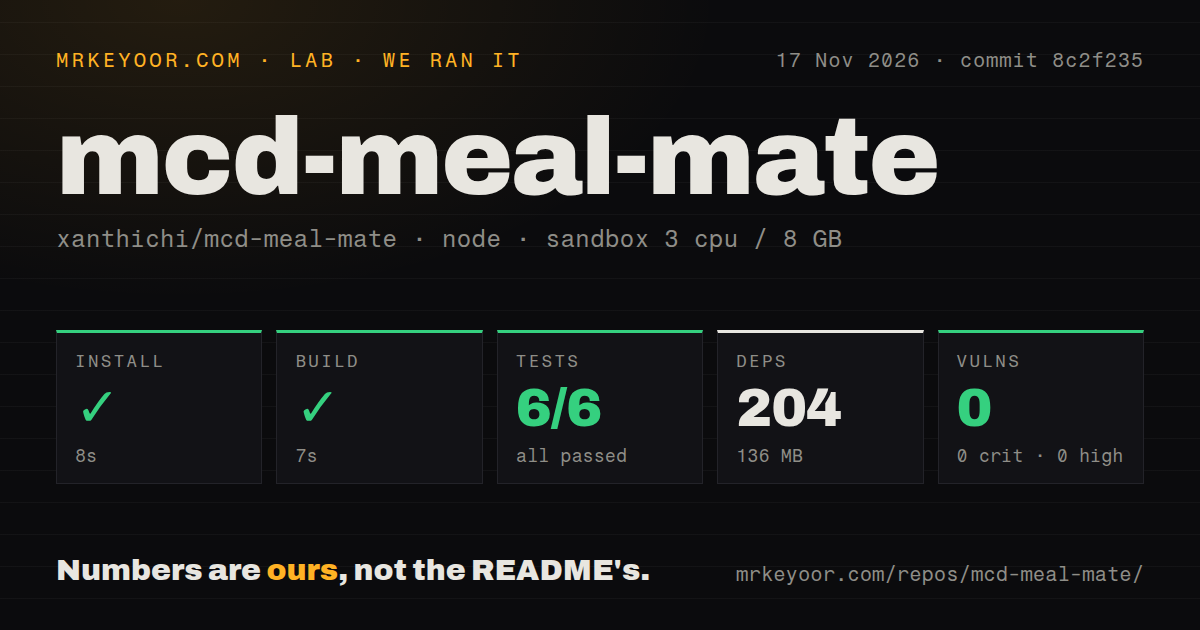
Our run of mcd-meal-mate at commit 8c2f235 installed in 8 seconds, built in 7 seconds and passed all 6 tests. Use it if you develop MCP integrations and want to inspect how store menus become explained meal combinations. Skip it if your requirement is ordering, payment or saved preferences: the README excludes transaction tools, and HotRepo's project account describes preferences limited to the current session.
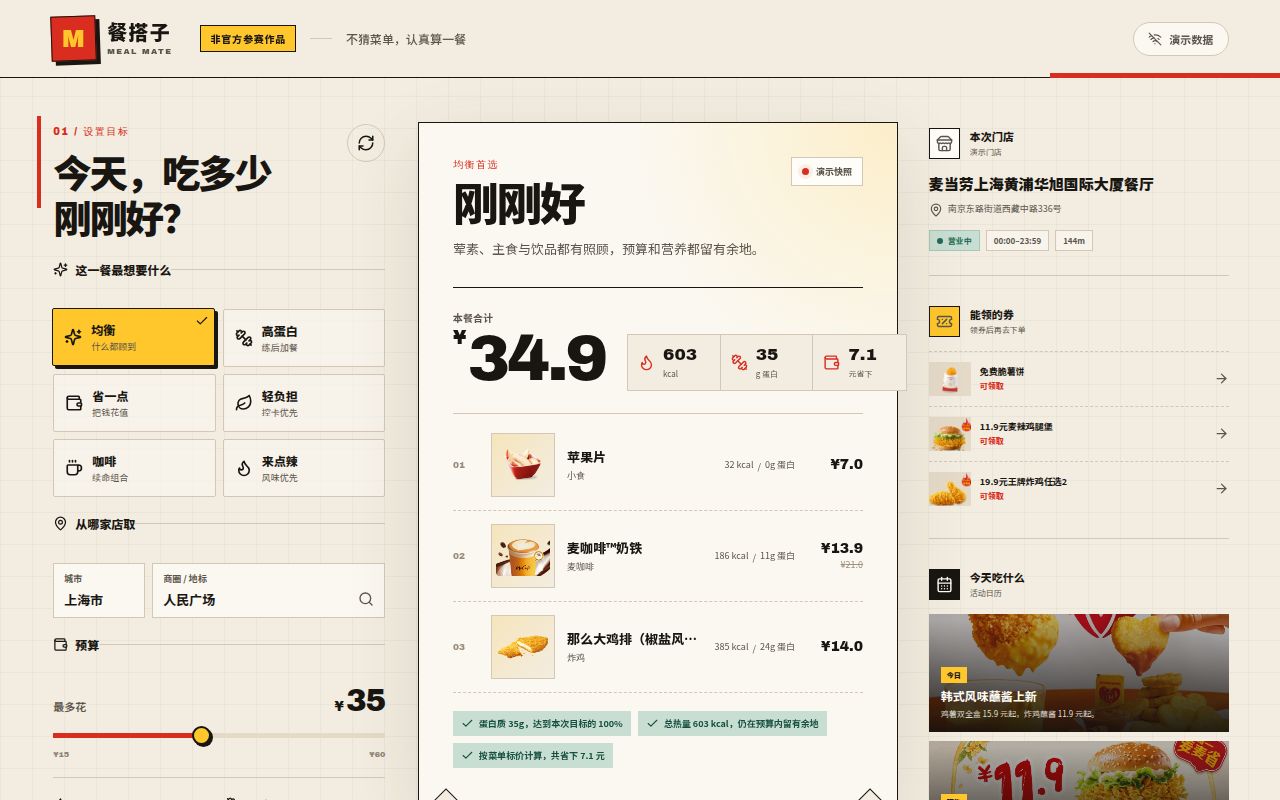
The project, also named M餐搭子, connects a browser workbench to a Node service. Its README describes city and landmark inputs, spending and calorie limits, and a protein target. The resulting shortlist includes prices, nutrition figures and an expandable MCP call chain. That combination gives a developer a specific design to study: how the service obtains its inputs, how it matches products to nutrition records, and how it explains the selected combinations.
The hosted demonstration uses a masked menu snapshot. The live-data route runs through the repository's Node service with an MCP token. This distinction determines where to start: use the demonstration to explore the interaction, then read the service and integration documentation to understand how a live request is assembled. The project is a contest entry and identifies itself as a non-official McDonald's product.
What you can do with mcd-meal-mate
The README describes three meal combinations built from location, budget, calorie and protein inputs. It names the options balanced, protein-boosted and a simpler economical choice. Each result presents price and nutrition arithmetic, including protein per yuan, budget use and remaining calorie allowance. For a developer, those outputs provide concrete fields to follow through the planner rather than a recommendation whose reasoning ends at a meal card.
The documented example uses Shanghai's People's Square, a 35 yuan budget, a 700 kcal ceiling and a 35 g protein target. These figures define the author's example input. They also make the intended calculation easy to understand: spending and energy are boundaries, while protein influences the selection. Read the example alongside the explanation of each option so that a preference for more protein stays distinct from the budget and calorie constraints.
The MCP integration guide names the tools behind that workflow. query-nearby-stores finds pickup locations, query-meals retrieves a store's menu, and list-nutrition-foods supplies nutrition records. available-coupons and campaign-calendar provide additional information for the results page. The guide says coupon availability does not promise applicability to the current order, so it describes displaying available offers rather than counting them as an applied discount.
What people use mcd-meal-mate for
The README proposes lunch selection, budget-conscious protein choices and MCP product development as uses for mcd-meal-mate. These are author-described scenarios, with different reasons to inspect the same interface. A person choosing lunch starts with constraints; a developer starts with the data flow that turns those constraints into a shortlist. The following sources identify the proposed uses and the separate discovery mention in the research pack.
| Who describes the use | What they propose or report | What that tells a prospective user |
|---|---|---|
| The repository author | A worker enters lunch constraints and receives three meal options | A concrete product scenario in the project README |
| HotRepo | Developers can inspect several MCP tools behind a server-side proxy and a visible call trace | An architectural reason to inspect the HotRepo project account |
| Agent Skills Hub on X | Its October 25 selection lists xanthichi/mcd-meal-mate as a menu-and-nutrition skill | A discovery mention in the supplied X search record |
Students and fitness users are another audience explicitly named in the README. Their proposed task is to improve protein per yuan while keeping a spending ceiling. Users who want to see coupons and campaigns before ordering are also listed. These scenarios explain why the workbench combines several information sources: the meal calculation occupies the center, while offers and activities provide surrounding context for a decision completed through official channels.
What happened when we ran it
Our November 17, 2026 sandbox run at commit 8c2f235 completed installation, build and tests successfully. Installation took 8 seconds, the build took 7 seconds, and Vitest passed 6 of 6 tests in 2 seconds. The recorded dependency footprint was 204 dependencies and 136 MB on disk. These are our measurements from the supplied build/test harness, with the individual results preserved below.
| Source-check step | Our recorded result |
|---|---|
| npm install | Succeeded in 8 seconds; 204 dependencies recorded; 136 MB on disk |
| Build | Succeeded in 7 seconds |
| Tests | Succeeded in 2 seconds; Vitest reported 6 passed and 0 failed of 6 |
| npm audit | 0 known vulnerabilities: 0 critical, high, moderate or low |
| Checkout | 34 files, about 2,275 source lines, 0.6 MB |
| Repository signals | 2 CI workflow files, a Dockerfile, no tests directory |
The sandbox configuration recorded 3 CPUs, 8 GB RAM and the image label lab-node:22. The README's source layout places planner.test.ts under server, which helps explain why the harness can report passing tests alongside a missing tests directory. These records describe different aspects of the checkout: test execution, file organization, installed dependencies and configured sandbox resources. Keeping those labels attached to the figures makes the results easier to interpret.
The separate hands-on safety step failed because none of compose.yaml, compose.yml, docker-compose.yaml or docker-compose.yml existed. The runner required a Compose file and labelled the repository unsafe on that basis. The README documents docker build and docker run instead. The failed step therefore identifies the exact deployment prerequisite that stopped this attempt, while the harness above records the successful source checks.
The hands-on run header says the repository's own Docker Compose deployed it on November 17, 2026 with every port bound to 127.0.0.1. That conflicts with the detailed safety failure. The specific failed step is the stronger account of where the attempt stopped. The teardown record separately reports successful cleanup with the result "teardown: ok".
Where people get stuck: snapshot fallback changes the data source
The README documents labelled snapshot fallback when a token is missing or an MCP tool is temporarily unavailable. The same interface can therefore display demonstration data through several routes. Reading the data-source label and expandable call trace is part of understanding the result: the recommendation calculation and the upstream retrieval have separate statuses, and the integration guide says a failed tool is marked as fallback.
| Situation described by the evidence | Documented response | Practical next action |
|---|---|---|
| Hosted Pages demo | Always uses masked snapshot data | Explore the interaction and recommendation explanation |
| No MCP token | Runs with clearly labelled demonstration data | Configure your token on the local server for the documented live route |
| A tool becomes unavailable | Falls back to the labelled snapshot | Read the trace and data-source label |
| Menu and nutrition records disagree | HotRepo identifies a text-parsing edge case | Inspect the matched product and serving information against official data |
| Our lab required Compose | Safety check stopped because no accepted filename existed | Consult the README's Docker build-and-run deployment route |
HotRepo describes disagreements between menu and nutrition lists as an edge case that tests cover but cannot eliminate. The integration guide explains the matching stage more specifically: menu products acquire nutrition records before combination selection, and products without a nutrition match are filtered. This gives a developer a useful inspection point. Follow the candidate product through matching and filtering before interpreting why it appeared in, or disappeared from, a suggested combination.
The documented token boundary is server-side
The README says the MCP token is read from a server environment variable and kept out of the browser. The documented architecture uses an Express service to communicate with the McDonald's MCP endpoint through native fetch. The same production process provides the API and static interface, while menu and nutrition results use an in-memory cache. These are the design choices described by the project's documentation.
The scope excludes ordering, payment, lottery and points-redemption tools. The README also says the server does not save user inputs or build user profiles. Those choices define a recommendation product whose responsibility ends before a transaction. They are relevant when deciding whether to reuse the design: the browser receives meal suggestions and explanations, while the server handles the upstream credential and tool orchestration.
The integration guide says city and landmark inputs have server-side length limits and lists a 15-second server timeout. It also describes the endpoint as https://mcp.mcd.cn using Streamable HTTP. When reading the project, connect these details to their purpose: user inputs feed a store query, the server makes the upstream request, and the returned tool statuses feed the trace shown beside the recommendation.
Chinese documentation and the Shanghai example define the starting context
The supplied README and integration guide are written in Chinese, and the documented example uses Shanghai, yuan, kcal and grams of protein. The MCP integration guide identifies mcp.mcd.cn as the upstream endpoint. An English-speaking developer should begin with those concrete details when reading the project, translating the setup and tool explanations while preserving the original parameter names, units and environment-variable names.
The README maps the implementation into a few named files. server/mcp.ts handles the MCP client, orchestration and fallback; server/nutrition.ts handles nutrition parsing and menu mapping; server/planner.ts handles constraints, preference scoring and selection. Reading them in that order follows the data toward the recommendation. The interface lives in src/App.tsx, and shared/types.ts holds types used by the frontend and backend.
That reading order is also useful for adapting the workbench. First identify the store and menu inputs, then examine how nutrition attaches to candidate products, and finally follow the constraints into the three selected plans. The README's division of responsibilities gives a prospective contributor a route through the source without requiring the meal cards to explain every implementation detail on their own.
mcd-meal-mate vs mcd-kcal-picker and McButler
mcd-kcal-picker documents a Python calorie-selection workflow, while mcd-meal-mate documents a browser workbench with store lookup and price constraints. McButler describes store comparison and group allocation. These task differences provide a more direct selection aid than a single score: choose the repository whose documented inputs and outputs match the calculation or interface you want to study, then follow its setup instructions.
| Comparison point | mcd-kcal-picker | mcd-meal-mate |
|---|---|---|
| Mid or Real Reality score | 15 | 18 |
| Mid or Real winner | No winner declared | No winner declared |
| Documented workflow | Python scripts select combinations around a calorie target and ceiling | Node service joins store menus with nutrition and presents three options |
| Reason to inspect first | You want a focused calorie-selection algorithm | You want a browser interface with store and price context |
Mid or Real's comparison supplies the third-party score rows and explicitly declares no winner. The workflow descriptions come from the project documentation. The mcd-kcal-picker README describes calling the read-only list-nutrition-foods tool and using a deterministic algorithm to select combinations. It also describes scripts without third-party dependencies, making the narrower calculation the clearest reason to inspect that alternative first.
McButler documents store comparison and group meal allocation. Its README describes grouping diners by restrictions and preferences, then producing item quantities for the group. It also describes comparing stores by a combined cost calculation. Those documented tasks make it relevant when several diners or store choices drive your question, whereas mcd-meal-mate centers the three-option workbench for a meal constrained by budget and nutrition inputs.
What discovery scores cannot establish
GitNova explicitly says its star-growth assessment does not check whether the project is safe to run. Its supplied project record distinguishes interest growth from a quality score. Mid or Real's comparison likewise describes its verdict as opinion and declares no winner. These sources state their own limits; neither needs to be presented as making an erroneous operational endorsement.
The README identifies mcd-meal-mate as a contest entry. The November 17 GitHub metadata records the last push as October 24, 2026, with zero open issues and PRs. Those are dated repository facts. They give a reader an activity snapshot to consider alongside the contest declaration, without assigning a maintenance judgment to HotRepo or treating an empty issue count as a support-quality rating.
The supplied sources answer different questions. The X roundup records discovery, GitNova discusses attention, Mid or Real presents an editorial comparison, and the README explains intended behavior and setup. Our harness adds installation, build and test outcomes at commit 8c2f235. Keeping those roles visible lets a reader use each source for the decision it actually informs instead of turning all of them into interchangeable endorsements.
FAQ
mcd-meal-mate can run without an MCP token using labelled demonstration data, according to the README. Live MCP access uses a token configured on the server. The three first-use questions below cover the documented installation requirements and transaction scope, so a new reader can choose between exploring the snapshot and preparing the local service before following the longer tool-flow explanation.
Can I try it without an MCP token?
Yes. The README documents a token-free local route using npm install, npm run build and npm start, followed by opening http://localhost:8787. It says the page clearly displays a demonstration-data label. The hosted Pages version also uses a masked snapshot. Follow the README's no-token instructions to explore the documented demonstration route and inspect how the interface presents its data source.
What do I need for live menus?
The README lists Node.js 20+, npm 10+ and a McDonald's MCP token for live access. Configure MCD_MCP_TOKEN on the server; the documented default service port is 8787. The integration guide identifies the endpoint and tool flow, while the README explains local development and production commands. Keep the token configuration with the service that makes the upstream calls.
Does it place orders or process payments?
No. The README says the project does not call ordering, payment, lottery or points-redemption tools. Its documented output helps the user choose a meal, while official channels determine supply, prices and campaigns. That scope suits a developer studying recommendations and rules it out for someone seeking an automatic checkout assistant. The README's safety notes state that boundary directly.
What we have not tested yet
The supplied records contain no completed live meal request, token-acquisition walkthrough or restaurant-purchase comparison for mcd-meal-mate. The integration guide reports successful calls to query-nearby-stores, query-meals, list-nutrition-foods, available-coupons and campaign-calendar as the author's result. Our evidence consists of the successful source harness and the separate hands-on attempt stopped by its Compose prerequisite. It contains no completed-session screenshots, meal-response records or checked-answer table.
Recommendation accuracy, serving-size matching, results across stores and success in meeting protein targets alongside hard constraints need direct evaluation. The documented Shanghai example supplies inputs rather than an independently checked meal outcome. Everyday adoption, English interface behavior and menus outside that setting also lack direct results here. The README excludes medical and professional nutrition advice, and neither alternative has a side-by-side runtime comparison in the supplied evidence.
The sandbox image label does not establish actual runtime or operating-system versions; raw toolchain logs would be needed for those facts. The 136 MB figure measures installed disk footprint, and the 8 GB allocation describes the sandbox configuration. Live memory use, cache freshness, concurrent traffic and repeated upstream failures lack measurements. Authentication, token leakage, network behavior and input handling lack an independent security audit; the zero npm audit result concerns known dependency vulnerabilities in this run.
The November 17 metadata alone cannot establish maintenance quality, abandonment or ongoing support. Discovery mentions and editorial comparison scores supply neither a security finding nor a recommendation-quality benchmark. A useful next evaluation would obtain authorized MCP access, record the actual responses and compare one suggested combination against the official menu for the same store. That would add the missing evidence connecting the documented workflow to a current meal result.