Port 53 carries proxy traffic, not a device VPN
MasterDnsVPN sends application traffic through DNS queries to a server listening on port 53. The client exposes a local SOCKS4, SOCKS5, or TCP-forwarding endpoint, splits streams into protocol packets, and sends them through one or more DNS resolvers. The server reconstructs each stream and connects to its destination directly or through another SOCKS5 proxy. Applications must use the local proxy; the project does not install a general system tunnel.
The server also needs authoritative DNS delegation. The README tells operators to point an A record at the server, then delegate a short tunnel subdomain with an NS record. The client and server must use that same domain. Resolver behavior, packet loss, MTU, and filtering can differ by network, so the client tests candidates and can shift traffic among them. Our lab did not measure tunnel speed, loss recovery, or censorship bypass.
The root installer can terminate the port 53 owner
The automatic Linux script refuses to run without root. It installs networking tools, checks TCP and UDP port 53, disables known DNS services, edits systemd-resolved, and can send SIGKILL to a process that keeps the port. It also removes matching iptables, ip6tables, or nftables redirect rules before installing the MasterDnsVPN service. Those actions are visible in the script, but a one-line curl command makes them easy to overlook.
System changes continue after the port is free. The installer opens port 53 in UFW, firewalld, iptables, or nftables, writes /etc/sysctl.d/99-masterdnsvpn.conf, adds file-descriptor limits, enables a systemd unit, and prints the generated key. Its uninstaller restores a saved systemd-resolved file and removes its own tuning files, but deliberately leaves firewall rules in place. Run it on a dedicated host or reproduce the steps manually after review.
What happened when we ran it
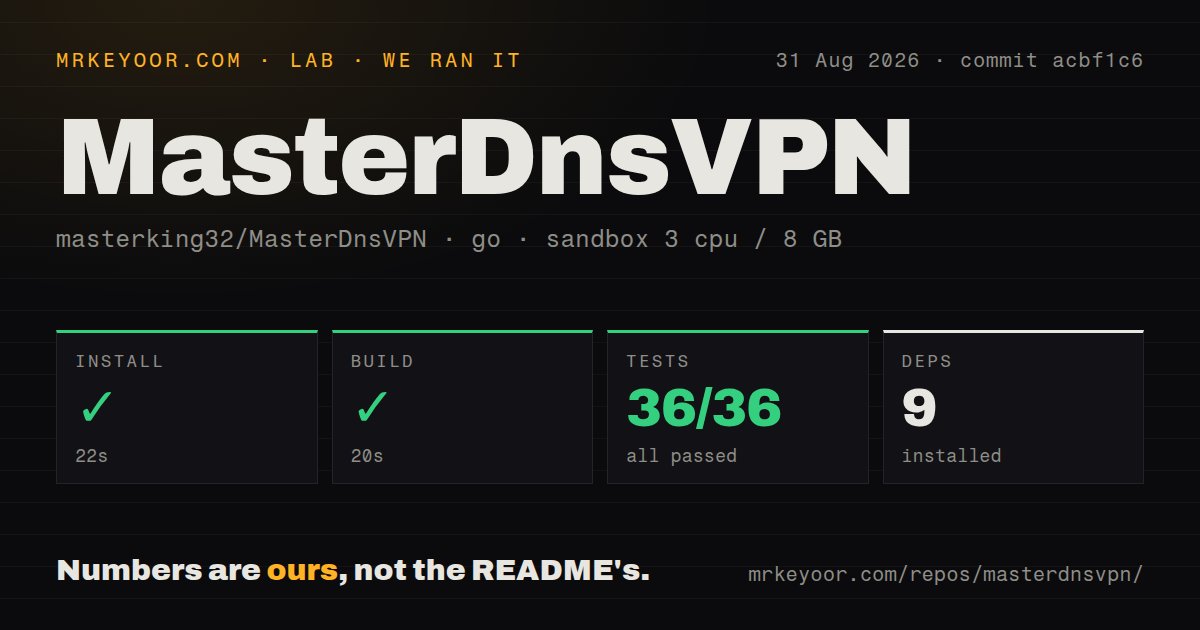
Our sandbox installed commit acbf1c6 in 22 seconds, adding 9 Go packages. The build completed in 20 seconds. go test then passed all 36 tests in 14 seconds with 0 failures. We used an unprivileged Debian container with 3 CPUs, 8 GB of RAM, the golang:1.24-bookworm image, and no secrets.
The checkout had 164 files, about 45,009 source lines, and occupied 2.2 MB. Our scan found 3 CI workflows, no root Dockerfile, and no dedicated tests directory. The repository does contain many _test.go files and a nested docker/Dockerfile, which explains how the Go suite can pass while those top-level signals remain absent. None of these results tests a delegated domain, public resolver, SOCKS application, or long-running session.
The 36 passing tests cover source behavior under the project's fixtures, not the benchmark claims in its README. We did not download 10 MB through the tunnel, compare another DNS tunnel, or measure performance during packet loss. A buyer should test the actual resolver set, destination mix, and network restrictions that matter, using the same client and server commit on both ends.
Six encryption modes include an XOR default
The source defines 6 methods: none, XOR, ChaCha20, and AES-128-GCM, AES-192-GCM, or AES-256-GCM. Both sample configurations set DATA_ENCRYPTION_METHOD = 1, which selects XOR. Invalid server values are also normalized to method 1. XOR is obfuscation rather than suitable confidentiality, and method 0 sends decoded payloads without encryption.
Method 2 uses the Go package's unauthenticated ChaCha20 stream cipher, so it does not provide the tamper detection of an AEAD mode. Methods 3 through 5 use AES-GCM and reject changed ciphertext during authentication. Client and server settings must match, and the client requires the shared key. The server creates encrypt_key.txt with mode 0600, but operators still need a safe channel to copy and rotate it.
One open report describes a silent session cutoff
Issue #202 reports that initial SOCKS connections worked before every stream went quiet and later hit a terminal ACK timeout. The reporter reproduced it with several resolver choices and two encryption modes. The server used the 2026-06-13 release while the Windows client used a 2026-05-10 build, and the issue offers a network-filtering suspicion rather than a confirmed project defect. It remains open without a maintainer diagnosis.
That report is enough to justify a burn-in test, not enough to declare current sessions broken. Keep client and server on the same pinned release, record logs on both sides, and test longer than a quick page load. The README also says there is no official Android or iOS application. Its mobile methods expose the proxy from a computer or intermediate server, which adds another network boundary and must use authentication when listening beyond localhost.
Twenty-three open items accompany current source work
GitHub reported 6,943 stars and 23 combined open issues and pull requests. The latest tagged release was published on 2026-06-13, while source work continued with a push on 2026-08-29 that added handling for non-DNS UDP traffic. Recent reports and pull requests cover resolver selection, startup, Docker use, mobile integration, and session behavior. The later push matters more for health than the older tag alone.
dnstt is the closer comparison for a smaller SOCKS-oriented DNS tunnel, while iodine offers an older IP-over-DNS design. MasterDnsVPN earns a lab trial because its 22-second install and passing 36-test suite lower the source barrier. The deployment barrier is much higher: port 53 ownership, DNS delegation, resolver behavior, key selection, and system-wide installer changes all need an operator who can reverse them without losing the server's normal name resolution.