
Logseq works best when the journal is your inbox
Logseq opens on a daily journal and treats each line as an addressable block. Indent a thought beneath another, link a page with brackets, add a task marker, or let a reference appear automatically on the page it names. That makes capture fast and connections visible without forcing every note into a finished document. PDF annotation, queries, whiteboards, plugins, themes, Markdown, and Org mode widen the job beyond journaling, but the block outliner remains the organizing idea.
The repository had 44,629 stars and 960 open issues and PRs when GitHub was checked on 2026-08-25. Those figures fit an established product with a large support surface, not a small notes utility. Logseq has desktop and mobile apps, an extension API, forums, and a substantial plugin ecosystem. The AGPL-3.0 license is friendly to people who want the full application source, though companies distributing modified networked versions should review its obligations with counsel.
This structure suits people whose notes arrive before their categories do. A meeting action can start in today's journal, link to a project, appear in a query, and remain traceable through backlinks. Researchers can keep comments beside PDF passages. Developers can expose commands through plugins or work with local APIs. Someone who wants polished prose in a folder tree may find the constant block boundaries fussy rather than freeing.
The 2.0 database edition is still a backup-first choice
Logseq 2.0.1 is labeled a beta release, and the README calls its new mobile application and real-time collaboration alpha. More importantly, Logseq says data loss is possible. It recommends automated backups or regular SQLite exports, a dedicated test graph, and a project that is not important to you. That is unusually direct guidance, and users should follow it literally instead of treating the beta badge as decoration.
The database edition does add useful structure. Pages and blocks become nodes, properties have types, tags can supply inherited fields, and tables can turn those fields into working views. The documentation lists 6 property value types and explains choices, defaults, bidirectional relationships, task history, and bulk actions. An MCP server and command-line tools also make the graph more accessible to external software. These changes reach deeper than a visual refresh, which explains why migration deserves care.
There is an awkward product split. The familiar file graph stores Markdown or Org files that remain easy to inspect outside Logseq. Database graphs use a different model and different sync work. The latest release notes direct bug reports for the new line to a separate db-test repository. A current issue in the main repository reports that the 2.0.1 local HTTP API can hang when inserting blocks into some non-journal pages, while the same call works on journals. Automation users should reproduce their exact write paths before committing.
What happened when we ran it
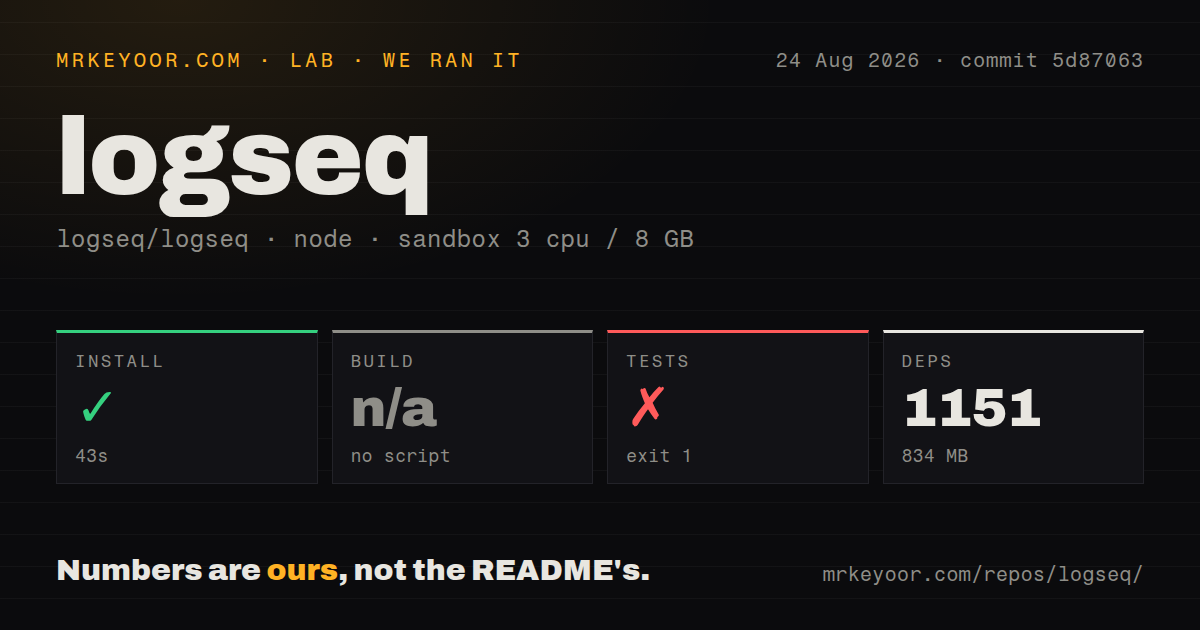
Our run installed 1,151 pnpm packages in 43 seconds and used 834 MB on disk. The 65 MB checkout contained 2,126 files and about 55,953 lines of source. The harness found no build script or target to run, so it skipped that step rather than substituting a command from the documentation. That distinction matters because the contributor guide names separate browser and Electron release commands.
Tests failed with exit code 1 after 12 seconds. The last useful lines show pnpm starting cljs:test, which ran clojure -M:test compile test; the shell then returned clojure: not found. The log establishes the missing executable and nothing more. It does not show a failed Logseq assertion. In a fresh Debian container, the result means the successful Node dependency install is insufficient for the documented test path.
The development guide confirms the extra requirements: Node.js, pnpm, Java, and Clojure. It even warns that the wrong Clojure distribution can produce a separate -M:cljs file error. Browser development uses pnpm watch; Electron development installs dependencies again under static and runs another process after compilation. Release builds have their own targets. A contributor arriving from a normal Node monorepo needs to budget for the JVM side from the start.
Self-hosted sync is a component, not a one-command server
The source tree includes a Node adapter for database sync, but the documented path is meant for operators. Local development requires an ENABLE_DB_SYNC_LOCAL build flag. The adapter then needs a port, data directory, Cognito issuer, client ID, and JWKS URL. A Cloudflare Worker adapter is another option and adds Wrangler plus a D1 migration. Logseq therefore supports self-hosting pieces of the new sync system, yet the README does not present a single production server bundle.
That complexity changes the comparison set. SiYuan and Trilium are better candidates when the browser-served application is the center of the deployment. AppFlowy is easier to grasp for teams that want familiar documents and database views. Logseq earns its place when journals, blocks, backlinks, and queries match how you already think. Choosing it because it is open source, without liking that interaction model, usually ends in friction.
Active development does not make beta data safe
The repository was pushed on 2026-08-25, and the latest issue list contained fixes and feature work updated that same day. Its 23 CI workflow files show substantial automation around a codebase spanning Clojure, ClojureScript, JavaScript, and supporting tools. The issue count includes pull requests, so 960 should not be described as 960 defects. It does tell buyers that the project has a wide platform and feature matrix to maintain.
Logseq is easiest to recommend in two distinct cases. Use the stable file edition when local notes, inspectable text files, and block-level links are the draw. Test the database edition when typed data, shared graphs, or its MCP surface solve a specific problem, and keep independent exports while doing so. The project's own labels set the boundary: beta for DB graphs, alpha for mobile and RTC, with backups required if the graph matters.