HA MCP gives assistants configuration tools for Home Assistant
HA MCP's README lists tools for editing automations and dashboards as well as controlling devices. That makes the adoption question concrete: do you want an assistant to help maintain the system that runs your home? Someone who only wants to ask whether a light is on has a different requirement from someone asking an agent to rewrite its automation.
The project is unofficial. Its documented scope includes traces, history, and configuration management, but we haven't exercised those functions against a Home Assistant instance. Our evidence supports describing an administrative interface worth evaluating, with access controls to investigate before adoption.
What happened when we ran it
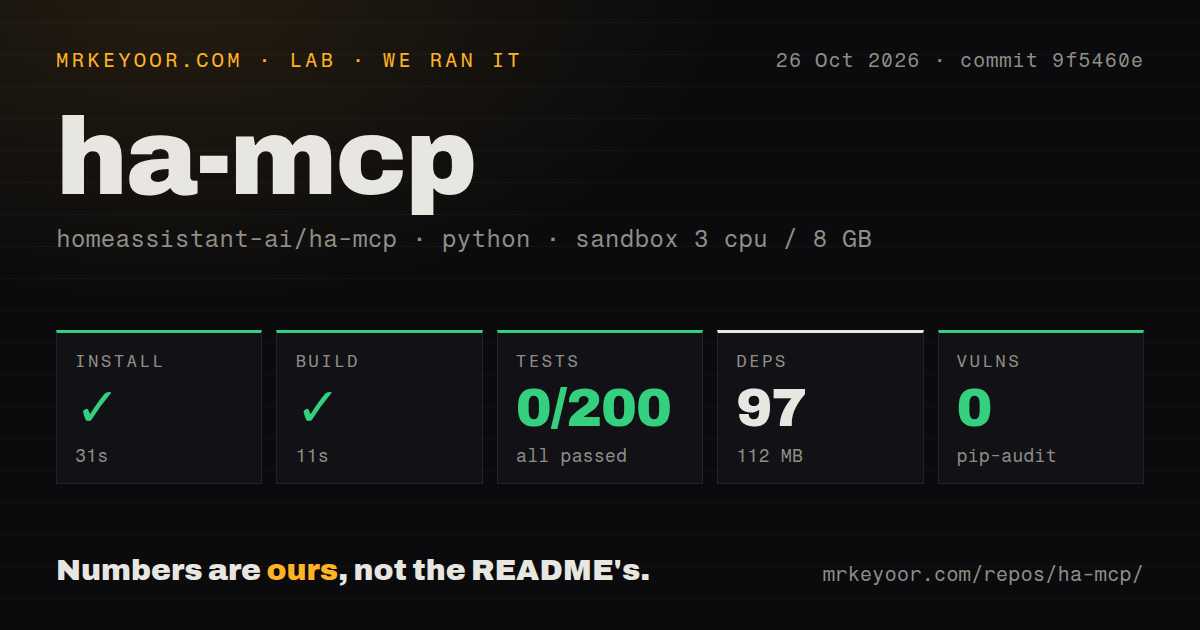
Our sandbox installed HA MCP's dependencies in 31 seconds and built the source in 11 seconds at commit 9f5460e on October 26, 2026. Both steps succeeded. The record lists 97 dependencies and 112 MB on disk, alongside a 52.6 MB checkout with 2,320 files and approximately 763,917 lines of source.
The test command exited 4 after 40 seconds. The recorded pytest summary gives zero passed, zero failed, 2 skipped, and 200 collection/setup errors. Those errors aren't successful tests or assertion failures. They prevented this command from establishing that the tested behavior works.
The tail repeatedly says 'asyncio' not found in markers configuration option, including entries for REST client retry, scenes, scripts, and state modules. It reports stopping after 200 errors. The excerpt establishes the marker-configuration complaint, but doesn't establish why the marker was unavailable. We can't diagnose a missing plugin or prescribe a package change from this tail alone.
Pytest's own summary reports 27.14 seconds and 6,208 collected items alongside the errors and skips. Its internal duration differs from the outer command's 40 seconds. The collected-item count does not mean those items ran. Our run provides no passing behavioral result to attach to the successful build.
The configuration recorded 3 CPUs, 8 GB RAM, and image ghcr.io/astral-sh/uv:python3.12-bookworm. That label doesn't establish the executing Python or operating-system version. The scan found a tests directory, Dockerfile, Compose file, and 45 CI workflow files. Their presence doesn't override the failed command.
The supplied pip-audit result reports zero known vulnerabilities. It doesn't establish the number of packages audited or certify the server's access controls. We did not connect a model, operate a device, or validate a backup restoration.
Choose release-matched instructions before entering credentials
The current README recommends an embedded custom component, while also documenting an app and external Docker or package routes. External HTTP deployments need the Home Assistant URL and a long-lived access token. Each route changes which service you must operate and where credentials are handled.
There is a dated mismatch to resolve. The quick start says its administrator-account setup applies to v9.0.0, dated October 28, 2026, and later. The latest-release endpoint returned v8.7.0, published October 14. Don't assume the current main-branch instructions describe the package you're about to deploy. Check that release's documentation and configuration form first.
The README warns against configuring multiple installation methods for the same server in one client because it can cause connection hangs. Pick one deployment for the evaluation. That makes a connection failure easier to investigate without guessing which copy of the server the client reached.
A read-only endpoint does not create restricted credentials
The README documents appending /readonly to the HTTP endpoint. It says that connection hides write tools and blocks write calls, including cached calls. It also states that the same credentials still work at the normal endpoint. This is a useful connection mode, with a specific security boundary you must understand.
If a client can use those credentials with the normal URL, the suffix alone isn't evidence that its authority has been reduced. For a trial, review enabled tools and the global Read Only Mode, then check the behavior of your selected connection. These are recommended checks. We haven't verified enforcement or attempted a bypass.
File and YAML tools add another boundary: the README requires a custom component entry and beta flags for them. Leave those opt-ins out of an initial device-state evaluation. An assistant answering questions about entities doesn't need a file-editing experiment attached to the same trial.
Home Assistant's own MCP integration may cover the task
Home Assistant's built-in MCP Server connects agents to device control and home-state information. Its current documentation also describes configurable LLM APIs and administrator-account requirements. Avoid relying on a blanket claim that the official integration can only ever expose a small fixed device set.
Start there if its APIs cover your request. HA MCP earns a separate evaluation when a specific configuration or diagnostic tool is the reason you need it. Node-RED offers a different choice: low-code programming for event-driven applications. Consider it if you want to author flows yourself. We haven't compared these approaches on task success or operating effort.
Recent activity leaves support capacity unmeasured
GitHub records a last push on October 27, 2026. Recent issues include a filesystem request updated that day and an automation-tool report updated October 26. Those observations show current activity, without establishing either report's cause or a support response guarantee.
Documentation earns 3/5 on a coverage rubric: 1 means a basic description, 3 means an actionable route with material caveats, and 5 requires independently verified instructions across assessed paths. The release mismatch is a material caveat. Setup ease, community support, and operational maturity remain unassessed. Before an assistant changes a working automation, use a disposable example and confirm exactly which account and tools it can use.