Home Assistant OS is the product most households should install
Home Assistant Core is the Python application that discovers devices, stores their state, runs automations, and exposes the interface used by the wider Home Assistant system. The project README describes local control and privacy as its purpose, with a modular integration system for adding devices and actions. That is a useful promise for a home: lights, sensors, media players, calendars, and vendor services can participate in one automation model instead of living in separate apps.
The source repository is easy to mistake for the normal installation. It is not. The official installation guide recommends Home Assistant OS for most people bringing their own hardware. That image supplies the managed operating layer, updates, backups, and optional apps. Home Assistant Container is for operators who already manage Linux and Docker. A direct Core checkout is best understood as the contributor route, which matters when judging the 27,218-file repository we tested.
This division makes the buying decision simpler. A homeowner should compare the supported integrations and pick suitable hardware, then start with Home Assistant OS. A Python developer fixing an integration needs the Core repository and its development setup. Running raw Core as though it were a small standalone script gives you work that the OS image is designed to absorb.
Local control still depends on each device and vendor
Home Assistant can keep its state and automation engine on your own machine, but an integration may still talk to a vendor account or remote API. Each device therefore deserves its own check in the integration directory. Confirm whether it works locally, requires credentials, depends on a cloud service, or needs a radio such as Bluetooth or Zigbee. The platform offers a common home, not a guarantee that every attached product becomes local.
The 2026.8.3 release notes show the maintenance cost of that breadth. That patch touched Sonos, Supla, Shelly, Signal Messenger, Vizio, Reolink, Enphase, Volvo, and several other integrations. Home Assistant had 3,652 open issues and pull requests when we fetched its repository facts on 2026-08-26. That number combines feature work, fixes, and proposed code, so it is evidence of scale and activity rather than a defect count.
A competent operator should expect occasional device-specific diagnosis. One open Total Connect report describes correct credentials and intermittent startup failure under Home Assistant OS, with the log ending in a global bootstrap timeout. That report does not establish a platform-wide fault. It does show why checking the issue tracker for your most important lock, alarm, camera, or energy integration is more useful than relying on the platform's overall popularity.
What happened when we ran it
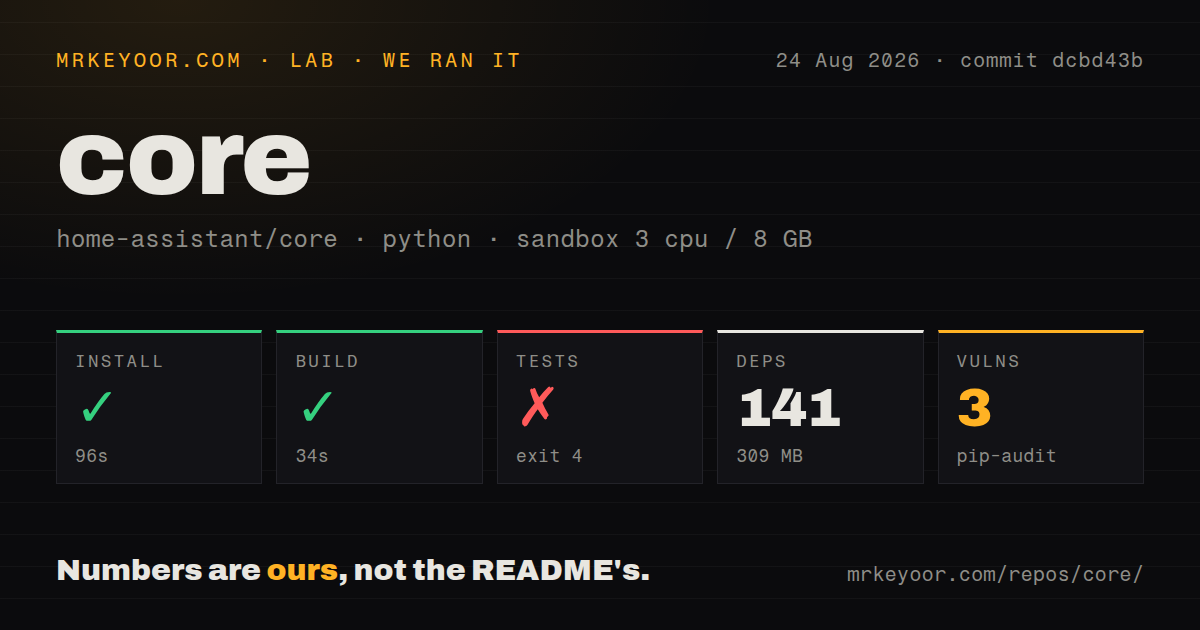
Our install at commit dcbd43b succeeded in 96 seconds. It added 141 packages and occupied 309 MB in a fresh Debian container with 3 CPUs and 8 GB of RAM. The build completed in another 34 seconds. Those results say the source and its declared runtime dependencies can be assembled in a clean Python 3.12 image, though that image differs from the newer Python version in the current contributor guide.
The test command failed after 10 seconds with exit 4. Pytest did not reach the suite because tests/conftest.py imported freezegun, which was absent, and the final error was ModuleNotFoundError: No module named 'freezegun'. The log does not say why that package was missing, so we will not assign a cause. For a contributor, the useful conclusion is narrower: our successful install did not produce a test-ready checkout.
Pip-audit also reported 3 known vulnerabilities in the installed environment. That result is a reason to inspect the exact advisories and the project's dependency policy before exposing a development image or basing another product on it. It is not evidence that a normal Home Assistant OS installation is remotely exploitable. The run covered the Core checkout in an unprivileged container with no secrets, not the managed appliance image.
The documented contributor path avoids a generic Python setup
Home Assistant's developer guide steers contributors toward Visual Studio Code and a dev container. The manual route currently calls for Python 3.14.2 or newer and a list of development libraries. That detail helps explain why a generic Python image is a weak stand-in for the supported workflow, even though our build succeeded. Use the project's environment before reporting a broken suite upstream.
Containers introduce their own hardware boundary. The same guide warns that exposing onboard Bluetooth, Zigbee, and USB adapters can be difficult inside a development container. Production container users also own the Linux host and updates. Home Assistant OS reduces that burden, which is why the recommendation is more than beginner-friendly packaging. It controls a larger share of the environment in a system where radios and network discovery are part of normal operation.
Active maintenance is the trade for broad compatibility
The repository was pushed on 2026-08-26, and release 2026.8.3 had arrived on 2026-08-21. Its 13 CI workflow files, Dockerfile, and dedicated tests directory match a project that treats changes across a large integration catalog as continuous work. The Apache 2.0 license is clear for the Core code, and the architecture documentation gives integration authors a defined extension path.
Choose Home Assistant when you want one local automation model and are prepared to verify the few integrations your household cannot live without. Choose openHAB when its bindings or Java extension model fit your existing work, Domoticz for a smaller traditional server, or Node-RED when the job is mainly visual message flow. Home Assistant's advantage is the joined household experience. Its cost is keeping that wide and changing edge of device support healthy.
Our run is most relevant to contributors: 189.1 MB of source, 309 MB of installed dependencies, a clean build, and a test bootstrap failure. Household users should not reproduce that route for sport. Use Home Assistant OS, keep backups, and judge reliability by the exact devices and services that will control heat, access, lighting, and alarms.