
mrkeyoor.com_
Wed 02 Sept 16:53 UTC
Self-Hostedevaluationupdated 02 Sept 2026

LiveTalking review

LiveTalking is a Chinese-first self-hosted server for making a digital avatar speak in real time; an English README and English documentation are available. It connects text or audio input to speech synthesis, lip-sync inference, and WebRTC or RTMP output, with optional language-model chat.

trackingstars / 7d
Verdict

Our LiveTalking install pulled 144 packages and occupied 5,453 MB before model weights, while the available suite contained only 2 tests, so production adoption needs its own load and disconnect testing. Use it when one GPU-backed service must drive several avatar engines through WebRTC or RTMP and your team can own the media plumbing. Skip it for a CPU box, a tightly firewalled network, or a multi-user launch that cannot first verify the open session-thread leak.

We ran it

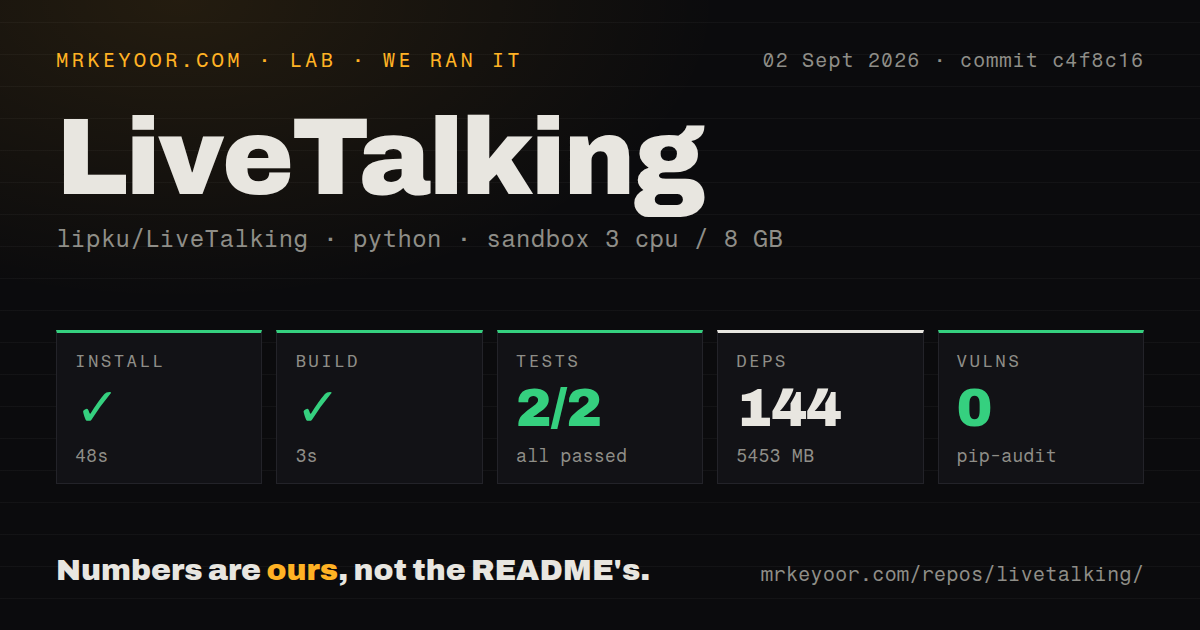
Lab card: what happened when we ran LiveTalkingScreenshot of LiveTalking (www.livetalking.ai)
Install✓ · 48s144 packages · 5453 MB
Build✓ · 3s
Tests✓ · 4s2 passed · 0 failed of 2 (pytest)
Known vulns0(pip-audit)
Repo176 files~19,415 lines of source · 6 MB · 0 CI workflows · Dockerfile · tests dir

Answers from our run

Does LiveTalking build from source?

Dependencies installed in 48 seconds (144 packages), and the build succeeded in 3 seconds. We cloned commit c4f8c16 into a clean Debian container with 3 CPUs and no project-specific setup.

Do LiveTalking's tests pass?

Yes: 2 of 2 passed when we ran the project's own test command (pytest). Some failures need services or credentials a bare container does not have.

Does LiveTalking have known vulnerabilities in its dependencies?

pip-audit found none in the dependency tree at the time of our run.

Who should not use LiveTalking?

CPU-only deployments: the README says every speaking stream consumes GPU and recommends at least an RTX 3060 for Wav2Lip256.

What are the alternatives to LiveTalking?

OpenAvatarChat, Linly-Talker, Wav2Lip. Our LiveTalking install pulled 144 packages and occupied 5,453 MB before model weights, while the available suite contained only 2 tests, so production adoption needs its own load and disconnect testing.

Setup2/5Clean install, but GPU models, providers, and WebRTC add real work
Docs4/5Chinese and English guides cover models, APIs, and streaming
Community4/59,349 stars with late-August code and September issue activity
Maturity3/5v2.0.4 and several backends exist, but only two tests ran

Who it’s for

Teams building a live digital presenter who already operate NVIDIA GPU servers.
Developers who want to compare Wav2Lip, MuseTalk, ER-NeRF, and Ultralight avatars behind one API.
Broadcasters who need WebRTC, RTMP, recording, or virtual-camera output from the same service.
Chinese-speaking implementers who can use the primary docs and community support.

Who it’s NOT for

CPU-only deployments: the README says every speaking stream consumes GPU and recommends at least an RTX 3060 for Wav2Lip256.
Locked-down networks that cannot expose TCP 8010 and a large UDP range for the documented WebRTC setup.
Multi-user production deployments that cannot test disconnect cleanup: open issue 615 reports worker threads continuing after a browser session closes.
White-label publishers unwilling to display project branding: the README says videos posted to named social platforms must include the LiveTalking watermark and logo.
Teams that equate two passing tests with end-to-end coverage of avatars, speech providers, recording, and streaming.

Setup reality

Our sandbox installed LiveTalking in 48 seconds, adding 144 packages and taking 5,453 MB on disk. The build passed in 3 seconds. Pytest finished in 4 seconds with 2 passed and 0 failed out of 2; pip-audit found 0 known vulnerabilities.

A working avatar still needs downloaded model weights and an avatar bundle. The documented GPU route pins PyTorch 2.9.1 with CUDA 12.8. Chat and speech choices may also need LLM or TTS credentials, provider endpoints, and a YAML configuration.

WebRTC setup asks for TCP 8010 and UDP 1-65536. CPU handles video compression while GPU handles lip inference, so concurrent capacity depends on both. The repository has a Dockerfile and tests directory, but no CI workflow files, and two tests cover little of that runtime surface.

Four avatar models share one streaming API

LiveTalking can drive ER-NeRF, MuseTalk, Wav2Lip, and Ultralight-Digital-Human avatars from text or uploaded audio. The server can synthesize speech, accept an optional language-model reply, generate lip movement, and send the result through WebRTC, RTMP, or a virtual camera. Its browser pages cover conversation, avatar creation, recording, and administration. The /human and /humanaudio endpoints also let another application control the avatar without using the included page.

That combination is more useful than a single talking-head notebook. Speech can be interrupted, idle video can be choreographed, and each connection receives a session ID. TTS choices include EdgeTTS, GPT-SoVITS, CosyVoice, and Tencent Cloud. The registry mechanism lets developers add avatar, speech, and output handlers. A customer-service product still needs its own knowledge source, access control, consent rules, and monitoring around those components.

A GPU and UDP access are part of the basic setup

The documented quick start installs PyTorch 2.9.1 for CUDA 12.8, downloads a Wav2Lip checkpoint, unpacks an avatar under data/avatars, and starts the service on port 8010. The README recommends an RTX 3060 or better for Wav2Lip256 and an RTX 3080 Ti or better for MuseTalk. The project supplies those GPU recommendations; our hardware run did not test them.

WebRTC also changes the network plan. The README tells operators to expose TCP 8010 and UDP 1-65536. That may be acceptable on an isolated GPU instance, but many production networks will require a narrower media design, TLS termination, and explicit firewall review. RTMP and virtual-camera output have different operating requirements. Pick the transport before buying capacity because the server divides work between CPU video encoding and GPU lip inference.

What happened when we ran it

Our sandbox installed commit c4f8c16 in 48 seconds. The process added 144 packages and used 5,453 MB on disk, a large base before downloading the avatar archives and model checkpoints named in the quick start. The build passed in 3 seconds in an unprivileged Debian container with 3 CPUs, 8 GB of RAM, Python 3.12, and no secrets.

Pytest completed in 4 seconds with 2 passed and 0 failed out of 2. Pip-audit reported 0 known vulnerabilities. The checkout itself contained 176 files, roughly 19,415 lines of source, and occupied 6 MB. It had a Dockerfile and tests directory but 0 CI workflow files. We did not run a GPU avatar, open a WebRTC peer, call a speech provider, or assess visual synchronization in that sandbox.

Two tests leave session cleanup largely unguarded

Two passing tests offer little coverage for four avatar engines and three output paths. Open issue 615 reports that closing a WebRTC browser session removes its dictionary entry without stopping render, inference, compositing, and TTS threads. The reporter measured about 3 CPU cores consumed per disconnected session on one MuseTalk deployment. Open pull request 616 proposes calling the existing shutdown chain during removal, but it was still open when checked.

That report lands directly on LiveTalking's multi-user claim. A prospective operator should connect, interrupt speech, refresh, close, and reconnect repeatedly while watching threads, GPU memory, CPU, and session counts. Recording and avatar-creation jobs need similar cleanup checks. The repository's 4-second test run cannot answer those questions, and the issue reporter's hardware result should not be treated as a universal capacity figure.

The Chinese and English setup pages disagree on Ubuntu

The primary README is Chinese and links to a substantial English translation plus an English documentation site. Both editions explain model downloads, web pages, APIs, streaming modes, and GPU expectations. There is one concrete drift point: the Chinese page says the stack was tested on Ubuntu 22.04, while the English page says Ubuntu 24.04. Both name Python 3.12, PyTorch 2.9.1, and CUDA 12.8.

Users should treat the language-specific README as orientation, then pin the actual container, driver, CUDA, and model combination they verify. The repository is Apache-2.0 licensed, while a separate README statement says videos published on Bilibili, WeChat Channels, and Douyin must carry the LiveTalking watermark and logo. A white-label team should resolve that publishing requirement before building templates and customer workflows around the output.

An August 30 push and 236 issues and PRs show current work

GitHub recorded the last push on August 30, 2026 and listed 236 open issues and pull requests. Issue 615 and its proposed fix were active on September 2. Release v2.0.4 arrived on June 20 with YAML configuration support and a documented priority order of command-line arguments, YAML values, then defaults. The combined open count includes pull requests and says more about queue size than defect count.

LiveTalking is worth a controlled trial when real-time avatar streaming is the actual product requirement. The shared API and output choices save integration work, while the 5,453 MB environment, model downloads, GPU floor, broad UDP instruction, and thin suite move risk into operations. Before serving real users, pin one backend, rehearse disconnect cleanup, test the chosen TTS path, and measure the exact avatar resolution on the GPU you will deploy.

Alternatives

ProjectWhat it isPick it when
OpenAvatarChatA modular conversational-avatar stack with swappable speech, model, and avatar handlers.pick this instead when you want preset conversational pipelines and a more explicitly modular handler architecture.
Linly-TalkerA conversational digital-avatar project combining language, speech, and talking-head models.pick this instead when a research-oriented conversational demo matters more than LiveTalking's streaming outputs.
Wav2LipA focused speech-to-lip synchronization implementation without LiveTalking's server layer.pick this instead when you only need lip synchronization and will build the serving pipeline yourself.

What people are saying

  1. [github-trending] lipku/LiveTalking

Sources

  1. LiveTalking Chinese README
  2. LiveTalking English README
  3. LiveTalking v2.0.4 release
  4. LiveTalking session-thread issue 615
  5. LiveTalking session cleanup pull request 616
  6. LiveTalking API documentation

More self-hosted reviews

nebula · pansou · birdnet-go · arcbox · ConvertX · TypeWords · the whole board →