SQLite recovery needs a restore you can inspect
Litestream adds a background recovery process to a SQLite application. Its README describes incremental replication to another file or S3. Before adopting it, check two practical constraints: it changes the source database schema, and you still need to verify that you can restore usable application data from your chosen destination.
Our repository checks passed. They did not exercise a remote-storage recovery or measure how much recent data a failure could lose. The useful next step is a restore drill with representative data and the configuration a replacement host would use.
What happened when we ran it
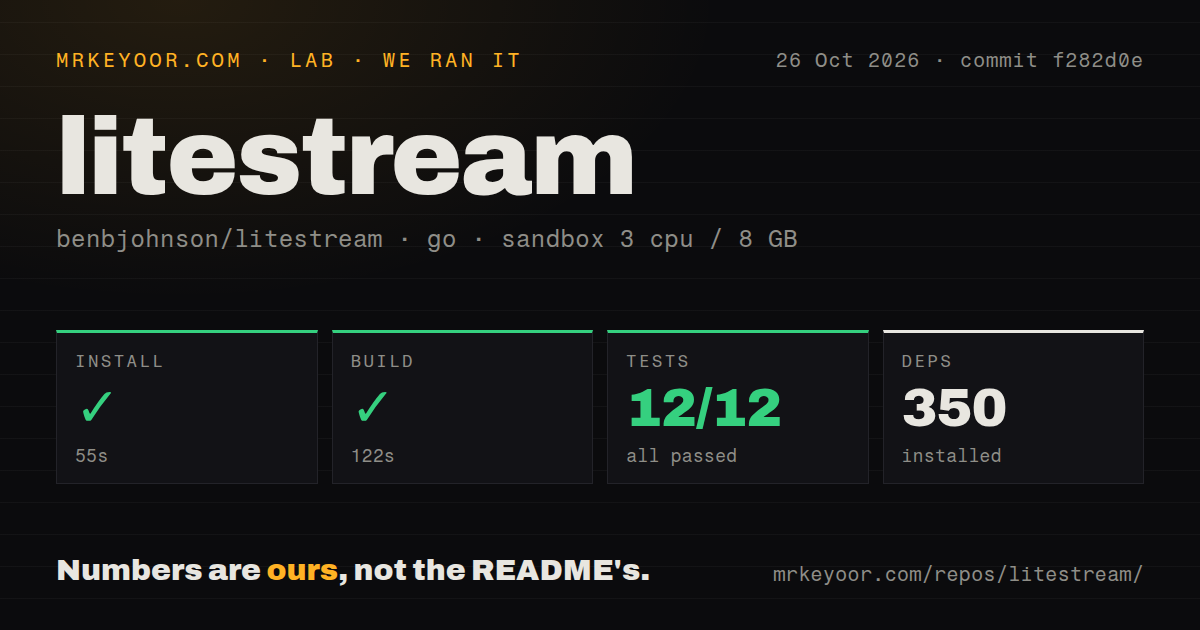
Our October 26, 2026 sandbox run used commit f282d0e. Installation succeeded in 55 seconds, with 350 dependencies recorded. The build succeeded in 122 seconds and the test step succeeded in 183 seconds. The go test summary reported 12 passed, 0 failed out of 12. Those are the recorded check totals, not a count taken from the README or a recovery benchmark.
The sandbox configuration had 3 CPUs and 8 GB RAM with image label golang:1.24-bookworm. The label does not establish the actual Go runtime or operating-system version. These checkout results also do not establish that we tested the v0.5.17 release binary.
The checkout scan found 10 CI workflow files, a Dockerfile and a tests directory. No vulnerability-audit result was recorded. The run also contains no database size, application write workload, replica lag or restore duration.
Start the replication process, then check a separate restored file
The official getting-started tutorial demonstrates local MinIO replication, restoration into another database file and a query against that restored file. We did not execute this tutorial. Use its sequence as an initial evaluation, then repeat the recovery check with representative application data and your intended storage destination.
The command distinction matters when configuring a service. The documentation says litestream replicate launches the daemon and keeps it running. The start and stop commands ask an already-running daemon to resume or pause replication for one database. They require its IPC control socket to be enabled and do not launch or shut down the daemon.
The tutorial's MinIO container only preserves data while that container runs. Its documentation calls for persistent storage in production and limits the example to local MinIO. Treat storage configuration and access as part of the recovery procedure. Check that a replacement host can obtain the credentials and configuration it needs without relying on the failed application's host.
Litestream changes the source database schema
When replication begins, Litestream creates an internal _litestream_lock table in the source SQLite database. The README says Litestream uses it to acquire SQLite's write lock while coordinating synchronization around WAL checkpoints. Its writes occur in transactions that roll back, so it leaves no rows in the table.
Creating the table still changes the source schema. The README also explains that restored databases contain it because the source schema is backed up. Database bytes and page counts can change, so applications that require an untouched schema or byte-identical file need another recovery design.
Do not drop the table while Litestream is running. Upstream says checkpoint synchronization can fail until Litestream reinitializes the database, and restarting recreates the table. Include it in schema checks rather than treating it as unexplained application data.
Check platform support and encryption requirements
Release v0.5.17, published August 31, 2026, lists Linux and macOS as supported platforms. Windows binaries are available for convenience, but Windows is explicitly not officially supported. A downloadable binary does not establish a supported deployment.
The supplied getting-started documentation says Age encryption is unavailable in v0.5.0 and later and directs users upgrading from v0.3.x with Age encryption to migration guidance. If that feature is part of your backup policy, resolve the encryption and migration requirements before upgrading. Our run did not evaluate either.
Choose alternatives by the job you need done
Restic documents file backups, repository restoration and mounting snapshots for browsing. Evaluate it when the backup job includes application assets and other files. For a SQLite backup, separately establish how you will supply a consistent database copy; the supplied Restic example does not demonstrate backing up an actively changing SQLite database.
rqlite is a distributed relational database built on SQLite. Its documented HTTP API and clustering model make it an architectural alternative for applications that need distributed database operation. Adopting that interface requires a different integration decision from adding a background replication process beside an existing SQLite application.
We did not compare either alternative's speed, recovery behavior or operating effort.
What the documentation rating means
Documentation scores 4/5 under a coverage rubric: 1 covers a product description, 2 adds setup instructions, 3 adds a concrete restore-and-query procedure, 4 also explains consequential operational limits, and 5 requires independent verification of the documented procedures being assessed. The supplied tutorial covers replication and inspection of a restored file; the README and release notes explain source-schema changes and platform limits. That supports 4 for the supplied documentation, while the unexecuted procedures prevent 5.
Setup ease, community support and production maturity remain unassessed. Before relying on Litestream for recovery, restore a representative copy on the machine that would replace your failed host and check the application's records against it.