Short answer: try the structure before trusting the graph
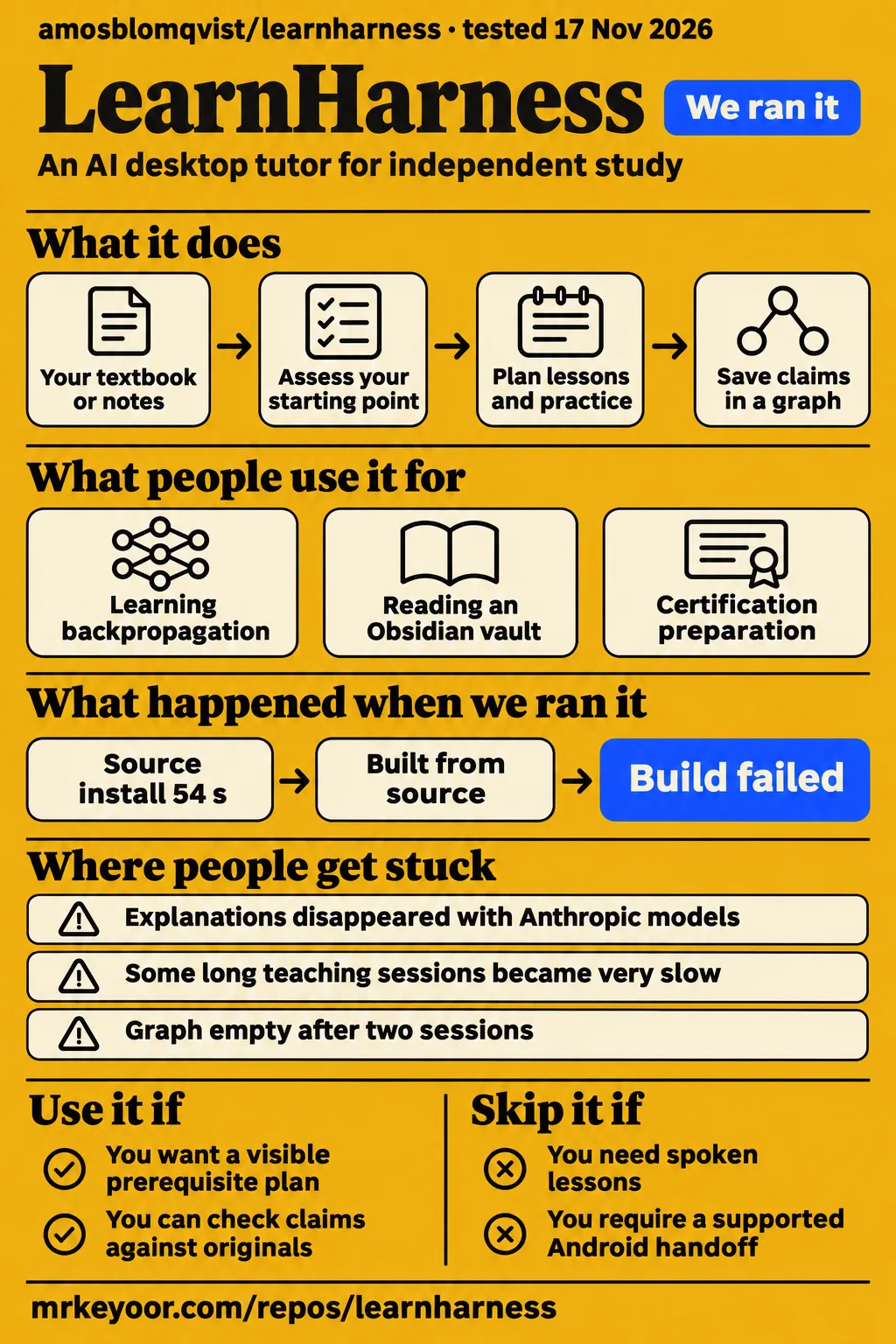
Our LearnHarness source install succeeded in 54 seconds, but the build and test commands both failed. Use it if you study difficult material independently, want a visible prerequisite plan, and can check the tutor's reasoning against your source material. Skip it if your study routine depends on spoken lessons, supported phone continuity, or an uninterrupted long teaching session. Those needs run straight into the reports below.
LearnHarness is an AI desktop tutor that asks what you understand, plans a route to a goal, teaches through questions and explanations, and saves propositions and reasoning chains for later sessions. The graph is useful context for another lesson. It isn't a certificate that you learned the material: the getting-started guide explicitly distinguishes stored propositions from mastery scores.
What people use LearnHarness for
X user yiyibuilds tried learning backpropagation from scratch and liked the live graph, but wanted more explanations and worked examples. That report captures both the attraction and the risk: seeing why rates of change precede backpropagation can help you follow a plan, while repeated questions about unfamiliar ideas can still leave you stuck. Read yiyibuilds's account.
| Person and task | What happened | What to take from it |
|---|---|---|
| X user yiyibuilds, building backpropagation from scratch | Liked the live learning map and highlighted progress, but felt tested rather than taught | Ask for a worked example when questioning outruns explanation. Learner report |
| GitHub user DavidFarago, reading a large Obsidian vault | Reported that navigation, reading and interpretation worked; requested Markdown learning records | Reading your notes and exporting reusable notes are different jobs. Issue #437 |
| GitHub user LittleHaku, certification preparation | Reported studying for a certification and requested Android access during commutes | This is an actual study use case, with no reported certification result. Issue #230 |
| GitHub user Azeirah, basic probability theory | Reported disappearing learner-facing explanations with Anthropic models on an M1 Mac | Provider behavior can interrupt the lesson itself. Issue #102 |
DavidFarago's experience makes the Obsidian distinction especially clear. The user could read a vault, then found learning records stored as JSON and asked for Markdown output with metadata. If Obsidian is where you keep durable notes, decide how you'll preserve a useful explanation before committing a large study history to a second application. The thread contains a request for that bridge, rather than a delivered export workflow. Obsidian discussion.
What happened when we ran it
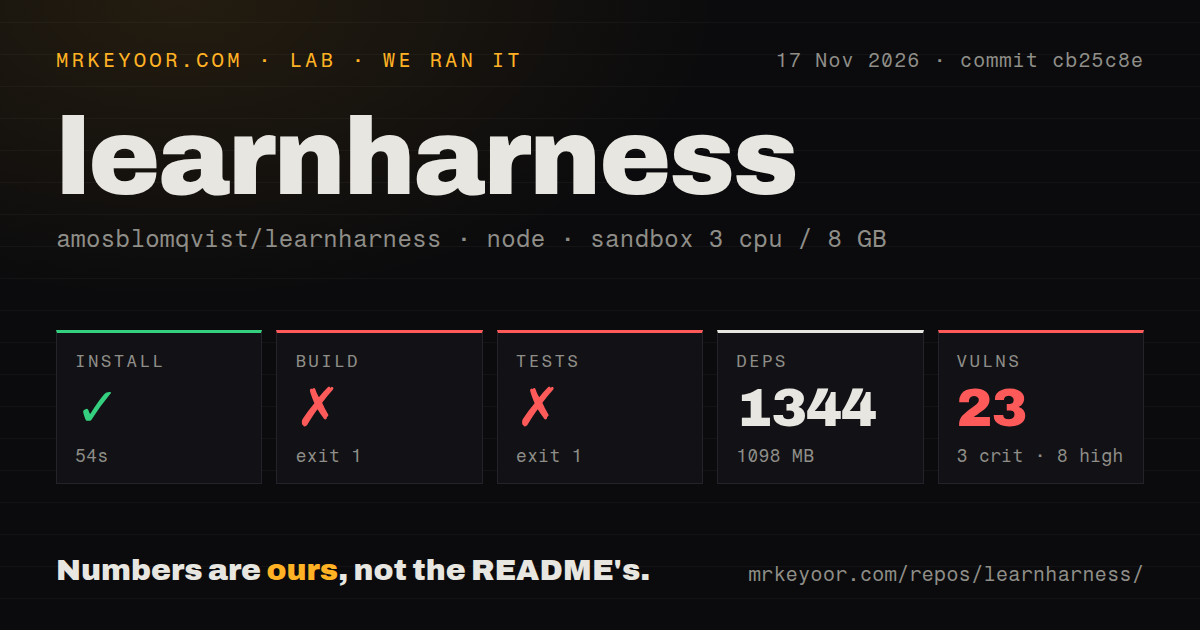
In our sandbox on November 17, 2026, LearnHarness installed in 54 seconds, then the build failed in 2 seconds and tests failed in 714 seconds. The checkout was commit cb25c8e; the recorded configuration was 3 CPUs, 8 GB RAM and image label lab-node:22.
| Recorded check | Result | Meaning for a developer |
|---|---|---|
| npm install step | Succeeded in 54 seconds | Dependency installation completed |
| Installed dependencies | 1,344 recorded; 1,098 MB on disk | Allow space for the developer environment |
| Build step | Exit 1 after 2 seconds | No successful source build from this run |
| Test step | Exit 1 after 714 seconds | The command failed despite passing lines at the end |
| npm audit | 23 known vulnerabilities: 3 critical, 8 high, 12 moderate, 0 low | Review affected dependencies before deciding exposure |
| Repository scan | 1,248 files, about 199,297 source lines, 18.2 MB checked out | This is a substantial source checkout |
| Automation signals | 3 CI workflow files, a tests directory, no Dockerfile detected | Presence of automation says nothing about its current results |
The build tail says [core-plugins] Error: coding-questions build failed (1) and names scripts/build-core-plugins.mjs. It also prints Node.js v22.23.2. That is runtime evidence from this step; the image label alone wouldn't supply it. The tail points to the failed plugin build, without exposing the underlying diagnostic. Installing a guessed package or blaming Node would go beyond that log.
The test tail ends with passing cases, including cancellation handling, provider-key checks and the keyless pre-send guard. Those lines aren't a suite summary. The recorded command exited 1, so treating the last visible ok line as a passing total would give you the wrong result. For someone planning a code change, the useful finding is that this checkout needs investigation before it offers a clean baseline.
A separate hands-on attempt stopped at its safety check because the repository lacked a required Compose file. The check looked for compose.yaml, compose.yml, docker-compose.yaml or docker-compose.yml; this was a rule of the lab's deployment procedure. It doesn't make a desktop application unsafe. The run header says “deployed with its own docker compose” with ports bound to 127.0.0.1, but the failed step supplies no successful deployment evidence. Teardown reported ok.
Where people get stuck: missing explanations and repeated compaction
Issue #102 records missing teaching explanations, and the maintainer describes the 0.3.8 change as an improvement rather than a complete fix. The reporter wanted to learn probability, initially suspected a provider budget error, then reproduced the disappearance in a new session without such an error. That matters: telling this learner merely to top up an account would have missed their report. Missing explanations.
| Symptom and source | Reported change or workaround | Status in the supplied thread |
|---|---|---|
| Missing learner-facing text, #102 | 0.3.8 adds an explicit message tool; a commenter switched models | Maintainer kept the issue open and acknowledged occasional missing explanations |
| Failed answer submission, #110 | 0.3.8 adds draft retention, reconciliation and bounded recovery | Reporter later saw no retry problems in 0.4.0; research-agent retry was still raised |
| Old summaries replayed during compaction, #160 | Maintainer says 0.3.9 fixes superseded-summary replay | That specific fix excludes retained-tail and hidden-reasoning behavior |
| Encrypted reasoning survives compaction, #160 | One user reports local improvement with PR #541 | Local report, no shipped resolution shown in the thread |
| Slow long teaching sessions, #160 | A fresh session initially helped one reporter, then slowed too | PR #541's user says it did not noticeably solve slowness |
Sources: issue #102, issue #110, issue #160.
Keep those compaction cases separate when searching for help. Replaying an obsolete summary is different from retaining opaque reasoning in the recent message tail. Neither explanation automatically diagnoses provider latency. A release that fixes the first problem can still leave a long session difficult to use. Record the app version, provider route and exact symptom when reporting it; “compaction is fixed” erases the distinction the maintainer explicitly made. Compaction discussion.
An empty graph needs an extraction check, not more lessons
Actro25 reported completing two sessions with no graph nodes and no apparent extraction progress in issue #781. The report asks about the extraction chunk budget, coverage and whether another AI model is needed. It contains a symptom and questions, not a diagnosis. Don't spend another evening generating lessons on the assumption that the graph will eventually fill itself. Empty-graph report.
The documented checks are narrower and more useful. Automatic session extraction can be disabled independently of graph rendering. Settings has separate Strong, Cheap and Vision selections, with no factory model choices; background roles use their assigned slots or overrides. A model chosen inside a lesson doesn't change those background choices. Check extraction enablement and the relevant background selection, then capture any error before changing the chunk budget. These are checks derived from the guide, not a claimed fix for #781. Extraction and model settings.
For note imports, a completed chunk survives a later failure. Retry is explicit and processes the file again, and reloading the page discards the queue. Save text as UTF-8: the guide warns that UTF-16 isn't decoded correctly and is often rejected. PDFs are converted locally without OCR, then extracted through a model. Start with a small file whose claims you can inspect, especially before importing notes with conditional reasoning. Import behavior.
Local files can reach models beyond the attached folder
LearnHarness's file tools are read-only, but the documentation says they have broad filesystem access under the server's user. Selecting a folder doesn't confine them to it. A sensitive-path guard blocks known credential locations rather than every document you would consider private. If you're studying confidential material, inspect what that operating-system account can read before allowing an agent to work with it. File-access boundaries.
Chats, graph records and settings live locally, while configured models, research services and dictation can receive content. Credentials are plaintext files with restrictive permissions, stored beside the learning-data folder. Don't share a complete profile to reproduce a bug or put credential files into a sync repository. Local storage is a storage choice; whether processing stays on your machine depends on the services you enable. Data and privacy guide.
A custom endpoint doesn't certify a model's capabilities either. Every custom model is selectable for Vision, including models whose backend may reject images. Discovery lists models; it isn't a continuing capability check. Use the complete API base URL, including /v1 where the backend requires it, because LearnHarness doesn't append that path. The documentation distinguishes image-payload delivery from the quality of an actual model's interpretation. Custom-provider guide.
Sync and audio output can decide whether it fits your day
Issue #782 reports no spoken lesson output in Linux AppImage 0.6.1, even though dictation is available. WSHAPER wants to hear explanations and practice problems for reading along, reviewing away from the screen and accessibility. If listening is part of how you study, microphone input doesn't meet that requirement. The request shows no implementation. Audio-output request.
For moving between computers, issue #108 describes conflict copies that the application ignores and stale in-memory sessions overwriting pulled changes. Our advice is to close the app on both machines, back up the learning data, and use one writer at a time if you attempt manual transfers. Exclude credentials. This reduces obvious hazards; it isn't a conflict-resolution guarantee. Contributors report adding idle protection, lifecycle hooks, a restart after pulling and version checks in PR #703, with packaged-build checks discussed in the thread. Treat those as reports about the proposal. Desktop sync discussion.
The standalone skill has its own compatibility issue. PR #783 proposes accepting current format-2 sessions and using UTF-8 output on Windows, where a console encoding failure could truncate records. Its author reports successful checks and reads of real data, but the supplied record lists the PR as open. Updating a desktop app and updating a separate reader are different maintenance tasks. Standalone-skill proposal.
LearnHarness vs ChatGPT, Anki and Obsidian
Anki users in issue #33 disagree about integration: some want to keep their existing review system, while others prefer LearnHarness to generate fresh problems without another dependency. That is a useful choice of study habits, not a contest that one feature list settles. Retention discussion.
| Alternative | Why someone would choose it | Reason to choose LearnHarness instead |
|---|---|---|
| A ChatGPT or Claude conversation | A quick explanation without the diagnostic and planning workflow; the fit-check video recommends ordinary chat for quick answers | You want an explicit prerequisite plan and a shared record for teaching and practice. Video comparison |
| Anki | Keep an existing card collection and review routine, as timovandrey requests | You prefer newly generated understanding problems, as marchellodev argues. User comparison |
| Obsidian | Keep notes in the workspace you already use | Add a teaching layer that can read your vault, accepting that Markdown learning-record export is a request in #437. Vault discussion |
Anki is a spaced repetition program. Anki's own README states that directly. LearnHarness also has an optional flashcard plugin: Amos Blomqvist's November 11 announcement lists FSRS-6 flashcards, coding questions, a drawing pad and renderers among the 0.6.0 plugins. Choose based on whether you want to maintain cards or work through adaptive problems, rather than an outdated claim that LearnHarness excludes flashcards. Plugin announcement.
What the other reviews get wrong
CodeRefer's claim that the meter shows exact provider fees conflicts with the official guide's description of estimated known API costs. Subscription, CLI and custom-endpoint use needs its own billing interpretation. HotRepo similarly overstates the need for an API key and per-token billing: the docs also describe subscription sign-in, an authenticated Claude Code CLI and custom endpoints. Those routes retain their own limits and costs. CodeRefer review, HotRepo listing, official billing guidance.
RepoPicks's “newest” 0.4.1 label is dated. The public release endpoint returned v0.6.1, published November 12, 2026. HotRepo's non-flashcard description also misses the optional FSRS-6 plugin announced for 0.6.0. These are consequential differences if you are choosing a provider or a review workflow. RepoPicks listing, v0.6.1 release, author's announcement.
The video titled “How Deterministic AI Tutoring Forces Active Learning” describes a strict state machine. The official instructions let learners revise the plan in natural language, and the author announced side conversations that preserve lesson position. Another video, “Personalized AI Learning Agent for Building Knowledge,” presents memorization benefits more confidently than the learner evidence warrants. yiyibuilds's backpropagation experience supplies a concrete counterexample to any promise that the workflow always prevents confusion. Deterministic-tutoring video, learning-benefits video, plan instructions, learner and announcement.
Questions people ask
LearnHarness supports independent study through diagnostic questions, prerequisite planning and practice, but one learner reported being questioned on concepts they hadn't understood. That makes it worth trying alongside a trusted source rather than making it your only teacher. Learner report.
Is LearnHarness right for someone studying a difficult subject independently?
Yes, if you want a visible plan and will explain your thinking rather than only collect answers. The fit-check video's creator recommends it for that kind of learner and recommends regular chat for quick answers. Their recommendation is a fit judgment, rather than a measured educational result. Fit-check video.
Does LearnHarness teach unfamiliar concepts or mainly test what I already know?
The guide describes probing, planning, explanations and checks. Actual experience varies: yiyibuilds wanted explanations and worked examples while learning backpropagation. Ask for those directly when you can't answer a question because you haven't learned the concept, then judge whether the next exchange helps. Teaching instructions, learner report.
How do I make sure I remember what AI explains to me?
A graph entry isn't evidence of retention. Use practice to attempt a fresh problem without the explanation open, and judge the result against your source. LearnHarness's guide distinguishes propositions from mastery scores; the optional FSRS-6 plugin adds a card-review option. Neither supplies a guarantee that you will remember. Graph guidance, plugin announcement.
Can I use a local model with LearnHarness?
Yes: configure a custom OpenAI-compatible endpoint, install its backend separately and select models. LearnHarness doesn't download models for you. Match the request budgets to your backend's actual configuration, and choose an image-capable model for image requests. A successful discovery response alone says nothing about image quality or tutoring quality. Local-model instructions.
Will the knowledge graph get messy?
Review imported claims against their original premises. Skyverses's 0.4.1 review describes a deferred defect where merging equivalent propositions can drop a necessary premise and strengthen an inference incorrectly. That is a specific historical warning about reasoning integrity, rather than proof that every graph becomes cluttered. Note-import review.
Does LearnHarness replace a textbook?
Keep your textbook or other trusted source. LearnHarness can teach from attached material and reuse stored reasoning, but its guide says a proposition's presence isn't proof of understanding. A readable explanation and an attractive graph still need checking against the source when correctness matters. Files and graph guide.
Why is my knowledge graph empty after completing two sessions?
Issue #781 reports exactly that symptom, without a supplied resolution. Check whether automatic extraction is enabled and whether background roles have usable models. These settings are documented independently of graph rendering and the active lesson's model choice. Changing the rendering view alone doesn't address those separate settings. Issue #781, configuration guide.
Do I need to configure another AI model to create the knowledge graph?
Background roles use assigned model slots or overrides, and there are no factory model selections. You need usable background configuration, not necessarily another provider account. Selecting a different model inside a session doesn't change those roles. Check that distinction before buying access to another service. Model configuration.
What do extraction coverage and the extraction chunk budget mean?
Those are the controls Actro25 asks about in #781, alongside stalled progress. The supplied documentation explains extraction and background-model choices but doesn't give a complete definition of those two interface labels. Don't interpret either as a learning score or assume increasing the budget fixes an empty graph. Question about extraction, graph semantics.
Can LearnHarness read lesson explanations and practice problems aloud?
WSHAPER reports no lesson audio output in Linux AppImage 0.6.1 and requests it for reading along and accessibility. Dictation converts your speech into input text, which serves a different need. The supplied request contains no delivered text-to-speech feature. Audio-output issue.
Can I continue the same learning session on Android during my commute?
LittleHaku requests exactly that workflow in #230 while preparing for a certification. The discussion mentions responsive web interfaces, headless work and forks, rather than confirming a supported upstream Android handoff. Don't make commute-to-desktop continuity a dependency of your study plan on the strength of those proposals. Mobile discussion.
How can I safely sync my sessions and graph between computers?
Avoid syncing live writes. Issue #108 describes ignored conflict copies and stale memory overwriting pulled records. Close both apps, preserve backups, exclude credentials and use one writer at a time for manual transfer. Contributors describe stronger coordination in PR #703; their reports about a proposed implementation aren't a general safety promise. Sync discussion.
What we have not tested yet
Our recorded run covers npm setup, a failed source build and a failed test command at cb25c8e; we did not complete a teaching session. The separate deployment attempt stopped at the Compose safety requirement. No known-answer learning task, retention study, session-cost benchmark or application-memory measurement came out of those checks. There are no lab screenshots in this pack.
We have not tested packaged desktop installation, local-model teaching, real image interpretation, plugin operation, long-session compaction or multi-device recovery. The audit total lacks package-level exposure analysis. The build tail lacks the original plugin diagnostic, and the test tail lacks an exhaustive summary. Node.js v22.23.2 is visible in the build tail, but the image name doesn't establish the operating-system version or every runtime used by the checks.
Community reports describe particular versions and provider routes, not universal failure rates. The supplied video records omit channel names, so the videos are identified by title here. The empty-graph thread's reply is absent, the extraction labels lack complete definitions in the supplied guide, and a current fix for the historical premise-merging warning remains untested. Support capacity, learning gains and comparable costs against other tutors are unknown. Our next useful check would be a short lesson on a topic with answers we can grade, followed by a fresh problem without the tutor open.