Short answer
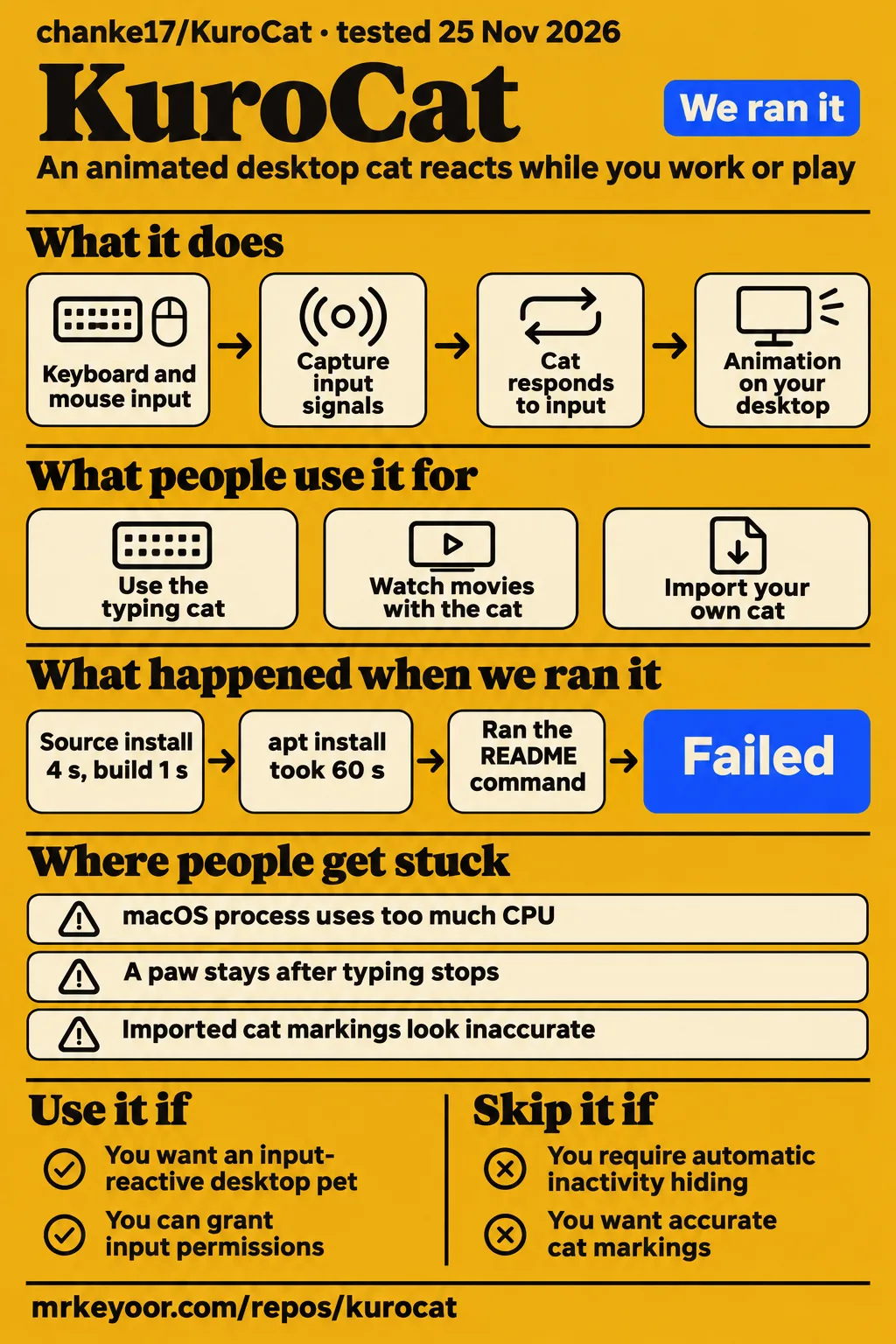
KuroCat puts an animated cat on your desktop that responds to typing and mouse movement, according to chanke17's English README. Use it if you want that small bit of company while working or playing games. Skip it if automatic hiding during movies is essential: the reporter of issue #8 asked for exactly that after the visible cat became distracting, and the maintainer discussed a plugin rather than announcing a delivered switch.
Those are repository-check results, not a desktop performance recommendation. The useful case for this app comes from its input-driven animation and the reports of people using it. The strongest objection also comes from a user: the macOS CPU complaint in issue #15.
What people use KuroCat for
The reporter of issue #1 liked KuroCat enough to recommend it to coworkers, while other users describe movie watching, personal-cat imports and checking macOS process usage.
| Who used it | What they did | What came back |
|---|---|---|
| Reporter of issue #1 | Used the typing cat and recommended it to coworkers | Praised performance against unnamed alternatives, then requested mouse bubbles, keycap letters and a smaller keyboard border |
| Reporter of issue #8 | Left the cat visible while watching videos and movies | Found the overlay distracting and asked for inactivity hiding |
| Reporter of issue #24 | Imported their own cat | Reported inaccurate coat-pattern recognition, with no reply in the captured thread |
| Reporter of issue #15 | Inspected process usage on macOS | Reported high CPU consumption; bugaio and Niuxintong supported optimization |
The coworker recommendation is a useful endorsement because it describes actual use, but the reporter names no competing program and gives no measurement. The movie report is more actionable if your computer doubles as an evening TV: an always-visible pet can become something you want out of the way. Neither experience cancels the other. Choose around when you want the cat present, rather than treating enthusiasm as evidence that every desktop will run it cheaply.
What you can do with KuroCat
The README describes native platform implementations: Swift on macOS and C++ on Windows and Linux. It lists skin choices, keyboard colors, click-through behavior and launch-at-login controls. Click-through means clicks reach the application underneath the cat, allowing the decoration to stay visible without taking every mouse click. That distinction becomes important when you need to open the cat's own menu again.
What happened when we ran it
| Recorded check | Outcome | What it tells you |
|---|---|---|
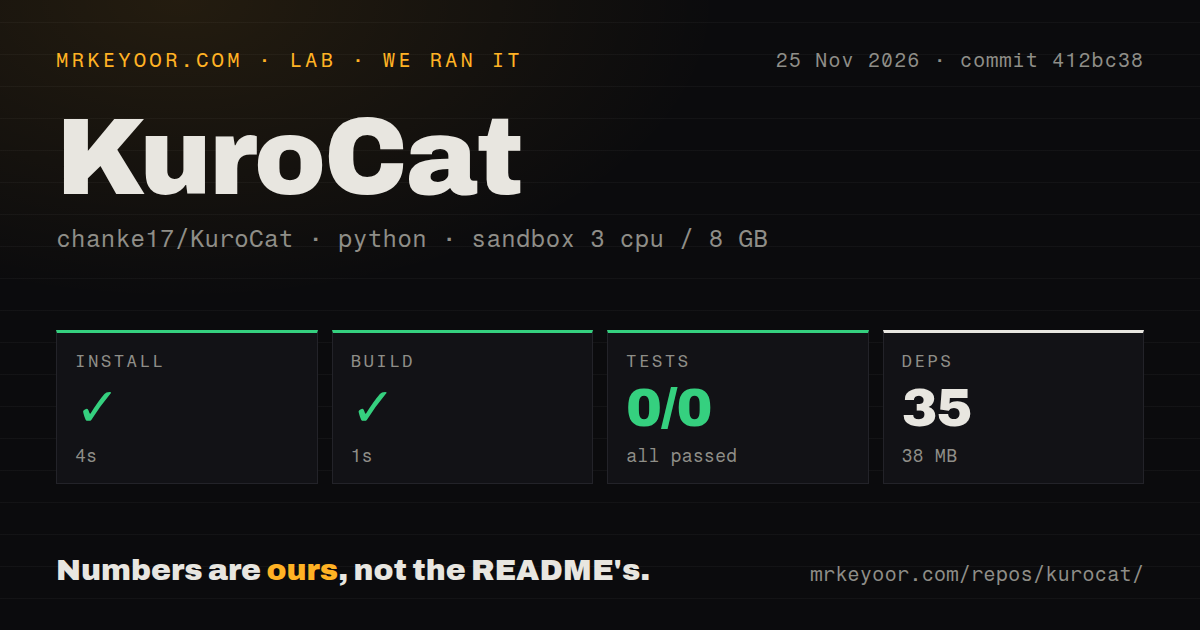
| Install | Succeeded in 4 seconds; 35 dependencies recorded; 38 MB on disk | The recorded dependency step completed |
| Build | Succeeded in 1 second | The recorded build step completed |
| Tests | Failed with exit 5 in 2 seconds; pytest counted 0 passed and 0 failed of 0 | No executed test coverage in this run |
| Repository scan | 74 files, about 36,893 source lines, 7.3 MB checked out | Size of the scanned checkout |
| Project signals | One CI workflow file, a tests directory, no Dockerfile detected | Repository structure, not a passing test suite |
The sequence matters. The first two steps succeeded. Then pytest printed no tests ran in 0.01s, and the outer test step failed. There is no failing test assertion to diagnose in that tail. A tests directory and a workflow file don't turn an empty collection into tested animation, and this log doesn't identify a package or environment error.
The recorded sandbox configuration was 3 CPUs, 8 GB RAM and image label ghcr.io/astral-sh/uv:python3.12-bookworm. The harness classified the ecosystem as Python, whereas the current README describes native Swift and C++ implementations. Treat that mismatch as a limit on what these successful steps prove. The image name alone doesn't establish the actual runtime or operating-system version.
A separate quickstart-cli probe used commit 8b8dded8364d. It cloned the repository, then followed the README's compiler-package command involving g++, GTK and X11 libraries. Its identity check selected the g++ package; that is the compiler, not the cat. Both g++ --version and g++ --help returned successfully. The next step failed with no runnable g++ command in the README's usage/examples sections. The probe then completed teardown successfully.
That probe stopped at compiler usage. It produced no observation of a moving cat, captured keypress or working desktop menu. Its failure belongs to the attempted quickstart path and cannot answer whether the application runs correctly.
Where people get stuck: menus, paws and personal skins
The maintainer reports v1.3.6 fixes for the disappearing Windows menu and stuck-paw animation in issues #9 and #11.
| Problem reported by a user | Maintainer response | How to use that information |
|---|---|---|
| Issue #9: on Windows, the menu flashes closed when Alt is used during full mouse click-through | Says v1.3.6 validates right-button event pairing and opens the menu after Alt is released | Match this exact trigger before treating another menu problem as the same bug |
| Issue #11: a paw stays on the keyboard after typing stops; refreshing temporarily helps | Says v1.3.6 fixes macOS CapsLock interpretation, adds hardware-state checks and state resets, and improves Linux release-event cleanup | Refresh was the reporter's workaround; the version-specific repair is the maintainer's report |
| Issue #24: imported cat markings look inaccurate | No response appears in the captured thread | Don't choose the app solely for a faithful portrait of your pet |
| Issue #1: keyboard border looks too large | Acknowledges further optimization | The response supplies no delivered border adjustment |
The Windows failure has a particularly useful explanation. Holding Alt lets you interact with the cat while full click-through is active. The maintainer says the menu was closing when Windows delivered the Alt-release event to its menu loop. The reported repair changes when the menu opens, after you release Alt, rather than asking you to abandon click-through entirely.
Both #9 and #11 carry open labels in the captured issue pages despite the fix replies. An open label alone is a poor guide here. Read the response for the affected behavior and version; don't turn that response into a claim that our lab reproduced the repair.
Mac CPU complaints matter more than the lightweight label
The reporter of issue #15 says the macOS process uses too much CPU, and two commenters ask for optimization.
A desktop decoration competes with the work you actually opened the computer to do. For you, the relevant cost might be fan noise, battery use or responsiveness while another app is busy. Those are reasons to care about the complaint, not effects demonstrated by the thread. The reporter includes process and device images, but the text does not provide a reproducible workload or a cause. There is no text-supported fix to recommend from that discussion.
The newer v1.4.3 release reports a macOS sleep-frame-rate optimization: once the cat has settled into sleep, the app reduces its frame rate. The release credits PR #20 by @simonwu53 and claims lower sleeping CPU usage. That gives you a more specific change to investigate than the issue's general request for optimization. The release does not say it closes #15, and it supplies no comparable CPU result for active typing.
The praise in #1 is equally personal. It supports saying that one user preferred KuroCat to other typing cats. It cannot support saying KuroCat is faster than Bongo Cat, or that macOS use is inexpensive. Before making it a permanent login item, look at its process during the things you normally do: idle work, typing and watching a video. That is an evaluation suggestion, not another lab result.
Input access is part of the product
The macOS instructions require Input Monitoring permission, and the privacy statement says keyboard and mouse signals stay in local memory.
This permission is central to the effect: the cat needs to react even when you type in another application. The English README directs macOS users to enable KuroCat in System Settings, then restart it from the menu bar. For pure Wayland sessions on Linux, it instructs users to join the input group and log in again for hardware input capture. If your work machine doesn't permit those access changes, that is a practical reason to choose a different kind of decoration.
The README says no keystrokes are logged or saved, and that network requests are limited to checking for new versions. Those are the project's privacy claims. For Windows games running as administrator, its troubleshooting instructions suggest restarting KuroCat as administrator too. Read that as an increase in the app's privileges, not a harmless visual preference. A pet that watches global input deserves the same permission scrutiny as another utility with that access.
English docs exist; the issue discussions are Chinese
The project opens with a Simplified Chinese README and links to a separate English README.
You can read download instructions, click-through controls and privacy guidance in English. The issue reports and maintainer replies discussed here are Chinese, so the fix map above translates the practical findings rather than expecting you to decipher them. English documentation and an English application interface are separate questions; the former is directly visible in the repository.
The README also points to a Skin Workshop & Plaza. That is a useful update to the earlier promise in issue #10, where the maintainer said a web workshop and skin importing would follow. The link shows a documented destination today; it doesn't resolve the imported-markings complaint in #24. A workshop's existence and the quality of its output are different buying questions.
KuroCat vs Bongo Cat and qianyiai/kurocat
One user prefers chanke17/KuroCat to unnamed typing cats; the Bongo Cat alternative claim belongs to qianyiai/kurocat's README.
| Option or comparison | What the source actually says | Pick it when |
|---|---|---|
| chanke17/KuroCat vs unnamed typing-cat programs | The reporter of #1 praises its performance without naming competitors or reporting measurements | You want the native desktop pet described in chanke17's README and accept the reported rough edges |
| qianyiai/kurocat vs Bongo Cat | qianyiai's README calls its own project a Bongo Cat alternative and describes a Tauri and Rust implementation | You specifically want to evaluate the separate project behind those claims |
| Bongo Cat website | bongo.cat lists instrument controls, including bongos, piano and marimba | You want a browser cat with musical controls rather than choosing a global-input desktop utility |
The similar names make feature comparison unusually easy to get wrong. qianyiai/kurocat describes OBS integration and an MCP server, a protocol endpoint AI assistants can call. Those features belong to that README. This review doesn't assign them to chanke17's project. Start your comparison with the owner and repository path, then decide which implementation's features you want.
Outdated claims, corrected
qianyiai/kurocat's v5.0.2 release supersedes its v5.0.1 promise that future macOS upgrades would preserve permissions without reauthorization.
The v5.0.1 release promises persistent authorization for future versions. The same releases page then says v5.0.2 returns to ad-hoc signing because the untrusted self-signed certificate could leave permissions ineffective. Its upgrade instructions tell users to remove old permission entries and authorize again. Don't repeat the earlier blanket promise as current advice.
This is a correction to qianyiai's release notes, not to a review page and not to chanke17/KuroCat. The repository paths are different. Copying a permission fix or performance claim from one to the other would give you instructions for software you may not have downloaded.
Questions people ask
KuroCat here means chanke17's desktop typing cat; “kurocat hotel” and “kurocats sg” lead to a Singapore cat-boarding business, while “kurocat vtuber” has no resolved identity in the autocomplete results.
Does “KuroCat” refer to the desktop project, a cat hotel, a VTuber, or kuro cats in Singapore?
The name is ambiguous. Kurocats.sg advertises cat boarding in Singapore, while the App Store's KuroCat describes a market-information app. Autocomplete contains the VTuber query but identifies no particular VTuber. None of those results is a user review of chanke17's desktop software.
Why does the macOS version of chanke17/KuroCat use so much CPU?
Issue #15 reports high CPU usage, but gives no textual diagnosis. Its two supporting comments ask for optimization. Naming a rendering loop, dependency or permission as the cause would go beyond that thread.
Can KuroCat automatically hide after 10 to 30 seconds without keyboard or mouse activity?
The reporter of #8 asks for that inactivity window. The maintainer considers adding it through a plugin and mentions a future marketplace. That reply is a feature discussion, not instructions for enabling automatic hiding.
Can I import a custom skin and match my own cat and keyboard colors?
The maintainer's reply in #10 promises a skin workshop and import functionality. The current English README links a workshop, and #24 describes someone importing their own cat. Together they show more than an untouched request, but don't promise a faithful result for your cat.
Why does importing my cat produce an inaccurate coat pattern?
The reporter of #24 describes inaccurate markings, with no cause or repair in the captured thread. There is no supported setting or workaround to offer from that report.
Can KuroCat show letters on its keyboard keycaps?
Yes, according to the maintainer's reply in #4: v1.3.0 added keycap characters, enabled by default, with a right-click-menu toggle. That is a specific answered feature request, rather than a reason to keep waiting for letter labels.
Can KuroCat display bubbles for left and right mouse clicks?
Yes, the maintainer says #1's mouse-click bubbles arrived in v1.3.0, with an independent right-click-menu toggle. The response distinguishes these from keyboard keycap characters, so you can treat them as separate visual preferences.
Can the keyboard's black border be made smaller?
The maintainer acknowledges the border complaint in #1 and says further optimization will follow. That reply names no shipped adjustment, unlike its explicit v1.3.0 answers about mouse bubbles and characters.
Why does the Windows right-click menu immediately disappear when I use Alt in full click-through mode?
The maintainer attributes #9's flash to the Alt-release event closing the Windows menu loop. The reported v1.3.6 repair waits until Alt is released before opening the menu and checks right-button event pairing.
Why does one paw stay on the keyboard after I stop typing?
The reporter of #11 says refreshing temporarily restored the animation. The maintainer reports v1.3.6 changes for macOS CapsLock state, missed release events and Linux input cleanup. The report says typing still worked while the paw appeared stuck.
Can KuroCat react to music and fade when I hover over it?
Issue #7 requests music feedback and adjustable hover fading. Its captured discussion has no replies or implementation instructions, so the request itself doesn't give you a feature to enable.
Can I choose special animations for long typing sessions?
The reporter of #23 asks for sustained-typing effects and selectable animations, including an anger effect. The thread contains no maintainer response. The request doesn't tell you which release, if any, implements that selection.
What we have not tested yet
We have not tested a running KuroCat desktop session, so this review has no measured idle CPU, battery, memory, animation-latency or gaming result.
The successful harness install and build are bounded by its Python classification and the missing raw command logs. We cannot reconcile that classification with the native project from the summary alone. The g++ probe supplies compiler output, not an application launch. Actual toolchain versions for the 412bc38 run require its raw logs; its image label is only recorded configuration.
We have not reproduced the v1.3.6 repairs, tried the workshop or a custom-cat import, checked an English UI, or compared competing typing cats on the same machine. The v1.4.3 sleep optimization also needs a before-and-after desktop measurement. No network inspection or source security audit supports the README's privacy statements here. The empty YouTube extracts add no viewable demonstration, and Bilibili search titles show interest in typing cats and skins rather than a checked chanke17 walkthrough. The relationship between chanke17/KuroCat and qianyiai/kurocat is not established by the pages reviewed. The next useful test is an actual desktop session, with the exact binary recorded and idle and active input measured separately.