
mrkeyoor.com_
Tue 01 Sept 17:41 UTC
Self-Hostedevaluationupdated 27 Aug 2026

jumpserver review

JumpServer is a self-hosted privileged access management system for controlling and recording access to servers, databases, Kubernetes clusters, and remote desktops. It gives administrators one browser-based gate for SSH, RDP, database, and RemoteApp sessions instead of distributing direct credentials.

+24 / 5dstars / 7d
Verdict

Our JumpServer run installed 34 packages in 55 seconds and built in 10 seconds, but the repository offered no test target, so the clean build is weaker evidence than a passing suite. Use it when browser access, session auditing, and policy around several privileged protocols justify a dedicated 4-core, 8 GB host and ongoing security operations. A small team that only needs controlled SSH should start with a narrower access broker.

We ran it

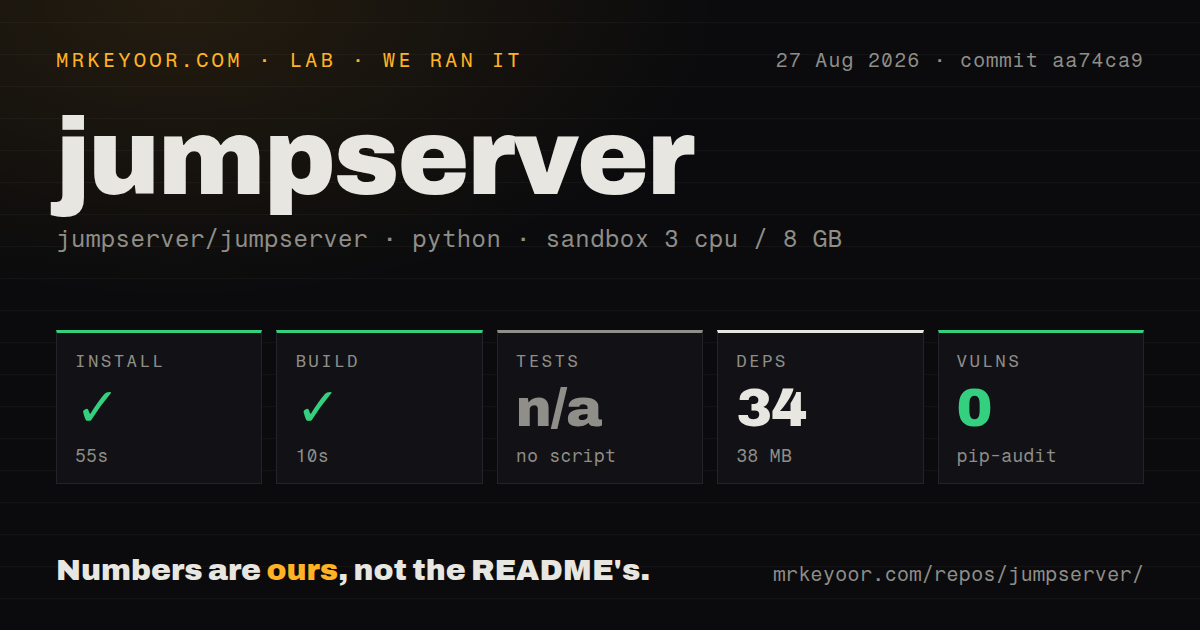
Lab card: what happened when we ran jumpserverScreenshot of jumpserver (jumpserver.com)
Install✓ · 55s34 packages · 38 MB
Build✓ · 10s
Testsn/ano test script
Known vulns0(pip-audit)
Repo2023 files~155,509 lines of source · 16.1 MB · 18 CI workflows · Dockerfile

Answers from our run

Does jumpserver build from source?

Dependencies installed in 55 seconds (34 packages), and the build succeeded in 10 seconds. We cloned commit aa74ca9 into a clean Debian container with 3 CPUs and no project-specific setup.

Does jumpserver have tests you can run?

Not through a standard command: the project exposes no test script or target that our harness could run.

Does jumpserver have known vulnerabilities in its dependencies?

pip-audit found none in the dependency tree at the time of our run.

Who should not use jumpserver?

Small teams that only need SSH keys or a VPN: the quick start asks for a clean 64-bit Linux server with at least 4 CPU cores and 8 GB of RAM.

What are the alternatives to jumpserver?

Teleport, Boundary, Apache Guacamole. Our JumpServer run installed 34 packages in 55 seconds and built in 10 seconds, but the repository offered no test target, so the clean build is weaker evidence than a passing suite.

Setup3/555-second install; full service needs a dedicated 4-core, 8 GB host
Docs4/5Clear quick start and component map, with deployment detail off-page
Community5/531,457 stars and fresh issue activity on August 27, 2026
Maturity4/5Active v4.10 LTS line, offset by current access and scaling reports

Discussed on

  1. hnJumpServer: Open-Source Privileged Access Management75 points

Who it’s for

Infrastructure teams that need audited browser access to SSH, RDP, Kubernetes, and databases.
Organizations replacing shared administrator passwords with centrally assigned access.
Security teams that need session records, approval flows, and account policies around privileged systems.
Operators willing to maintain a multi-component security service on a dedicated Linux host.

Who it’s NOT for

Small teams that only need SSH keys or a VPN: the quick start asks for a clean 64-bit Linux server with at least 4 CPU cores and 8 GB of RAM.
Buyers who assume every connector is in the community edition: the README labels Tinker, Panda, Razor, Magnus, Nec, and Facelive as private components.
Organizations that need a tiny, easily audited codebase: our checkout contained 2,023 files and about 155,509 lines of source across a component family.
Teams requiring short-lived authorization reminders measured in minutes: open issue 17343 says the current reminder job works at day-level granularity.
API users who cannot tolerate a known authentication regression while evaluating v4.10.19-lts: issue 17351 reports HTTP 500 responses for Access Key signed POST requests.

Setup reality

Our sandbox installed 34 Python packages in 55 seconds and used 38 MB on disk. The build succeeded in 10 seconds. The repository exposed no test script or target, so we skipped tests; pip-audit reported 0 known vulnerabilities.

The README's supported quick start expects a clean 64-bit Linux server with at least 4 CPU cores and 8 GB of RAM, then pipes a downloaded installer into a shell. A real deployment also needs asset inventories, administrator accounts, network routes, and policies for the systems placed behind it.

The 16.1 MB checkout is only the Python core. JumpServer names separate web UI, web terminal, protocol connector, graphical connector, database connector, and client projects, while several remote-access components are private. Running the full PAM service is therefore a larger job than our 10-second source build.

One browser gate covers five kinds of privileged access

JumpServer puts SSH, RDP, Kubernetes, database, and RemoteApp access behind a web interface. Administrators assign people to assets and accounts, while users connect without receiving the underlying credential directly. That is a useful boundary for teams that have outgrown shared root passwords, jump boxes with hand-maintained keys, or a VPN that grants more network reach than a job requires. Session access and operations can then be reviewed from the same product.

The breadth has a cost. JumpServer is a family of components rather than one Python daemon. Its README names separate projects for the web UI, browser terminal, character-protocol connector, graphical-protocol connector, database connector, and desktop clients. Our checkout of the core alone held 2,023 files and about 155,509 source lines. A buyer should evaluate the service as security infrastructure with several moving parts, even though the quick-start command looks simple.

Community users do not receive every named connector

The GPL-3.0 core covers the central PAM platform, but the component table draws a visible product boundary. Tinker, Panda, Razor, Magnus, Nec, and Facelive are marked private. Those entries include remote application, RDP proxy, database proxy, VNC proxy, and facial-recognition pieces. Before choosing JumpServer for one of those jobs, map the required protocol and deployment shape to the edition that supplies it. The word open-source does not mean every box in the architecture diagram is available in this repository.

The current v4.10.19-lts release is substantial. Published on August 20, 2026, it added clipboard controls for graphical sessions, account policies for file transfer, custom ticket workflows, SMTP certificate options, and visual maintenance through KOTL. It also changed database parsing, object-storage compatibility, and password-change automation. This is evidence of an actively maintained operations product, but the volume of behavior also raises the amount a security team must regression-test during upgrades.

What happened when we ran it

Our sandbox cloned commit aa74ca9 and installed 34 Python packages in 55 seconds, leaving 38 MB on disk. The source build completed successfully in another 10 seconds. Pip-audit found 0 known vulnerabilities in the installed packages. These are useful repository checks, though they do not represent the complete service with its web, proxy, database, and graphical-session components running together.

There was no test script or target for the harness to invoke, so tests were skipped. The checkout had 18 CI workflow files and a Dockerfile, yet no tests directory. That combination suggests automation exists outside the simple local path we inspected, but it does not let us claim a passing test suite for commit aa74ca9. For software that will mediate administrator access, prospective operators should identify the upstream integration checks and run their own protocol and upgrade tests.

The 16.1 MB repository and 10-second build can make source setup look light. The README's actual quick start asks for a clean 64-bit Linux server with at least 4 CPU cores and 8 GB of memory, then downloads and runs quick_start.sh through a shell. Review that script before execution, pin the release you intend to deploy, and place the service on a host whose network routes and backups match its security role.

Day-level reminders and current reports affect stricter policies

JumpServer's issue activity is useful because it exposes cases that a feature checklist misses. Issue 17343 asks for hour-level or minute-level expiration reminders, explaining that the current daily task cannot sensibly warn about a 2-hour authorization. If your access policy depends on a notice 15 minutes before expiry, the reported behavior does not meet it. Enforce expiry independently or verify a later release before relying on notifications.

Issue 17351 reports that Access Key signed POST requests returned HTTP 500 on v4.10.15 and still did so after an upgrade to v4.10.19-lts. The report names authentication and connection-token endpoints, which makes it directly relevant to API-driven access workflows. Issue 17325 describes slow web and SSH login against an audit table with 6 million rows. Neither report proves every installation is affected, but both supply concrete acceptance tests for an evaluation.

Active development deserves a controlled upgrade process

GitHub showed 31,457 stars, 79 combined issues and pull requests, and a last push on August 27, 2026. The latest release was only 7 days old. That is healthy activity, and the recent issue list also shows users testing community and enterprise editions across one-click, offline, all-in-one, and Kubernetes installs. The combined open count is not a defect count, so the dated release and issue traffic matter more than the raw number.

JumpServer makes sense once privileged access is an organizational system rather than an SSH configuration problem. The browser workflow, protocol coverage, and current LTS work are persuasive. The missing local test target, edition boundaries, 4-core and 8 GB starting point, and live access reports keep it out of casual-deployment territory. Put a narrow pilot in front of representative SSH, RDP, database, and API flows, then treat upgrades like changes to an authentication service.

Alternatives

ProjectWhat it isPick it when
TeleportAn identity-aware access plane for SSH, Kubernetes, databases, desktops, and applications.pick this instead when short-lived certificates and infrastructure identity are central to the access model.
BoundaryA broker for identity-based access to private hosts and services without exposing their networks.pick this instead when session brokering matters more than a broad browser-based operations console.
Apache GuacamoleA browser gateway for remote desktop protocols including RDP, VNC, and SSH.pick this instead when browser-based remote access is the main requirement and PAM workflows are secondary.

What people are saying

  1. [velocity-scout] jumpserver/jumpserver

Sources

  1. JumpServer repository and README
  2. JumpServer v4.10.19-lts release
  3. Access Key POST authentication issue 17351
  4. Short authorization reminder request 17343
  5. Large audit table login report 17325

More self-hosted reviews

v2 · OpenShell · wigolo · Mindwtr · club-3090 · reclip · the whole board →