One Rust client takes on memory, swarms, providers, and a terminal UI
jcode is much more than a prompt box attached to a shell. It keeps persistent sessions, embeds conversation memory, renders side panels and Mermaid diagrams, controls a browser, connects to MCP servers, and can coordinate several coding agents in one repository. Interactive TUI use sits beside non-interactive runs and a server-client mode. That range is appealing if your current workflow already uses several agent tools. It also means a buyer is adopting a large opinionated environment, not a small command wrapper.
Provider support is one of the strongest reasons to try it. The README documents login flows for Claude, OpenAI, Gemini, GitHub Copilot, Azure OpenAI, and several other services. Named profiles cover more OpenAI-compatible hosts, while local endpoints can run without a key. Our checkout had about 776,443 source lines across 1,937 files, which matches the breadth on display. Each extra route brings its own authentication behavior, model catalog, context limits, and failure modes.
Persistent sessions help until the saved transcript falls behind
The memory design can reduce repeated explanation. jcode embeds turns, retrieves related entries, and periodically extracts or consolidates memories. Users can also search sessions directly. The server-client mode lets a long-running session survive a disconnected front end, and the August 26 v0.81.1 release specifically changed how desktop-owned sessions are marked when a client disappears unexpectedly.
Issue 1065 describes a serious boundary for anyone archiving work. On Windows with v0.79.1, the reporter found an active session file whose newest stored message was more than 13 hours behind the live conversation. A clean exit was the only reported guarantee of a full flush. That report does not prove every platform loses data, but it is enough to disqualify the session file as a crash-safe record without your own test and backup procedure.
What happened when we ran it
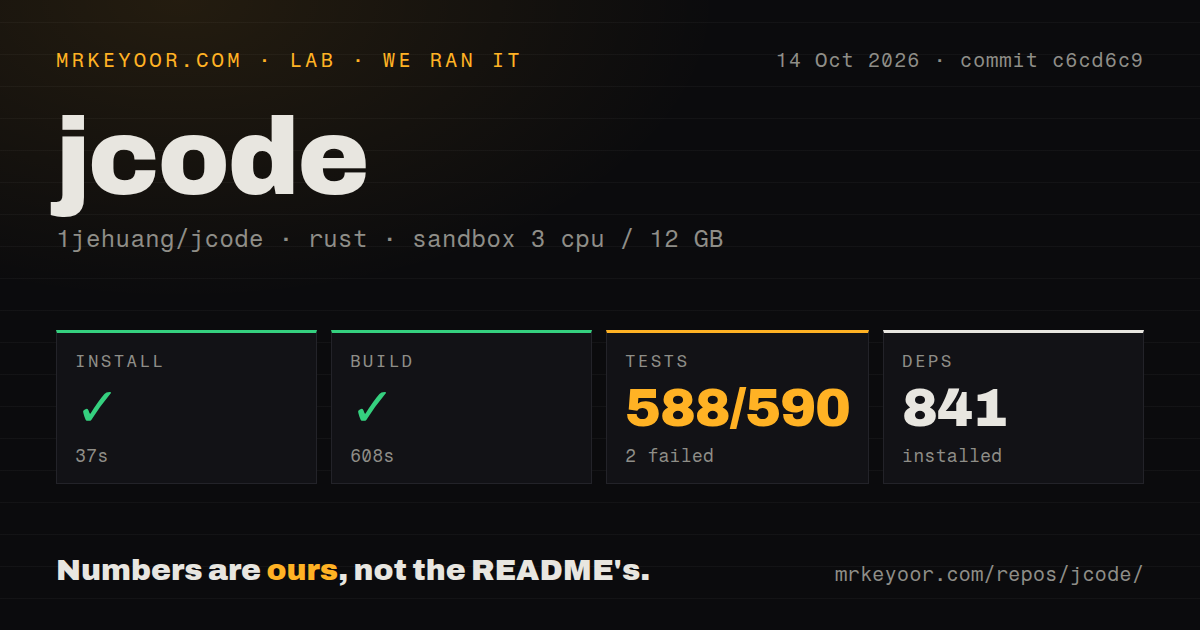
Our sandbox installed 870 Rust packages in 106 seconds. Building commit 5b8374e succeeded in 660 seconds on 3 CPUs with 12 GB of RAM. That is 11 minutes for the build after dependencies were present, so source-based upgrades are a real wait even though prebuilt installers are available. The repository occupied 213.6 MB before compilation and included 9 CI workflow files plus a tests directory, but no Dockerfile.
The full test command ran for 622 seconds and exited with code 101. Cargo reported 226 passing tests and 5 failures out of 231. The log showed an expected label of Jcode Hosted Models receiving Jcode Subscription. Other failed test names covered provider registry wiring, provider choice round trips, an auth status and login lifecycle, and an automatic follow-up aimed at low-threshold todos. The tail does not establish a cause beyond those mismatches and failures.
Swarms coordinate edits, but operators cannot yet pin every worker route
A jcode swarm can let agents message one another and warn a worker when another agent changes a file it has read. Agents can also spawn workers themselves. For a large refactor, those primitives save the user from manually opening and coordinating several terminals. The persistent server mode makes the idea more credible because worker state does not have to live inside one fragile terminal window.
Control is less settled. Issue 1066 says the configured swarm model acts as a default and a coordinator can pass another model at spawn time. The request asks for an enforce mode or allowlist that an agent-written config cannot bypass. That matters for a hosted or cost-controlled environment where a specific authentication route is mandatory. Until such a control exists, prompts and defaults are policy guidance rather than a hard operating boundary.
Terminal integration can alter or fail inside specific desktop stacks
The custom interface is a genuine differentiator. Side panels can display files, diffs, and diagrams without replacing the conversation. jcode also has its own scrollback behavior and offers left or centered alignment. Yet terminal graphics depend on the path between application, multiplexer, and emulator. Issue 1062 reports blank Mermaid areas in WezTerm on WSL2 through Zellij, even after the probe selected Sixel and PNG artifacts were produced.
Desktop integration deserves equal scrutiny. Issue 1063 reports that v0.80.1 inserted 3 launch bindings into a niri compositor config on first run without asking, while the Linux uninstall command could not remove them. The issue includes the affected config block and source paths. Users with managed dotfiles or established keybindings should disable launch hotkeys before first use and inspect configuration changes after setup.
August activity is intense, and so is the change rate
GitHub showed 18,625 stars, 363 combined open issues and pull requests, and a last push on August 26, 2026. Release v0.81.1 landed the same day. The recent issue list includes provider routing, session persistence, terminal input, diagram display, configuration resets, and swarm controls. That is healthy participation, but the subjects also show how many platform seams the project owns.
jcode makes the most sense for an experienced agent user who feels constrained by a single provider or disposable terminal sessions. The 660-second build and 5 failed tests make a cautious trial the right entry point. Start with one repository, one provider, and copies of important transcripts. Add swarms, self-editing, browser control, and desktop hotkeys only after each has survived the terminal and policy constraints you actually use.