Saving the configuration changes your window behavior
Hyprland reloads its configuration when you save it. You can change window rules, keyboard bindings, and visual effects while shaping the desktop around your work. The README's layout list includes dwindle, master, and scrolling, alongside floating windows and tabbed groups. A scratchpad workspace can hold applications you summon only when needed. That's a useful offer for someone who already knows which parts of a conventional desktop get in the way.
Our checkout contained 1,816 files, roughly 335,099 source lines, and occupied 79.3 MB. GitHub identifies C++ as the main language, while the lab selected a Python directory inside the bundled Tracy subproject. That distinction matters when judging effort: getting that directory through a package install says little about whether your graphics hardware, login session, and everyday applications will cooperate with the compositor.
What happened when we ran it
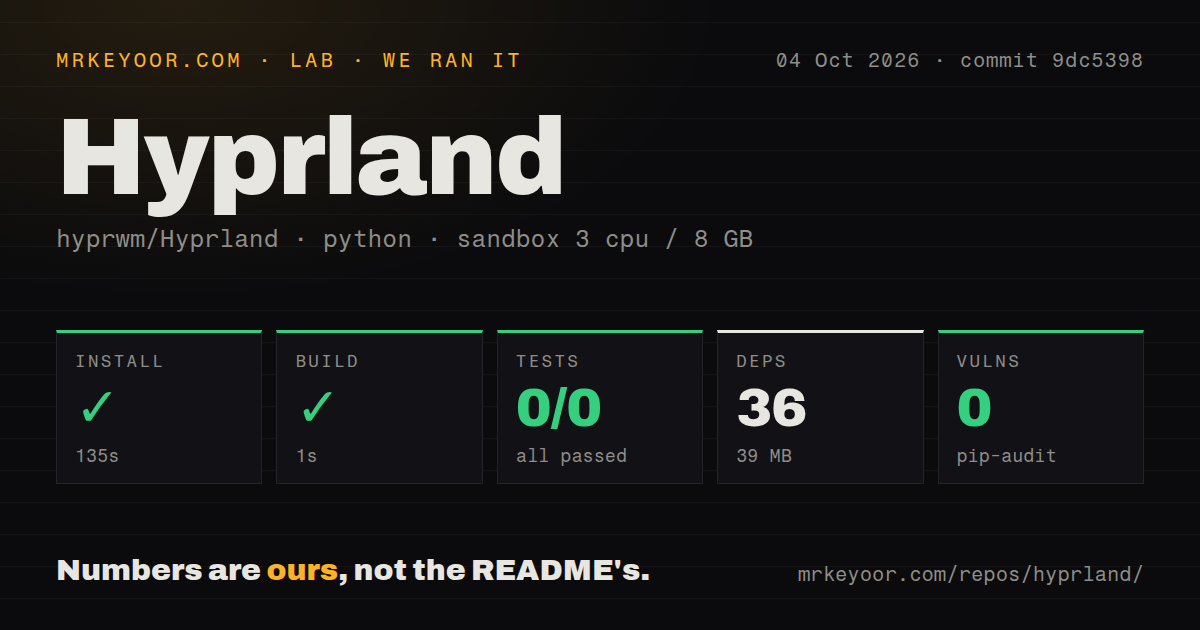
Our run installed 36 packages in 135 seconds and completed the build step in 1 second at commit 9dc5398. We cloned it on October 4, 2026. Our measurement setup used an unprivileged Debian Bookworm container with 3 CPUs, 8 GB of RAM, and the ghcr.io/astral-sh/uv:python3.12-bookworm image. The selected project lived in ./subprojects/tracy/python/. Those successful steps belong to that Python subproject, so they cannot establish that Hyprland itself compiled or displayed a working desktop.
Pytest exited with code 5 after 2 seconds. The supplied summary reports 0 passed, 0 failed, and 0 tests collected. Its log tail says that no tests ran. The test command failed without executing a failing test case. Nothing in that tail identifies a missing system library, a broken compositor function, or a collection error, so assigning any of those causes would go beyond the evidence.
The installed Python environment occupied 39 MB, and pip-audit reported 0 known vulnerabilities. Neither figure describes the complete desktop stack. The repository scan found a tests directory and 13 CI workflow files, but the command we ran exercised no tests. Treat the audit as a result for the selected Python dependencies, and the suite outcome as absent coverage in this run.
Arch and NixOS have explicit support; Bookworm packages are too old
The installation guide's distro support names Arch and NixOS as officially supported and recommends distribution packages over manual compilation. It explicitly rules out Bookworm's packages as too old. Our 3-CPU Bookworm container therefore cannot serve as a desktop setup recommendation. The guide's package and library warnings are separate evidence about the compositor, rather than an explanation for pytest finding no tests.
Configuration instructions also depend on your installed version. The wiki's version selector defaults to the latest development commit, while GitHub's latest release endpoint returned v0.56.2. Current tutorial examples use hyprland.lua. Check hyprctl version and select matching documentation before copying settings. I like the wiki's specificity, but a reader who mixes release packages with development instructions can spend time solving a mismatch they introduced themselves.
Screen sharing needs PipeWire and a desktop portal
The required desktop services include PipeWire for screen sharing and an XDG portal for desktop integration such as file pickers. Notifications need their own daemon, and permission prompts need an authentication agent. Our 36-package Python install did not establish that those pieces were running. This is the practical price of choosing each component: a working window layout leaves several everyday desktop functions for you to connect.
Hardware deserves the same attention. The startup tutorial's graphics requirements call for accelerated graphics or GPU passthrough in virtual machines. Its NVIDIA guidance points you to driver setup before launch. Someone who needs dependable video calls should check capture and application behavior on their own machine before switching their daily session. Our sandbox supplies no screen-sharing, animation, or graphics performance measurement.
Native plugins require trust and coordinated upgrades
Pip-audit's 0 known vulnerabilities in the Python environment tells you nothing about a native Hyprland plugin. The plugin loading documentation says plugins are C++ code running inside Hyprland and warns against accepting arbitrary shared-library files. Open issue 15757 on Hyprpm's cache reports that it does not rebuild the cache when hypr* libraries change binary compatibility. The report concerns the plugin manager, not Tracy.
I'd start with the built-in layouts and rules before adding native extensions. Plugins are useful when they solve a specific missing behavior, but they give you more code to trust and another upgrade relationship to maintain. The documentation recommends Hyprpm and explains how to disable a plugin when troubleshooting crashes. That's a concrete recovery path, though the cache issue remains open.
October activity shows maintenance beyond the August release
Our scan found 13 CI workflow files. GitHub reports a last push of October 9, 2026, and the issue and pull-request list shows updates through October 11. The API lists 196 open issues and PRs combined. The v0.56.2 release notes, dated August 5, describe fixes for configuration crashes, fullscreen behavior, and screen capture. Those dates support active maintenance, while the fixes identify desktop behavior worth checking after upgrades.
Choose Sway's i3-compatible configuration if preserving familiar bindings is your priority. Consider niri's scrolling columns if new windows should leave existing sizes alone. Hyprland also supports scrolling, so that choice is about layout behavior. For a coordinated desktop, I'd choose KDE Plasma. Hyprland earns its place when shaping the session is work you want to do. Before making it your daily desktop, verify your actual applications and hardware: our run executed 0 tests and leaves that decision open.