HTTPie CLI for manual API work
HTTPie CLI lets you express HTTP headers and JSON fields directly in a terminal command. The useful adoption question is whether that syntax fits your API work and which checks remain before you depend on it.
The README describes a command-line HTTP client with formatted, colorized output. It demonstrates a PUT request with a custom header and a JSON field:
http PUT pie.dev/put X-API-Token:123 name=John
It also documents constructing and printing a request without sending it:
http --offline pie.dev/post hello=offline
These are documentation examples, not commands we separately executed for this review. The manual says offline mode constructs the request, prints it to standard output and exits without making a network connection. That makes the second example a useful first check after you verify your installation.
What our recorded run establishes
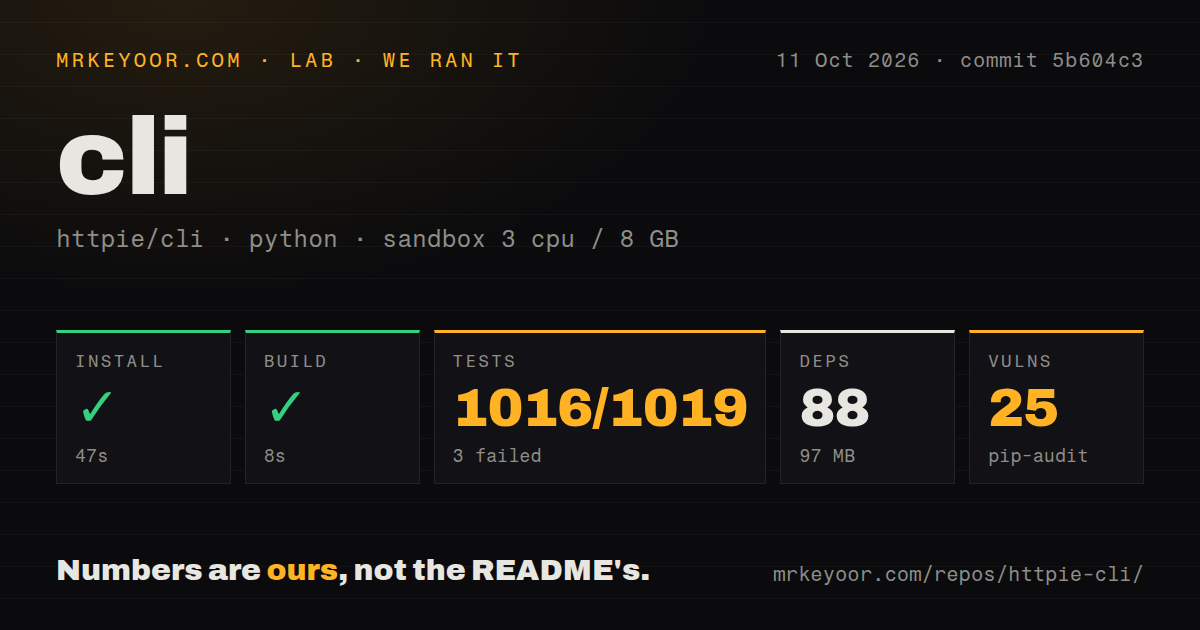
Our recorded run took place on October 11, 2026 at commit 5b604c3, whose full SHA is 5b604c37c6c67e18e7c3e9aee6c88a8c22b98345. No new execution was performed for this correction.
The install step exited 0 after 46.502 seconds, shown as 47 seconds in the summary. Its tail states that it used a Python 3.12.12 environment. The summary records 88 dependencies and 97 MB. A successful step does not by itself establish that an installed HTTPie executable was checked; the supplied record contains no separate installed-binary verification.
The build step exited 0 after 7.526 seconds, rounded to 8 seconds. Its tail includes SyntaxWarnings about invalid escape sequences in the man-page generation script. The successful exit therefore should not be read as a warning-free build.
The test step exited 1 after 165.095 seconds, rounded to 165 seconds. Pytest's own summary reports 1,016 passed, 3 failed, 5 skipped, 4 xfailed and 134 warnings in 151.40 seconds. The parser's total of 1,019 equals its passed-plus-failed counts; it does not include every reported outcome category. The supplied record does not explain the difference between pytest's elapsed time and the step duration. No complete-log reconciliation or verification of exhaustive unique test coverage was performed.
The raw assertions make the failures more specific than a general failed-check label:
- The invalid
--prettyvalue case expected quotation marks around the listed choices. The actual error message omitted those quotation marks. - The Big5 response-output case expected Chinese text but received different displayed characters.
- The Big5 request-output case showed the same kind of character mismatch.
Those observations identify the failing assertions. They do not establish their root causes or prove that ordinary API requests fail. If your workflow depends on Big5 terminal output, reproduce those cases in your intended environment.
Pip-audit recorded 25 advisories across three packages. The supplied evidence does not name the packages or establish severity, reachable vulnerable code or scan coverage. The 88-dependency figure is not a count of audited packages. Inspect the actual advisories for the installation you plan to use before making a security decision.
The checkout scan recorded 265 files, approximately 19,308 source lines, 2.1 MB, 15 CI workflow files and a tests directory, with no Dockerfile or Compose file detected. These describe the scanned checkout; they are not performance or reliability measurements.
The sandbox configuration specified 3 CPUs, 8 GB RAM and image label ghcr.io/astral-sh/uv:python3.12-bookworm. The install tail supports the Python 3.12.12 environment claim; the image label alone does not verify the operating system. The run did not measure request throughput, compare clients, verify packaged installations across platforms or complete an authenticated API workflow.
Release and contribution evidence
The supplied manual identifies version 3.2.4 with the date November 1, 2024 and lists a development version dated December 17, 2024. Our measured object was commit 5b604c3. The record does not establish that the lab installed the published 3.2.4 artifact, even though test output includes an HTTPie/3.2.4 user-agent string.
The supplied repository metadata records the last push as December 17, 2024 and an open-issue counter of 358. That counter includes open issues and pull requests; it is not a measure of support quality.
The supplied updated contribution queue includes open proposals dated October 21 through October 25, 2026. One proposes moving pytest options into pytest.ini so doctests run. Its author reports additional passing doctests while retaining three pre-existing failures. That is the contributor's report about their environment, not an additional result from our run or an independently established diagnosis of our failures. The supplied entry is open and has no merge timestamp, so it does not establish a shipped fix.
The README provides support routes through Discord, StackOverflow and GitHub issues. Those routes and the open contributions show ways to participate. They do not establish response times or maintainer support quality.
How to read the scores
These editorial scores assess the supplied evidence, not production suitability. The common scale is 1 for a documented blocker to the assessed task, 2 for partial support with substantial unresolved checks, 3 for a concrete documented route or a completed limited check, 4 for supporting examples plus explicit operational guidance, and 5 for corroborated completion across the stated scope. Missing evidence earns no extra credit.
Setup receives 3/5 for successful recorded install and build steps, with no separate installed-command check. Documentation receives 3/5 for concrete request examples and offline-mode instructions; the supplied extract does not support a broader assessment of every workflow. Community receives 3/5 for documented support routes and visible open contributions, without evidence about response quality. Maturity receives 2/5 for this evaluation's unresolved test and audit checks. That last score is not a finding that HTTPie is unsuitable for production.
Alternatives by requirement
The curl README lists HTTP, FTP and SFTP among its supported protocols. Choose curl when FTP or SFTP transfers are part of your requirement. The supplied evidence does not compare its setup ease or automation reliability with HTTPie CLI.
The xh README says it reimplements much of HTTPie's design and uses HTTPie's request-item syntax. Compare xh if you want to evaluate another implementation of that syntax. Its performance emphasis is a project claim; no comparative speed measurements were supplied here.
For an HTTPie evaluation, verify the command installed by your chosen distribution, inspect the documented offline request, and then test a representative API workflow. Resolve the recorded output failures if they affect that workflow, and review the dependency advisories for that exact installation.