
HEY moves beyond the browser without pretending to be generic
HEY CLI bridges a HEY account and terminal-native work. It exposes Mail, Contacts, Calendar, and Journal through a TUI, ordinary commands, and an MCP server for coding agents. Most terminal mail clients stop at mailboxes, while this project preserves HEY concepts such as the Imbox, Screener, threads, and events. At v1.4.1, it is a companion to one service, not a protocol layer for every provider.
The daily workflow is coherent. Running hey starts browser sign-in and agent discovery, while hey tui opens the full-screen app. The TUI follows HEY live, according to the README, so a thread archived on a phone should leave the terminal moments later. Examples cover reading a thread as Markdown, composing, searching the last 30 days, screening senders, and adding an event at 14:00.
Structured output supports useful automation
Interactive output is made for people, but piped commands return JSON. Built-in --jq can select fields without a separate jq installation, and --ids-only emits 1 identifier per line for xargs. Those choices let scripts pull topic_id and subject without scraping terminal decoration, giving the CLI a serious role beyond keyboard convenience.
hey watch --box imbox --events new emits 1 JSON line for every arriving message. That gives local automation a simple event stream without building a mail poller. Because the same CLI can reply, compose, and create events, production scripts need confirmation rules and logs before an incoming message triggers an external action. The tool supplies access, not judgment or organizational policy.
Agent integration is real, with meaningful permissions
Agent support is concrete: hey setup codex installs a Codex skill, hey setup claude adds a skill plus the hey@37signals plugin, and hey mcp exposes the signed-in account through MCP. An agent can work with thread or calendar context while this 1 CLI remains the authenticated integration point. That is simpler than maintaining separate mail parsing and calendar adapters.
The same feature deserves caution. An agent connected to a live inbox can move from summarizing information to sending messages or scheduling events. The README excerpt does not state approval policies, audit retention, or least-privilege scopes, so teams should inspect the agent guide before connecting even 1 production account. hey doctor checks installation, sign-in, and setup, but connection health does not settle governance.
What happened when we ran it
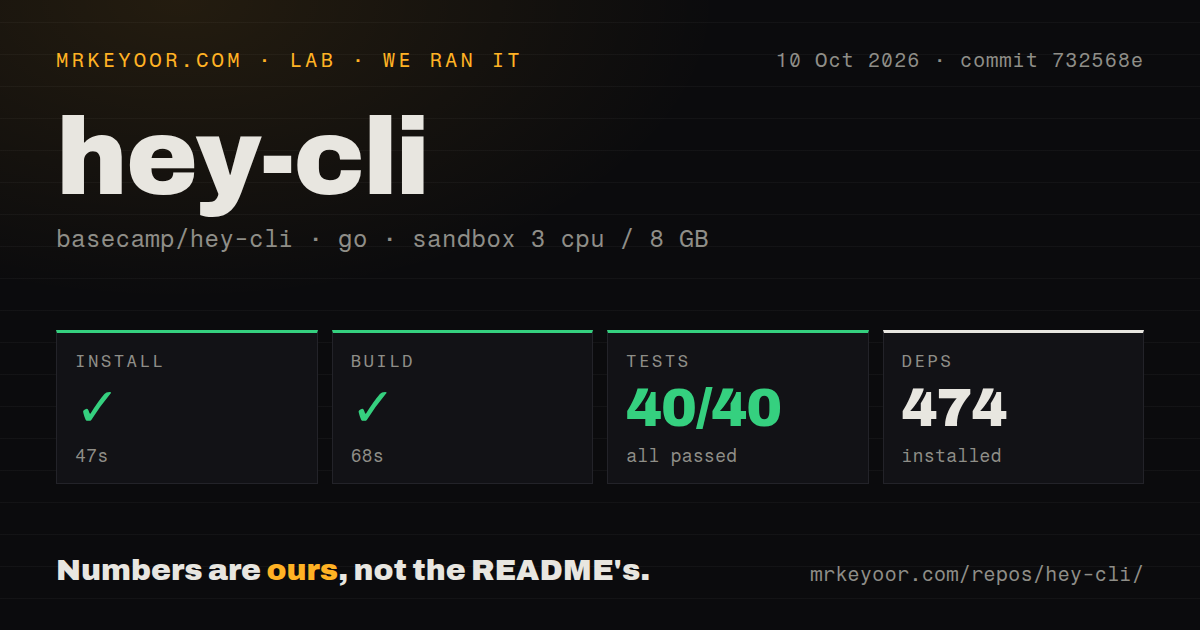
We cloned commit f9a0208 into an unprivileged Go 1.24 Debian container with 3 CPUs and 8 GB of RAM. The checkout was 6.5 MB, with 525 files and roughly 117,345 source lines. Installation succeeded in 52 seconds and installed 474 packages. The build also succeeded in 48 seconds, so dependencies and compilation worked on our box without secrets.
Tests did not finish cleanly. The run lasted 83 seconds, with 36 passing and 3 failing out of 39, then exited with status 1. The supplied tail showed successful packages including internal/mcpserver, internal/output, internal/threadload, internal/tui, and skills, followed only by FAIL. It proves a failure, but not its cause, so blaming packages, networking, or credentials would be speculation.
The repository does show engineering investment: it has a tests directory and 14 CI workflow files. It has no Dockerfile, so there is no supplied container to compare with our Debian environment. Package routes including mise, Homebrew, Scoop, and Nix are the practical choice for users. Contributors should still make make test explainably green before trusting a change.
The docs get people moving, but leave operational questions
The README handles the first 10 minutes well. It includes platform installation, sign-in, representative mail and calendar commands, output rules, agent setup, diagnostics, and links to dedicated install, TUI, CLI, agent, and Omarchy guides. Commands offer --help, contributors get make build, make test, and make lint, and the MIT license makes reuse terms clear.
The excerpt does not state an offline mode, backup path, server deployment pattern, or compatibility route for non-HEY accounts. Its curl and PowerShell installers execute downloaded scripts directly, so cautious teams may prefer 1 of the package managers after reviewing provenance. With 45 open issues, users should also inspect the queue for their operating system and intended agent workflow.
Recent activity is strong, while community scale is modest
Health looks active on 2026-09-04: the last push landed at 19:02 UTC, and v1.4.1 followed at 19:18 UTC. The repository has 327 stars, and the supplied trending item reports 55 more today. This shows current maintenance and attention, but a single release timestamp cannot establish a long cadence or a large support network.
The 45 open issues are not evidence of abandonment when paired with a same-day push and release. They are an active queue to inspect. The available facts do not reveal response time, closure rate, or contributor breadth, so community maturity remains average despite the visible v1.4.1 momentum.
It fits beside HEY, scripts, and agents
In a real stack, HEY stays the system of record, hey provides authenticated terminal access, and scripts consume JSON or its 1-line event stream. Agents connect through MCP for contextual tasks, while the TUI serves keyboard-driven humans. This is a clean arrangement when HEY-specific behavior is a requirement, not a limitation.
Choose Himalaya for multi-provider command automation, aerc for a conventional terminal UI, or NeoMutt for extensive mailbox configuration. HEY CLI wins when HEY concepts, calendar access, and agent setup belong in 1 tool. The successful 48-second build supports trying a packaged release, while the 3 failed checks argue for measured adoption and further source-level investigation.