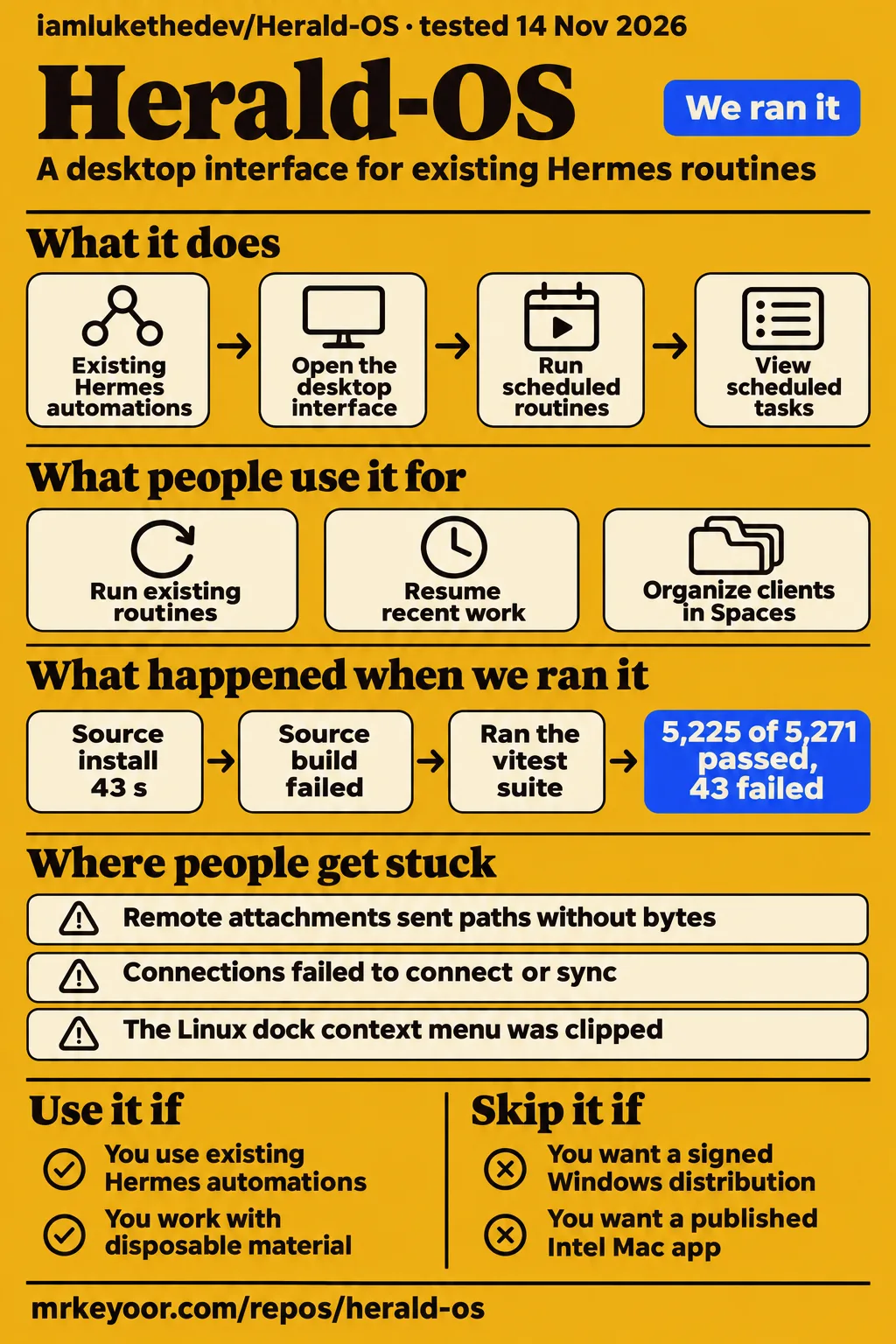
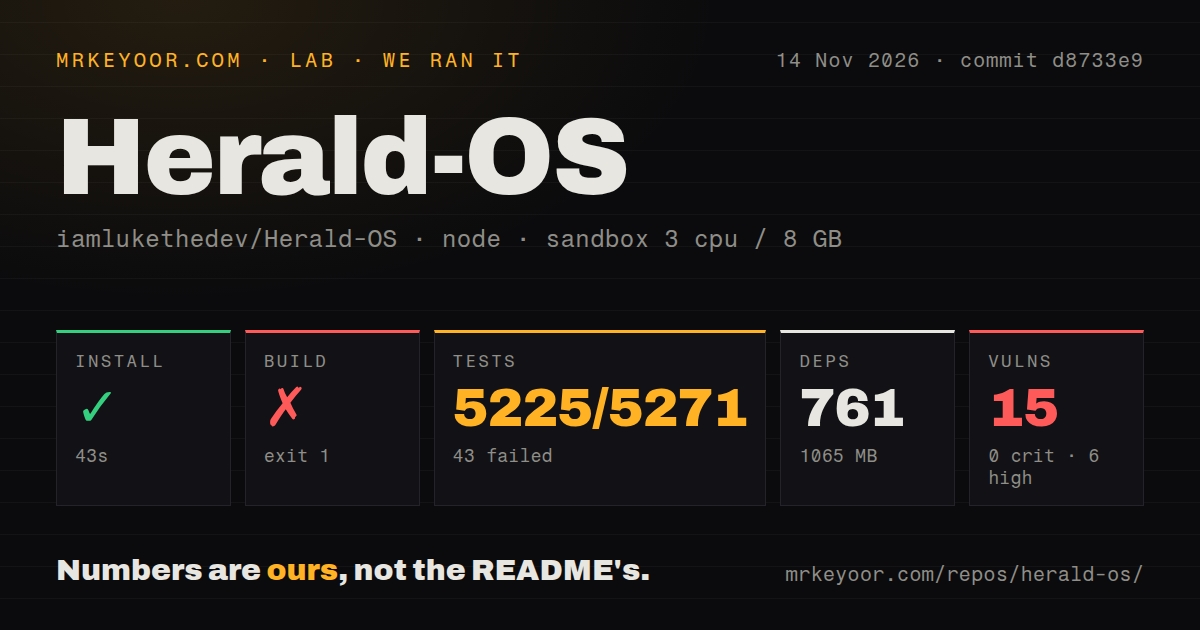
Herald OS gives existing Hermes users a desktop interface and a separate full-Linux installation route. Our source run at d8733e9 installed dependencies in 43 seconds, then failed its build and test commands. That makes release readiness the useful question here: which downloads exist, which fixes are merged, and which reported workflows give you a concrete reason to try the interface? My recommendation is to explore it with disposable material while keeping your current Hermes workflow available.
What people use Herald-OS for
Julian Goldie reported shared automations and dashboard context; GitHub contributors also describe remote-file and Windows experiments. These are identifiable uses with recorded outcomes. Goldie's related articles describe the same tour, so they count as one reviewer's experience. The project itself documents an interface around standard Hermes Agent, with a bridge plugin supplying system abilities, rather than a replacement agent implementation.
| Who used it | What they did | What happened |
|---|---|---|
| Julian Goldie | Opened existing Hermes automations | His daily 6am to-do recap, Japanese practice and morning inbox triage appeared across Herald OS, Hermes Desktop and his Agent OS. Goldie's shared-automations account |
| Julian Goldie | Viewed the Overview | Scheduled tasks and recent desktop screenshots appeared during his tour. Goldie's dashboard account |
| HypeLaser and collaborators | Attached a laptop PDF to a remote Hermes backend | Alpha.2 sent a client path without the document bytes. Remote-attachment report |
| Robby19882025 | Worked on a native Windows app with an isolated backend | Reported authenticated transport and Canvas/Office save-and-reopen checks, followed by a newer unsigned candidate blocked before JavaScript. Windows contributor report |
Goldie also reported getting Herald running with Claude's help in about two minutes. That is his setup account, separate from our source harness and restricted CLI recipe. His shared routines provide a practical reason to consider another Hermes interface: the work already existed. His Memory page also displayed Telegram details during recording, making inspection of remembered content a useful step before sharing the screen. Goldie's installation and Memory account
What happened when we ran it
Our source harness at d8733e9 installed dependencies in 43 seconds, then failed its build and test commands on 2026-11-14. A separate quickstart-cli recipe at d8733e9393c7 stopped at installation planning. The two records describe different methods, so the successful npm installation belongs to the source harness. The restricted recipe excluded Homebrew, source builds and pipe-to-shell scripts, and found none of its permitted installation methods.
| Hands-on record | Recorded outcome | What it means |
|---|---|---|
| Clone | quickstart-cli cloned the repository in 2 seconds | Source acquisition completed. |
| Installation plan | FAILED: no allowed apt, npm global, pipx, uv tool, Cargo or Go route, and no manifest-named binary | The recipe stopped before an application task. |
| Teardown | ok | Recorded cleanup completed. |
The hands-on summary says deployment used the project's own Docker Compose with ports bound to 127.0.0.1, while its detailed planning record says installation failed. Those records conflict. The source harness separately recorded no Dockerfile or Compose file. We use the explicit failed planning step as the hands-on outcome; the summary supplies no completed desktop task to describe.
| Source harness step | Our recorded result |
|---|---|
| npm installation | Succeeded in 43 seconds; 761 dependencies; 1065 MB on disk |
| Build | Failed, exit 1, after 12 seconds |
| Tests | Failed, exit 1, after 186 seconds; 5225 passed, 43 failed and 3 skipped of 5271 |
| npm audit | 15 known vulnerabilities: 6 high, 9 moderate, zero critical and zero low |
The sandbox configuration was 3 CPUs, 8 GB RAM and image lab-node:22. The checkout contained 1770 files, approximately 325134 source lines and 20.5 MB of repository data. The harness recorded npm workspaces and five CI workflow files. These figures describe our checkout and command run. They give a developer a concrete account of the source route rather than a timing borrowed from somebody else's desktop installation.
The build tail names @herald-os/desktop@0.1.0-alpha.5 and the command that runs Vite before the Electron bundler. It includes a Vite stack and an errors getter. The test tail names 40 failed cases in room/store.test.ts and three in requests-raise.test.ts, with two skipped cases in charts/validate.test.ts and one in memory-race.test.ts. It reports 46 failed test files and 377 passed files, 423 total. Thousands of cases passed in this run; the overall test command exited 1.
Where people get stuck: fixes on main can precede downloads
Issue #75 documents a remote attachment failure in alpha.2, and its maintainer response assigns the fix to the next release. That delivery wording also appears in other closures. For someone choosing between a published app and source, the distinction changes the installation decision: a merged pull request identifies code work, while a release asset identifies the downloadable build. Remote-attachment issue #75
| Report | Recorded problem | Maintainer response |
|---|---|---|
| #75, remote attachments | Paperclip attachments sent client paths to a backend on another computer | PR #102 merged session uploads and a shared-filesystem check for the next release |
| #90, Terminal and endpoints | Terminal failed with posix_spawnp; custom endpoint key entry, network access and model reporting also caused trouble | PR #104 merged an executable-helper fix, Local Network handling, endpoint key entry and immediate model responses for the next release |
| #91, renderer failures | Rejected calls could leave surfaces stuck with little useful logging | PR #103 merged named error paths and forwarding into herald-os.log for the next release |
| #94, Linux dock menu | Firefox's single-window menu was reproduced clipping inside the Dock's fixed 84 px window | PR #105 merged a separate popup window |
HypeLaser reported an authenticated SSH tunnel between machines without a shared filesystem. The agent spent about 14 minutes searching the backend computer and timing out, and no document ingestion occurred. The maintainer acknowledged the path-only behavior and described session uploads through file.attach. Goldie's tour encountered different failures: Connections did not sync, and the top of the interface was slightly cut off. Those observations remain attributed to their respective users and setups. Attachment investigation, Goldie's interface failures
The Mac Terminal report also has a practical distinction between existing builds and merged code. The maintainer says builds through alpha.4 shipped a shell-spawn helper without executable permission and supplied a permission workaround. PR #104 addresses that helper alongside endpoint problems. This page directs readers to the original exchange for that installed-build procedure; it supplies no newly constructed shell command or claim that we executed the workaround. Terminal and endpoint report
Published assets decide which machine can try it
The supplied release is v0.1.0-alpha.4, with Apple Silicon Mac downloads, Linux tarballs, a split PC installer ISO and a split ARM VM disk. Its release notes distinguish the desktop app from the full operating system. An app over macOS and an installation replacing a PC's operating system involve different setup choices, even when they expose the same Hermes-centered interface. Alpha.4 release notes and download table
| Route | Supplied availability | Decision |
|---|---|---|
| Apple Silicon macOS app | alpha.4 mac-arm64 DMG and ZIP | Try the interface over macOS |
| Linux PC installer | alpha.4 split x86_64 ISO | Choose a full operating-system installation |
| Linux app/package routes | alpha.4 x64 and ARM64 tarballs | Follow the distribution-specific instructions |
| Apple Silicon VM | alpha.4 split aarch64 qcow2 disk | Use the documented terminal route |
| Intel Mac app | No published mac-x64 build in the supplied documentation | Separate a build target from a release download |
| Hyper-V or x86_64 VM disk | Issue #186 confirms absent downloads | Wait for published assets |
| Native Windows app | Contributor work in issue #92 | Follow the upstream porting discussion |
In issue #186, the maintainer confirms alpha.4 preceded the amd64 qcow2 job. PR #195 marks the Hyper-V disk, x86_64 VM disks and Apple Silicon UTM bundle unavailable in published releases, while main contains workflows intended to produce them. Native Windows is a separate project thread: Robby19882025 reported a narrow start/attach/Quit check on f46c9f2 with Smart App Control enabled, followed by a newer unsigned candidate blocked by Code Integrity before JavaScript. Missing-assets discussion, Windows distribution discussion
Permissions and updates have separate rules
The supplied permission account says read and act tools run directly, mutate tools request approval, and destructive tools ask every time. Hermes's terminal tool follows Hermes's own approval settings. These tiers are the useful detail behind the overview's broader permission language. Before connecting working folders, choose approval settings for the actions involved and use the audit log to inspect recorded system activity. Permission tiers
The updates manual says components update independently. Root-dependent components can be skipped from the menu because there is nowhere to enter a password. A check can omit system updates and report that they were not checked. Flatpak and Hermes update failures can appear in the summary while the command exits 0. Read the component summary before treating that exit status as successful maintenance. Rollback leaves personal files and settings as they are. Update behavior and rollback
Issue #17 describes an edge-channel switch that failed while still writing the new channel name. The maintainer reports PR #110 fixed publication from main and preservation of the previous channel after a failed switch. Issue #18 records signing implementation in PR #109, with signed updates conditional on adding the signing key and enabling SIGNING_ENABLED. Those are distinct maintenance records: channel-state handling and signing setup answer different operational questions. Edge-channel report, Signing prerequisites
Client organization uses profiles as well as Spaces
The manual assigns each Hermes profile its own memory, skills, model and conversations. Goldie's tour presents Spaces as a way to organize clients or companies visually. A team planning client work should account for both mechanisms: the visible workspace arrangement and the profile selected for the conversation. The manual also says another bot receives Herald system tools when that profile has the bridge plugin. Profile behavior, Goldie's Spaces account
PR #106's bot chooser was merged for the next Herald OS release. The closure describes choosing a new conversation's bot, showing its identity and keeping sessions apart. NederGh's backend probes had reported profile-scoped sessions and parallel replies, including a cold response in about 2 seconds. The manual separately assigns the desktop pet, Office's Ask Hermes, missions, Studio and crash help to Hermes. Missions and command-bar recent sessions show Hermes conversations. Bot chooser closure, Embedded-feature routing
Chinese localization changes are merged for the next release
PR #107's Chinese localization pass was merged for the next Herald OS release. Issue #93 names the menu bar, Overview, command bar, notifications, spelling menu and main Settings sections as that pass's translated surfaces. It assigns the Hermes page, composers, Dock and other pages to follow-up work. This separates the merged first pass from the remaining translation work. Localization closure and delivery wording
The current README also lists English, Brazilian Portuguese and Simplified Chinese and describes translated menus and main Settings pages. That current-source description and the issue's delivery statement belong to different checkpoints in the project's history. For a colleague who mainly uses chat, the untranslated surfaces named in the closure matter more than the presence of a language selector. Match the documentation to the release selected for installation. Current project language description
Herald-OS vs Hermes Desktop and Hermes in the terminal
Goldie's comparison assigns Hermes Desktop to stability and official support and Herald to visual organization. His table assigns terminal use to developers comfortable with the command line. These are his recommendations. The useful decision is which interface suits your work around the underlying Hermes installation; his report says existing automations appeared across all three interfaces, including his own Agent OS. Goldie's interface comparison
| Option | Reason to choose it in the supplied comparison | Evidence basis |
|---|---|---|
| Herald OS | Dashboard, Spaces and OS-style visual organization | Goldie's design preference and tour |
| Hermes Desktop | Stability and official support | Goldie's comparison table |
| Hermes in the terminal | A command-line workflow for developers | Goldie's comparison table |
| Goldie's Agent OS | Several agent types, training and support | His description of his own commercial offering |
SkillsLLM compares Herald with superpowers using popularity, forks and available metadata. Its own text tells readers to treat those signals as community interest rather than an objective measure of which project is better. That directory comparison answers a different question from choosing a Hermes interface. The concrete alternative here is to keep using the interface you already understand while examining the Herald download and workflow relevant to your machine. SkillsLLM comparison
What the other reviews get wrong
SkillsLLM's entry recommends adding the clone to Claude Code skills, while its comparison says neither project contains a SKILL.md file. Herald's repository instead describes an app or operating system using standard Hermes plus a bridge plugin. Cloning into a skills directory therefore differs from the documented installation route. That correction matters before following a short directory instruction as though it launches the desktop. Skills directory entry, SKILL.md comparison
The supplied fork snapshots also contain conflicting platform and account instructions. Issue #186 corrects advertised Hyper-V and x86_64 VM downloads, while the current README explicitly marks the Intel Mac build unavailable. Older bootc wording describes passwordless sign-in; the other account describes preserving the existing user and keeping the added hermes account locked and nonadministrative until assigned a password. Use the instructions matching the actual route and version. Fork snapshots, Other README snapshot, Maintainer's asset correction
The permission and update corrections are equally concrete. The tiered account distinguishes direct actions from approval-requiring actions. The detailed update manual describes independent components and personal files remaining unchanged by rollback. Reading a short overview as a promise covering every action, update component or user document would erase those distinctions. Use the detailed rules when deciding what folders to expose and what maintenance outcome to report. Permission account, Update manual
FAQ
Herald OS is an independent alpha project around Hermes Agent, and its software license, provider costs and platform downloads answer separate questions. The questions below come from the supplied search intents, review questions and GitHub discussions. Their answers retain the distinction between project identity, reported experience and published files, so a favorable interface description does not turn into a recommendation for every machine or workload.
What is Herald OS, and where is its GitHub repository?
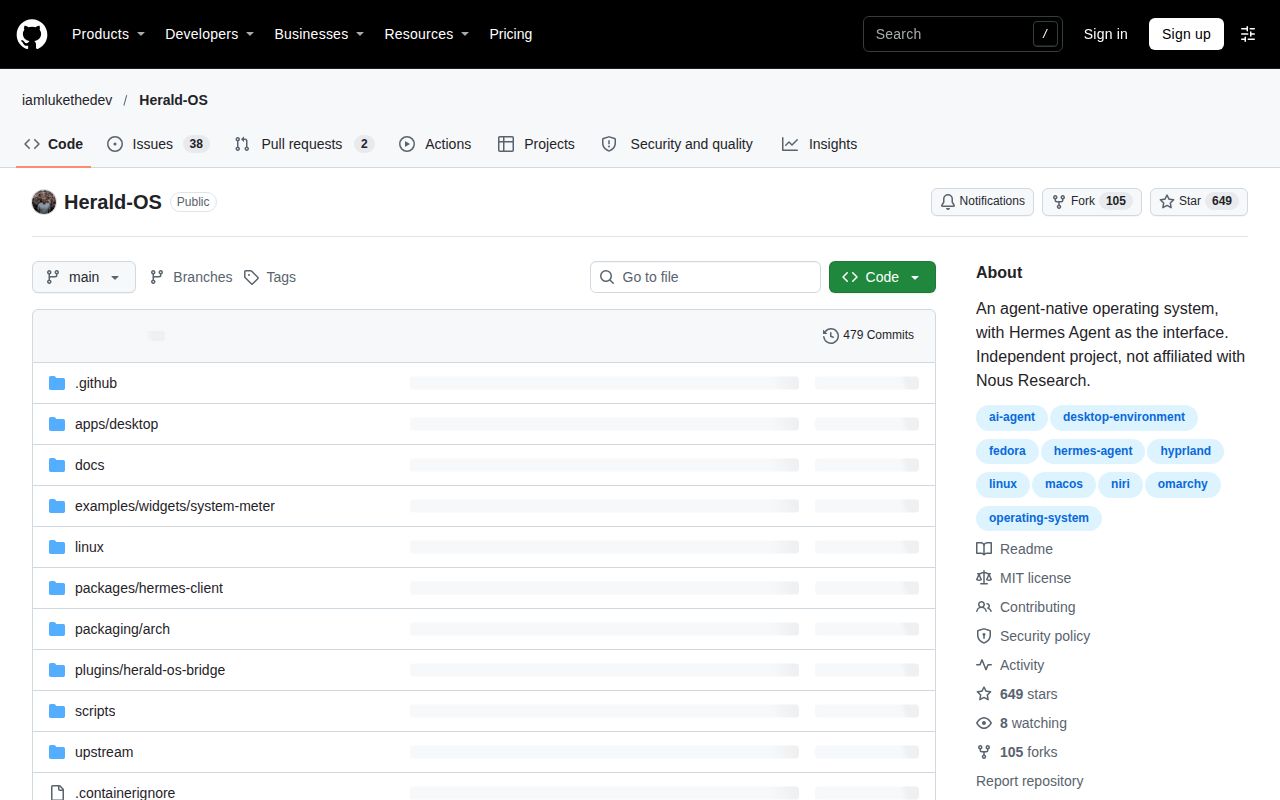
Herald OS is Luke The Dev's independent project around Hermes Agent. Its repository is iamlukethedev/Herald-OS. The documented routes include a Mac interface and a Fedora-based Linux system, alongside Linux app/package routes. Hermes runs underneath it, with Herald's system abilities added through a regular bridge plugin. The project describes its status as alpha (0.1).
Is Herald OS better than Hermes Desktop?
Goldie prefers Herald's design and assigns Hermes Desktop to stability and official support. His existing routines appeared across the interfaces, so his account supports keeping more than one available. For readers choosing today, the release-asset table and specific workflow reports above provide more concrete grounds than treating an appearance preference as the answer for every task. Goldie's comparison
Is Herald OS free, and what can still cost money?
Herald OS is MIT licensed, and the connected model can cost money. The README requires a model provider through a Nous Portal account or a supported provider configuration. That separates the software license from the costs of operating the agent. Choose the model and billing arrangement as part of setting up Hermes, even when downloading the interface costs nothing. License and model-cost account, Provider setup
Is Herald OS made by Nous Research?
Herald OS is independent of Nous Research and built by Luke The Dev. Hermes Agent is the Nous Research software installed alongside it. The repository explicitly says Herald is neither an official Hermes nor Nous Research product. That distinction helps route a desktop-specific problem to Herald's tracker while preserving the identity of the underlying agent. Project identity statement
Which platforms does Herald OS run on?
Alpha.4 lists an Apple Silicon Mac app, Linux tarballs, a PC installer and an Apple Silicon VM disk. The supplied documentation marks the Intel Mac app, Hyper-V disk, x86_64 VM disk and UTM bundle unavailable as published downloads. Native Windows work has its own contributor discussion, separate from running Herald OS Linux inside a VM. Alpha.4 downloads, Platform corrections
How should I organize separate companies or clients in Herald OS?
Goldie suggests Spaces for visual client organization, while the manual assigns memory, skills, models and conversations to Hermes profiles. Plan around the profile and embedded feature that will handle the material, as well as the Space shown on screen. The manual's routing rules above explain why changing the bot in a conversation does not redirect every embedded Herald feature. Spaces account, Profile rules
Can I use Herald OS for client work?
Our source build and test commands failed, and Goldie's client-oriented tour encountered failed Connections and displayed Telegram details in Memory. My recommendation is to keep deadline-critical deliverables in your established workflow and use disposable documents when exploring Herald. The remote-attachment report supplies a specific next check: confirm that the intended backend receives the document bytes. Goldie's tour, Remote-file report
Which models should I run underneath Herald OS?
The README supports a Nous Portal account or a provider Hermes supports, including hosted services and local models. Start with a Hermes configuration whose provider and billing you understand. Herald's settings expose provider selection and custom endpoint configuration; issue #90 describes fixes around endpoint keys, local-network permission and model reporting. Those setup details are the relevant evidence here. Provider documentation, Endpoint report
Can Herald OS run agents in Docker?
Goldie's settings tour includes an option for where agents run, including Docker. That is the supplied evidence for the exposed setting. It belongs alongside the underlying Hermes configuration rather than the failed quickstart recipe's conflicting deployment summary. Readers planning a container-based workflow should distinguish that settings option from the source harness, which recorded no Dockerfile or Compose file. Docker setting in Goldie's tour
What would it mean for my computer itself to understand what I want?
The project describes concrete actions: asking Hermes to open apps, organize files or run scheduled routines. Those actions give the idea an observable outcome. Pick a disposable file or routine, state the intended result, then inspect the action and its approval behavior. The documented permission tiers determine which system tools run directly and which request approval. Project description, Permission tiers
Is native Windows support planned, and will upstream accept contributions?
The maintainer says Windows is on the beta roadmap and welcomes contributions upstream. His suggested sequence starts with the platform adapter, secure named-pipe control socket and Windows CI, then proceeds through desktop behavior, bridge tools and packaging. Contributor reports describe narrow working paths and a later Code Integrity block. Follow that thread for the port's next concrete milestone. Windows roadmap and contribution exchange
How should a Windows contribution handle Electron, node-pty, Hermes paths and bridge tools?
The maintainer directs machine facts and actions through HostPlatform and asks for a Windows platform implementation rather than scattered platform checks. His guidance also covers the named-pipe control socket, PowerShell defaults, node-pty packaging, Windows bridge tools and CI. The original exchange supplies the implementation locations and proposed pull-request order; it is the source to follow for contribution structure. Windows implementation guidance
What we have not tested yet
PR #107's translated surfaces and PR #106's bot chooser are merged changes whose supplied closures promise the next release; delivery in alpha.4 is not established. The localization closure leaves the Hermes page, composers, Dock and other pages for follow-ups. The bot-chooser closure leaves visibility controls, guided bridge preparation and per-bot voice for follow-ups. These release boundaries apply when reading current documentation alongside the supplied alpha.4 download.
Our records contain no completed supported desktop installation, real agent task, hands-on Q&A evaluation or screenshot records. The deployment summary conflicts with the failed planning step. The source harness belongs to d8733e9, with workspace version @herald-os/desktop@0.1.0-alpha.5, rather than the alpha.4 release. Its build tail lacks the root diagnostic, and its test tail leaves some failed files unexplained. The image label supplies neither actual runtime nor operating-system versions; configured RAM and installed footprint are not running-desktop memory measurements.
Unexamined workflows include voice, Connections retesting, Office fidelity, uploads after PR #102, client isolation, Docker containment, sustained concurrent work and rollback recovery of agent-touched material. The Dock maintainer explicitly says the popup fix had not been tried under niri. The Windows contributor's latest full candidate remained unrun, and the Hyper-V maintainer requested a future boot test. Issue #18 supplies signing prerequisites without evidence of activation. Audit counts describe known advisories in our run, without determining exploitability.
We have no controlled interface reliability comparison, productivity measurement, model-quality result or model bill from this evaluation. Goldie's related articles describe one tour, and his Agent OS comparison concerns his own commercial offering. The supplied record lists no existing Herald page; it does not substantiate the earlier private plan's claimed inspection of other site pages. Rendered layout, automatic related links, recommendation modules and template behavior also fall outside this text correction. A useful next evaluation is a published asset plus a disposable document sent through the intended local or remote path.