Should you add Harbor to your local AI setup?
Choose Harbor when connecting services has become a recurring part of your experiments. Its documented role is to coordinate backends such as Ollama and llama.cpp, interfaces such as Open WebUI, and supporting services such as SearXNG. You still need to operate the selected applications and understand their storage, authentication and hardware requirements.
Harbor is not designed as a deployment solution, but rather as a helper for the local LLM development environment.
That distinction matters more than the size of the catalog. If your goal is one model endpoint or one chat interface, start by checking whether the narrower options below already cover the job.
What our sandbox established
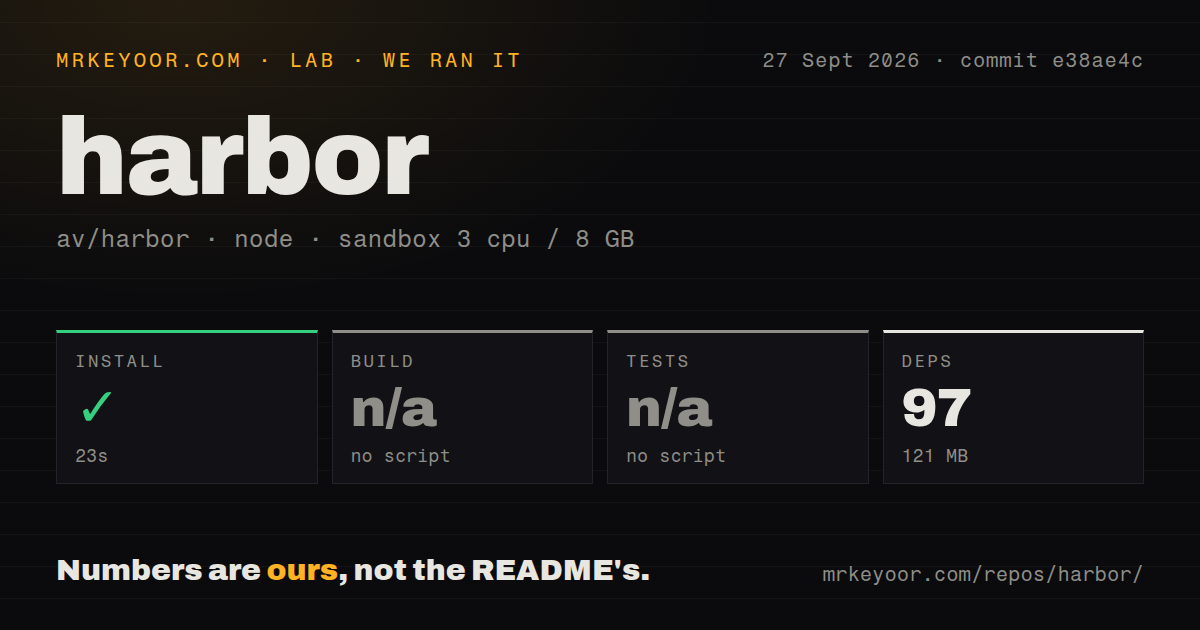
Our sandbox recorded a successful yarn install in 23 seconds, with 97 dependency packages and a 121 MB dependency footprint.
This was our run on September 27, 2026 at commit e38ae4c, not a new execution. The matching raw record identifies the full commit as e38ae4c189faa46f89ad47f8f66a08a64a3fda54. It records a Node 22 sandbox with 3 CPUs and 8 GB RAM. The release page associates this commit with v0.5.14.
Our harness stores command outcomes separately: installation has an exit code, elapsed time and output tail; build and test each have a skipped flag and the reason "no script". Installation exited zero without timing out. Build and test were skipped, not failed or passed. The detector found both Node and Python signals and selected the root Node/Yarn path. That selection does not establish coverage of every way this repository can be checked.
The stored record also identifies Compose configuration, a tests directory and six CI workflow files. None of those signals proves that a service combination was exercised. The dependency count is a stored parser summary, not a test count or evidence of exhaustive coverage.
We did not test container startup, model downloads, chat responses, inference speed, model quality or GPU access. The record contains no audit result, so advisory totals and scan coverage are unknown.
MrKeyoor's testing methodology explains how command outcomes and measurements reach our reviews. The supplied methodology page describes the publisher's current procedure; it does not establish which procedure version governed this September run. The matching stored record is the evidence for the results above.
What the documented workflow adds
The README documents a default startup pairing of Open WebUI and llama.cpp. Additional selections connect services for search, voice, images and other workflows. Profiles let you save configuration for different experiments.
The measured-commit README also documents host coding-tool integration: Harbor can start or detect a compatible backend and write configuration for a supported host tool. We did not execute that integration in our sandbox.
For an exit path, the README documents exporting selected services and their variables to standalone Docker Compose configuration. That gives you something concrete to inspect when deciding whether to keep Harbor in your workflow or maintain the selected services yourself. Exporting configuration does not establish production readiness.
Check the host before choosing services
The current installation guide requires Docker Compose 2.23.1 or newer. Its minimum storage figure is a prerequisite, not a prediction of your completed stack's size. Images, models and persistent application data add their own requirements.
Windows requires WSL2; WSL1 is unsupported. The macOS instructions warn that some services do not ship ARM64 images and that GPU pass-through is unsupported. They describe Docker Model Runner, MLX and oMLX as host-native routes for Metal inference. Our run verified none of those platform paths.
The README warns about exposing services through its tunnel and calls for service authentication. Check listening addresses, access controls and persistent storage for your selected profile before making it reachable from another machine. The supplied extracts do not establish the status of pull request 282 or issue 225, so this review makes no current port-binding or Fedora/Podman compatibility finding from those references.
When Ollama or Open WebUI is enough
Ollama has a REST API for running and managing models.
Choose Ollama directly when model execution and an API are your main requirements. Its README also documents coding-tool integrations, so that need alone does not establish a reason to add Harbor. Ollama can also be a backend inside Harbor; the two can complement each other.
Open WebUI supports Ollama and OpenAI-compatible APIs.
Choose Open WebUI directly when you want the interface and can manage its backend connection yourself. Its README documents a container image that bundles Ollama, so a chat interface plus a model runner does not automatically require Harbor. Open WebUI is also part of Harbor's documented default stack. Managing it directly replaces Harbor's coordination layer for that setup, rather than replacing the interface Harbor launches.
How to read the ratings
These are editorial ratings, not benchmark results. The scale runs from 1 for substantial documented obstacles, through 3 for a usable option with material conditions, to 5 for strong evidence on the stated criterion. A 2 or 4 falls between those anchors. Each note states the narrower criterion being assessed.
Setup ease is 3/5: dependency installation succeeded, but Docker, models and hardware remain separate setup work. Documentation is 5/5 for the coverage visible in the supplied guide, including prerequisites, platform instructions, installation choices and troubleshooting; we did not execute every instruction. Community is 4/5 for documented access to help through Discord, GitHub Issues and contribution routes, not for adoption, response speed or support quality. Maturity is 3/5 because the guide identifies active v0.x development and a beta companion app while the project explicitly limits its role to local development.